

Other Good Webcams
Photograph: Logitech
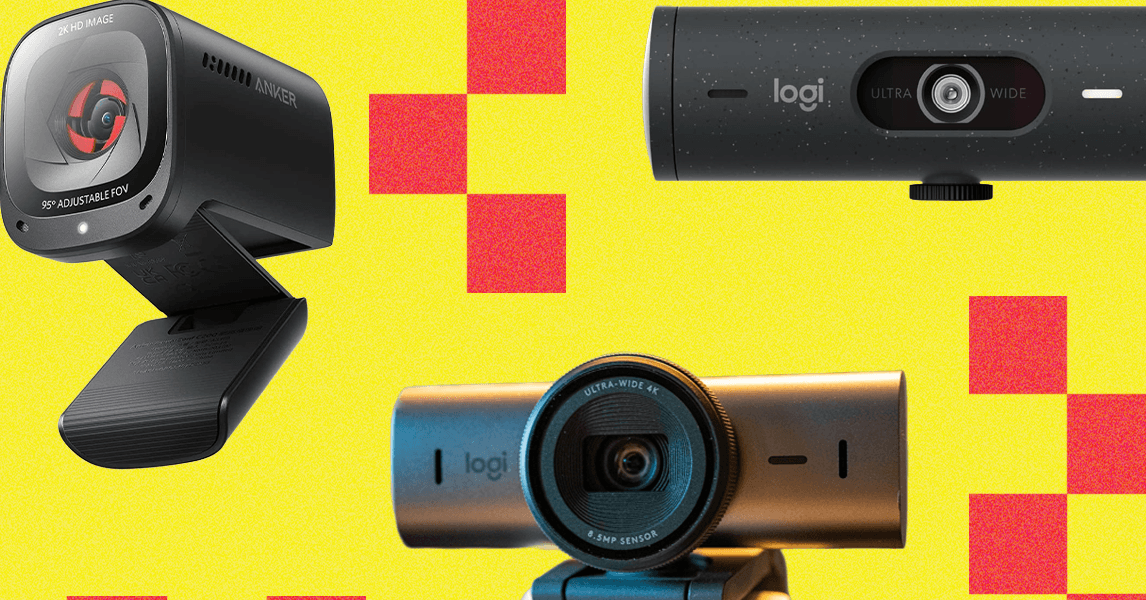
Logitech Brio 4K for $170: The original Brio from 2017 was one of the earliest mainstream webcams to offer 4K resolution at 30 fps. Logitech gave it a minor update in 2022 with updated software and a privacy shutter, but the old model is still a fine purchase that’s a little cheaper. The white balance is still accurate, and my skin color always looks normal, whether I’m in a sunny room, in limited light, or using artificial light. The autofocus is fast and subtle when refocusing, and the image is razor-sharp. Plus, you can choose from 65, 78, and a superwide 90 degrees for your field of view, giving you some framing options. If you’re using a Windows machine, you can set it up to work with Windows Hello for face authentication to log in.
Dell UltraSharp Webcam for $200: The UltraSharp Webcam feels incredibly substantial and is solid enough to take with you anywhere. Everything from the webcam body to the stand to the included tripod adapter is made of brushed aluminum. The stand and tripod adapter connect to the webcam body with a magnetic post that makes for a secure mount. The privacy cap connects magnetically and stays put with a satisfyingly strong hold, but it isn’t hard to remove. The inside of the cap is padded with a soft-touch fabric to keep it from scratching the lens. Even the forward-facing part of the stand is covered in soft-touch rubber to keep you from scratching the back of your laptop lid if you get a little reckless when setting up for a Zoom call. You can adjust the viewing angle between 65, 78, and 90 degrees and record in 4K resolution at 24 or 30 frames per second, as well as in 720p or 1080p resolutions at 24, 30, or 60 frames per second. However, the picture quality of the Dell isn’t any better than the Logitech MX Brio. It doesn’t have any microphones.
Obsbot Tiny 2 Webcam for $299: I used Obsbot’s first Tiny 4K PTZ webcam with great results for more than a year, and after switching to the new Tiny 2, it’s just as great. The 4K-capable picture quality looks great, and the camera does an excellent job of following my movement. The company has also really polished its software over the years, offering lots of customization. It can respond to your hand gestures, but you can also buy a remote to control it, making it great for presentations and group video calls.
Insta360 Link for $179: This 4K webcam is an impressive beast. Mounted on a powered gimbal that rotates horizontally and vertically, the Insta360 Link (8/10, WIRED Recommends) will follow, refocus, and zoom in and out (up to 4X zoom) automatically as you move around the screen. It’ll even zoom in on presentation boards or papers you want to show off on your call. It offers outstanding sharpness, color contrast, and white balance in the choice of recording in 24, 25, and 30 frames per second in 4K resolution. There are dual noise-canceling microphones and a screw mount on the bottom for attaching it to a tripod too. The only thing it lacks is a physical privacy shutter, but the camera points downward when it’s not in use. The Link 2 is a better buy, but this model has a three-axis gimbal that makes it more versatile than the Link 2’s two-axis gimbal.
Logitech C922x for $99: The C922X is a capable webcam with solid specifications. It can stream 1080p video at 30 fps or 720p at 60 fps, which makes the Razer Kiyo X its prime competition. But it’s more expensive and has a slightly narrower 78-degree field of vision. It’s a good webcam, but you can get a comparable Kiyo X for less money.
Don’t Bother With These Webcams
Photograph: Adorama
Not every webcam is an upgrade over the built-in one on your laptop. These are the models I tested that ranged from merely unimpressive to ones that made me look like the subject of a second-grade art project.
Microsoft LifeCam Studio for $100: It says it’s a 1080p webcam, but there’s a catch—that’s only for recording video. Using it for video calls restricts you to 720p. My coworkers commented on how out-of-focus I constantly was. The white balance was so off that I looked more orange than an Oompa Loompa. And the exposure was so blown out that I never stopped looking like I was living through the last scenes of The Lighthouse. There was also a lot of lag in my movements and bad motion blur.
Logitech Brio 500 for $130: This webcam has wacky adjustment. Held onto the base via a magnet, panning it downward often pulled it off the base instead of adjusting the angle, and swiveling it left or right caused it to loosen so much it wouldn’t stay put. That meant I kept having to pull it off the magnetic stand, screw the mount back down, and reposition it—and then not adjust it during the rest of the Zoom. That said, the image quality of its 1080p resolution, white balance, and color contrast was quite good, if not excellent, and it came with a USB-C connection and a physical privacy shutter. The autofocus could stand to be a touch quicker. Other positives are that you can get it in black, white, or pink, two more colors than what most webcams offer.
Logitech Brio 300 for $60: The image quality is lacking on this one. Even in a fairly well-lit room, my picture was grainy. It also did weird things with the white balance as it autofocused. The field of view is quite narrow at 70 degrees and non-adjustable, so the image onscreen is up in your face. You’ll want to scoot back quite a bit so everybody else isn’t looking up your nose. Like the Brio 500, it comes in black, white, and pink, connects via USB-C, and has a physical privacy shutter. There are better options for this price without these image quality oddities.
Razer Kiyo X for $45: The Kiyo X does away with the integrated ring light of the original Kiyo, but it does have automatic white balance and color saturation. Video picture settings can be tweaked in the Razer Synapse app too. It also shoots 1080p-resolution video at 30 frames per second or 720p resolution at 60 frames per second. Its field of vision is a slightly wide 82 degrees. The built-in mics are nothing to write home about, so stick to the ones in your laptop or grab a USB mic. Sadly, there is no privacy shutter.
Razer Kiyo Pro for $130: Although it looks similar to its cheaper, non-pro sibling, the Pro ditches the light ring and instead relies on software to compensate for low-light conditions. I resented having to download the Razer Synapse app to get a decent image out of the Kiyo Pro. Yes, fine-tuning settings is a very WIRED thing to do, but most people just want to plug their webcam in. Once you fiddle with the app settings, the image is sharp and beautiful. However, it has the same overly obvious autofocusing as the regular Kiyo, and it’s also a little overpriced. It’s not a bad pick, but again, the Logitech Brio can do 4K/30 fps, as opposed to this camera, which tops out at 1080p/60 fps.
Creative Labs Live! Sync 4K for $57: I was skeptical about a 4K resolution webcam for this price, and my skepticism was validated in the wildly strange white balance that turned me and everything faintly orange. It may be the only webcam that made my room look darker than it was. The privacy shutter is a rubber cap you put on and take off. The bit that holds it to the webcam when it’s off is flimsy enough that if you’re rough or careless, you could rip it off, but it’s nice that it isn’t plastic, which would weaken over time. A minor issue is that the black cap blends in with the black webcam and lens, so, at a glance, it’s hard to tell whether the cap is on or off.
Cisco Desk Camera 1080p for $121: Not to be confused with Cisco’s almost identically named Desk Camera 4K. I tried the 1080p, 8-MP version in a variety of natural and artificial lighting, but my fellow Gear Team members and I couldn’t help but notice that no matter how I used it, the video looked overly pixelated. Unless a webcam can make me look as good pixelated as Axel from Streets of Rage, then I want smooth video that looks like it’s 1080p. During Zooms, the Desk Camera 1080p had trouble with focusing and zooming, frequently and jarringly refocusing but never getting it quite right.
Power up with unlimited access to WIRED. Get best-in-class reporting that’s too important to ignore for just $2.50 $1 per month for 1 year. Includes unlimited digital access and exclusive subscriber-only content. Subscribe Today.
