


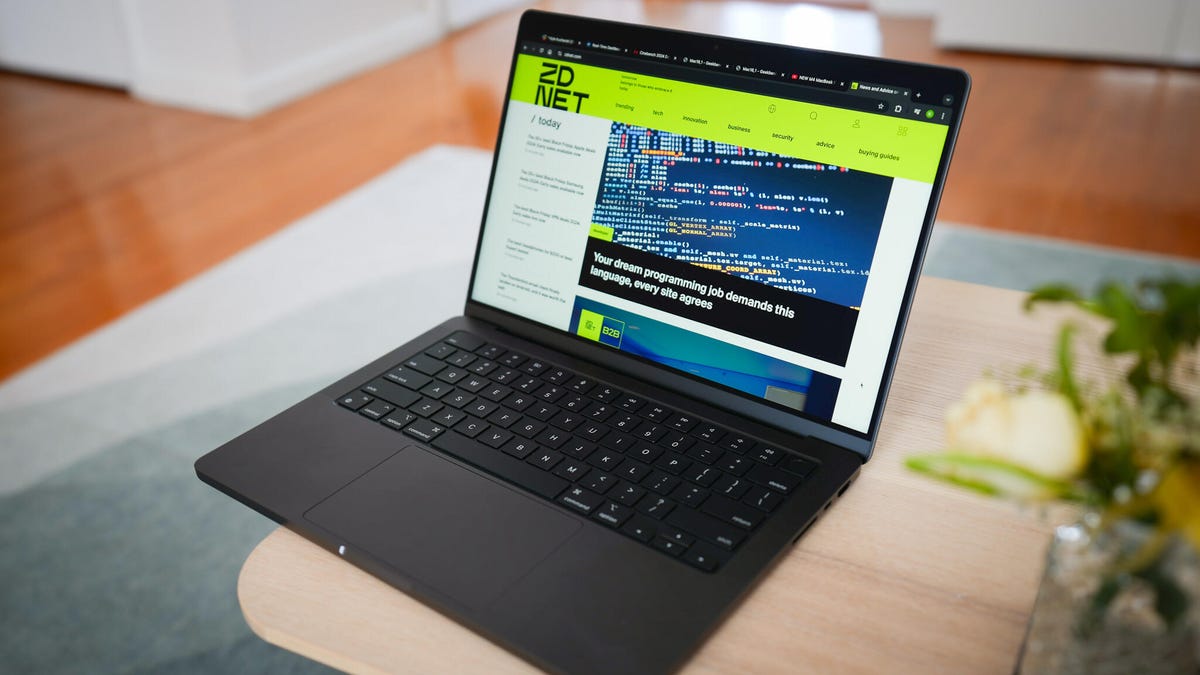
Summer is a great time to invest in projects, creative gigs, and content creation — and having the right laptop for video editing is a key piece of the puzzle. You need a machine that can handle everything you throw at it, from full-length film to clips for social media. We tested a wide range of laptops for video editing and found that while some budget laptops can manage basic editing, investing in a purpose-built laptop makes a huge difference. Powerful machines like the Apple M4 MacBook Pro give you a high-quality display and beefy specs to bring your vision to life this upcoming season.
What is the best laptop for video editing right now?
We’ve extensively researched and tested dozens of computers for the best video editing laptop. The Asus ProArt P16, for example, has one of the better displays out there, and the Dell Inspiron is a solid budget option. But our pick for the best overall is Apple’s M4 MacBook Pro due to its M4 chipset, stunning Liquid Retina XDR display, and long-lasting battery. It is rather expensive but worth the price. Naturally, it isn’t the only option out there. Below is a list where we compare the top models from major brands like ASUS and Dell.
Also: The best laptops you can buy for under $1,000
Sort by
All
Value
Performance
Design/Build
Battery life
Display
The best laptops for video editing in 2025
Show less
Why we like it: Apple’s M4 MacBook Pro takes the top spot as the best video editing laptop. It handles heavy workloads, like exporting large files to scrubbing through high-resolution footage, with relative ease. This performance is thanks to the M4 chipset. The MacBook Pro can house different chip models, depending on what you want. For example, the M4 Max consists of a 14-core CPU and a 32-core GPU. According to Apple, a MacBook Pro equipped with the M4 Max is 3.5 times faster than an M1 MacBook Pro.
There is more to the MacBook Pro than just its hardware. The Liquid Retina XDR display remains best-in-class with an anti-glare coating and up to 1,600 nits of brightness. Unified memory options scale up to 48GB, giving users more headroom for multitasking or large AI models.
Last, but not least, the MacBook Pro has an impressive battery life of up to 24 hours on a single charge.
Also: Apple’s boringly awesome reason to buy the M4 MacBook Pro – and why I’m sold on it
Who it’s for: I recommend the MacBook Pro to anyone juggling video editing projects with high-resolution footage or projects that require a lot of rendering. This machine can keep up without breaking a sweat. Digital nomads will also appreciate the full-day battery and sharp display.
Who should look elsewhere: The M4 MacBook Pro is probably overkill for people who don’t often deal with heavy creative work, especially with its high price tag. Prices start at $1,599 for the base model and can go over $5,000 with all optional features included. Casual users are better off using a MacBook Air or something more budget-friendly.
Apple MacBook Pro 16 specs: Processor: Apple M4 | Display size: 14 or 16 inches | Operating system: Mac OS | Dimensions: 14 x 9.77 x 0.66 inches
Read More
Show Expert Take Show less
Show less
Why we like it: Asus’ ProArt P16 has the best display I’ve seen on a video editing laptop. Two factors make it as good as it is. First, it’s large, measuring 16 inches diagonally. The size helps you be more productive and multitask. Second, it is an OLED touchscreen with a bright, deeply vibrant output. The display accurately represents colors, which, as you can imagine, is an essential feature when creating content.
A good editing computer can only accomplish so much with the right hardware. The model houses an AMD Ryzen 9 HX 370 processor, an Nvidia GeForce RTX 4060 graphics card, and 32GB of RAM. This configuration can chew through high-res footage and render the final product without a problem.
I also want to shout out the custom DialPad. It is a small circle on the trackpad that provides shortcuts to various editing tools. Battery life is decent. It can last over 10 hours on a single charge.
Review: Asus ProArt P16
Who it’s for: The ProArt P16 is ideal for creative professionals looking for a mobile computer with a color-accurate display and a lot of customization options. That DialPad comes in handy whenever you want to change brush sizes in Photoshop or cut something in Adobe Premiere. Plus, the top-notch hardware makes it a great pick for cartoonists, animators, and 3D designers working on large projects.
Who should look elsewhere: The display may be its best feature, but it does have one major flaw. It’s an ultra-glossy screen, causing distracting reflections. Using the laptop under brightly lit conditions may prove difficult. Also, the customization options may prove overwhelming for some. In his review, ZDNET Editor Kyle Kucharski pointed out that it took a long time to set up the DialPad.
Asus ProArt P16 specs: Processor: AMD Ryzen AI 9 HX 370 | Display size: 16 inches | Operating system: Windows 11 | Dimensions: 13.97 x 9.72 x 0.68 inches
Read More
Show Expert Take Show less
Show less
Why we like it: Dell’s Inspiron 16 Plus is a well-rounded, dependable laptop. It sports a 2.5K display with a refresh rate of 120Hz, delivering sharp and impressively smooth visual outputs. Thanks to its 120Hz refresh rate, it’s sharp, color-rich, and impressively smooth. The 16:10 aspect ratio provides a good amount of vertical workspace, so you can get a good view of your project. I should mention that the panel has a peak brightness of 300 nits, which isn’t amazing. But it’s serviceable for indoor work and enables a long battery life.
For hardware, you can choose to equip the machine with an Intel Core Ultra 7 processor and an Nvidia RTX 4050 graphics card. This setup is capable of easily handling multitasking and creative workloads. ZDNET Editor Kyle Kucharski also praised the Inspiron 16 Plus’ lengthy battery life in his review. It’s capable of lasting up to 12 hours on a single charge. Other notable features include a quad-speaker array and up to 2TB of storage.
Review: Dell Inspiron 16 Plus (7640)
Who it’s for: If you’re a content creator, student, or a professional looking for a new laptop that won’t break the bank, the Dell Inspiron 16 Plus 7640 is among the best. It doesn’t excel in one particular area, but it does multiple things quite well. This computer boasts enough horsepower for animation work and even some light gaming.
Who should look elsewhere: Dell’s device is a chunky laptop, weighing nearly five pounds. So, traveling with the Inspiron 16 is going to be rather difficult. Although the display’s resolution is high, it lacks support for enhancement software like HDR. Users who value color-accurate imaging above all else should consider another option.
Dell Inspiron 16 Plus 7640 specs: Processor: Intel Core Ultra 7 155H | Display size: 16 inches | Operating system: Windows 11 | Dimensions: 14.05 x 9.87 x 0.72 inches
Read More
Show Expert Take Show less
Show less
Why we like it: At 14 inches and 3.42 pounds, the Acer Swift X 14 is a compact laptop that still manages to provide an excellent user experience. It boasts a 2.8K OLED display that feels like it’s been tailor-made for video editing. The panel supports the entire DCI-P3 color gamut to deliver rich colors, and its sharp contrast ratio brings images to life. The 120Hz refresh rate further adds to the experience with velvety-smooth animation and a snappy UI.
Under the hood is an Intel Core Ultra 7 processor, an Nvidia RTX 4070 graphics card, and 32GB of RAM. It’s an impressive configuration, one that is typically found in bulky gaming laptops. Plus, the wide selection of ports makes the Swift X 14 a portable editing workstation I would recommend to most people.
Review: Acer Swift X 14
Who it’s for: Acer’s Swift X 14 is a great choice for editors or hobbyists who want a powerful laptop with a compact design. It perfectly balances portability with high-end performance. After a long day of work, you can kick back with a video game and enjoy the impressive output.
Who should look elsewhere: The Swift X 14 unfortunately does not have a very good battery life. In my tests, it ran for about six hours before tapping out. That’s not very good, and the number drops even further under heavy loads. Acer’s device can run rather warm when tackling heavy workloads.
Acer Swift X 14 (2024) specs: Processor: Intel Core Ultra 7 155H | Display size: 14.5 inches | Operating system: Windows 11 | Dimensions: 12.7 x 9 x 0.70 inches
Read More
Show Expert Take Show less
Show less
Why we like it: 2-in-1 laptops lend themselves quite well to video editing. Turning the computer into a tablet deepens the device’s usability. You can directly interact with a video’s timeline, cut out clips, or sketch out storyboards in real time. There are many options out there, but the HP Envy x360 is the best. It boasts a large 16-inch, 2.8K OLED touchscreen that is both sharp and color accurate.
HP claims that its laptop is “IMAX certified” due to its ability to show “IMAX-formatted content in [their] original… aspect ratio.” ZDNET Editor Kyle Kucharski states that although this is a “flashy designation”, the 16-inch screen “does look good”. That’s not all. HP’s machine comes with an AMD Ryzen 7 8840HS CPU, an integrated AMD Radeon GPU, a long-lasting battery, and “beefy speakers”, all working together to provide you with an experience that’s second to none.
Review: HP Envy x360
Who it’s for: The HP Envy x360 is a good choice for people who want the interactivity a tablet provides while still enjoying the power of a laptop. It strikes a nice middle ground for those who want a blend of portability and flexibility. Plus, the large screen size makes touchscreen editing a lot more comfortable for extended periods of time.
Who should look elsewhere: There are a couple of issues with Envy x360 that may dissuade people from purchasing it. First, it’s a little heavy, at just over four pounds. Second, the glossy display attracts fingerprints like a magnet. Additionally, I wouldn’t recommend the device to professionals with heavy workloads. You’re better off buying a laptop with a dedicated graphics card or a powerful desktop.
HP Envy x360 specs: Processor: AMD Ryzen 7 8840HS | Display size: 16-inch 3K OLED touchscreen | Operating system: Windows 11 | Dimensions: 14.04 x 9.68 x 0.72 inches
Read More
Show Expert Take Show less
Show less
Why we like it: Galaxy smartphones make it incredibly easy for users to take high-quality videos, thanks to their advanced camera technology. These mobile devices come with their own editing tools, but if you want to take things to the next level, I recommend the Galaxy Book5 Pro.
The laptop has many useful features that can help people refine their creations. Quick Share lets you seamlessly transfer files from your mobile device to the computer, where you can then work on them. It sports a 16-inch AMOLED touchscreen capable of outputting images at 3K resolution and covers 120% of the DCI-P3 color gamut. The display also runs at a refresh rate of 120Hz. Specs like these allow the Galaxy Book5 Pro to be perfect for color grading and scrubbing through footage.
Add in 15.5 hours of battery life, a big touchpad, and a lightweight build, and you have a well-rounded video editing machine.
Review: Samsung Galaxy Book5 Pro
Who it’s for: I strongly recommend this laptop to Galaxy owners, especially those who own a Galaxy S25. Content creators can record footage on their smartphone and edit it on their machine. Built-in Galaxy AI features like Photo Remaster and AI Select add convenient creative tools for polishing visuals or finding reference materials.
I should also mention that the Galaxy Book5 Pro has decent hardware, running on an Intel Core Ultra 7 256V chipset and 16 GB of RAM.
Who should look elsewhere: If you don’t own a Galaxy smartphone, I would recommend another laptop. You could still get a lot out of the Galaxy Book5 Pro even if you own a non-Samsung phone. The problem is you won’t be able to use many of the features to their fullest extent. Plus, it’s not all that different from the Galaxy Book5 Pro 360, which, at the time of this writing, is cheaper.
Samsung Galaxy Book5 Pro specs: Processor: Intel Core Ultra 7 256V | Display size: 14 inches AMOLED | Operating system: Windows 11 | Dimensions: 13.99 x 9.93 x 0.50 inches
Read More
Show Expert Take Show less
Show less
Why we like it: Gaming laptops also lend themselves very well to video editing projects. These machines often have some of the best hardware on the market. The main problem with these computers is that you can’t take them into the office. Their bright RGB lighting can be very distracting. Seeing an opportunity, Dell made a gaming laptop with the office worker in mind: the Alienware m16 R2.
It houses an Intel Core Ultra 9 185H processor and an Nvidia GeForce RTX 4070 graphics card, a hardware pairing that can adeptly handle heavy workloads. The vibrant, 2K display runs at a refresh rate of 240Hz, which is perfect for content creation since it enables smooth on-screen animations. But what really makes the laptop stand out is its thoughtful design. It’s not as bulky as many other gaming laptops, and the Stealth Mode feature instantly turns off the RGB lighting for a more professional look.
Review: Alienware m16 R2
Who it’s for: The Alienware m16 R2 is a great computer that balances power with practicality. I would recommend this to users wanting top-tier performance while maintaining a clean, office-friendly look. In my experience, few laptops can do both equally well, but not this machine. It’s the exception to the rule.
Who should look elsewhere: I would not recommend the Alienware m16 R2 to people who value portability and longevity. The laptop is pretty chunky, clocking in at nearly six pounds. It is not very travel-friendly, and you’ll want to keep the charger close by. During my time testing it, the device only lasted for about 6.5 hours before tapping out.
Alienware m16 R2 specs: Processor: Intel Core Ultra 9 | Display size: 16 inches | Operating system: Windows 11 | Dimensions: 14.33 x 9.81 x 0.93 inches
Read More
Show Expert Take Show less
What are the tariffs in the U.S.?
The recent U.S. tariffs on imports from countries like China, Vietnam, and India aim to boost domestic manufacturing but are likely to drive up prices on consumer electronics. Products like smartphones, laptops, and TVs may become more expensive as companies rethink global supply chains and weigh the cost of shifting production.
Also: Tariff war has tech buyers wondering what’s next. Here’s what we know
Laptops and PCs are also hit hard by the new U.S. tariffs, with import duties potentially increasing prices by up to 35%. Many major brands still rely on Chinese and Vietnamese factories for assembly, meaning consumers could soon pay significantly more for everything from budget Chromebooks to high-end gaming rigs.
These tariffs may accelerate efforts to move production to regions like Mexico or India, but shoppers can expect higher costs and fewer discounts in the short term.
Right now, it looks like some tech may be exempt from the issued tariffs, but since it’s always changing and developing, we are keeping an eye on it and will update you on the latest.
Also: Tariff exemptions for electronics offer a break for tech – but not for long
Due to its powerful hardware and crystal-clear display, the Apple MacBook Pro 16 from 2024 is the best laptop for video editing. Below is a list comparing it to the rest of our picks.
Best laptop for video editingStarting priceProcessorDisplay sizeApple MacBook Pro 16 (2024)$1,999Apple M414 or 16 inchesAsus ProArt P16$2,114AMD Ryzen AI 9 HX 37016 inchesDell Inspiron 16 Plus 7640$800Intel Core Ultra 9 185H16 inchesAcer Swift X 14$1,256Intel Core Ultra 7 155H14.5 inchesHP Envy x360$1,190AMD Ryzen 7 8840HS16 inchesSamsung Galaxy Book5 Pro$1,250Intel Core Ultra 7 256V16 inchesAlienware m16 R2$1,900Intel Core Ultra 9 185H16 inches
Show more
Finding the right laptop can take a lot of work. You’re dealing with many numbers being thrown your way, specifications can get confusing, and several of the models have similar if not outright the same, features. It can be tricky to differentiate between laptops.
Below is a table briefly explaining each recommendation and why you should get them. They can help you find the right one to meet your needs.
Choose this laptop for video editing…If you want...
Apple M4 MacBook ProThe best video editing laptop, with its stunning Liquid Retina display and high-performing M4 chipset powering it.
Asus ProArt P16A laptop with the best display. Its vivid AMOLED display outputs vibrant colors and deep shades of black.
Dell Inspiron 16 Plus 7640The best value for a video editing laptop. It’s a large 16-inch laptop with a vivid 2.5K resolution screen and long battery life.
Acer Swift X 14The best 14-inch video editing laptop. Although small, the Swift X 14 packs strong hardware for on-the-go editing.
HP Envy x360The best 2-in-1 video editing laptop. HP’s device combines a high-quality touchscreen, a lengthy battery life, and a booming sound system.
Samsung Galaxy Book5 ProThe best video editing laptop for Galaxy owners. Its features make transporting images from your Galaxy phone to the laptop easy.
Alienware m16 R2The best gaming laptop for video editing. It houses powerful hardware and, thanks to Stealth Mode, can blend in at the office..
Show more
When picking out the best laptop for video editing, there are multiple factors to consider. The selections we made on the list were made with them in mind. For our evaluation, we weighed the following aspects:
-
Processor: A CPU directly determines how fast a laptop can process and finish tasks. This includes actions like opening apps to run complex workloads. We specifically looked for advanced and multi-core processors capable of handling video editing programs.
-
RAM: This refers to the amount of memory present on a laptop. It is essential to buy a device with a decent amount of memory installed, at least 16 GB. It’s even better if you can get more. Ideally, you should opt for 32 GB. Having a lot of RAM is crucial for a laptop to handle video editing apps, which can be quite resource-hungry.
-
Graphics: When shopping for a laptop, it is recommended that you choose a model with a dedicated graphics card rather than an integrated one. The former can better handle tough workloads because it won’t be sharing power with the CPU. It has its power supply, allowing it to direct its resources to its processes.
-
Display: You will need a high-quality display for video editing. Professionals have to be able to tell how good (or bad) the footage looks, its color output, and the finer details. Sizes can vary from model to model. Some have a large 17-inch screen, while others are a bit smaller at 14 inches. Big screens are ideal for navigating your workspace, while small screens make the laptop easier to carry around.
Show more
We use a combination of methods to test laptops here at ZDNET. First, we acquire data from benchmarking software to analyze a system’s metrics under the hood and compare those to advertised numbers. Then, we spend an extended amount of time with the laptop — usually a week or two — using it the same way a normal consumer would, to assess its portability, form factor, and how well the battery actually holds up. For an extensive breakdown, check out our comprehensive laptop testing methodology.
- Benchmarking: First, we run a series of tests to put the computer’s hardware through the wringer in order to see what it’s capable of. Cinebench is one of the most commonly used hardware testing suites, which tests the laptop’s rendering performance on single and multiple central processing unit (CPU) cores. PCMark 10 is another powerful program that covers a wide variety of tasks performed in the workplace, and there are many others that we use in tandem to gather as much data as we can. Some components we run tests on include:
- Processor: The “brain” of the laptop and one of the most important factors that determines performance. The four biggest manufacturers that make most of the CPUs found in laptops today are Intel, AMD, Qualcomm, and Apple — in Apple machines only. This is tested in benchmarking software.
- The display: The size of the display — measured diagonally from corner to corner — is also what dictates the laptop’s overall size and plays a big role in the device’s cost. Brightness is measured in “nits,” and color spectrums are tested in benchmarking software.
- The graphics processor (GPU): Whether it’s integrated into the CPU or a dedicated graphics card, how well the machine handles graphics is a key factor when it comes to demanding tasks like video editing, rendering, and of course, gaming. We test the GPU with a combination of benchmarking software, gaming, and media playback.
- Physical form factor: Finally, the laptop’s overall appearance and physical form factor encompasses its weight, thickness, how the keyboard and trackpad feel, and whether it has a display that can be folded back to form a tablet. We carry the laptop around for at least a week and note how well it commutes.
- Battery testing: We test a unit’s battery in a few ways. A handful of benchmarking programs have their own battery testing components, but we also will just let the laptop run for as long as it can under a medium load. We ensure screensavers and hibernation mode are turned off, set the display’s brightness and audio at 50%, load up a livestream on YouTube in Chrome, and wait ’til the end.
- The human element: As we mentioned earlier, metrics and system data is important, but numbers alone don’t give you the full picture. This is where we weave in our personal experience with the device and tap into the practical use cases that consumers actually care about.
Ultimately, our goal is to break down the capabilities of each and every laptop we test into digestible terms that real people find useful. There is a lot of noise and confusion when it comes to navigating the laptop and computer consumer market, so we hope to bring an intuitive element to the whole process by leveraging our team’s decades of experience.
Show more
Latest information on video editing laptops in 2025
Artificial intelligence will increasingly gain a stronger presence within video editing laptops. The technology can do so much beyond generating content and automating certain tasks. AI can improve hardware performance, streamline workflows, and enhance editing tools, among other things. As a result, we could see a new wave of content creators break through because they won’t be held back by their lack of technical experience. AI tech can democratize video creation in ways we haven’t seen before.
Also: Google made it clear at I/O that AI will soon be inescapable
Artificial intelligence can be quite demanding on laptop resources. To facilitate this, manufacturers may develop new products with more RAM. 16GB may not be sufficient. And we’ve already seen this happen. For the release of the M4 MacBook Pro, Apple equipped its laptop with 16GB of RAM, double that of the previous generation. As things ramp up, I think laptop brands will adjust accordingly.
Show more
Apple consistently makes some of the best video editing laptops. The company equips its machines with powerful hardware, a long-lasting battery, and access to some of the best software on the market. We could go on and on about how good their models are. That said, it’s not perfect. Other laptops can be better under certain conditions.
Also: Best HP laptops of 2025
Dell makes a lot of great budget options. The Acer Swift X 14 is a good choice for people who commute frequently, but don’t want to lug around a big laptop. Similarly, users who want a machine that doubles as a solid entertainment device should go for the Alienware m16 R2. See, it all depends on what someone is looking for. This isn’t a one-size-fits-all scenario.
Show more
There isn’t a single laptop that all YouTubers use. It differs from person to person and from team to team. Although, it is probably safe to assume that the MacBook Pro is a common model. As stated earlier, it does so much in cultivating creative endeavors. The M3 chipset is much faster than the first generation. The laptop is also better suited for handling multimedia content thanks to support for HEVC, H.264 hardware acceleration, and ProRes RAW files.
Besides the MacBook, YouTubers probably have a spare workstation computer for editing.
Also: The best lightweight laptops you can buy
Show more
Video editing laptops tend to be expensive. This is because they tend to house the industry’s best hardware. If you look at the list in detail, all entries cost over $1,000 except for the low-priced Acer Aspire 5.
Be prepared to shell out a significant amount of cash for one. The most expensive model on the list is the 16-inch HP ZBook Studio G10, which costs nearly $3,000. And there are builds of the ZBook that cost way more. After that, you have the Asus ProArt Studiobook 16 OLED costing over $2,000.
The one thing we stress is that your make sure whatever laptop you plan on buying meets your needs. There’s no point in buying an expensive laptop that’ll disappoint you or you purchase something with features you don’t ever use.
Also: I tested every Lenovo laptop released at MWC – and these are the very best
Show more
16GB of memory is an okay amount for video editing. That’s fine for 4K resolution videos, so long as you don’t have a lot of apps running in the background. However, if you plan on having heavy workloads, you will need more. 16GB is not going to cut it. Instead, we recommend buying a laptop with at least 32GB of RAM.
Think of that amount as the golden standard for video editing. 32GB allows you to edit all kinds of files and work with longer videos. Of course, more is better. 64GB of memory lets you run multiple apps in the background and tackle 8K footage.
Show more
You should, at the very least, have a laptop with 256GB of storage space. Uncompressed video footage and audio files can take up a lot of room on a computer, so you’ll need as much space as possible. Ideally, it’s best to have a 1TB SSD. That’s a good amount, but if you can afford more, I urge that you get bigger storage space: 2TB, 3TB, whatever is available at checkout.
Show more
Laptops constantly go on sale throughout the year. However, many devices see deeper discounts on Black Friday and Cyber Monday. In fact, those two days are usually the best time to purchase laptops.
You might find some decent Boxing Day sales in the week between Christmas and New Years. Many brands join the festivities. Apple slashes the price tag on MacBooks, Dell does the same with Alienware models, and Asus discounts its Swift laptops.
Also: MacBook Pro vs. MacBook Air: How to decide which Apple laptop you should buy
Show more
Latest updates
- In the May 2025 update, I updated the top list to include more detailed information for each of the main entries.
Other laptops we’ve tested
Laptops Reviewed & Compared
