


Why you can trust TechRadar
We spend hours testing every product or service we review, so you can be sure you’re buying the best. Find out more about how we test.
Home design apps and tools are plentiful these days, and you’ll find loads f options for designing interior and exterior spaces online, on your desktop, and on mobile devices. IMSI Design FloorPlan Pro offers high end options for your desktop.
I was keen to see how this professional design tool compared to the best interior design software I’ve tested – especially considering the company behind it is also responsible for the excellent TurboCAD.
FloorPlan Pro; Pricing & plans
- It’s not the cheapest 3D home design software out there, but it promises to offer a wealth of features, which you can try free for 15 days
As for this writing, although FloorPlan Pro is available for both Macs and PCs, the former hasn’t been updated in years, and we’ve been told a brand new version is just round the corner. As such, we’ll be focusing our attention on the Windows version.
You may like
FloorPlan Pro is the high-end version of IMSI Design’s 3D home design family, the other two being “FloorPlan Deluxe”, and “FloorPlan Instant Architect”. As such it bears the highest price at just under US$280.
With it, you’ll get over 1,000 3D interior design furnishings and materials, over 4,000 plants for landscaping, foundation and HVAC planning tools, advanced dimensioning tools, the ability to import your own materials, backgrounds and plants, and much more.
This is a big software package and you may feel you need time to explore it and make sure it offers all the features you’re after. Thankfully, IMSI Design allow you to try their program free for 15 days.
FloorPlan Pro: Quick Start
The Quick Start section helps you design the overall structure of your buildings in minutes (Image credit: IMSI Design)
- A great way to quickly and easily create the basic outline of the building you’re about to create
There’s little doubt that FloorPlan Pro is replete with powerful features, and is designed with someone who’s serious about 3D home design in mind. However, despite that, the software is also designed to be as approachable as possible, and this is made exceedingly clear from the outset, thanks to the Quick Start section, which greets you when you launch the software.
This enables you to create the bare bones of your building in next to no time: to the right is a sidebar containing various generic rooms, such as a Kitchen, a Bedroom, a Garage, and so forth. Drag them onto your blank canvas (pretty much the rest of the interface), resize them, place them next to others, and within seconds, you’ll have created the outline of your building.
Now, you can’t do much else with this section – you can’t even add windows or doors – that’s for later on – but it does let you get started at lightning speed. Once you’re happy with the results, click on ‘Continue’ to access the ‘proper’ interface.
FloorPlan Pro: Interface
The interface feels crowded, and a little dated, but everything you need is only a click away (Image credit: IMSI Design)
- The interface feels crowded as there are buttons and icons on every edge of the screen, but everything is well organised and it won’t take you long to figure out where everything is and make good use of the available tools
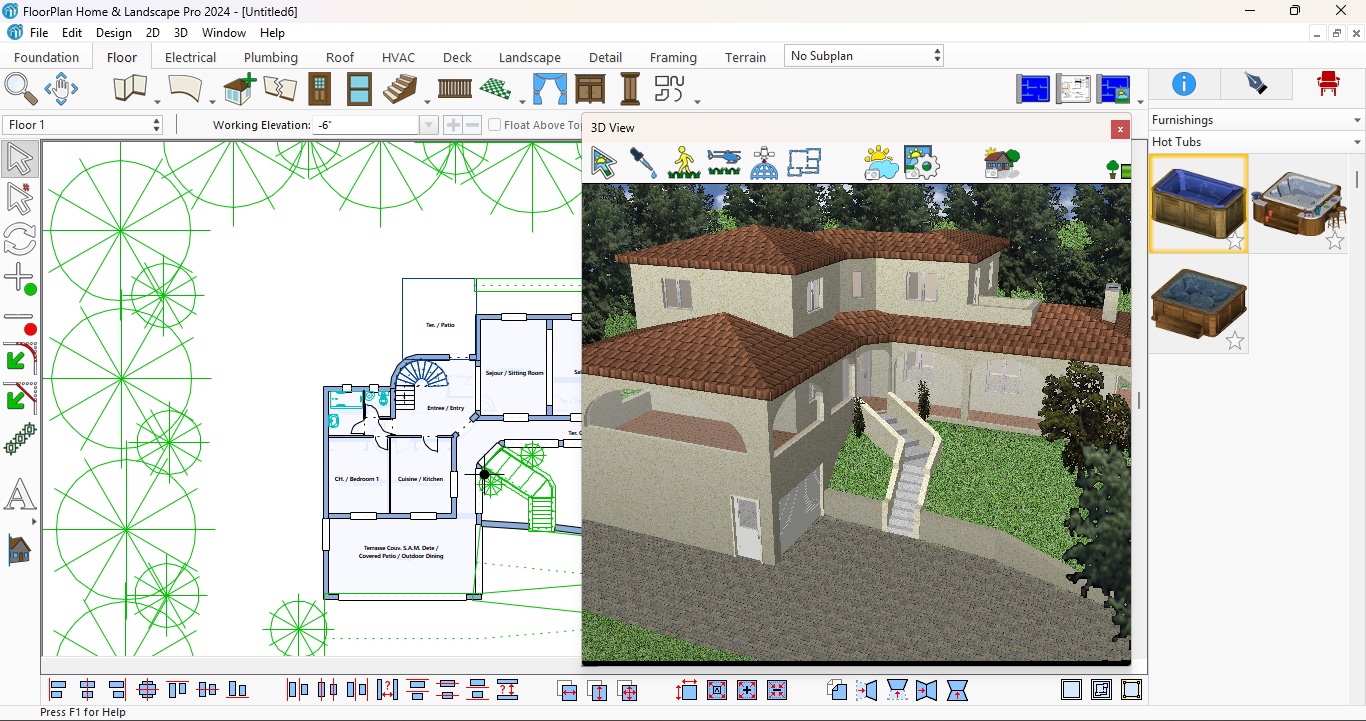
FloorPlan Pro’s main interface is pretty busy, although well organised, despite the fact it looks antiquated and could do with a more modern lick of paint. You have alignment controls at the bottom, a series of cursors offering different functions to the left, and at the top, all the tools you need to design your home, organised by category, with ‘Floor’ being selected by default.
That section contains the tools you need to build walls, add windows and doors, insert stairs, railings, columns, and more. Other categories allow you to work on the foundations, add a roof, design the electrics and plumbing, work on the ventilation and air conditioning, add a deck, landscape the outside, etc. It’s incredibly full featured.
If you’re unsure what a tool does, just hover over it for a couple of seconds, and a detailed tooltip will appear telling you exactly what it does, and how to use it. Some even include a short animation to explain the concept more clearly.
By default, you’ll be working in a traditional 2D view, but you can also add a 3D view to the mix, which you can explore in parallel. You can use it to navigate through your design, select items and such, but you cannot manipulate your work from there.
When it comes to making alterations, the interface is very responsive: click on an object to select it, and drag it to move it around or resize it. We did notice however, that unlike other competing products, when you reposition a wall, adjoining walls aren’t resized and repositioned at the same time to accommodate that wall’s new position: you need to work on each in turn.
It’s cumbersome if you’ve grown used to the other way of working, but it shouldn’t be a deal breaker, especially if you like more precise control over your project.
FloorPlan Pro: Tools
Hover over a tool for it to reveal what it does. Some even include a short animation to explain how they work (Image credit: IMSI Design)
- There’s a lot of tools at your disposal, and once you’re used to the interface’s layout, you’ll start enjoying the creation process
As mentioned above, you can find the tools along the interface’s edges, and once you’ve gotten used to their location, accessing the right tool when you need it becomes second nature. In fact we found designing a project to be pretty easy considering the number of available options – not as easy as the “Quick Start” feature, mind, but still, it can become an immersive experience, as you focus on your design.
Working primarily in 2D to create your project might be viewed as a drawback, but there’s an inherent simplicity to the concept that we ended up enjoying the process, occasionally switching to 3D to see how it was all shaping up. The biggest drawback though is that you need a large screen, especially with the 3D view activated, as it can overlap with the rest of the interface and all too easily gets in the way, especially when you’re furnishing your building.
Altering the topography is done through the 3D view (Image credit: IMSI Design)
When it comes to furnishings and materials, everything is located in a drop down menu to the right. All items are organised by category which you can explore, or just use the search field to quickly find what you’re looking for, which you then click and drag onto your design.
We really liked the landscape feature, and can understand why FloorPlan Pro have so many available plants for you to populate your grounds with. The versatility is immense, even allowing you to create uneven ground, creating a much more realistic look for the surrounding area; you can even build a house, cut into a hill for instance, and turn the garden into a dense forest.
The 3D view truly comes into its own when altering the landscape, as this is where you get to change the topography with the various available tools.
Should I buy FloorPlan Pro?
Image 1 of 3
FloorDesign Pro has thousands of objects you can use to furnish your home(Image credit: IMSI Design )Use the 3D view primarily to explore your design(Image credit: IMSI Design )The landscaping is a big part of this software, allowing you to create complex exteriors(Image credit: IMSI Design )
Buy it if…
You’re looking for a professional-grade home design program, with a vast array of features and options, and don’t mind the somewhat dated interface.
Don’t buy it if…
You prefer creating, designing and altering your house in a 3D environment, or feel you need an interface that looks a little more modern.
For more design essentials we tested the best landscape design software and the best architecture software.
