

Close Menu
TechurzTechurz
    What's Hot

    Evotrex raises $30M to build the RV that doesn’t need a charging station

    June 9, 2026

    It’s not FAANG anymore. It’s MANGOS.

    June 9, 2026

    Zepto’s IPO filing reveals fast growth, bigger losses, and a valuation question nobody’s answered yet

    June 9, 2026
    X (Twitter) Pinterest YouTube LinkedIn WhatsApp
    Tech Pulse
    • Evotrex raises $30M to build the RV that doesn’t need a charging station
    • It’s not FAANG anymore. It’s MANGOS.
    • Zepto’s IPO filing reveals fast growth, bigger losses, and a valuation question nobody’s answered yet
    • How to apply to Startup Battlefield 2026, what you need ahead of today’s June 8 deadline
    • Beyond Instagram: Introducing the next generation of social apps
    X (Twitter) Pinterest YouTube LinkedIn WhatsApp
    TechurzTechurz
    • Home
    • Tech Pulse
    • Future Tech
    • AI Systems
    • Cyber Reality
    • Disruption Lab
    • Signals
    TechurzTechurz
    Home - Security - How to turn off Gemini in your Gmail, Docs, Photos, and more – it’s easy to opt out
    Security

    How to turn off Gemini in your Gmail, Docs, Photos, and more – it’s easy to opt out

    TechurzBy TechurzJune 6, 2025No Comments3 Mins Read
    Share Facebook Twitter Pinterest LinkedIn Tumblr Reddit Telegram Email
    How to turn off Gemini in your Gmail, Docs, Photos, and more - it's easy to opt out
    Share
    Facebook Twitter LinkedIn Pinterest Email


    Elyse Betters Picaro / ZDNET

    Are you frustrated by Google’s seeming insistence on injecting Gemini into everything? There’s a way out.

    Also: Your Gmail inbox now includes Gemini summaries by default – how to stop them

    While some users enjoy Google’s AI features that seem to roll out every week, others would rather have things the way they were before Gemini. Google somewhat sneakily buries it under a setting called “Smart features,” but if you know where to look, there’s an option to completely turn off Gemini from Gmail, Google Docs, Google Photos, and every other Google product.

    How to disable Gemini from Gmail, Google Docs, or Drive

    Go to your Gmail account and tap or click on the settings gear. For some reason, I’ve only found this setting in Gmail despite the fact that it affects Drive, Docs, Photos, and every other Google product. If you check settings in those apps, this feature isn’t there. This works from the app or the browser version of Gmail.

    Also: 8 ways Google’s Gemini AI assistant is getting more powerful and helpful

    From Gmail settings:

    1. Choose “See all settings.”
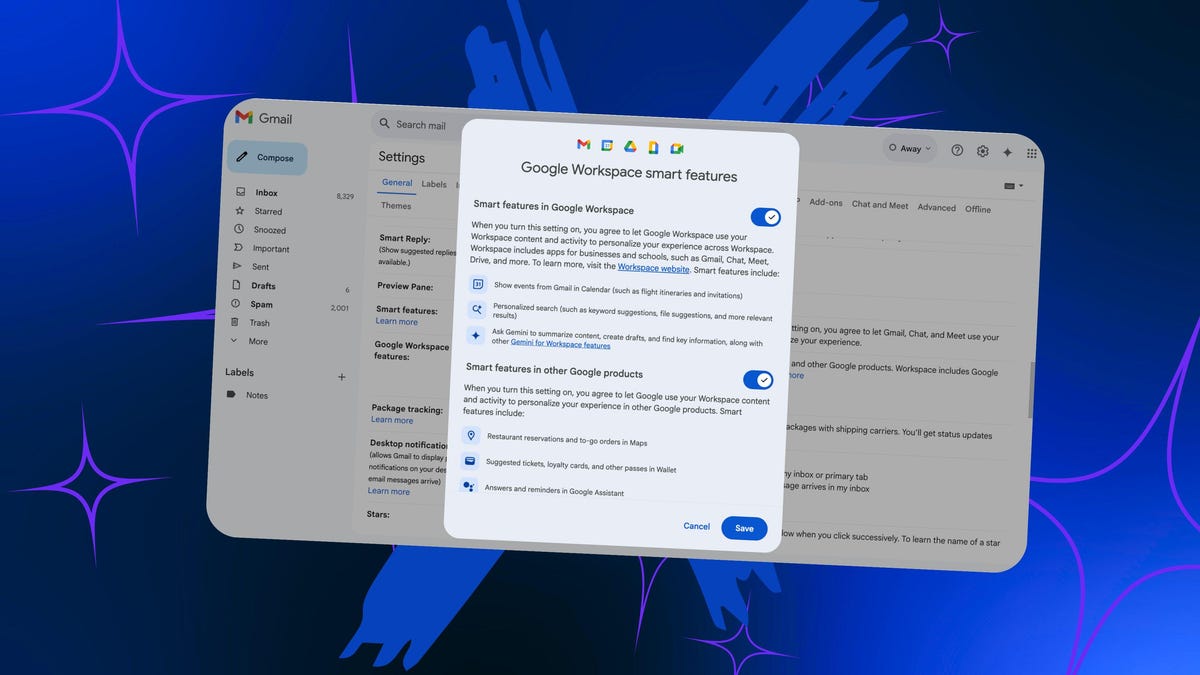
    2. Scroll down under the “General” tab until you see “Google Workspace smart features.”
    3. Select “Manage Workspace smart feature settings.”

    Screenshot by Artie Beaty/ZDNET

    Once you’re there, you’ll see two toggles. The top one is for Google Workspace products, the bottom one is for other Google products that interact with Workspace data (like Maps and Wallet).

    “When you turn this setting on,” a message explains, “you agree to let Google Workspace use your Workspace content and activity to personalize your experience across Workspace.” The message goes on to explain that “smart features” include things like showing events from Gmail in your calendar (flight itineraries, event tickets, and such) and personalized content like keyword suggestions and file suggestions.

    Also: Gemini can now watch Google Drive videos for you – including work meetings

    The third example is what we’re after: “Ask Gemini to summarize content, create drafts, and find key information, along with other Gemini for Workspace features.” Toggle that off, and you’ll no longer have Gemini across any Google product. Be warned: it does mean you’ll lose the other features, too.

    When I tried this for myself, I noticed that the Gemini button was still there across different products. If I clicked on it, though, Google prompted me to turn on smart features to get Gemini back. I didn’t notice Gemini summaries in Gmail or any other Gemini suggestions across other apps. From everything I could see, Gemini seemed gone entirely.

    How to turn off Ask Gemini in Google Photos

    The only exception seemed to be Gemini in Google Photos. When I opened the Photos app, Ask Gemini functioned normally. In the Google Photos settings, though, I found a toggle to turn off Gemini in Photos. When I did, the classic search became my only option.

    Also: 5 easy Gemini settings tweaks to protect your privacy from AI

    Whether it’s for privacy concerns, performance issues, the sometimes inaccuracy of AI, or just a desire to keep things the way they are, it’s good to know that Google leaves you a way to opt out, even if it is a little hidden.

    Get the morning’s top stories in your inbox each day with our Tech Today newsletter.

    docs Easy Gemini Gmail opt Photos Turn
    Share. Facebook Twitter Pinterest LinkedIn Tumblr Email
    Previous ArticleiOS 26: 7 changes we want Apple to make at WWDC
    Next Article Xbox’s Games Showcase and Outer Worlds 2 Direct Stream Sunday: How to Watch
    Techurz
    • Website

    Related Posts

    Opinion

    Forget the feed: Status AI raises $17M to turn social media into interactive entertainment

    May 19, 2026
    Opinion

    AI agent Poke makes setting up automations as easy as sending a text

    April 8, 2026
    Opinion

    Gumloop lands $50M from Benchmark to turn every employee into an AI agent builder

    March 12, 2026
    Add A Comment
    Latest Tech Pulse

    College social app Fizz expands into grocery delivery

    September 3, 20252,289

    SolarSquare in talks to raise up to $60M as India’s rooftop solar market draws major VC interest

    May 23, 202621

    A Former Apple Luminary Sets Out to Create the Ultimate GPU Software

    September 25, 202518
    Stay In Touch
    • YouTube
    • WhatsApp
    • Twitter
    • Pinterest
    • LinkedIn

    Techurz helps readers stay ahead of digital change with clear, practical, future focused technology intelligence written today,searched tomorrow.

    X (Twitter) Pinterest YouTube LinkedIn WhatsApp
    Company
    • About Us
    • Contact Us
    • Our Authors / Editorial Team
    • Write For Us
    • Advertise
    Policy
    • Editorial Policy
    • Privacy Policy
    • Terms and Conditions
    • Affiliate Disclosure
    • Cookie Policy
    • Disclaimer
    • DMCA
    Explore
    • AI Systems
    • Cyber Reality
    • Future Tech
    • Disruption Lab
    • Signals
    • Tech Pulse
    • Sitemap

    Join the Techurz Brief

    The future does not arrive suddenly.
    Stay ahead with fast, sharp tech signals.

    Type above and press Enter to search. Press Esc to cancel.