


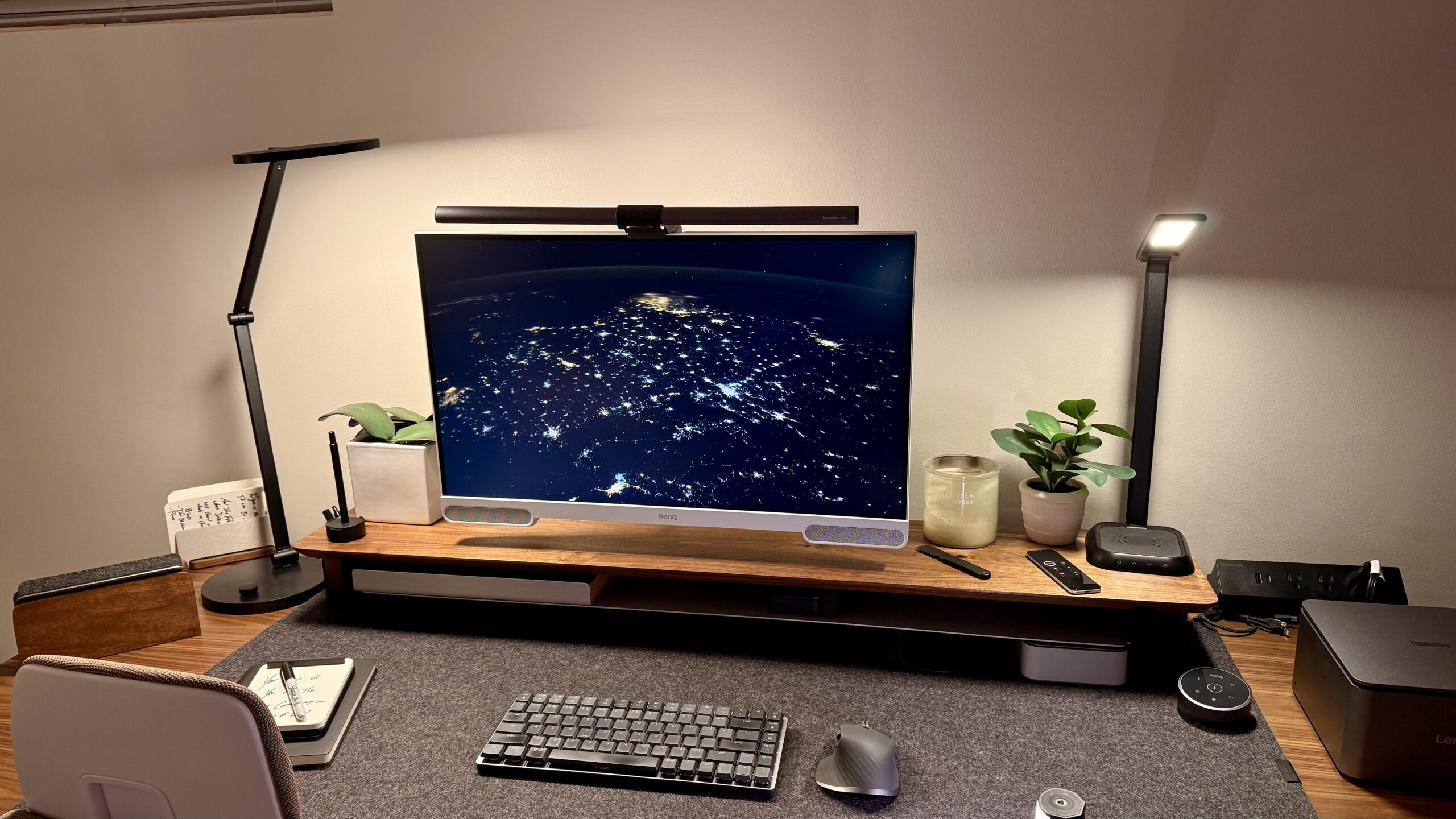
I review monitors as a significant portion of my work here at TechRadar Pro. I’ve tried more than most, and I have a good sense of what monitor I’d be willing to buy for real-world use and what is good on paper. That’s partially due to the fact that I am still very much in the “regular” workforce as well, using all sorts of different setups, computers, monitors, and so on. With all that being said, I had forgotten how affordable this monitor was during my testing phase and realized it was only $360 when I sat down to write the review and double-checked the specs.
There is a plethora of 4K monitors on the market right now, ranging from budget options that are not worth the money to absurdly overpriced models. We have excellent guides if you’re looking for some of the best business monitors right now, but what is truly impressive about this EW2790U is that, for only $360, you get a great 4K panel packed with features, not just a bare panel.
(Image credit: Collin Probst // Future )
BenQ EW2790U: Pricing & Availability
The EW Series currently has three variants: the EW3290U at $549.99, the EW2790U at $359.99, and the EW2790Q at $329.99. The Q model has a lower resolution (2560×1440) but a higher refresh rate of 100Hz compared to the EW2790U. Outside of that, the displays are identical. The EW3290U, then, is essentially the same as the EW2790U, but with a larger screen and an improved speaker system.
BenQ displays are sold through the BenQ website and at major retailers and are frequently available at discounted prices. If you are in the market for a new panel and want a BenQ, be sure to do some searching to check for deals.
BenQ EW2790U: Unboxing & first impressions
The BenQ EW2790U comes with a monitor, a slimmer stand than other BenQ monitors, a USB-C cable, a power cable (IEC), and a quick guide. Right off the bat, the visible speakers stand out, there’s no doubt about that. Additionally, the white bezel is a bit different than most black bezel monitors. However, after having it out of the box for a little while, I grew accustomed to it, and now I don’t mind it at all.
(Image credit: Collin Probst // Future )
I had the monitor on the stand it came with for about 15 seconds to see how it worked. Then I moved the display to one of my monitor arms because I’m pretty sure I’ve reached my limit, and all my monitors need to be on one of my monitor arms for aesthetic reasons, to keep the desk clean, and for cable management.
BenQ EW2790U: Design & build quality
Specs
Display: 27-inch IPS
Resolution: 3840×2160
Contrast Ratio: 1,000:1
Refresh Rate: 60Hz
Response Time: 5ms
Color Profile: 95% DCI-P3
There have been a few BenQ monitors now that I have tested that has a non-standard white bezel frame, and I have really grown to like it in the right space. It feels modern and fun, reminding me that I can enjoy this space and the work I am doing and not just feel like work is work.
The visible speakers are something that I haven’t seen before in a monitor, but now I barely even see them as odd since I have seen them so frequently at this point.
The port offering on the back is another build quality that I was not expecting on a budget monitor in the slightest. Most budget monitors have minimal ports, I’ve seen some with a single HDMI port to save money. This monitor, though, has three HDMI, two USB-C (one that can plug into your computer, one for accessories), three USB-A, a headphone jack, and an IEC port for power (not a cheap barrel connector like a lot of budget displays have).
(Image credit: Collin Probst // Future )
BenQ EW2790U: In use
Alright I’ll admit it, I have a problem. After only about 15 seconds of having this monitor on the stand it came with, just long enough to test it out and see how it functions, I threw this display on one of my monitor arms. I just love the look and function. But that’s not to say anything negative about the stand that BenQ sends with the monitor, because I don’t mind it. It’s minimalist, has some nice mobility to it, and it’s pretty.
Moving on, this display has been running my secondary setup for 105 days at the time of writing this review. For 105 days I have run every computer through this monitor to test specs and performance, I’ve had it in the background of every meeting, I’ve had my son play games on it, and watch shows on it while I’m working, I’ve had friends co-work from it, and I’ve even had it play a podcast or two just because I can and it’s that easy.
(Image credit: Collin Probst // Future )
For productivity, this display is great. The 27-inch size is industry standard for a reason, it’s a sweet spot. That, along with the 16:9 aspect ratio and 4K resolution, works well with almost every computer. What makes this unit unique though is that with the tap of a button you can swap color profiles, audio modes, display modes and volume and jump to a totally different profile for a different device all together.
So, you could have your productivity setup with your standard visuals, vocal audio mode, and USB-C port, and then with the touch of a button you can be ready for gaming after hours, or watching content on your lunch break. And, with the three HDMIs, you can plug in a gaming system, an Apple TV, and a work dock all while still keeping your personal laptop or tablet plugged in via USB-C. Oh, and don’t forget this is a budget monitor.
The speakers are not ground breaking, but I will say that they are better than the vast majority of other monitors and would more compare to a TVs speakers in my mind. They’re good, you won’t be upset with the quality but you also won’t be mind blown by them. For music I could tolerate non-descript background music but anything I know well I felt like I was missing out on some parts. For virtual meetings the audio profiles were excellent, same with podcasts or videos I was watching.
BenQ EW2790U: Final verdict
The BenQ EW2790U is a spectacular budget 4K monitor with phenomenal port offerings, fabulous features and a unique design. If you’re looking for a full-featured budget monitor, or even just a full-featured monitor and you aren’t as worried about the price, you’ll want to check this display out before you make any other purchases.
Attributes
Notes
Rating
Design
Unique and clean design
⭐⭐⭐⭐
Ease of use
Easy for all to use
⭐⭐⭐⭐⭐
Practicality
Practical for most who need monitors
⭐⭐⭐⭐⭐
Price
Great price
⭐⭐⭐⭐⭐
