


Why you can trust TechRadar
We spend hours testing every product or service we review, so you can be sure you’re buying the best. Find out more about how we test.
TP-Link Omada SG3428XMPP: 30-second review
(Image credit: Mark Pickavance)
TP-Link has successfully made the Omada branding mean something to those who work with information systems on a daily basis.
Part of that success has been the comprehensive hardware offerings that rarely leave any boxes unticked.
Recently, the Omada range underwent a significant overhaul with the introduction of a collection of L2+ switches, including the SG3428XMPP, which I’ll be reviewing in this article.
You may like
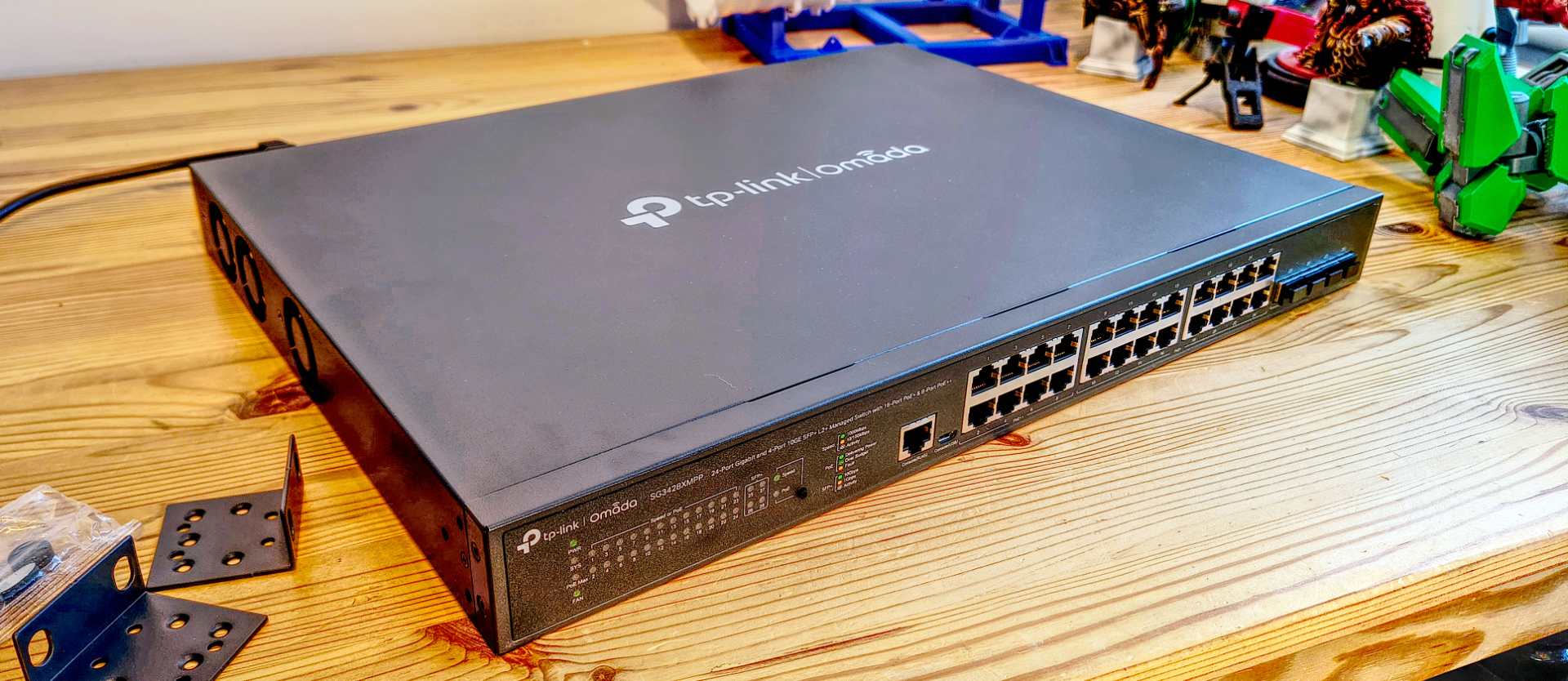
This is a 24-port switch designed for smart network deployments that utilise PoE technology to simplify and easily adapt the cable infrastructure.
To that end, it offers two blocks of 1GbE RJ45 outlets, with eight utilising the PoE++ standard, which provides up to 90W of power per port, and sixteen PoE+ ports with a 30W budget per port. With 500W of power to share, that’s plenty of power to distribute to Mesh routers, intelligent lighting, security cameras, or any other PoE devices that are important to you.
In addition to all the 1GbE ports, there are four SPF+ 10GbE receptacles for linking the switch to other switches or servers. That’s 40GbE of potential bandwidth, easily covering the 24GbE of PoE ports.
Where this hardware justifies its cost, however, is that it can be centrally cloud-managed via the web or the Omada app, or it can be entirely standalone. TP-Link has introduced a series of affordable hardware control platforms that link to the SG3428XMPP and other options in the L2+ range. The OC300 provides remote access to the switch without the need for a subscription cloud service or even allocating computing resources to run the Omada App locally.
Overall, this is might be the best network switch around – ticking the boxes for good hardware, ably supported by strategic thinking by TP-Link, that isn’t excessively priced.
TP-Link Omada SG3428XMPP: Price and availability
- How much does it cost? $650/£580
- When is it out? Available globally
- Where can you get it? Direct from a TP-Link, a retail partner or via an online retailer
It’s possible to buy the SG3428XMPP directly from TP-Link or via online retailers.
If purchased through Amazon or directly from TP-Link, the US price is $649.99, and the UK price on Amazon is £577.60.
The OC300 TP-Link Omada Hardware Controller, designed to manage multiple Omada devices, such as the SG3428XMPP, costs £119.99 from Pacetech in the UK and $159.99 from TP-Link for US customers.
Normally, I’d have other products with a similar specification to compare this equipment with, but there are remarkably few PoE++ managed switches available, and none that are remotely similar.
On that basis, the price for the SG3428XMPP seems reasonable for its high specifications.
TP-Link Omada SG3428XMPP: Specs
(Image credit: Mark Pickavance)Swipe to scroll horizontally
Item
Spec
Interfaces:
• 24× 10/100/1000 Mbps RJ45 Ports (8× PoE++, 16× PoE+)
Row 1 – Cell 0
• 4× 10G SFP+ Slots
Row 2 – Cell 0
• 1× RJ45 Console Port
Row 3 – Cell 0
• 1× Micro-USB Console Port
PoE Ports (RJ45):
• Standard: 802.3at/af/bt compliant
Row 5 – Cell 0
• PoE++ Ports: Ports 1~8 (up to 90 W PoE Output per Port)
Row 6 – Cell 0
• PoE+ Ports: Ports 9~24 (up to 30 W PoE Output per Port)
Row 7 – Cell 0
• Power Budget: 500 W
Mounting:
Rack Mountable or shelf standing
Switching Capacity:
128 Gbps
Packet Forwarding Rate:
95.23 Mpps
L2 and L2+ Features:
• 128 IP Interfaces: Support IPv4/IPv6 Interface
Row 12 – Cell 0
• Static Routing: 48 IPv4/IPv6 Static Routes
Row 13 – Cell 0
• Static ARP: 128 static entries
Row 14 – Cell 0
• 512 ARP Entries
Row 15 – Cell 0
• Proxy ARP
Row 16 – Cell 0
• Gratuitous ARP • DHCP Server
Row 17 – Cell 0
• DHCP Server
Row 18 – Cell 0
• DHCP Relay: DHCP Interface Relay, DHCP VLAN Relay
Row 19 – Cell 0
• DHCP L2 Relay
Row 20 – Cell 0
• Link Aggregation
Row 21 – Cell 0
• Spanning Tree Protocol
Row 22 – Cell 0
• Loopback Detection
Row 23 – Cell 0
• 802.3x Flow Control
Row 24 – Cell 0
• Mirroring
QoS:
• 8 priority queues
Row 26 – Cell 0
• 802.1p CoS/DSCP priority
Row 27 – Cell 0
• Queue scheduling: SP (Strict Priority), WRR (Weighted Round Robin), SP+WRR
Row 28 – Cell 0
• Bandwidth Control: Port/Flow-based Rating Limiting
Row 29 – Cell 0
• Smoother Performance
Row 30 – Cell 0
• Action for Flows: QoS remark (802.1P Remark, DSCP Remark)
Control options:
• Omada Cloud-Based Controller
Row 32 – Cell 0
• Omada Hardware Controller
Row 33 – Cell 0
• Omada Software Controller
Maximum Power use:
605.5W (110V/60Hz) ( with 500W PD connected)
Dimensions:
440 × 330 × 44 mm (17.3×13.0×1.7 in)
Weight:
6.246 kg
TP-Link Omada SG3428XMPP: Design
(Image credit: Mark Pickavance)
- Solid construction
- Active cooling
- Other models have more future-proofing
- A decent power budget
With so much switch hardware available from TP-Link, it’s important to first establish an orientation with the SG3428XMPP.
TP-Link currently offers eight levels of switches, ranging from the Campus series to Aggregation, Access Max, Access Pro, Access Plus, Access, Agile, and Unmanaged.
The SG3428XMPP fits into the Access Plus tier, where it resides alongside five other designs, some of which feature 48 PoE ports, in addition to the four 10GbE SPF+ ports that are standard on this platform.
Even before unpacking the SG3428XMPP, it became apparent that the engineers who designed this switch put industrial strength on their wishlist. This is entirely metal construction, and the 1U rack element is 440 x 330 x 44 mm. That means, since you need space at the back to accommodate the power cable, it won’t fit into anything shallower than a 400mm deep enclosure. Most racks are 600mm or more, so that won’t be an issue for most.
Due to the robust construction, it’s also not the lightest switch I’ve worked with, being over 6 kg. I presume that most of this weight is internal heat sinks to avoid thermal issues, but the case is also substantial.
Out of the box, it comes with some mounting plates to attach it to a rack or adhesive rubber feet if you want to put it on a shelf. The installation documentation warns the customer about using the brackets and then adding extra weight by putting other hardware on top of this switch. Evidently, the brackets are only for attaching the switch and aren’t overspecified for ad hoc deployments.
There is also a second aspect to not physically stacking this unit, and that’s heat management. TP-Link suggests that deploying this switch with hardware directly above and below it on the rack is a poor plan, and it is recommended that at least 5cm of space be given to the next rack element, ideally 10cm.
One option I wouldn’t recommend is deploying this switch unenclosed in an office. Not only does this expose the cabling to those who might be tempted to alter things, but the fans can be noisy, depending on how much power is being distributed via PoE.
When you first turn the switch on, the three cooling fans generate at least 75 dB, and even once it’s settled down, it hums at about 60 dB. That’s too much for an office where people are making calls.
My only other concern with the SG3428XMPP is that without some 2.5GbE ports, its hardware spec is fine for today, but the transition to faster protocols is already underway on some sites.
Thankfully, TP-Link offers the SG3428X-M2, a model with 2.5GbE ports, which eliminates the need to chain an additional switch or use 2.5GbE PoE products, such as the new TP-Link BE3600 Wall Plate router.
IT professionals specifying this equipment may want to better future-proof their investment by opting for 2.5GbE PoE, which the SG3428XMPP doesn’t offer. However, for general use where the PoE is powering lighting or security cameras, the 1GbE ports are sufficient, and this is unlikely to change going forward.
The most critical limitation of this device is that it has 500 watts of power to distribute over PoE. However, that doesn’t imply that this switch will consume a lot of power if it isn’t powering lights or dozens of security cameras.
Powering up the SG3428XMPP for the first time and connecting a single 1GbE port to my network, the switch consumed only 16 watts of power. Attaching the OC 300 hardware controller only increased the power consumption by about one watt, indicating that without PoE, the network ports on this hardware are remarkably efficient. Then, adding an Omada BE3600 wall plate WiFi 7 router that uses PoE bumped that up to 23.7 watts.
On the web interface, the PoE page reported that 7.2 watts were being used by ‘unit 1’, and that left 492.8 watts available.
Being able to see where the power is being used and how close you are to the availability cap is critical, though there is another switch in this range that has 700W to share out if you need more high-power devices.
(Image credit: Mark Pickavance)
As with many platforms these days, it is possible to oversubscribe the switch, not for data but for power. Each of the PoE++ ports is rated for 90W, and that alone adds up to 720W, without considering the sixteen ports of PoE+ that can all draw 15W (making another 240W).
However, most PoE devices don’t flirt with the power limit of the port they’re connected to, and 40W on each PoE++ and 10W on each PoE+ port won’t take you over budget.
I could wax poetic about some of the awe-inspiring features of this hardware for another three thousand words, but only a few readers will be interested in things like the ERPS (Enterprise Resource Planning), which enables recovery from network issues in a ring topology.
Where many competitors offer L2, this hardware boasts a range of L2+ features that enhance efficiency through static routing, among other benefits. In terms of features and functionality, this gear is at the top tier.
Overall, for rack-mounted equipment, there is a lot to like here. And other Omada devices in the range cover those areas where this device doesn’t deliver. It’s meant for long-term deployment in a dedicated machine room rack, and in that context, it’s a desirable piece of equipment.
Design score: 4.5/5
TP-Link Omada SG3428XMPP: In use
(Image credit: Mark Pickavance)
- Multi-approach
- Encourages localised controller
I’ve seen plenty of comms hardware in the past decade, where the only two options are standalone or cloud-based subscriptions. Those are both available with the SG3428XMPP, but these aren’t the only options, thankfully.
Having set up the review hardware, I’d strongly recommend anyone using one of these to start by configuring it in standalone mode. This involves simply connecting it to your existing network, identifying the IP address, and opening a browser to that IP address.
Without the IP, you won’t be able to connect via the Omada phone app, so it’s best to perform the initial login and password definition using a computer. This hardware also supports CLI, SNMP, and RMON, should you prefer those interfaces.
Once everything is running smoothly, you can then move to the next tier and consider controllers, whether local or Cloud-based.
This switch can be controlled by a computer running the Omada Controller application, which is available for Windows, macOS, and Linux. However, for the management to work fully, that machine needs to be dedicated to that job and not shut down at the end of a working day.
Probably the best approach if you want to have a software controller that monitors this switch or a range of Omada products would be to create a dedicated virtual machine (VM) on a server and install the app on that.
My only dislike of the software controller approach is that the app requires Java to be installed, and that’s a step that many IT managers might be less than keen to take.
This installation can be avoided entirely by opting for TP-Link Omada cloud management, although a monthly subscription fee is required for this option.
Typically, those would be the choices, with the best one being cloud management, where TP-Link charges a fee to avoid having a local computer with the management tool running on it.
However, TP-Link offers a fourth choice: a dedicated hardware controller, such as the OC300 that I used when testing the SG3428XMPP, which provides the best of both worlds.
(Image credit: Mark Pickavance)
Not only does it avoid the Java application and the computer that it must run on, but it also enables remote web access without the subscription costs. This device is silent, uses only a small amount of power, and is not expensive to purchase, as it can control up to 500 devices.
If you opt for the hardware controller path, you can install it first using the web interface and then add switches, routers, and other devices through the controller’s interface in a top-down approach. This is the easiest and most elegant deployment method, and it’s ideal for those who aren’t configuring a single switch but a suite of hardware and services.
What’s also lovely about the OC300 is that it keeps an eye on all the hardware in its regime and will update the firmware if new releases become available. Its ability to do those jobs and identify other issues should recoup the cost of the device in just a few months.
However, that assumes the deployment is exclusively TP-Link rather than a mix of branded hardware.
TP-Link Omada SG3428XMPP: Final verdict
(Image credit: Mark Pickavance)
What the SG3428XMPP offers is a particular set of features that are likely to fit nicely into locations where the network is progressing towards an innovative environment, with data flow, smart devices, and extensive Wireless hardware deployments to meet dynamic demand.
Traditionally, IT professionals are inclined to create a network infrastructure with a simple core model and then add to it around the periphery when new demands emerge.
However, the SG3428XMPP, along with others in this series, are designed for a much more flexible scenario where resources can be easily redirected to create isolated networks with tailored needs and manage these changes remotely.
What is especially gratifying is that there are numerous options for management, covering the entire spectrum of time and resources available to those responsible for network infrastructure. With this hardware, you’re not forced to spend more or take on subscriptions to utilise the most sophisticated features, which is excellent news for those with shrinking budgets and limited resources.
In the next few weeks, I’ll be covering the Omada BE3000 Wall Plate and Omada BE11000 indoor/outdoor router, which are designed to work seamlessly with the SG3428XMPP. Watch for those reviews.
Should I buy a TP-Link Omada SG3428XMPP?
(Image credit: TP-Link)Swipe to scroll horizontallyFRITZ!Box 7690 Scorecard
Attributes
Notes
Rating
Value
For the functionality it has, the price is realistic
4/5
Design
Built for the long haul
4.5/5
In Use
Many ways to use this equipment, from simple to complicated
4/5
Overall
Serious gear for those who like to change things around
4.5/5
Buy it if…
Don’t buy it if…
For more connectivity hardware, we’ve reviewed the best mesh Wi-Fi systems and the best Wi-Fi routers.
TP-Link Omada SG3428XMPP: Price Comparison
