

Close Menu
TechurzTechurz
    What's Hot

    Humble Robotics’ CEO says the tech finally caught up to the vision for autonomous vehicles

    July 1, 2026

    Autonomous vehicle hype is back, and Humble Robotics is bringing it to freights

    July 1, 2026

    Builders Stage agenda revealed for Disrupt 2026

    July 1, 2026
    X (Twitter) Pinterest YouTube LinkedIn WhatsApp
    Tech Pulse
    • Humble Robotics’ CEO says the tech finally caught up to the vision for autonomous vehicles
    • Autonomous vehicle hype is back, and Humble Robotics is bringing it to freights
    • Builders Stage agenda revealed for Disrupt 2026
    • Startup Battlefield Australia application closes in days: Apply before July 6
    • Acti puts AI agents directly into your smartphone keyboard
    X (Twitter) Pinterest YouTube LinkedIn WhatsApp
    TechurzTechurz
    • Home
    • Tech Pulse
    • Future Tech
    • AI Systems
    • Cyber Reality
    • Disruption Lab
    • Signals
    TechurzTechurz
    Home - News - Apple Music just dropped 10 years of your favorite jams into one playlist – how to listen
    News

    Apple Music just dropped 10 years of your favorite jams into one playlist – how to listen

    TechurzBy TechurzJuly 1, 2025Updated:May 11, 2026No Comments3 Mins Read
    Share Facebook Twitter Pinterest LinkedIn Tumblr Reddit Telegram Email
    Apple Music just dropped 10 years of your favorite jams into one playlist - how to listen
    Share
    Facebook Twitter LinkedIn Pinterest Email


    Apple / Elyse Betters Picaro / ZDNET

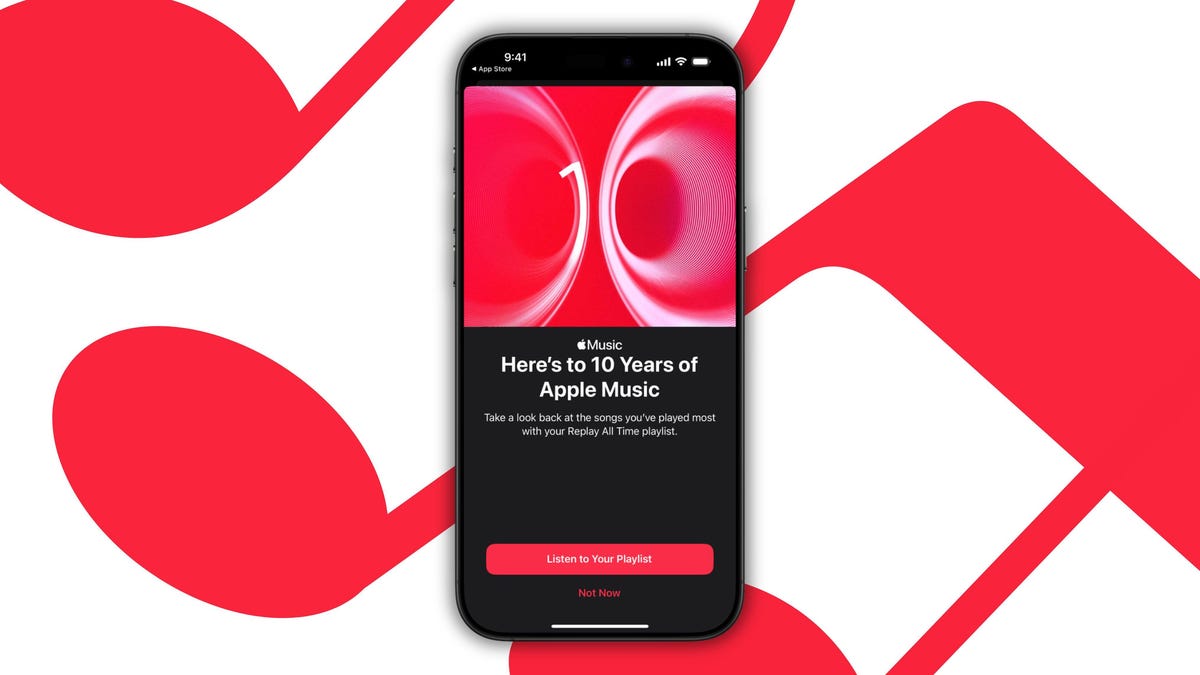
    Apple is launching a new version of its annual Replay playlist called Replay All Time. Interestingly, instead of only tracking the tunes you’ve streamed most in the past calendar year, it goes all the way back to when you first subscribed.

    Also: iOS 26 just solved one of my biggest pain points with Apple Music

    So, if you’ve been an Apple Music user since the service first launched, you should see a consolidated view of your decade-long listening habits. The timing is no coincidence: Apple Music is now 10 years old. Replay All Time is here to celebrate that milestone — by giving die-hard fans a deep data dive as well as a nostalgic trip through every era of their Apple Music journey to date.

    Table of contents
    1 How to find your Replay All Time playlist
    2 Spotify Wrapped, who?
    3 Top 500 most-streamed songs

    How to find your Replay All Time playlist

    Subscribers can stream their Replay All Time playlist right from the Home tab in Apple Music.

    Just open the latest version of the Apple Music app, tap Home at the bottom (or side), and scroll until you spot Replay All Time. Once you see it, tap it, and then you can hit Listen to your Playlist to start streaming your decade’s most-played tracks.

    Also: How to use the viral AutoMix feature on iOS 26 (and which iPhone models support it)

    Want to save it for later? Tap the ••• menu in the top-right corner and choose Add to Library (or Add to a Playlist). Once it’s in your library, Replay All Time works like any other playlist: You can shuffle the songs, view play counts, and share it with friends.

    Spotify Wrapped, who?

    Apple Music Replay is Apple’s answer to Spotify Wrapped — the annual heavyweight that drops every December since 2016 with shareable, story-style recaps of your year’s top streams. YouTube Music, Tidal, and Deezer all offer their own annual recaps, but none pack a full decade into a single playlist like Replay All Time now does.

    Whether Apple will keep this feature alive after Apple Music’s 10th birthday remains to be seen — but for now, subscribers have an unprecedented look back at how their music tastes have changed over the years.

    Top 500 most-streamed songs

    To further celebrate Apple Music’s 10th anniversary, Apple Music Radio will reveal the service’s overall top 500 most-streamed songs from the past decade. The countdown kicks off July 1 — with 100 songs revealed each day — and culminates on July 5, 2025.

    Also: The best MP3 players you can buy

    The full list will then be available as a new 10 Years of Apple Music: Top Songs playlist.

    Get the morning’s top stories in your inbox each day with our Tech Today newsletter.

    Apple dropped favorite jams Listen music playlist years
    Share. Facebook Twitter Pinterest LinkedIn Tumblr Email
    Previous ArticleWiz Gradient Light Bars review: make your home theater more immersive without breaking the bank
    Next Article AI Investor Stuck At A Standstill? 3 Strategic Paths To Buy, Build, Or Partner With AI Vendors
    Techurz
    • Website

    Related Posts

    Opinion

    Warner Music acquires AI attribution startup Sureel AI

    June 10, 2026
    Opinion

    GRAI believes AI can make music more social, not replace artists

    April 21, 2026
    Opinion

    Apple acquires video editing software company MotionVFX

    March 16, 2026
    Add A Comment
    Latest Tech Pulse

    College social app Fizz expands into grocery delivery

    September 3, 20252,290

    SolarSquare in talks to raise up to $60M as India’s rooftop solar market draws major VC interest

    May 23, 202622

    Future of Digital Privacy and Security: 7 Truths Nobody Tells You

    May 25, 202619
    Stay In Touch
    • YouTube
    • WhatsApp
    • Twitter
    • Pinterest
    • LinkedIn

    Techurz helps readers stay ahead of digital change with clear, practical, future focused technology intelligence written today,searched tomorrow.

    X (Twitter) Pinterest YouTube LinkedIn WhatsApp
    Company
    • About Us
    • Contact Us
    • Our Authors / Editorial Team
    • Write For Us
    • Advertise
    Policy
    • Editorial Policy
    • Privacy Policy
    • Terms and Conditions
    • Affiliate Disclosure
    • Cookie Policy
    • Disclaimer
    • DMCA
    Explore
    • AI Systems
    • Cyber Reality
    • Future Tech
    • Disruption Lab
    • Signals
    • Tech Pulse
    • Sitemap

    Join the Techurz Brief

    The future does not arrive suddenly.
    Stay ahead with fast, sharp tech signals.

    Type above and press Enter to search. Press Esc to cancel.