


Why you can trust TechRadar
We spend hours testing every product or service we review, so you can be sure you’re buying the best. Find out more about how we test.
Alienware 16 Area-51: Two-minute review
There are only a few gaming laptop releases that’ll impress buyers this year as much as the Alienware 16 Area-51. Everything about this work of premium art and technology oozes perfection.
Though the configuration I reviewed came out to around $3,249.99 / £3,349 / AU$5,497.80, there’s plenty of scalability in terms of both price and component options, with systems starting at $1,999.99 / £2,149.01 / AU$4,198.70.
The design alone places this as one of the best gaming laptops going, thanks to a futuristically sleek design that mirrors its desktop sibling with “fluid contours and soft surfaces” that blends nice angles, lovely multi-zone customizable lighting, smart port placement, clever ventilation, a clear glass panel on the bottom to show of the internals, and much more.
The phenomenal design philosophy is matched with gaming performance that’ll impress enthusiasts and competitive gamers alike. All of that power is pumped out through a 16-inch 2560×1600 display that offers a 240Hz refresh rate as well.
However, holding the display back significantly is the image quality. Despite featuring 100% DCI-P3, 500 nits of brightness, and Nvidia G-Sync, images lack crispness and can come off as smudged a bit as well. Thankfully, the Dolby Atmos-certified speakers provide great, nuanced sound for gaming alongside general music listening.
That doesn’t even count the amount of extras that are featured on the Area-51 16, such as the option to have a full RGB mechanical keyboard, which makes it to where serious players don’t have to use a USB slot and lug an extra keyboard around.
Even outside of gaming, the mechanical keyboard makes general computing tasks a thrill thanks to how fantastic keystrokes feel. In a cool touch, the touchpad itself glows with customizable lighting too.
All of this greatness does come at the cost of borderline abysmal battery life, which comes with the territory of most high-end gaming laptops.
Those in need of more juice for long flights or times without a nearby electrical socket may be in some trouble. Regardless, the Alienware 16 Area-51 is out of this world when it comes to laptop gaming.
Alienware 16 Area-51: Price & availability
(Image credit: Future / John Loeffler)
How much does it cost? Starting at $1,999.99 / £2,149.01 / AU$4,198.70
When is it available? Available now
Where can you get it? Available in the US, UK, and Australia
The Alienware 16 Area-51 is now available through Dell’s online store and other digital retailers, starting at $1999.99 / £2,149.01 / AU$4,198.70. Buyers in the US, UK, and Australia can choose from a range of configurations and options tailored to their Windows gaming needs.
My review unit was configured with an Intel Core Ultra 9 275HX, Nvidia GeForce RTX 5080, 32GB RAM, and 1TB SSD Storage comes in at $2,849.99 / £3,298.99 / AU$5,497.80. Other features include the 4K web camera and mechanical keyboard options.
While not the most expensive laptop in its size class, it’s not the cheapest either, but its starting price is very good for a laptop with this kind of premium feel.
Alienware 16 Area-51: Specs
(Image credit: Future / John Loeffler)Swipe to scroll horizontallyRow 0 – Cell 0
Alienware Area-51 16 (Lowest Configuration)
Alienware Area-51 16 (Review)
Alienware Area-51 16 (Highest Configuration)
Price:
$1,999.99 at Dell.com | £2,149.01 at Dell.com | AU$4,198.70 at Dell.com
$2,849.99 at Dell.com | £3,298.99 at Dell.com | AU$5,497.80 at Dell.com
$5,499.99 at Dell.com | £5,779 at Dell.com | AU$$8,847.30 at Dell.com
CPU:
Intel Core Ultra 7 processor 255HX
Intel Core Ultra 9 processor 275HX
Intel Core Ultra 9 processor 275HX
Graphics:
NVIDIA GeForce RTX 5060
NVIDIA GeForce RTX 5080
NVIDIA GeForce RTX 5090
RAM:
16GB DDR5-6400MT/s
32GB DDR5-6400MT/s
64GB DDR5-6400MT/s
Screen:
16″ WQXGA 2560×1600 240Hz 3ms 100% DCI-P3 500 nit, NVIDIA G-SYNC + Advanced Optimus
16″ WQXGA 2560×1600 240Hz 3ms 100% DCI-P3 500 nit, NVIDIA G-SYNC + Advanced Optimus
16″ WQXGA 2560×1600 240Hz 3ms 100% DCI-P3 500 nit, NVIDIA G-SYNC + Advanced Optimus
Storage:
1TB SSD
1TB SSD
12TB (3 x 4TB) PCIe SSD (4TB PCIe SSD in Australia)
Ports:
1X SD Card Slot, 1 x 3.5mm Headset Jack, 2 x USB Type-A 3.2 Gen 1, 1 x USB Type-A 3.2 Gen 1, 2 x USB-C Thunderbolt 4 ports, 1 x HDMI 2.1
1X SD Card Slot, 1 x 3.5mm Headset Jack, 2 x USB Type-A 3.2 Gen 1, 1 x USB Type-A 3.2 Gen 1, 2 x USB-C Thunderbolt 4 ports, 1 x HDMI 2.1
1X SD Card Slot, 1 x 3.5mm Headset Jack, 2 x USB Type-A 3.2 Gen 1, 1 x USB Type-A 3.2 Gen 1, 2 x USB-C Thunderbolt 4 ports, 1 x HDMI 2.1
Wireless:
Intel Killer Wi-Fi 7 BE1750 (2×2 320Hz) MIMO 802.11be Wireless LAN and Bluetooth 5.4
Intel Killer Wi-Fi 7 BE1750 (2×2 320Hz) MIMO 802.11be Wireless LAN and Bluetooth 5.4
Intel Killer Wi-Fi 7 BE1750 (2×2 320Hz) MIMO 802.11be Wireless LAN and Bluetooth 5.4
Camera:
1080P Webcam
4K Webcam
4K Webcam
Weight:
7.49 lbs | 3.40 kg
7.49 lbs | 3.40 kg
7.49 lbs | 3.40 kg
Dimensions:
14.37 x 11.41 x 1.12 ins | 365 x 290 x 28.5mm (W x D x H)
14.37 x 11.41 x 1.12 ins | 365 x 290 x 28.5mm (W x D x H)
14.37 x 11.41 x 1.12 ins | 365 x 290 x 28.5mm (W x D x H)
Alienware 16 Area-51: Design
(Image credit: Future / John Loeffler)
- Sleek, rounded design with a beautiful liquid teal colorway and RGB lighting nearly everywhere
- Nice rear port selection and SD Card slot
- Comfortable experience with the mechanical keyboard
As noted before—and it bears repeating—the Alienware 16 Area-51’s design is truly breathtaking. From the moment you unbox it, the spaceship-inspired curves and sleek, dark liquid teal finish immediately signal a premium, high-end machine that stands out in any setting. While closed, there are some noticeable design choices that truly set this gaming laptop apart from others.
Every angle of the Area-51 16 is picturesque from top to bottom. This includes the top panel featuring the standard Alienware logo that is backlit by customizable RGB.
At the bottom, you get to see the laptop’s Cryo-Chamber structure, allowing direct airflow to the laptop’s core components. This also raises the device for both comfort and larger air intake. For added measure, there’s a clear Gorilla Glass panel showing the AlienFX fans that also has customizable lighting.
Image 1 of 3
(Image credit: Future / John Loeffler)(Image credit: Future / John Loeffler)(Image credit: Future / John Loeffler)
A nice selection of ports is located on the rear, which offsets the display hinge by about a few inches. That portion also features a customizable RGB light ring that circles it from top to bottom, too.
This allows access to three USB-A, two USB-C with Thunderbolt, a single HDMI port, and a power port. Those are joined on the left side by an SD Card slot and a 3.5mm headset jack. Smartly designed V-Rail edges make opening and closing the gaming laptop a smooth
(Image credit: Future / John Loeffler)
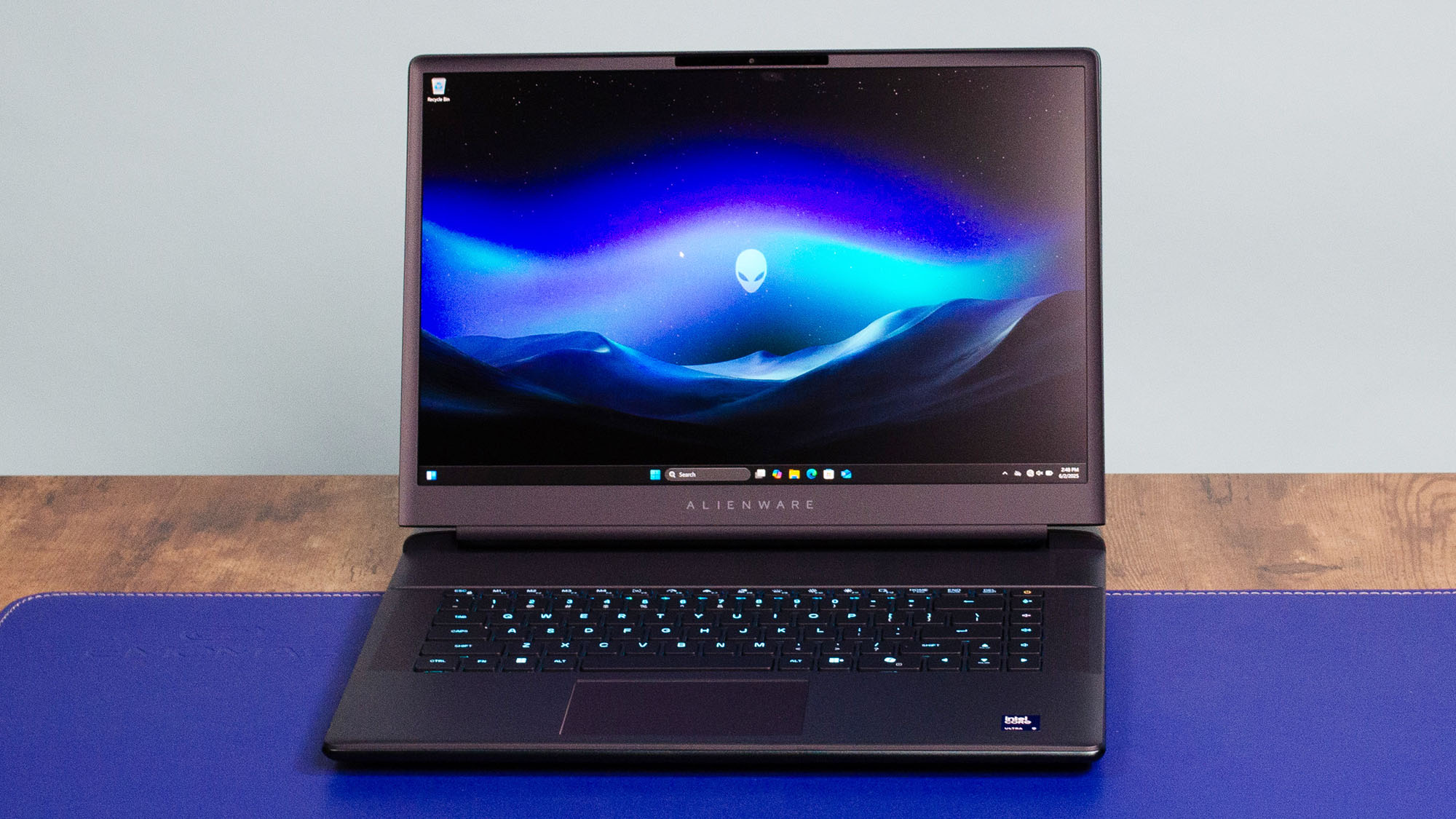
When opened, the display offers either an FHD or a 4K webcam at the top. Below, the mechanical keyboard provides a satisfying feel for both gaming and typing, complete with customizable RGB lighting, and is flanked by a speaker system with two 2W woofers, two 2W tweeters, and Dolby Atmos certification.
The smooth, precision glass touchpad at the bottom also features customizable RGB lighting, adding to the laptop’s premium, tailored experience. Usage is made extra comfortable through a pillowed palm rest, which helps when gaming or when doing general web browsing tasks for long periods.
The Alienware Area-51 16 is just so thoughtful in the engineering and design. There’s a visual appeal and functional enhancements that elevate the ownership experience here in ways that feel luxurious yet cool.
Alienware 16 Area-51: Performance
(Image credit: Future / John Loeffler)
- Incredible power for modern AAA games with high frame rates
- Can control power output through Alienware Command Center
- Display performance is awesome though image quality suffers
Swipe to scroll horizontallyAlienware 16 Area-51 CPU benchmarks
Benchmark
Score
Geekbench 6.4 Single-core
3,126
Geekbench 6.4 Multi-core
20,498
Crossmark Overall
2,338
Crossmark Productivity
2,173
Crossmark Creativity
2,587
Crossmark Responsiveness
2,145
Gaming and high-end creative task performance match the design perfectly on the Alienware 16 Area-51. The Intel Core Ultra 9, Nvidia RTX 5080, 32GB RAM, and 1TB SSD in my configuration was probably the ideal way to make the most of the 16-inch 2560×1600 resolution display when it comes to configuration options.
I was able to play all the latest, visually arresting AAA games at 60+ frames per second without problems using Cyberpunk 2077, Black Myth: Wukong, Forza Motorsport (2023), Doom: The Dark Ages, and Assassin’s Creed: Shadows.
Swipe to scroll horizontallyAlienware 16 Area-51 GPU benchmarks
Benchmarks
Header Cell – Column 1
Score
3DMark Fire Strike
Row 0 – Cell 1
37,813
3DMark Time Spy
Row 1 – Cell 1
21,070
3DMark Fire Strike Ultra
Row 2 – Cell 1
14,073
3DMark Time Spy Extreme
Row 3 – Cell 1
10,558
3DMark Speed Way
Row 4 – Cell 1
5,613
3DMark Steel Nomad
Row 5 – Cell 1
5,142
3DMark Port Royal
Row 6 – Cell 1
13,966
There are ways to push frame rates even higher thanks to Nvidia’s DLSS upscaling technology. The base configuration option is great for 1080p and 1440p gaming, while the max configuration is good enough for 4K gaming if users plan on connecting to a compatible monitor.
The Area-51 16-inch is powerful enough to edit high-resolution photo and video content without any problems in apps like Adobe Premiere and Photoshop.
Despite pushing the Area-51 16-inch to max capabilities, I didn’t hear much fan noise and it didn’t get too hot, mostly thanks to the Area-51 16-inch’s Cryotech cooling and smart vent placement.
Swipe to scroll horizontally
Game
Average FPS
Assassin’s Creed Shadows (Ultra, 1080p)
52
Black Myth: Wukong (Cinematic, 1080p)
58
Cyberpunk 2077 (Ultra, 1080p)
63
Monster Hunter Wilds (Max, 1080p)
83
Shadow of the Tomb Raider (Very high, 1080p)
183
Total War: Warhammer III (Ultra, 1080p)
201
Like other Alienware devices, the Command Center app is a great way to augment power delivery to focus on a quieter fan speed, focus on battery (though it doesn’t help much), and full-on performance power. Other features of the Command Center include the ability to manage various game settings alongside customizing the various RGB lighting zones around the gaming laptop.
Gaming and the display performance are good enough to make me forget how average-looking the display is when it comes to image quality, suffering from washed-out colors that aren’t very crisp.
Alienware 16 Area-51: Battery life
- General computing tasks usage will give around 4 hours of usage between charges
- Trying to game is only going to provide about two hours
Gaming laptops at this level rarely excel in battery life, and the Alienware 16 Area-51 is no exception. In our PCMark 10 gaming battery test, it lasted around two hours, typical for machines in this category.
More disappointing is its performance in everyday tasks: during our Battery Informant Web Surfing test, it managed just over four hours with power-saving settings like reduced RGB lighting and lower brightness.
With lighting and medium volume levels on, the battery dipped to roughly three hours before needing a recharge. It would be nice to see the power-focused sect of gaming laptops reach the level of the ASUS ROG Zephyrus G14.
On the positive side, the Alienware Battery Defender technology promises to balance power consumption with temperature monitoring to give the battery a longer life.
Charging takes a little over a few hours to reach full battery life, and there isn’t any quick charging. The power adapter brick is also pretty large as well so be mindful when traveling.
Should I buy the Alienware 16 Area-51?
(Image credit: Future / John Loeffler)Swipe to scroll horizontally
Attributes
Notes
Rating
Value
Gaming laptops are expensive by nature but the lower configuration versions of the Alienware 16 Area-51 do come at an attractive price.
4 / 5
Design
Between the smooth sleek chassis with lovely RGB lighting everywhere, port placements, fan placement and see-through bottom, this is the coolest looking gaming laptop ever made. This is the perfect match of form and function.
5 / 5
Performance
No matter which configuration you choose, you’re getting top-tier components that offer impressive scalability in performance options.
5 / 5
Battery
Battery life is pretty average so users are going to have to make sure they are near some power outlet.
3 / 5
Average rating
Image quality and battery life issues aside, this gaming laptop is worth every penny.
4.25 / 5
Buy the Alienware 16 Area-51 if…
Don’t buy it if…
Also Consider
If our Alienware Area-51 16 has you considering other options, here are two laptops to consider…
Razer Blade 14 (2024) review
Though it may not have the colorful lighting of the Area-51 16 and loses about two inches of display real estate, the Razer Blade 14 is a powerhouse that’s also portable.
Read the review here
MSI Katana 15
Anyone looking for an ultra-affordable gaming laptop that’s good for 1080p gaming performance should definitely check out the MSI Katana 15.
Read the review here
How I tested the Alienware 16 Area-51
- Tested the gaming laptop over the course of a week
- Games tested include Forza Motorsport (2023), Warhammer 40,000: Space Marine II and Doom: The Dark Ages among others
- General computing tasks include Tidal, Google Chrome and Adobe Suite
During my week with the Alienware 16 Area-51, I spent my time split between work during the day and gaming at night.
During the day, I used Google Chrome for web browsing, Gmail, Docs, and Sheets. Other software used includes Tidal to test speakers and Adobe Suite software like Photoshop, alongside Premiere Pro for creative tasks.
Outside of standard benchmark tests for games like Cyberpunk 2077 and Black Myth: Wukong, I tested out plenty of modern games, including Forza Motorsport (2023), Warhammer 40,000: Space Marine II, and Doom: The Dark Ages. I also managed to handle a few video conferences, which allowed me to test out the webcam as well.
Read more about how we test
