


I seldom sleep in the same place for more than a couple of weeks at a time, so I’m a big fan of portable all-in-one projectors. They’re small and set up quickly, making them ideal for vanlife, gaming parties, outdoor movie nights, or an evening in on the couch — but they usually sacrifice quality for convenience. Anker’s new Nebula X1 projector promises to produce an incredibly bright and color-accurate 4K image with excellent sound while remaining portable and quiet.
Typically, if portability is at the top of your wish list, then sound and picture quality will suffer. Prioritize a cinematic experience and you’re looking at an expensive, hulking, noisy device that requires permanent placement inside a home theater. Over a month of testing across endless firmware updates and a variety of viewing conditions, the Nebula X1 did a superb job of striking the right balance with very few tradeoffs, delivering on Anker’s promise.
But with a price starting at $2,999, or $3,998 for a kit that includes the highly recommended satellite speakers, it’s not exactly cheap. And at close to 25 pounds (11.3kg) for the entire bundle — the Nebula X1 is more luggable than portable.
$2999
The Good
- Unbelievably bright
- Excellent image on a variety of surfaces
- Incredible sound for a portable
- Automatic everything with manual overrides
- Netflix works out of the box
The Bad
- Expensive
- 4.1.2 channel separation is trash
- Satellite speakers can drop connection
- Large and heavy for a portable
The Nebula X1 is a 3500 ANSI lumen triple-laser 4K projector with integrated four-speaker sound system. It runs Google TV so you get built-in Chromecast, Google Assistant, and an official Netflix app (unlike many all-in-one projectors) that streams media over Wi-Fi 6. It includes a pair of USB and HDMI 2.1 ports (one supporting eARC) to attach your favorite game console or media drive. A satisfying, recessed handle pops up with a push to make the 13.7 pound (6.2kg) projection unit portable.
There’s a long list of features that make the X1 unique for a portable projector:
- An all-glass 14-element lens that won’t yellow over time, mounted onto a 25-degree motorized mechanical swivel that avoids inferior digital tricks while increasing placement options.
- Liquid cooling that all but eliminates noise.
- Optical zoom coupled with a 0.9:1 to 1.5:1 throw ratio gives you giant images, up to 300 inches diagonally, when placed closer to the screen than typical projectors.
- Class-leading 200W of sound when adding Anker’s highly recommended 80W battery-powered, water-resistant, Wi-Fi-connected speakers.
Note: I did my best with the photographs, but they can only approximate the brightness, color, and contrast viewed with the naked eye.
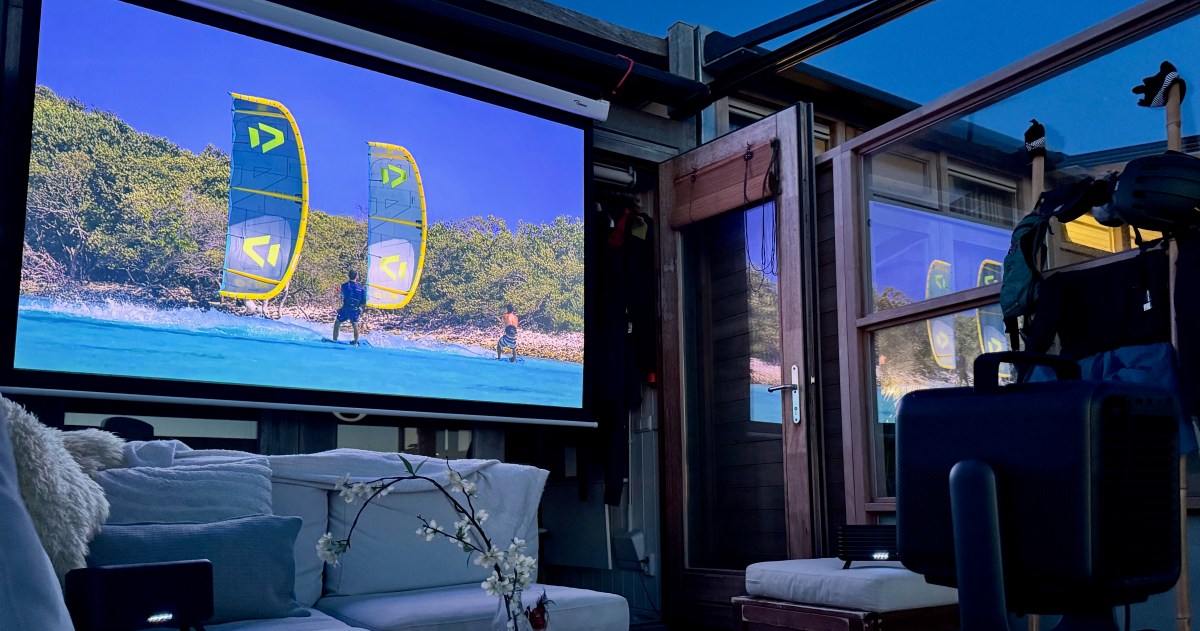
This 4K Dolby Vision Netflix stream was delivered over Starlink onto a 90-inch projection screen from 7.5 feet (3.5m) away, just after sunset. Photo by Thomas Ricker / The Verge
This 32-inch YouTube image projected onto a glossy folding Ikea table was actually too bright. Photo by Thomas Ricker / The Verge
This large image was watchable mid-day even when viewed on an ALR screen next to a wall of floor to ceiling windows. Photo by Thomas Ricker / The Verge
The X1 struggled at times to find the maximum screen size on this white wall, and delivered about a dozen firmware updates over my month of testing. Photo by Thomas Ricker / The Verge
I’ll just say it: the X1’s image quality is unmatched for a go-anywhere all-in-one projector. Its 3500 ANSI lumen output is better than many home theater projectors, allowing it to produce a vivid image across a range of challenging environments with no apparent optical distortion. It looked great at default settings when tested in a variety of lighting situations on painted walls, a traditional white-matte pulldown screen, a gray Ambient Light Rejection (ALR) screen, and a small folding Ikea tabletop.
The X1 will attempt to dynamically balance the colors and contrast on whatever surface it detects. Mostly it works, but colors, especially reds, tend to be over-saturated out of the box, making Gwyneth Paltrow’s face overly ruddy, especially on my ALR screen. Anker offers plenty of manual overrides to dial in the exact image you prefer with just a few minutes of work.
The X1’s lumen count made casual viewings possible in spaces flooded with ambient light. At times, I found the image to be too bright, especially when all that light was focused into a 32-inch diagonal on a glossy Ikea panel from just five feet (about 1.5 meters) away. Fortunately, you can manually reduce the power and iris settings to dim the image. That class-leading brightness makes the X1’s HDR10 and Dolby Vision support more than just checkmarks on a sales sheet — color is mostly accurate with plenty of contrast, but it’s still a DLP projector, so don’t expect true blacks. The X1’s lumen count should also do a decent job with 3D if you own DLP 3D glasses (I did not test this).
The auto-placement feature takes about 20 seconds to scan the area before choosing the best location. Photo by Thomas Ricker / The Verge
The X1 found a perfect fit on this folding Ikea table about 90 percent of the time, always offering a quick manual override to adjust. Photo by Thomas Ricker / The Verge
Importantly for a portable, the Nebula X1 features all the automatic placement features you’d expect. These include automatic focus, keystone correction, and obstacle avoidance, as well as automatic color adaptation to optimize the image based on the color of the paint or material used on the projection surface. These can be triggered manually from the device, Nebula app, or remote control, or set to engage at startup and when the projector is moved.
Autofocus worked 100 precent of the time, while the automatic placement features worked well when there was a clear border. I had to manually correct the edges more often than not when projected onto a blank white wall.
Startup is relatively fast. You can begin navigating Google TV in about 45 seconds from a cold boot, or just a few seconds if resuming from standby.
There’s also an “Extreme” game mode that disables digital keystone correction and motion smoothing to devote all that background processing to faster response times. For casual game play, the very slight lag is something you quickly get used to. The bundled mics, I can confirm, are fun for karaoke nights.
The status light on the satellites can be dimmed or disabled. Red means the battery is getting low. Photo by Thomas Ricker / The Verge
The legs can be folded down and a flap protects the USB-C charging port from dust and rain. There’s also a tripod mount. Photo by Thomas Ricker / The Verge
Sound is the killer feature of the Nebula X1. Even without the satellites, the sound is clear and immersive and easily fills a room. Connecting the optional battery-powered satellite speakers over a direct, low-latency 5.8GHz Wi-Fi connection to the main unit takes things to another level.
The satellites link automatically at startup and transform the X1’s four internal speakers into a makeshift subwoofer, while the three speakers in each satellite take over responsibility for center, top, and side channels. The resulting soundscape is wide and impressive and plenty loud enough for a group to enjoy outdoors — so long as you have accommodating neighbors. There’s also a “Bluetooth Speaker Mode” that turns off the projection lamp to play music with plenty of bass when full, rich, warm audio is all the entertainment required. I used this feature several hours a day which helps to maximize value for money.
With the audio turned down the projector is largely silent thanks to its liquid cooling. The fan kicked in on an especially hot day of testing, but I could barely hear it (measuring just 26dB from a distance of 1 meter) over the regular din of a living room or waves crashing beyond.
As expected, the X1 did not deliver on the promise of 4.2.1 surround sound. I struggled to hear any simulated channel separation from overhead or behind. Anker lists some strict placement requirements that I couldn’t meet exactly in testing — you might have better luck. Those satellites also dropped connection occasionally requiring manual intervention that sometimes resulted in an audible pop. It’s a little annoying, and has improved with each firmware update.
I saw 19 hours of battery life from those satellites (the projector does not have a battery) in my testing. That included two hours of film watched outdoors at a loud 50 percent volume, and the rest spent vibing to music at a relaxed 20 to 30 percent. Those IP54-rated satellite speakers even survived a small rain shower when I forgot them outside once.
1/16The sound and image quality are truly spectacular.
Overall, I don’t have any real complaints. Sometimes the automatic image placement features can miss the mark, but I find them far more useful than annoying. Sometimes the satellite speakers don’t pair properly, but that can be quickly fixed with a power toggle. The Google UI verges on sluggish at times, but it’s faster than any other portable implementation I’ve tried. And I’ve seen far too many firmware updates, but things keep improving.
Anker’s Nebula X1 has left me utterly impressed. It produces incredibly immersive sound for its size, alongside a bright, vivid image comparable to home theater projectors costing closer to $5,000. The Nebula X1 with the satellite speaker bundle is expensive at $3,998, but anyone who finds themselves in need of a projector that can quickly approximate a home theater experience anywhere they go will get their money’s worth.
Photography by Thomas Ricker / The Verge
