

Close Menu
TechurzTechurz

    Subscribe to Updates

    Get the latest creative news from FooBar about art, design and business.

    What's Hot

    Aetherflux reportedly raising Series B at $2 billion valuation

    March 27, 2026

    OpenAI shuts down Sora while Meta gets shut out in court

    March 27, 2026

    VCs are betting billions on AI’s next wave, so why is OpenAI killing Sora?

    March 27, 2026
    Facebook X (Twitter) Instagram
    Trending
    • Aetherflux reportedly raising Series B at $2 billion valuation
    • OpenAI shuts down Sora while Meta gets shut out in court
    • VCs are betting billions on AI’s next wave, so why is OpenAI killing Sora?
    • 16 of the most interesting startups from YC W’26 Demo Day
    • Defense startup Shield AI lands $12.7B valuation, up 140%, after US Air Force deal
    • Silicon Valley’s two biggest dramas have intersected: LiteLLM and Delve
    • Why hiring the weirdos works
    • Conntour raises $7M from General Catalyst, YC to build an AI search engine for security video systems
    Facebook X (Twitter) Instagram Pinterest Vimeo
    TechurzTechurz
    • Home
    • AI
    • Apps
    • News
    • Guides
    • Opinion
    • Reviews
    • Security
    • Startups
    TechurzTechurz
    Home»Guides»Find My Bluetooth Device: How-To Guide
    Guides

    Find My Bluetooth Device: How-To Guide

    TechurzBy TechurzJuly 31, 2025No Comments3 Mins Read
    Share Facebook Twitter Pinterest LinkedIn Tumblr Reddit Telegram Email
    Find My Bluetooth Device: How-To Guide
    Share
    Facebook Twitter LinkedIn Pinterest Email


    The Download

    • Use a Bluetooth scanner app to find nearby devices by checking their signal strength.
    • Play loud music from lost Bluetooth headphones to help locate them, if they are still connected.

    This article explains how to locate a misplaced Bluetooth device using an Android, iPhone, or iPad.

    Locating a Lost Bluetooth Device

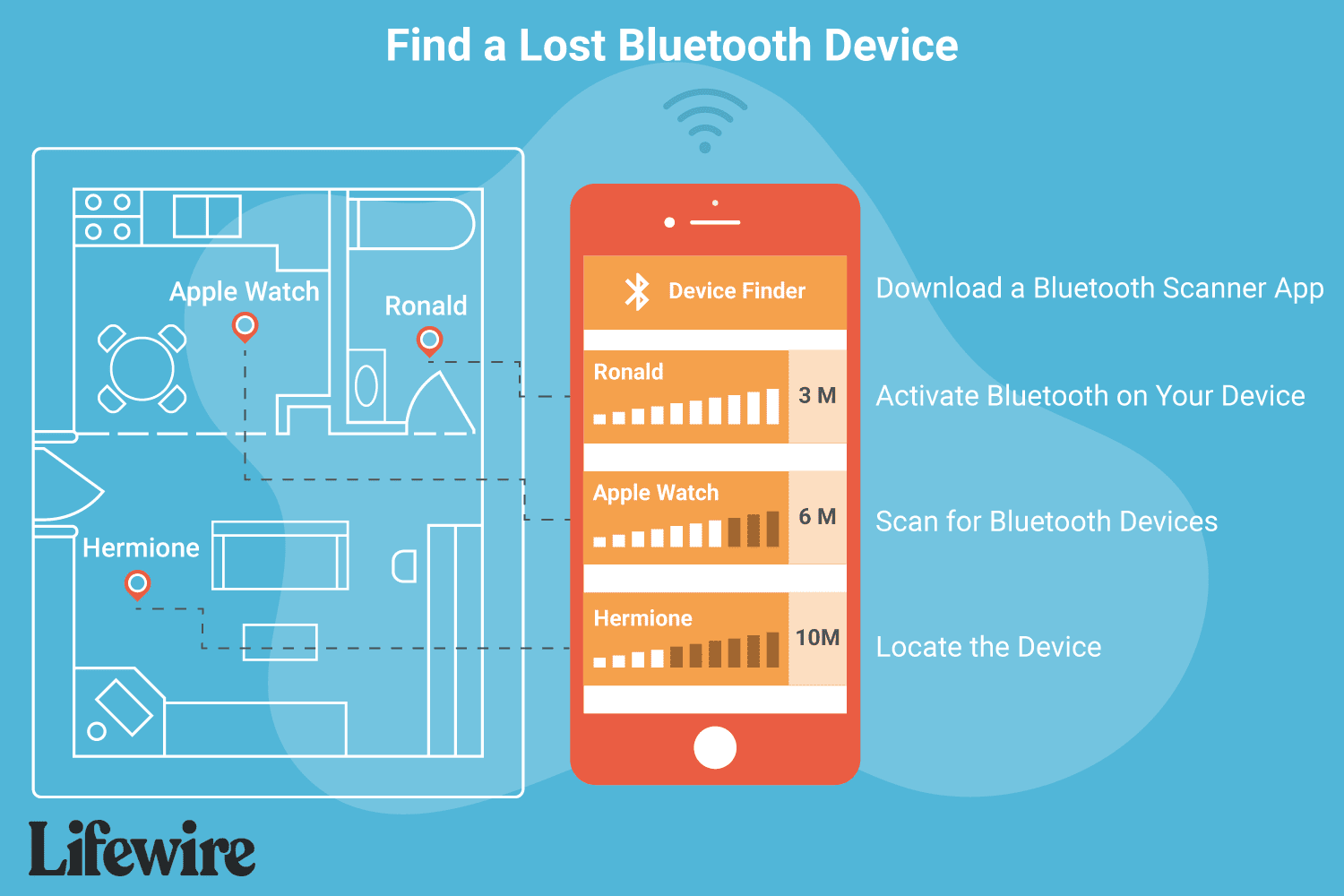
    If the Bluetooth-enabled device has some battery life and was on when you lost it, you can likely find it using an app on your phone or tablet. Here’s how:

    1. Turn on Bluetooth on your tablet or phone. This can be easily done on Android via the Quick Settings Menu or on iOS through the iPhone Settings app. The Bluetooth radio must be on to pick up the signal from the lost device.

    2. Install a Bluetooth scanner app like LightBlue to detect and list all nearby Bluetooth devices. You can download LightBlue on iPhone or get it for Android.

    3. Open the Bluetooth scanner app and grant any necessary permissions, such as access to location and nearby devices, to help locate the Bluetooth device.

    4. Begin scanning. Find the missing Bluetooth item in the list of discovered devices and note its signal strength. If it doesn’t appear, move around the area where you think it might be until it does.

    5. Once the item appears on the list, try to locate it. A drop in signal strength means you’re moving away; an increase (e.g., from -10 dBm to -1 dBm) means you’re getting closer. Keep tracking until you find your device.

    Tips for Finding Bluetooth Devices

    While apps like LightBlue are useful for tracking Bluetooth devices, here are some additional tips that may assist you:

    • Did you lose your headphones or some other audio device? If you’re actively connected to it over Bluetooth, turn on some loud music. Chances are, you can control the volume of the Bluetooth headset on the phone, so crank up the volume and listen for where the music is coming from.
    • Some devices can be located through a dedicated finder tool. Assuming you set this up before your device went missing, the Find My app is how you can locate an iPhone and other Apple devices; Find My Device is Google’s tool for locating devices compatible with its network.

    FAQ

    • How do I rename a Bluetooth device?

      On most Android devices, to change the Bluetooth name, go to Settings > Connected devices > Connection preferences > Bluetooth > Device name. To rename on iOS devices, go to Settings > Bluetooth > Choose connected Bluetooth accessory > Name.

    • How do I unpair a Bluetooth device on my Android?

      With Bluetooth turned on, go to Settings > Connected devices. Select the cogwheel next to the device you want to unpair, then choose Forget or Unpair.

    Thanks for letting us know!

    Get the Latest Tech News Delivered Every Day

    Subscribe

    Tell us why!

    Other

    Not enough details

    Hard to understand

    Bluetooth device Find Guide HowTo
    Share. Facebook Twitter Pinterest LinkedIn Tumblr Email
    Previous ArticleSouth Park is taking a break after its controversial premiere – here’s when you can watch episode 2
    Next Article ‘The overall vibe was total chaos’: Tesla Diner goes viral for long waits and mixed reviews
    Techurz
    • Website

    Related Posts

    Opinion

    South Korea’s Edenlux set for U.S. debut of eye-strain wellness device

    January 27, 2026
    Opinion

    Meta acquires AI device startup Limitless

    December 6, 2025
    Opinion

    Find Your Grind raises $5M to grow platform empowering students to explore unique career paths

    November 25, 2025
    Add A Comment
    Leave A Reply Cancel Reply

    Top Posts

    College social app Fizz expands into grocery delivery

    September 3, 20252,288 Views

    A Former Apple Luminary Sets Out to Create the Ultimate GPU Software

    September 25, 202516 Views

    The Reason Murderbot’s Tone Feels Off

    May 14, 202512 Views
    Stay In Touch
    • Facebook
    • YouTube
    • TikTok
    • WhatsApp
    • Twitter
    • Instagram
    Latest Reviews

    Subscribe to Updates

    Get the latest tech news from FooBar about tech, design and biz.

    Most Popular

    College social app Fizz expands into grocery delivery

    September 3, 20252,288 Views

    A Former Apple Luminary Sets Out to Create the Ultimate GPU Software

    September 25, 202516 Views

    The Reason Murderbot’s Tone Feels Off

    May 14, 202512 Views
    Our Picks

    Aetherflux reportedly raising Series B at $2 billion valuation

    March 27, 2026

    OpenAI shuts down Sora while Meta gets shut out in court

    March 27, 2026

    VCs are betting billions on AI’s next wave, so why is OpenAI killing Sora?

    March 27, 2026

    Subscribe to Updates

    Get the latest creative news from FooBar about art, design and business.

    Facebook X (Twitter) Instagram Pinterest
    • About Us
    • Contact Us
    • Privacy Policy
    • Terms and Conditions
    • Disclaimer
    © 2026 techurz. Designed by Pro.

    Type above and press Enter to search. Press Esc to cancel.