


Kerry Wan/ZDNET
Apple introduced iOS 26 to the public at its annual Worldwide Developers Conference event in early June, and since then, has been polishing the software with developers for the eventual beta release. Now that it’s finally available for everyone to test, you may be wondering if it’s worth diving straight into or waiting for the official software launch — likely sometime in September. That’s what we’re here to answer.
Also: Should you buy an iPhone 16 or wait for the iPhone 17? Know this before you decide
To set the stage, Apple’s iOS 26 offers a refreshing new look, more streamlined first-party app layouts, more functionalities across popular services, and some smaller Easter egg features that greatly enhance your iPhone’s usability. My ZDNET colleague Kerry Wan and I have been testing the public beta (via Developer Beta 4) for the past few weeks, and here are our biggest takeaways so far.
1. Visual Intelligence is almost ready for primetime
Prakhar Khanna/ZDNET
When I first tested Visual Intelligence on iOS 18, I mainly used the feature to translate signage and menus when traveling abroad. Compared to competing multimodal tools on other phones, the feature was noticeably barebones. However, I found myself using it more often on iOS 26, thanks to the ability to better process on-screen information and follow up with relevant tasks.
Specifically, being able to add a calendar event from my email has been a blessing. Apple now allows you to take a screenshot of an invitation (whether from email, messages, or anything else) and run Visual Intelligence on it. This suggests the options to Add to Calendar, Read Aloud, and Summarize. Using the first option creates an event in the Calendar app with details such as event name, time, and duration.
Also: First look at iPhone 17 Pro? Public images seemingly confirm big design and camera changes
While both Kerry and I find Samsung’s AI Select and Google’s Circle to Search easier to recognize on-screen items and perform functions based on AI suggestions, some users will prefer that Apple’s AI service also lets you save screenshots for future reference.
You can, of course, delete the screenshot right after an event is created, but the process of taking a screenshot and then waiting for suggestions to show the ‘Add to Calendar’ option is something that currently requires more than ideal time.
It’d be great if I could enable on-screen Visual Intelligence with a press (or double press) of the Camera Control instead of taking a screenshot.
2. Apple fixed the Photos app, thankfully
Apple
The Cupertino tech giant redesigned the iPhone’s Photos app in iOS 18 last year and touted it as “the biggest-ever redesign.” Over the course of 2024, I, like many others, never got used to the new UI and almost always felt frustrated when looking through my vacation photos. Apple listened to user feedback to give us an updated layout, and I love it.
Also: You can download iOS 26 public beta right now – how to install (and which iPhones support it)
The new Photos app is now compartmentalized by Library and Collections, so if I scroll to the end of my library, it doesn’t automatically show any outstanding folders. Instead, those have been moved to a separate Collections tab. Overall, the app interface looks cleaner and doesn’t frustrate me anymore. Fewer pathways are required to access certain albums, bringing iOS 26 closer to the burdenless software experience we’ve come to expect from Apple.
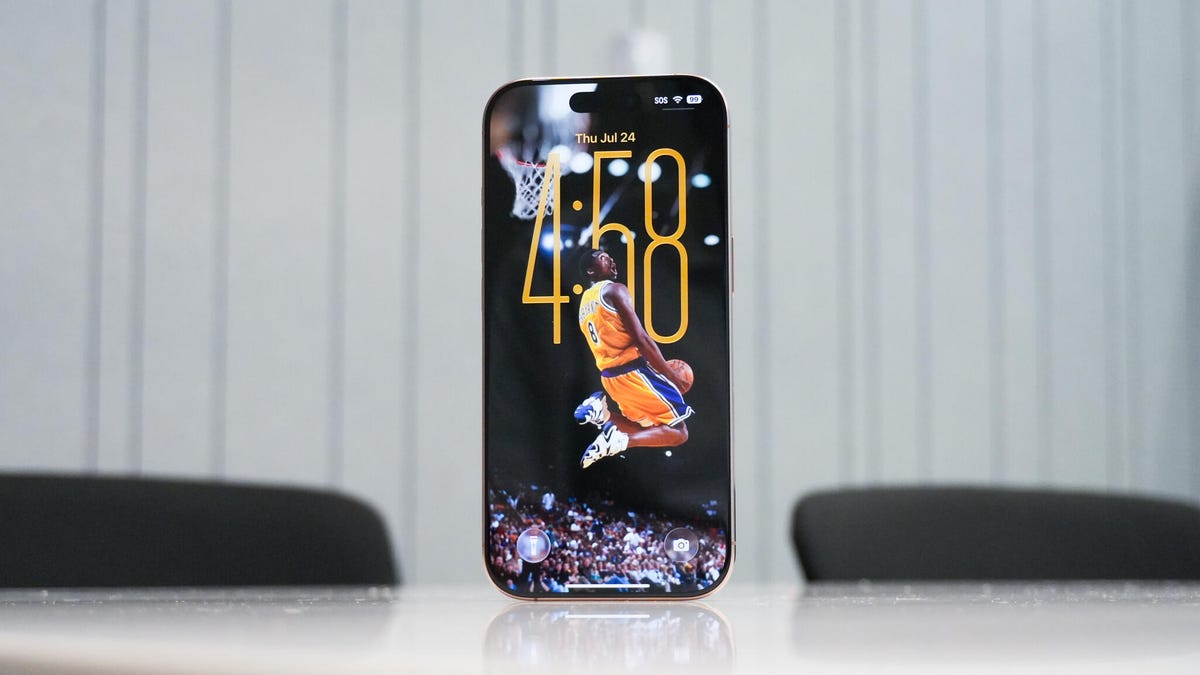
While we’re on this note, the ZDNET team has agreed that the ability to quickly transform virtually any still image into one with spatial depth is the “gimmicky” feature we love the most. It’s fun, easy to use, and works reliably well — now more than ever, on the public beta. It’s the same technology that gives lock screen wallpapers that gyroscopic portrait effect.
3. A simplified Camera layout
Kerry Wan/ZDNET
The biggest app redesign in iOS 26 is a simplified Camera app layout. Apple now gives you two options for Video and Photo at the bottom, where you can swipe up to reveal more settings like Flash, Live Photo, Timer, and more. These can also be found by tapping the settings button at the top-right corner.
You can press, hold, and drag to change to other modes like Cinematic Video, Portrait, etc. At first, I found the new look too minimal for my taste; even if you’re familiar with all the tools and settings in the camera app, there’s no clear indication — like a menu button or expand symbol — of how to access them. I’d imagine that more casual users will struggle, at least in the beginning, to find certain settings.
Also: Five ‘new’ iOS 26 features that feel familiar (I’ve been using them on Android for years)
Having a more minimalist design does give you the benefit of a fast and responsive UI, which is a major advantage for photographers and users looking to grab quick shots.
Hiding more of the interface also makes framing and capturing subjects easier. My colleague Kerry recently went on a trip to Barcelona and Lisbon, two cities filled with architecture and tilework with Mediterranean influence. He found the revamped camera app very intuitive when quickly switching between photo and video modes and framing scenic views. When every little detail on buildings, streets, and statues matters so much, the ability to easily see how things fit within the viewfinder was appreciated.
4. Safari gets the biggest Liquid Glass treatment
Kerry Wan/ZDNET
Safari’s new Liquid Glass-enhanced look makes a big difference for reading and browsing web pages. Apple’s browser on iOS 26 not only looks better but is more usable than before. For example, the emphasis on minimizing distracting UI means what was previously a two-row menu at the bottom (which took up a good portion of the web page) is now simply a floating three-button navigation bar — which includes the back button, URL bar, and three-dot button.
Also: Should you buy a refurbished iPad? I tried one from Back Market and here’s my verdict
The nav bar minimizes when you scroll through a web page, and switching from one tab to another with a swipe feels faster than ever. I also love that Apple bundled the additional web page options in a three-dot menu, which houses shortcuts like Share, Add to favorites, Add Bookmark too, etc.
One of our favorite new Safari features is the introduction of haptic queues. For example, you’ll feel a gentle buzz when an image or file has successfully downloaded from the web browser, whereas previous, it would appear as a hidden notification. These subtle software tweaks go a long way, so much so that my colleague Kerry has switched back from primarily using Chrome on his iPhone.
5. Our favorite lock screen feature is…
Kerry Wan/ZDNET
I have waited for this feature for years, and it’s finally here. No, it’s not the expandable clock widget that adapts to the wallpaper. Nor is it the ability to now place ticker widgets on the bottom half of the screen.
Instead, it’s the fact that when you charge your iPhone now, iOS 26 displays the estimated battery charging time. It’s a small touch, but one that proves surprisingly useful, giving me glanceable info on exactly when my iPhone will be fully charged when I’m short on time. I’m also a fan of the refreshed album artwork, which now fills the entire lock screen when streaming from Apple Music, Spotify, and other services.
Bonus: Using my AirPods as a Camera remote
As a solo traveler, there are times when I miss having my Apple Watch — which I often leave at home to reduce charging needs — when I have to record or capture an image of myself. But now, I can trigger video recording wirelessly with my AirPods Pro 2.
Also: Your AirPods are getting 2 major upgrades for free thanks to iOS 26
Apple’s iOS 26 allows you to start recording video in Camera by pressing and holding on AirPods or AirPods Pro with the H2 chip. It should come especially handy for content creators and people like me who prefer wearing an analog watch to an Apple Watch.
Keep in mind that all the features mentioned here could change before the stable release later this year, including how they’re accessed, how they look, and how they work. Even so, iOS 26 is shaping up to be one of the most significant updates to Apple’s operating system in years, and we can’t wait to see what more consumers think in the near future.
