


ZDNET’s key takeaways
- HP’s 14-inch EliteBook X G1a features AMD’s latest Ryzen AI Pro chip, starting at $2,099.
- It’s a powerful enterprise laptop with lots of I/O, a sleek form factor, and comfortable keyboard.
- It’s expensive, and can run warm under a heavy workload.
more buying choices
Get more in-depth ZDNET tech coverage: Add us as a preferred Google source on Chrome and Chromium browsers.
HP rebranded its laptop lineup last year, renaming its high-performance business devices to the EliteBook X series. The first laptop from this series I’ve tested is the 14-inch HP EliteBook X G1a, an impressive enterprise laptop with a lot to like, but a few considerations that make it unique.
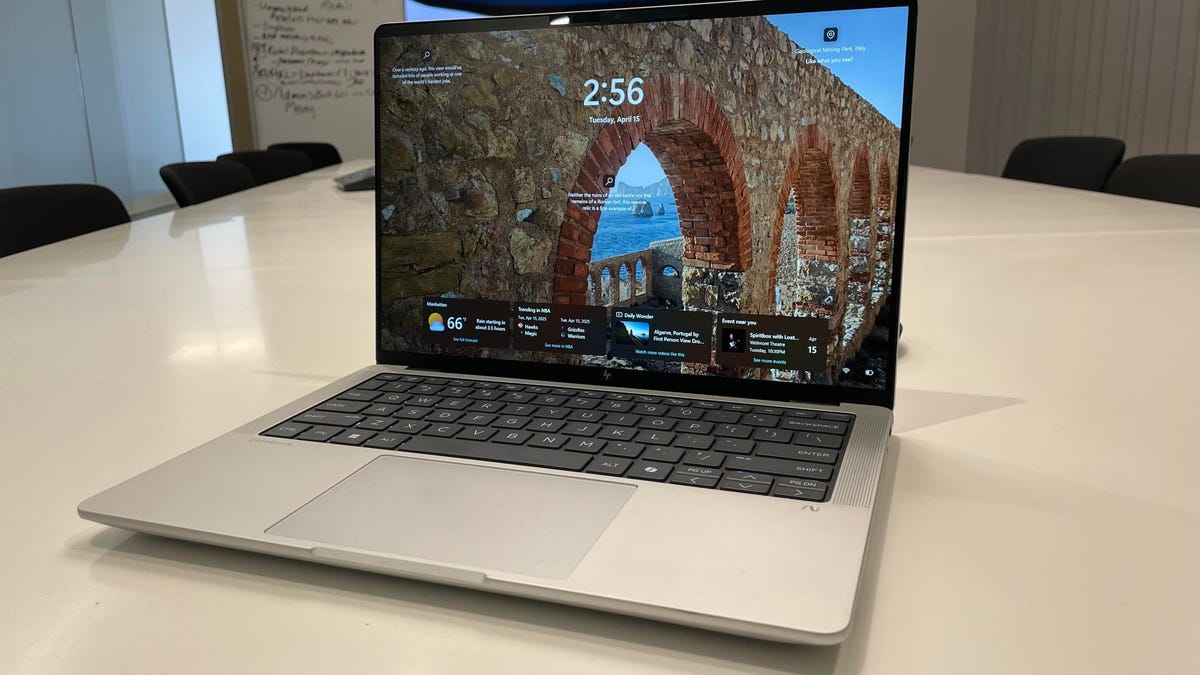
This is a business laptop aimed at professionals, and it aims to combine the connectivity of a ThinkPad, the sleek form factor of a MacBook, and HP’s signature minimalist, if non-descript, design.
Also: Why my favorite MacBook Pro alternative is this Windows laptop with a striking design
There are a few configurations of this laptop, the most premium featuring an AMD Ryzen AI 9 processor — one of the most cutting-edge chips on the market right now — and an OLED display, but the one I tested had the AMD Ryzen AI 7 Pro 360 processor, 32GB of RAM, and a 14-inch matte WUXGA IPS display.
On the surface, it’s minimalist and rather corporate-looking, with a matte WUXGA display and an abundant selection of ports. It passes the one-finger test and opens up to a rather standard display with 400 nits of brightness, 60Hz refresh rate, and a compact and efficient keyboard.
One of its best features is the keyboard. It’s utterly silent, with a snappy tactile feel and a key travel distance that (almost) feels mechanical. The keys are spacious and smooth, and the backlighting is effective and well-designed. Similarly, the trackpad is responsive and premium, even if the clicks feel a little on the “heavy” side.
Kyle Kucharski/ZDNET
I do wish it had a haptic trackpad, however, as it would go a long way toward making it more premium, especially as a device geared toward a sophisticated demographic: business leaders and tech experts. When you consider the price of this laptop, it seems like a missed opportunity.
During my testing, I found this laptop really enjoyable to use for long days at work, and a big part of that was due to its well-designed ergonomics. Unlike other machines, which require the user to adjust to bold or unorthodox design choices, the EliteBook X G1a fits like a familiar glove right off the bat, making it a solid long-day-at-work type of laptop.
Also: The best 15-inch laptops of 2025: Expert tested and reviewed
If the keyboard and trackpad contribute to an enjoyable physical form, the abundant I/O selection solidifies its practicality. You’ve got an HDMI, three USB-C (one Thunderbolt 4 on each side — thank you), a USB-A port, a 3.5mm headphone jack, and a Kensington lock slot. This is, in my opinion, one of the best combinations of ports you can ask for in 2025; the only thing that would make it better would be an SD card reader.
It can certainly pivot to creative tasks, as well, as video editing in industry-standard programs like Da Vinci Resolve was a breeze. By the same token, gaming on this laptop is possible, but I wouldn’t recommend this as a dedicated gaming machine with the 60Hz display and its heat dissipation (more on that later).
While testing, I encountered a hiccup when connecting to an external monitor with the Thunderbolt 4 port. Both displays would flicker and restart intermittently, even after driver and Windows updates.
Issues like this can result from any number of things, including problems with the operating system, hardware, or even the USB-C cord itself, so I don’t necessarily fault the EliteBook. However, this was the first time it happened to me after using dozens of laptops with that connection and monitor.
Also: I finally solved the toughest question about buying laptops – here’s my expert guide
A busy workday prevented me from troubleshooting for an extended period of time, but this is where the generous port selection came in clutch, allowing me to simply swap to an HDMI connection. It’s a perfect example of where redundant I/O access can solve tech problems, especially in the work setting.
In terms of performance, the EliteBook X G1a is fast and responsive, with benchmarking numbers that back its claim of being a powerful enterprise machine.
One thing I noticed during testing the EliteBook X G1a, however, was that it ran a bit hotter than other laptops in its class, kicking on the fans during sustained workloads in High Performance mode. When it’s not being pushed, however, it’s silent and cool, leading me to believe there’s simply a threshold here with the hardware. At no point did I see any evidence of throttling, however.
Continuing its specialization in the professional sphere, the EliteBook X G1a features a 74.5Whr battery, which is on the large size for a laptop of this size, earning it just over 11 hours during our standard battery test. This is good, sure, but it didn’t quite translate to the spectacular duration I was expecting. Particularly when you compare this to competitors.
Also: Is a refurbished MacBook viable in 2025? I did the math, and here’s my expert advice
It’s about the same amount of time we got when testing the MacBook Pro M4, although that laptop is cheaper and, not to mention, a MacBook. Conversely, HP’s own OmniBook X 14 with the Snapdragon X Elite was an absolute marathon machine, earning over 20 hours.
Of course, the hardware on the OmniBook is a bit more modest, but its 65Wh battery overperforms in a way that can’t be ignored. As I spent more time with this laptop, however, I came to understand its intended use case as a device that trades in the ultrathin and light form factor for raw power, making it a durable, reliable workhorse.
ZDNET’s buying advice
There is no shortage of thin and light laptops with marathon batteries. The HP EliteBook X G1a is, comparatively, more focused on providing reliable muscle during working hours. The beefy hardware takes full advantage of the large battery, the abundant ports keep your options open, and the comfortable keyboard acts as an ergonomic command center so you can hunker down and get work done.
However, all that hardware can run warm when it’s pushed, and this is not a cheap laptop. If you’re looking for a 14-inch device that’s fully committed to the enterprise use case, it’s a solid option, but keep in mind that it’s quite specialized for that role.
If you’re looking for a similar laptop for a little less, I recommend the Lenovo ThinkPad T14s Gen 6 — another workhorse laptop with lots of connectivity and the same processor around the $1,500 mark.
