

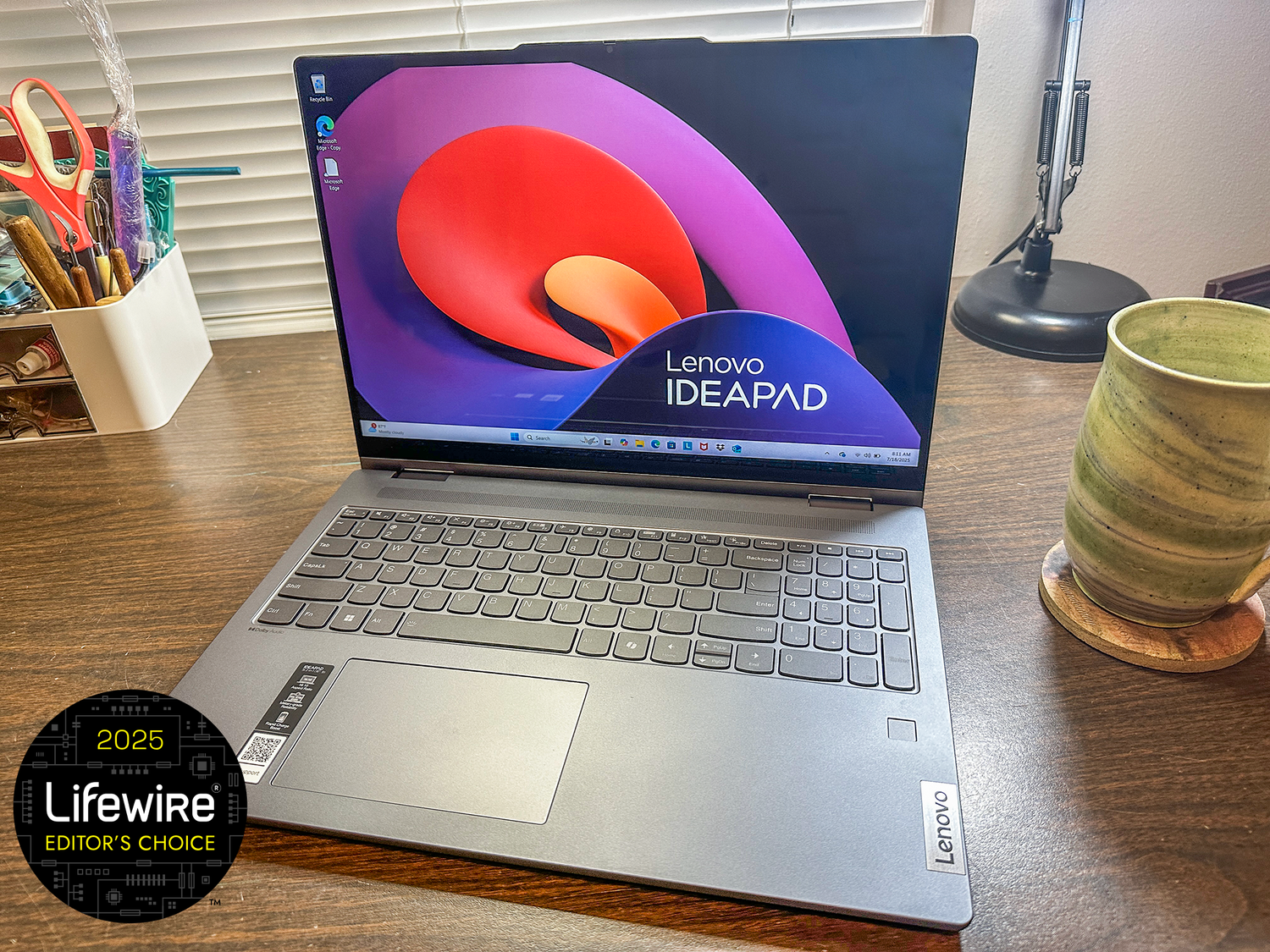
A laptop is a laptop is a laptop… except that’s not true. Not all laptops are created equally, and I love testing them to see what’s different or special about each one. So when Lenovo offered to send the IdeaPad 5i 2-in-1, I was more than happy to accept. I love a good 2-in-1 laptop, so I was eager to get started testing this one. Keep reading to find out how it stacks up.
Key Features and Findings
The Lenovo IdeaPad 5i laptop is a solid piece of equipment that’s designed to be a workhorse. That’s what I had in mind as I tested this machine. Here’s what I learned.
- Form. This is a solid laptop! And by solid, I don’t mean heavy, though it is over 4 lbs. What I’m talking about is the build. It’s full-body aluminum, has a backlit keyboard, and a fingerprint scanner. It has a nice, large trackpad (4.75×3″) that’s slightly off center (but is centered with the main part of the keyboard), which I didn’t think I was going to like, but I do. The keyboard is also very comfortable. I like the soft-touch keys, and they’ve just enough travel so you can feel them engage without feeling like you’ve done a hand workout when using them. Lenovo has even managed to include a number pad on the keyboard, which makes me super happy, because laptops don’t often have them.
- Computing Power. As for what this computer can handle, the version sent to me features an Intel Core 7 processor, which can handle pretty much anything I want to do with it—creating documents, streaming, and light photo and video editing. The 16-inch screen makes those tasks even easier. It’s not a gaming laptop by any stretch of the imagination, but you can do some light gaming on it. Overall, the purpose of this laptop is to be an affordable workhorse, and I think it meets those requirements. The 1TB storage is a major plus, too, since we seem to generate a lot of digital information these days.
- The Display. I’ve seen a lot of complaints about the brightness of these computers. Max brightness is 300 nits, which worked fine for what I needed while testing, but in general, I prefer a brighter computing experience. However, the 1920X1200, 16:10 display is ideal for working on documents, spreadsheets, and other ‘work’ tasks, so it’s a good option for this computer. And when you’re streaming videos, you’ll still see plenty of detail and smooth transitions.
- The Ports: Ports are always a concern with a laptop, and the Lenovo IdeaPad 5i has an HDMI port, two USB-C ports, two USB-A ports, and a microSD card reader. One of the USB-C ports doubles as the power port for this system, so when you’re charging, that reduces your USB-C availability. The IdeaPad 5i also has an audio jack if wired audio is your preference.
- Battery Life: One of the useful features of the IdeaPad 5i is the Rapid Charge Boost. The battery on the one I tested lasted a little more than 9 hours on a single charge when using the laptop for writing, editing, social media, and some short video streaming, but the Rapid Charge Boost feature can give you a couple more hours with just a 15-minute charge. You can also disable this feature if it’s something you don’t want to use. Charging the battery without it can take more 4-8 hours, depending on the type of charger you’re using.
- Extras: Here’s the fun part, this is a 2-in-1 laptop, so it’s easy to flip the hinge around and use it as a (pretty heavy) tablet. The touchscreen is fairly responsive, and if you like to use one, you can also get the Lenovo Digital Pen 2 to use with your laptop. It’s good for long-form handwriting, drawing, and can work in place of the touchpad if that’s the way you want to use it. Also, because this is a Windows computer, it comes with Copilot installed, and a dedicated Copilot key, so you can quickly access the AI when you need it.
The trackpad is off-center on the laptop, but centered on they keyboard, which is useful.
Lifewire / Jerri Ledford
Important Specs to Know
Processor
Intel Core 7 150U
Touchscreen
Yes
Operating System
Windows 11 Home 64
Display
16-Inch WUXGA
Memory
16GB
Storage
1TB
Ports
HDMI, 2-USB-C, 2-USB-A, audio jack, microSD card reader
Audio
Stereo; Realtek Audio Controller
Video
Camera; 1080p, FHD camera, dual mic, privacy shutter
Stylus
Yes; optional
Weight
4.41 lbs
The Bottom Line
The Lenovo IdeaPad 5i is a very affordable laptop at less than $800. For that, you’re getting a machine that’s designed to work as hard as you do. It’s sturdy enough to withstand travel and regular use, and there’s enough computing power built into this machine to make it useful for business people and students.
The folding feature of the IdeaPad 51 makes it useful for watching videos hands-free.
Lifewire / Jerri Ledford
With the addition of the 1Tb storage drive and Microsoft’s Copilot built in, you’ll find you have plenty of room to store all your documents, and lots of help when it comes to creating those documents. And if using it in tablet mode is more your style, the large 16-inch screen makes the tablet experience even better, especially for drawing or streaming videos.
Overall, this is a great laptop at a great price. I would recommend it for anyone that needs a solid machine build for working as hard as you do.
Thanks for letting us know!
Subscribe
Tell us why!
Other
Not enough details
Hard to understand
