
Close Menu
TechurzTechurz

    Subscribe to Updates

    Get the latest creative news from FooBar about art, design and business.

    What's Hot

    After pivoting, Y Combinator grad Glimpse raises $35M led by a16z

    March 25, 2026

    A former Thiel fellow’s startup just launched a drone it says can replace police helicopters

    March 25, 2026

    Accel, Prosus pick six ‘off-the-map’ startups for inaugural India cohort

    March 24, 2026
    Facebook X (Twitter) Instagram
    Trending
    • After pivoting, Y Combinator grad Glimpse raises $35M led by a16z
    • A former Thiel fellow’s startup just launched a drone it says can replace police helicopters
    • Accel, Prosus pick six ‘off-the-map’ startups for inaugural India cohort
    • Databricks bought two startups to underpin its new AI security product
    • BKR Capital raises $14.5M (so far) to invest in Black founders
    • Insight Partners scrubs investment post about Delve amid ‘fake compliance’ allegations
    • Doss raises $55M for AI inventory management that plugs into ERP
    • Flighty’s new update gives you real-time alerts about airport disturbances
    Facebook X (Twitter) Instagram Pinterest Vimeo
    TechurzTechurz
    • Home
    • AI
    • Apps
    • News
    • Guides
    • Opinion
    • Reviews
    • Security
    • Startups
    TechurzTechurz
    Home»AI»Adding calendar events with a screenshot is AI at its finest
    AI

    Adding calendar events with a screenshot is AI at its finest

    TechurzBy TechurzJuly 4, 2025No Comments4 Mins Read
    Share Facebook Twitter Pinterest LinkedIn Tumblr Reddit Telegram Email
    Adding calendar events with a screenshot is AI at its finest
    Share
    Facebook Twitter LinkedIn Pinterest Email

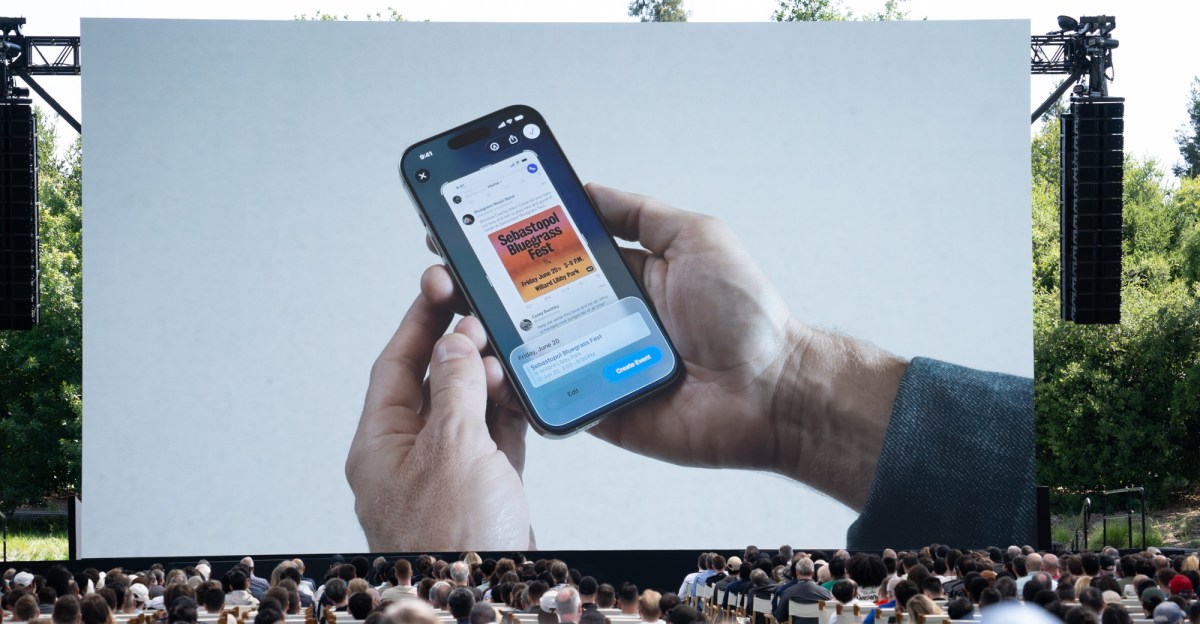
    Apple’s AI capabilities have been less than impressive to date, but there’s one new feature coming with iOS 26 that’s actually really handy: adding stuff to your calendar with a screenshot.

    I’ve been testing this feature out for the past few weeks in the developer beta, and I’m pleased to report that it works, easily making it my favorite Apple Intelligence feature so far. That’s admittedly a low bar to clear — and it’s not quite as capable as Android’s version — but it’s a nice change of pace to use an AI feature that feels like it’s actually saving me time.

    Maybe adding things to your calendar doesn’t sound all that exciting, but I am a person who is Bad At Calendars. I will confidently add events to the wrong day, put them on the wrong calendar, or forget to add them at all. It’s not my finest quality.

    The iOS version of “use AI to add things to your calendar” taps into Visual Intelligence. The ability to create calendar events based on photos was included in iOS 18, and now iOS 26 is extending that to anything on your screen. You just take a screenshot and a prompt will appear with the words “Add to calendar.” Tap it, and you’ll see a preview of the event to be added with the top-level details. You can tap to edit the event or just create it if everything looks good and you’re ready to move on with your life.

    None of this would be useful if it didn’t work consistently; thankfully, it does. I’ve yet to see it hallucinate the wrong day, time, or location for an event — though it didn’t account for a time zone difference in one case. For the most part, though, everything goes on my calendar as it should, and I rejoice a little bit every time it saves me a trip to the calendar app. The only limitation I’ve come across is that it can’t create multiple events from a screenshot. It kind of just lands on the first one it sees and suggests an event based on that. So if you want that kind of functionality from your AI, you’ll need an Android phone.

    Gemini Assistant has been able to add events based on what’s on your screen since August 2024, and it added support for Samsung Calendar last January. To access it, you can summon Google Assistant and tap an icon that says “Ask about screen.” Gemini creates a screenshot that it references, and then you just type or speak your prompt to have it add the event to your calendar. This has failed to work for me as recently as a couple of months ago, but it’s miles better now.

    I gave Gemini Assistant on the Pixel 9 Pro the task of adding a bunch of preschool events, which were all listed at the end of an email, to my calendar, and it created an event for each one on the correct day. In a separate case, it also noticed that the events I was adding were listed in Eastern Time and accounted for that difference. In some instances, it even filled in a description for the event based on text on the screen. I also used Gemini in Google Calendar on my laptop, because Gemini is always lurking around the corner when you use literally any Google product, and it turned a list of school closure dates into calendar events.

    This is great and all, but is this just an AI rebranding of some existing feature? As far as I can tell, not exactly. Versions of this feature already existed on both platforms, but in a much more basic form. On my Apple Intelligence-less iPhone 13 Mini, you can tap on a date in an email for the option to add it to your calendar. But it uses the email subject line as the event title, which is a decent starting point, but adding five events to my calendar with the heading “Preschool July Newsletter” isn’t ideal. Android will also prompt you to add an event to your calendar from a screenshot, but it frequently gets dates and times wrong. AI does seem to be better suited for this particular task, and I’m ready to embrace it.

    adding Calendar events finest Screenshot
    Share. Facebook Twitter Pinterest LinkedIn Tumblr Email
    Previous ArticleBest iPhone to buy in 2025: Which iPhone is best for you?
    Next Article mSpy parental control software review
    Techurz
    • Website

    Related Posts

    Opinion

    Former Sequoia partner’s new startup uses AI to negotiate your calendar for you

    January 23, 2026
    Opinion

    TechCrunch Disrupt 2025 Side Events schedule: Women in Tech, MongoDB, Silkroad Innovation Hub and more to host

    October 24, 2025
    Security

    Microsoft plots new path for Sentinel, adding agentic AI features

    October 1, 2025
    Add A Comment
    Leave A Reply Cancel Reply

    Top Posts

    College social app Fizz expands into grocery delivery

    September 3, 20252,288 Views

    A Former Apple Luminary Sets Out to Create the Ultimate GPU Software

    September 25, 202516 Views

    The Reason Murderbot’s Tone Feels Off

    May 14, 202512 Views
    Stay In Touch
    • Facebook
    • YouTube
    • TikTok
    • WhatsApp
    • Twitter
    • Instagram
    Latest Reviews

    Subscribe to Updates

    Get the latest tech news from FooBar about tech, design and biz.

    Most Popular

    College social app Fizz expands into grocery delivery

    September 3, 20252,288 Views

    A Former Apple Luminary Sets Out to Create the Ultimate GPU Software

    September 25, 202516 Views

    The Reason Murderbot’s Tone Feels Off

    May 14, 202512 Views
    Our Picks

    After pivoting, Y Combinator grad Glimpse raises $35M led by a16z

    March 25, 2026

    A former Thiel fellow’s startup just launched a drone it says can replace police helicopters

    March 25, 2026

    Accel, Prosus pick six ‘off-the-map’ startups for inaugural India cohort

    March 24, 2026

    Subscribe to Updates

    Get the latest creative news from FooBar about art, design and business.

    Facebook X (Twitter) Instagram Pinterest
    • About Us
    • Contact Us
    • Privacy Policy
    • Terms and Conditions
    • Disclaimer
    © 2026 techurz. Designed by Pro.

    Type above and press Enter to search. Press Esc to cancel.