
Close Menu
TechurzTechurz

    Subscribe to Updates

    Get the latest creative news from FooBar about art, design and business.

    What's Hot

    Elon Musk’s last co-founder reportedly leaves xAI

    March 28, 2026

    From Moon hotels to cattle herding: 8 startups investors chased at YC Demo Day

    March 28, 2026

    Aetherflux reportedly raising Series B at $2 billion valuation

    March 27, 2026
    Facebook X (Twitter) Instagram
    Trending
    • Elon Musk’s last co-founder reportedly leaves xAI
    • From Moon hotels to cattle herding: 8 startups investors chased at YC Demo Day
    • Aetherflux reportedly raising Series B at $2 billion valuation
    • OpenAI shuts down Sora while Meta gets shut out in court
    • VCs are betting billions on AI’s next wave, so why is OpenAI killing Sora?
    • 16 of the most interesting startups from YC W’26 Demo Day
    • Defense startup Shield AI lands $12.7B valuation, up 140%, after US Air Force deal
    • Silicon Valley’s two biggest dramas have intersected: LiteLLM and Delve
    Facebook X (Twitter) Instagram Pinterest Vimeo
    TechurzTechurz
    • Home
    • AI
    • Apps
    • News
    • Guides
    • Opinion
    • Reviews
    • Security
    • Startups
    TechurzTechurz
    Home»News»Google’s customizable Gemini chatbots are now in Docs, Sheets, and Gmail
    News

    Google’s customizable Gemini chatbots are now in Docs, Sheets, and Gmail

    TechurzBy TechurzJuly 3, 2025No Comments2 Mins Read
    Share Facebook Twitter Pinterest LinkedIn Tumblr Reddit Telegram Email
    Google’s customizable Gemini chatbots are now in Docs, Sheets, and Gmail
    Share
    Facebook Twitter LinkedIn Pinterest Email

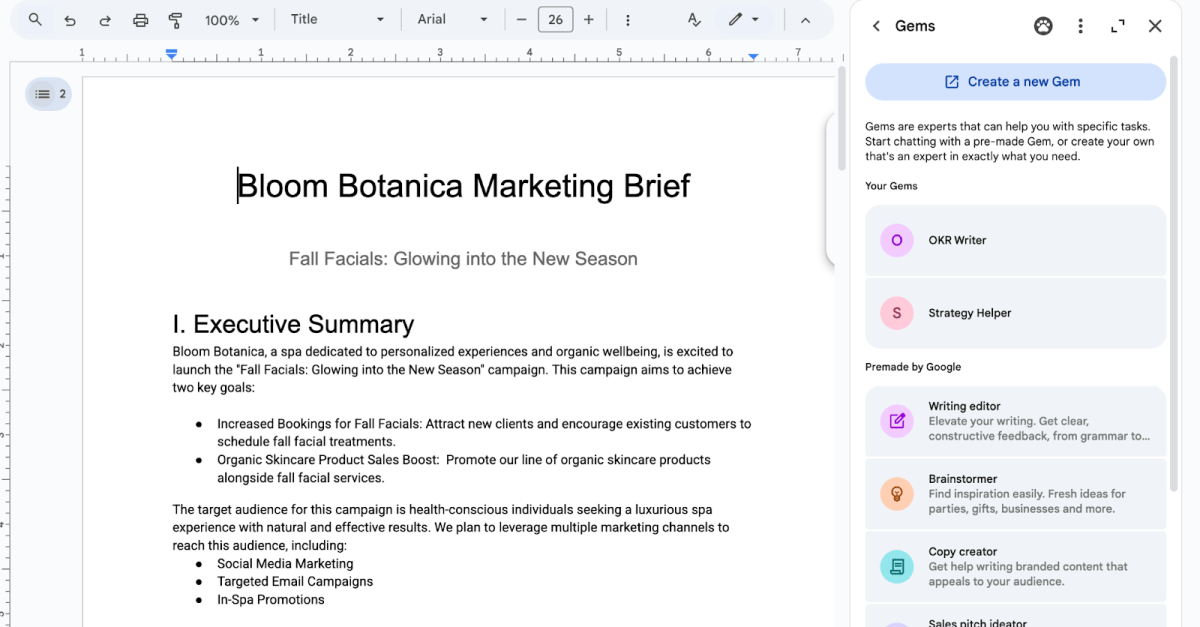
    Both custom and pre-made Gems will now be available to use via the side panel in Workspace apps.

    Google is giving Workspace users a way to access “Gems” — customizable versions of its Gemini AI assistant that specialize in specific tasks — without opening the Gemini app. Gems are now available directly in the side panel of Google Docs, Slides, Sheets, Drive, and Gmail, allowing users to access custom chatbots they’ve created or a selection of pre-made offerings without switching between apps.

    “Gems can help you further leverage the power of Gemini in a way that’s customized to your needs more efficiently by minimizing repetitive prompting,” Google said in its announcement.

    Gemini users can curate versions of the chatbot to be an “expert” in particular tasks they regularly require, such as brand-tailored copywriting or revising for exams. Users can also upload their own files into Gems to provide them with task-specific context and resources. Otherwise, Google provides pre-made Gems for things like text editing, writing code, creating sales pitch ideas, and more.

    According to Google, some examples of how Workspace users can utilize Gems include:

    • Leverage a copywriting Gem to create posts and content tailored to your target audience, pre-loaded into the Gem.

    • Create a Gem that helps with sales interactions that is grounded on information for a specific company, prospect, or industry. 

    • Leverage an “assistant gem” tailored to your job role to help provide more relevant summaries for you and content for internal communications.

    • Leverage a Gem designed to help pressure test content from a certain persona (e.x C-Suite or CEO) to help you create the most compelling message.

    Gems were previously only available in the Gemini app. Custom Gems can’t be created directly in Workspace apps, but users can do so by either heading to gemini.google.com/gems/create or tapping the “Create a new Gem” option in the Workspace side panel. Workspace capabilities like @-mentioning and accessing files/folders are supported by both custom and pre-made Gems.

    The Gems update is available to all Google Workspace users who can access Gemini in Workspace app side panels. It started rolling out on July 2nd, but Google says it may potentially take “longer than 15 days” to appear.

    Chatbots Customizable docs Gemini Gmail Googles Sheets
    Share. Facebook Twitter Pinterest LinkedIn Tumblr Email
    Previous ArticleHow I Built a Multi-Unit Franchise Operation Without Leaving My Day Job
    Next Article Anker Prime TB5 Docking Station 14-in-1 Review: Impressive, but Expensive
    Techurz
    • Website

    Related Posts

    Opinion

    Wiz investor unpacks Google’s $32B acquisition

    March 15, 2026
    Security

    Google’s Built-In AI Defenses on Android Now Block 10 Billion Scam Messages a Month

    October 30, 2025
    Security

    Chromium flaw crashes Chrome, Edge, Atlas: Researcher publishes exploit after Google’s silence

    October 30, 2025
    Add A Comment
    Leave A Reply Cancel Reply

    Top Posts

    College social app Fizz expands into grocery delivery

    September 3, 20252,288 Views

    A Former Apple Luminary Sets Out to Create the Ultimate GPU Software

    September 25, 202516 Views

    The Reason Murderbot’s Tone Feels Off

    May 14, 202512 Views
    Stay In Touch
    • Facebook
    • YouTube
    • TikTok
    • WhatsApp
    • Twitter
    • Instagram
    Latest Reviews

    Subscribe to Updates

    Get the latest tech news from FooBar about tech, design and biz.

    Most Popular

    College social app Fizz expands into grocery delivery

    September 3, 20252,288 Views

    A Former Apple Luminary Sets Out to Create the Ultimate GPU Software

    September 25, 202516 Views

    The Reason Murderbot’s Tone Feels Off

    May 14, 202512 Views
    Our Picks

    Elon Musk’s last co-founder reportedly leaves xAI

    March 28, 2026

    From Moon hotels to cattle herding: 8 startups investors chased at YC Demo Day

    March 28, 2026

    Aetherflux reportedly raising Series B at $2 billion valuation

    March 27, 2026

    Subscribe to Updates

    Get the latest creative news from FooBar about art, design and business.

    Facebook X (Twitter) Instagram Pinterest
    • About Us
    • Contact Us
    • Privacy Policy
    • Terms and Conditions
    • Disclaimer
    © 2026 techurz. Designed by Pro.

    Type above and press Enter to search. Press Esc to cancel.