

Why you can trust TechRadar
We spend hours testing every product or service we review, so you can be sure you’re buying the best. Find out more about how we test.
Ivanky is a brand that I have not heard a ton about other than a few targeted ads or other people’s setups I watch on YouTube (yes, gear is a hobby and a job). Once I got my hands on the iVanky FusionDock Max 1 though, I realized just how powerful this docking station truly is.
Granted, it’s clearly designed for MacBooks alone, and M-Series, Apple Silicon MacBooks at that. But for Apple users, it’s a great docking station, able to produce the amount of power that just about anyone from a casual user with a single display, to a professional user with a quad setup and plenty of accessories.
I added this to one of my more robust desks I have set up as of recently, with a custom desk from Uplift, a super cool desk shelf from Hexcal and a dual monitor setup. Just the kind of bougie, yet accessible setup the iVanky FusionDock Max 1 commands.
You may like
(Image credit: Collin Probst // Future)
iVanky FusionDock Max 1: Unboxing & first impressions
Unboxing this docking station was pretty straightforward, in the box was the dock itself, which is a bit heavier than expected, a Dual USB-C Cable which has connected USB-C ports on one end and disconnected leads on the other end. It also has a power adapter, an HDMI Cable and the user manual.
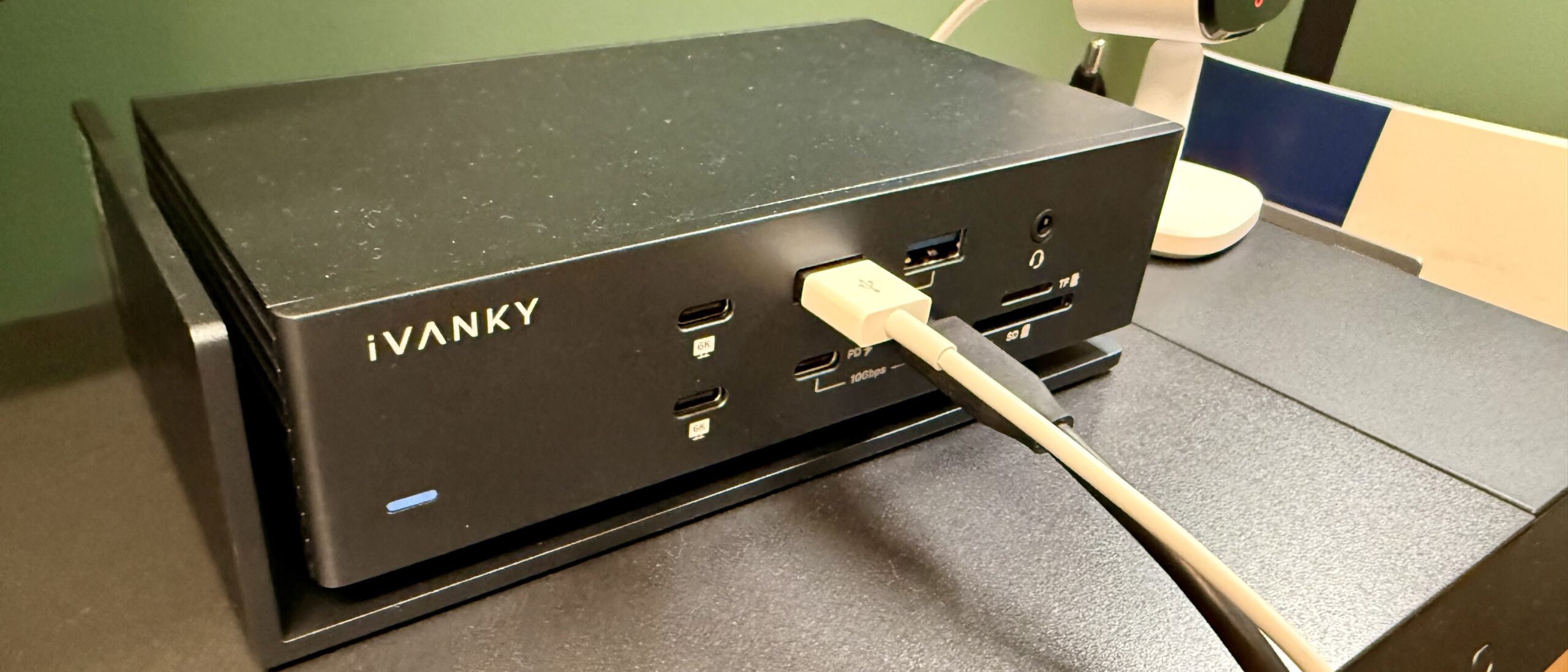
Personally, I love the floating look, I think it looks fantastic, intentional and unique in a good way. It stands out in all of the best docking stations I have tested, and I have seen quite a few. It has a minimalist design with a compact footprint, though it is a bit too thick to slide underneath my Hexcal Desk shelf, at least without the extensions which would then make my monitors too high.
Moving on, the port split from the front to the back seems very intentional, and easy to navigate. Lastly, the dual-cable system is interesting, though understood. It is interesting that the part that connects to the MacBook is the side that is connected meaning that there is only ever the option to plug both into the MacBook — then again what ports could you possibly want that this dock doesn’t already offer?
iVanky FusionDock Max 1: Design & build quality
Specs
Ports: 20 ports; 4x Thunderbolt 4, 2x HDMI, 5x USB-A, 3x USB-C, SD card slot, Ethernet port, Optical Audio
PD: 96W
The iVanky FusionDock Max 1 is clearly a premium product. By build quality alone let alone the materials used and the unique design promoting better airflow, this device is high-end. The ports are tight and assembled perfectly, the labels are clear and descriptive, and the front facing ports are exactly what I would want up front, just enough to keep me capable of pretty much anything I’d need to plug in, but not so much that I feel like there is always a cable cluttering my desk.
iVanky seems to understand the same thing that I have been saying for years with docking stations. The back ports are for your constantly plugged in devices, such as HDMI, Audio, USB-A (most), USB-C (most), power, Ethernet, in this case, optical, and so on. It should be all the devices you don’t plan on unplugging anytime soon. The front, however, is where your frequently accessed devices should live. SD Cards, USB-C, USB-A, Headphone jack, and maybe some more.
(Image credit: Collin Probst // Future)
iVanky FusionDock Max 1: In use
From the first time I plugged a MacBook into this docking station it has run wonderfully. Part of the reason I chose to put this docking station on this desk you see in the photos is because that desk has a soundbar that is currently being used via Bluetooth, but it also has an optical port, just like this dock (something I have never seen before on a docking station).
The integration to the MacBook was not only seamless physically but digitally as well. The ports lined up great to plug in, and then once I approved the device on my Mac I was instantly connected to my dual display setup, my SSD, my Optical, Power, Ethernet, and more.
So far, I have yet to have any issues with the FusionDock Max 1. Like I said, I am running audio out every day through Optical, I am streaming content with the network cable, along with uploading and downloading large files and more. I don’t notice any lag or latency in the displays, even when running a heavy load.
I will say that under a heavy load this guy can get hot, but thankfully that is why there is a bit of a guard built into the stand, but regardless, if it takes having a dock that gets a little hot to be able to to run as smoothly as this, then it’s worth it.
iVanky FusionDock Max 1: Final verdict
The FusionDock Max 1 is a hefty, powerful, and premium docking station with an ideal number of ports for heavy users. It’s a feature-rich docking station that has been super impressive to use and rely on for a few months now. I have this dock running a dual-monitor setup for a MacBook, and it has been an absolute dream so far. If you’re looking for a reliable docking station to run your professional setup without compromise, this is a docking station worth checking out.
Swipe to scroll horizontally
Attributes
Notes
Rating
Design
Unique and beautiful
⭐⭐⭐⭐
Ease of use
Needs to be for specific macs
⭐⭐⭐⭐
Practicality
Practical for the right machine
⭐⭐⭐
Price
Decent price for the quality
⭐⭐⭐⭐
iVANKY FusionDock Max 1: Price Comparison
