

ZDNET’s key takeaways
- The Razer Blade 14 (2025) is on sale now starting at $2,000.
- It’s a gorgeous laptop that redefines portability for gaming machines.
- However, the ultraportable form factor results in trade-offs when it comes to performance and upgradability.
Get more in-depth ZDNET tech coverage: Add us as a preferred Google source on Chrome and Chromium browsers.
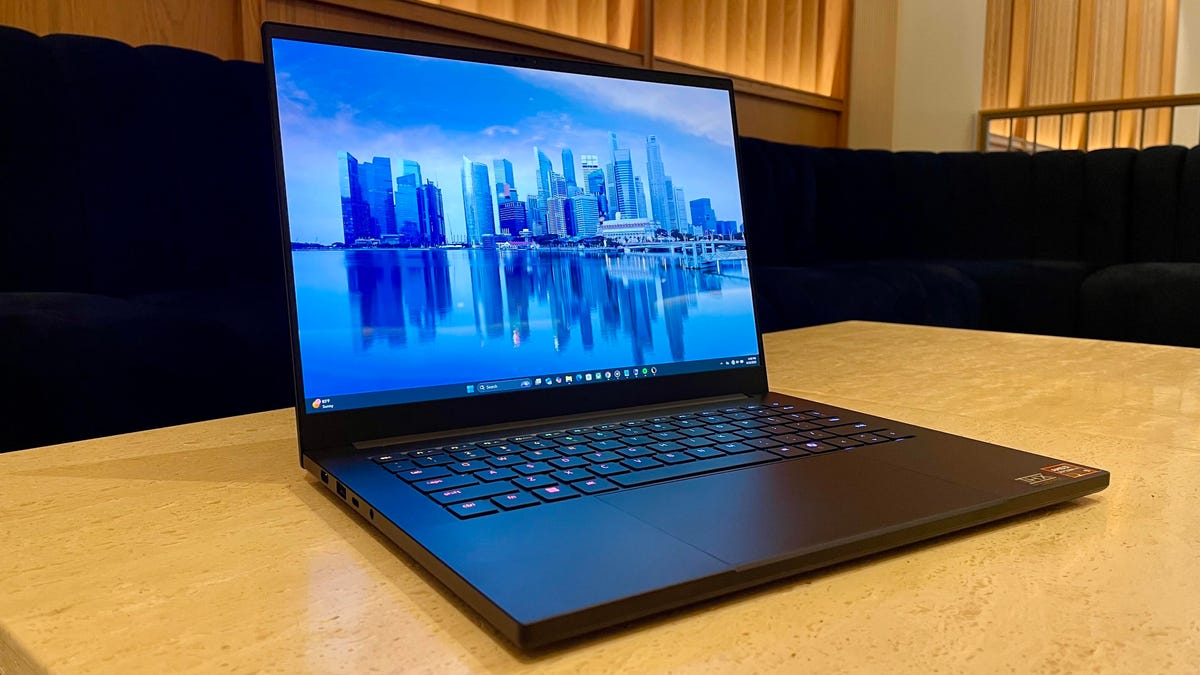
The Blade 16 has been Razer’s flagship gaming laptop for years, but the thinner, sleeker design on 2025’s Blade 14 (the thinnest Blade model yet) gives nothing short of a stunning first impression.
The new model is 11% thinner and 11% lighter than its predecessor, weighing just 3.5 pounds and 0.6 inches thick, with a slick, matte black finish that looks and feels premium. The form challenges the brand’s own aesthetic with a device that looks more like a Dell XPS 14 or MacBook Pro than a gaming laptop.
Also: Why buying the right laptop is more complicated than ever (and how to make the best choice)
The physical build is certainly one of this laptop’s best features. Despite its thin and light frame, it feels expressly durable, with minimal flexing or screen wobble. I also love the large rubber posts on the bottom of the device that keep it from sliding around and allow for more airflow.
By highlighting this new and improved form factor, Razer is taking aim at competing 14-inch gaming laptops, particularly the Asus ROG Zephyrus G14, which reigns supreme as one of the best 14-inch gaming laptops out there (one of our favorites, as well).
There are a handful of differences between these two laptops, however, with the Blade 14 trading a little bit of that power for its svelte form factor, opening up a use case as a device that’s equally capable on the Steam dashboard as it is in the office.
The 3K, 120Hz OLED display is gorgeous, going right up to the very edge with ultrathin bezels mere millimeters thick. Similarly, the trackpad is large (but not ridiculously so), going as far to the edges as it possibly can, exuding a precise, expertly crafted physical aesthetic.
Also: I found a cheap Windows laptop that I’d actually use for work travel – and it’s on sale
There are trade-offs to this design, however. The thinner form means less robust cooling and limits hardware, which The Blade 14 opts for in exchange for the extra portability. You’ve got an AMD Ryzen AI 9 365 processor paired with Nvidia’s new Blackwell architecture in the GeForce RTX 50 series, up to the 5070, and up to 32GB of soldered RAM.
Kyle Kucharski/ZDNET
Sure, it’s not the powerful loadout you can get on a gaming laptop, but that isn’t really the point here. Razer scaled things back with the Blade 14 for a capable machine that errs on the side of battery efficiency, rather than trying to strongarm performance with heavy hardware.
For example, the Blade 14 supports 100W of total graphics power, going up to 115W with Dynamic Boost on, so technically this laptop has more than enough power to support a higher-end GPU like the RTX 5080. However, Razer likely opted for the 5070 to reign in heat and power consumption.
To compare, the 14-inch Asus Zephyrus G14 has the 5080, and that thing gets hot. Even with the fans cranking (which are not quiet), the reality of gaming on a 14-inch means accounting for these factors, of which the Blade 14 mitigates with this hardware.
Also: I found a cheap Windows laptop that I’d actually use for work travel – and it’s on sale
Gaming performance while plugged in is fantastic, with smooth, lag-free visuals in “Elder Scrolls IV: Oblivion Remastered”, “Diablo IV”, and “Cyberpunk 2077”. The latter, at 3K resolution, pushes things to the top end, with an average right around 40 FPS and some light visual stuttering, but nothing that feels problematic. Swapping to a more manageable 1200p resolution drastically improved performance.
In terms of benchmarking, the Blade 14 holds its own against two powerful 16-inch gaming laptops we’ve tested this year, the MSI Stealth 16 AI, and the Lenovo Legion Pro 7i, but shows a slight dip in raw power to the hardware in those (much larger) systems.
The Blade 14 has nice I/O coverage, as well. You’ve got two USB4 Type-C ports with Display Port 2.1 and power delivery support on either side, two USB-A ports on either side, an HDMI port (on the right side), and a MicroSD card reader.
Also: The best laptops you can buy: Expert tested
On the left side, you also have the proprietary charging port for the 200W power brick. This is the most efficient form of power delivery, but it will charge via USB-C as long as you have the appropriate wattage. Just don’t expect plugged-in performance if you’re gaming on this with a 65W charger.
The RGB lighting effects on the keyboard don’t disappoint, either. Razer does a great job at maximizing the intensity and punch of each individual key, with minimal light leakage from the corners of the keys for a dramatic effect.
If you like per-key customization, the keyboard here has all the effects you can ask for in the accompanying Razer Chroma app. If you want to dress things down with a more subtle, office-ready aesthetic, you can do that just as easily.
The keyboard itself feels nice, with silent activation unless you’re really hammering away. However, I can see some gamers not being completely satisfied with the travel distance, as although it feels premium, it errs more toward a MacBook or business laptop than an explicit gaming board. Conversely, the speakers are alright. They’re better than average, but a little lacking in bass or richness.
Also: Walmart has discounted this Acer Nitro gaming laptop down to a record-low price
The Razer Synapse app acts as the device’s dashboard for controlling everything from performance modes to overclocking to at-a-glance metrics like operating temps and CPU usage. However, the app itself feels a little unfinished, and it became unresponsive a few times during my testing. It’s useful enough to manage settings, however.
Just note that when you’re on battery, the laptop forces you into Balanced mode — with no option to switch out of it. Obviously, this is the preferred setting for when you’re untethered from the outlet, but eliminating the option for short sprints of performance on battery power isn’t my favorite thing.
Kyle Kucharski/ZDNET
Hopping into Balanced mode goes a long way toward maximizing battery life, however. Turning the refresh rate down to 60Hz and reducing brightness to half resulted in a little over nine hours of runtime during our battery testing — very good for a gaming laptop.
For sustained gaming on battery, you can expect two to three hours, which is more or less standard, although less demanding games will undoubtedly push that past that to four to five. The takeaway here is that the Blade 14 can stay alive in low-demand sessions or while idle much longer than most gaming laptops, which tend to be a lot thirstier.
ZDNET’s buying advice
The Razer Blade 14 is a gaming laptop, but it’s not limited to that use case. You can take it to the office or pack it in a travel bag just as easily as you can get those headshots in the latest top-tier gaming titles on Steam.
It’s a gorgeous laptop, and it resonates with me personally as a “mature” gamer whose all-day gaming sessions are (mostly) a thing of the past, but still enjoys a regular portfolio of games to log into.
Also: Should you replace your desktop with a laptop setup? I tried with this Dell, and didn’t mind it
I’d recommend this laptop to anyone looking for a capable gaming laptop, but who is not interested in a massive 16- or 18-inch behemoth. In that sense, the Blade 14 speaks to the consumer who is comfortable with the trade-offs discussed and appreciates the lightweight form factor.
The Blade 14 comes in several different configurations, with 16GB, 32GB, or 64GB of soldered RAM and either the Nvidia GeForce RTX 5060 or 5070 GPU. The most high-end loadout retails regularly for $2,999, which isn’t exactly cheap and requires commitment to its niche use case. However, right now, it’s on sale for $2,599 — a price that’s a lot more palatable.
