

ZDNET’s key takeaways
- The Lenovo Chromebook Duet Gen 9 is available now for $399.
- It’s a versatile and highly-portable device that’s as useful at home as in the office.
- Some of the most buzzworthy features are tied to subscriptions, and the keyboard and trackpad are very small.
more buying choices
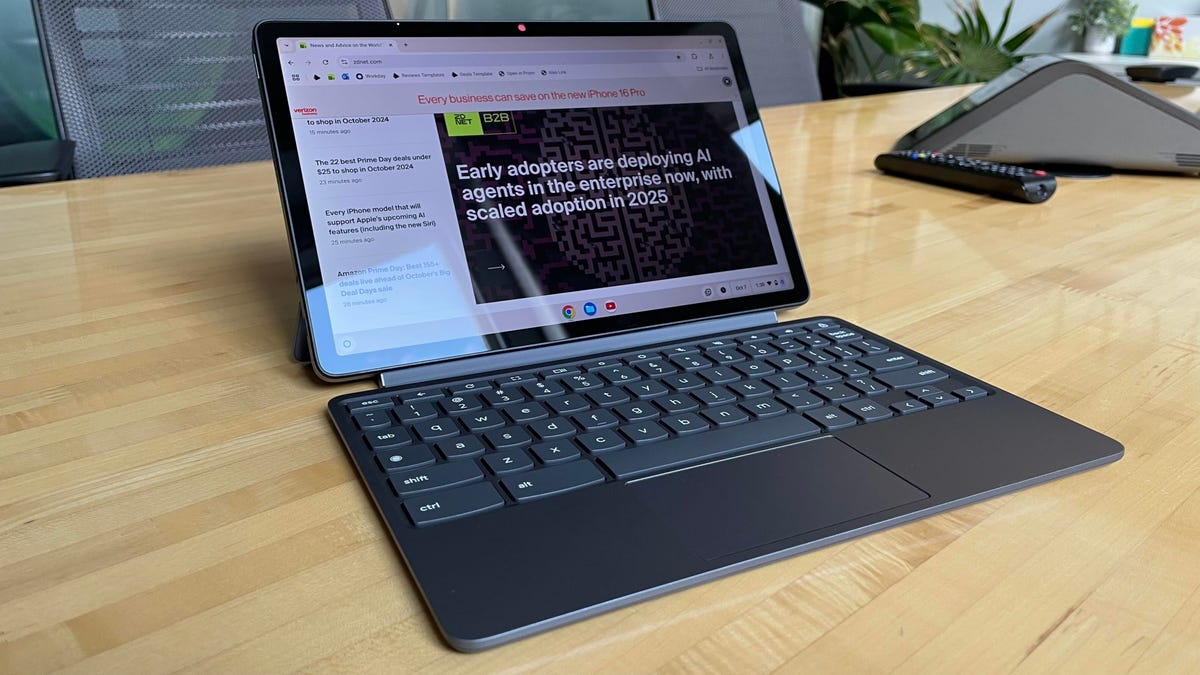
The ninth-generation Lenovo Chromebook Duet is an 11-inch 2-in-1 laptop/tablet that combines a nice display, a versatile form factor, and accessible hardware for an agreeable regular price of $399. It’s essentially a tablet that comes with a keyboard and a magnetized backing with a foldable kickstand for either landscape or portrait mode (think a more affordable Microsoft Surface Pro).
We went hands-on with the previous version of the Duet back in 2022, and even though we praised it then for its versatility, this year’s device is a little more sophisticated, in part due to upgraded hardware, but also due to improvements made to ChromeOS. More on that in a bit.
Also: This 8-inch gaming tablet is the ultimate plane entertainment device (and on sale)
The tablet can stand on its own or connect to the keyboard and kickstand, which is a smart design that allows for a large range of angles (although it can’t quite support a 90-degree angle). The keyboard is small and light and connects to the tablet/display with a (surprisingly strong) magnetized pin connector.
When I say this keyboard is small… that’s not an overstatement. The keys might be hard to use for anyone with big hands, and the trackpad is so small it’s almost toylike. I recently went hands-on with the Duet for about a week, and I have to say that navigating the web or ChromeOS with this trackpad is too small for me to use comfortably, but I’m a mouse and keyboard kind of guy, anyway.
Also: This Lenovo Chromebook easily replaced my Windows laptop for work – and I can’t go back
The tablet weighs 1.12 pounds, but the keyboard and backplate/kickstand brings the total weight up to 2.09 pounds. That’s still pretty dang light, even for a Chromebook.
The magnetized backplate is thick and well-padded, adding a degree of sturdiness that makes this a great device for kids or anyone who values durability (while also providing a home for the stylus).
Kyle Kucharski/ZDNET
Speaking of, the pen comes with the device (but the AAAA batteries it uses do not). The Lenovo USI Pen 2 is functional, but there is a little bit of lag when writing with it on the Duet, although I say that as someone who is spoiled by my ReMarkable Paper Pro.
Google is really leaning into marketing the Duet as a note-taking device, with palm-rejection software on the screen to prevent false inputs, to a newly-optimized experience on ChromeOS with the Goodnotes app, which you can get for free for three months with the purchase of a new Chromebook.
So what kind of hardware does a $399 Chromebook tablet come with? Under the hood, it’s equipped with 4GB of RAM and 64GB of storage, but there’s also an 8GB/128GB configuration that brings the price up.
A MediaTek Kompanio 838 (2.60 GHz) chip powers the Duet, which is comparable in performance to other similarly-priced Android tablets. In my experience with the device, it’s well-suited for multitasking within reason, but if you have a handful of different apps open along with a bunch of browsers, you might experience some slowdown.
Also: I pack this portable workstation whenever I travel – here’s why it’s worth the bag space
This is a Chromebook made for ease of use, to play media while propped up in the kitchen, on a plane, or to bring to a coffee shop to get some work done, and its ultraportable form factor is what allows you to do all of those things in settings where a 16-inch laptop would be cumbersome or impossible.
In terms of the device’s physical ports and features, you get two USB-C ports and a headphone/mic combo port, along with a 5MP front camera with a physical shutter and an 8MP rear camera. The tablet also has two physical buttons on the side that increase or decrease volume, making it easy to control media without having to mess around with the UI.
Kyle Kucharski/ZDNET
The 11th-generation Duet comes on the scene just as Google announced a host of new ChromeOS features, all of which integrate nicely with the Duet, strengthening the argument for this device as a nimble and versatile multitasker that can take on practical tasks with ease.
For example, the new Quick Insert function feels right at home on the Duet (activated by hitting the Launcher key + F) which can be activated anywhere, bringing up a mobile quick menu with suggested actions. If you’re in a Google Workspace app, it’ll suggest recent documents. If you’re in the Chrome browser, it’ll suggest history, or recently-visited sites.
Also: This 2-in-1 wireless charger simplified my workspace (and freed me from the cables)
The beauty of Quick Insert is that it’s actually good at intuiting what you’re trying to do, making the suggestions useful and actionable. In the end, it means fewer clicks, less navigation, and more efficient computing.
While the device is in tablet mode, it can take on a new set of functionalities thanks to the gestures supported by ChromeOS. Swiping up from the bottom of the screen, for example, brings up all the windows that you currently have open.
Kyle Kucharski/ZDNET
You can also navigate any element of the OS like you would a browser, by swiping left to go back to the previous screen. Activating Split Screen is another feature that Google implemented earlier this year, and I find it helpful when using the tablet in the kitchen with a YouTube video on one side of the display and a recipe on the other.
Finally, the battery life is quite good. Lenovo advertises over 12 hours of use, but I got a little over 10 in my testing. The physical size of the device is going to prevent the 29WHr battery from going much beyond the 10- to 12-hour mark.
ZDNET’s buying advice
The Lenovo Chromebook Duet 11-inch is a complete package: a self-supporting tablet as well as a laptop, all with Google’s lightweight operating system. I’d recommend it to anyone looking for next-level portability and who expects to use it in all its different configurations: as a tablet, as a laptop, and as a note-taking device. Many devices can do all those things, but the Duet can go places a laptop can’t, and is well-priced for its wide versatility.
