

ZDNET’s key takeaways
- The Naya Create keyboard is available now starting at $500, with additional modules sold separately.
- It’s very well-built and well-designed, with a breadth of customization options that let you go as deep as you want.
- It’s expensive, and the learning curve requires dedication.
I’ve tested a few split keyboards over the past year, and they all have one thing in common: You really have to be committed to the cause. Rewiring your brain to an all-new keyboard format requires time, patience, and a little bit of work.
But it’s easier than you think, and there’s a market for it. Plenty of consumers are looking for ergonomic, alternative solutions to the flat, plastic keyboards we’ve all been hammering away at for our entire lives.
Also: I switched to a split ergonomic keyboard for a week, and it’s spoiled every other peripheral for me
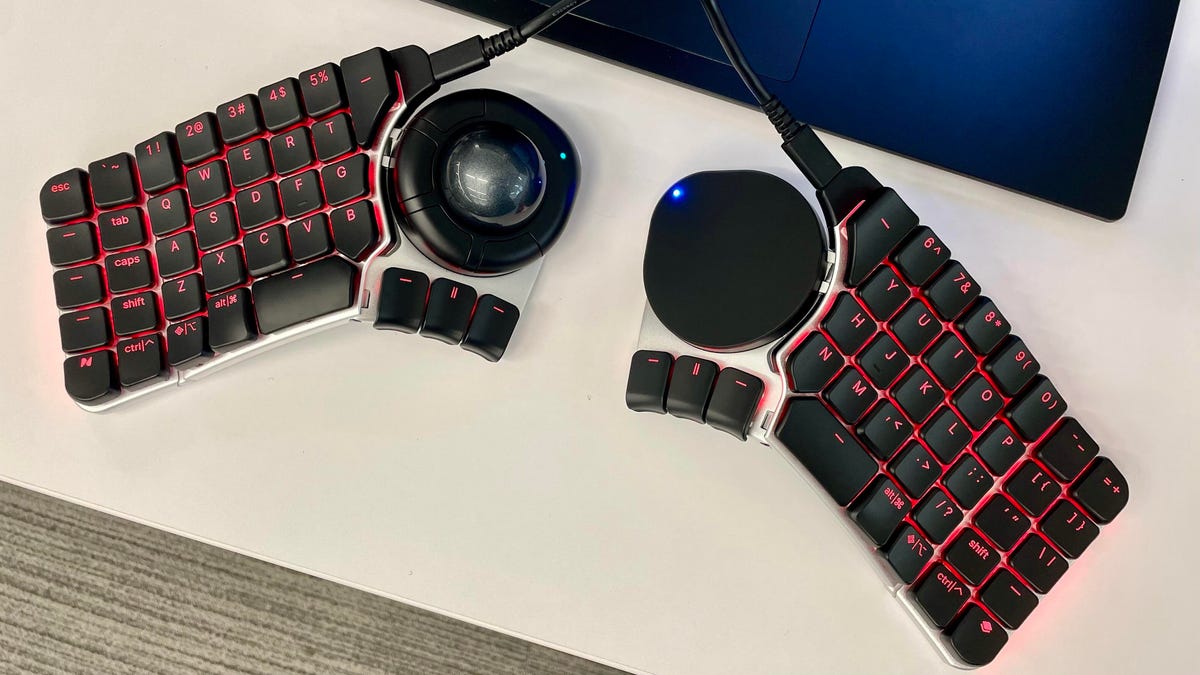
The latest split keyboard I’ve tested, the Naya Create, is both a deconstruction of the traditional keyboard setup and something entirely new. It’s a wired split keyboard that can be positioned in unconventional ways, including at an angle, or spaced far apart, allowing the user to keep both arms neutral in front of them.
The result is a keyboard that looks and feels more like a tactile control center than the standard keyboard/trackpad setup we’re all familiar with. This is especially true with the boards angled, which allows you to rest your arms on the desk without having to lift and rotate your wrists.
Once you start trying to type, however, you realize you can’t stare at the screen while your fingers fly. In fact, during my first few days using the keyboard, my eyes were glued to it. But it doesn’t take long before you get to an operational threshold.
Looking at the device’s physical form, one of the biggest changes is the additional, customizable buttons that don’t exist on a regular keyboard. Also, both sides feature a space bar (it turns out most of us actually only use the same thumb to hit the space bar while the other one just… hovers there). This way, you can utilize space on both hands.
Kyle Kucharski/ZDNET
The rest of the keys on the far right and left sides of each board do have some logic to how they’re mapped out, but they’re not the keys your muscle memory remembers, so they demand an adjustment.
You’ll also notice the keyboard is built to accommodate some ambiguity. Not every key is clearly defined, and that’s on purpose. Naya wants you to customize your device by mapping keys to your preferences in the Naya Flow software. Fortunately, the process is straightforward: Just drag and drop a key’s function to its position on the board.
Also: I pack this portable workstation whenever I travel – here’s why it’s worth the bag space
This was an interesting experiment for me. Initially, I didn’t love that there was no Backspace key, as that space was occupied by the 0 number key. But I remapped Backspace to the far right multifunction key next to the space bar and was surprised how easy it was to adapt to this change. Sure, it took some time, but it wasn’t as laborious as I assumed.
Going deeper on this concept of customizable key mapping, you can consider each layout to be a separate “layer”. For example, you have your regular, everyday QWERTY keyboard layout that’s optimized for normal usage.
But you can switch to another layout for gaming, where the WASD keys are arrows on the left board, and the right side is a number pad. Below that layer is a “System” layout, where each key is mapped to controlling a separate LED style or function for the keyboard’s RGB lighting.
Furthermore, you can treat each key like you would a trackpad or mouse. A single tap of a key could be mapped to one thing, while a double tap, or a hold, could make it do something else.
Also: I tested a split keyboard made for gamers, but I’d use it in the office just as much
Speaking of, the Naya Create isn’t just a keyboard; each side of the keyboard has two slots for additional modules: a trackpad, a ball-style mouse, and a dial. The modules couldn’t be easier to use; they just snap into place with a solid magnetic fix, and they connect automatically with the pins.
The trackpad, or Naya Touch, is fully customizable with all the gestures you’d expect: one-, two-, or three-finger taps, double-taps, spreads, etc. The dial is great for users who spend a lot of time dragging sliders in Adobe Photoshop or scrubbing video tracks in DaVinci Resolve.
Overall, the keyboard’s build quality feels very good. The hinges are extremely sturdy and don’t move at all when they’re placed on the desk, which allows for a high degree of precision when adjusting the boards, as they’ll stay exactly where you put them. Even with sustained, focus pressure, the board doesn’t budge.
Kyle Kucharski/ZDNET
Besides all the key customization, the device itself is absolutely loaded with RGB lighting effects. The light beneath the keys themselves and effects on the modules are not only surprisingly bright, but ostentatious enough to please the most diehard gamers. Personally, I don’t mind the more subdued lighting, but the rotating prismatic effects are not for me.
Also: I’ve tested dozens of ultralight laptops this year, but I keep coming back to this one
If the Naya Create looks like something you could get into, there’s a very active Discord community where users share configurations, templates, and setups, as well as offer troubleshooting advice and, most importantly, pro tips for how to embrace the learning curve. The end result, from people who have stuck with it, say they can’t ever go back to a “regular” keyboard.
ZDNET’s buying advice
The Naya Create keyboard is perhaps the strangest premium split keyboard I’ve gone hands-on with. Its build is surprisingly solid, and the customization runs deep. With the ability to load different layouts, you can swap keyboards depending on what you’re doing, and multiple functions per key based on single, double, or long-pressing keys allow for endless experimentation.
The biggest drawback is its price. The keyboard alone is $500, which puts it firmly in niche luxury tech territory. The touchpad is an additional $80, the trackball $100, and the dial $170. When all is said and done, you’re looking at close to $800.
Also: The best mechanical keyboards: I hand-picked the top models available
One thing is certain, though: This device requires feedback from the user. You’ve got to be engaged in the learning process, and the customization continues as you use the device. The end result, however, has the potential to be an absolute game-changer for productivity.
Looking for the next best product? Get expert reviews and editor favorites with ZDNET Recommends.
