

Summary
- Razer Pro Click V2 is a heavy, ergonomically designed mouse with plenty of features, but it’s too large and uncomfortable.
- New Razer products, including the Pro Click V2, now support Mac for customization through the Razer Synapse app.
- Retailing for $129.99, despite premium features like AI access and customizable lighting, the Razer Pro Click V2 is not recommended due to its uncomfortable design.
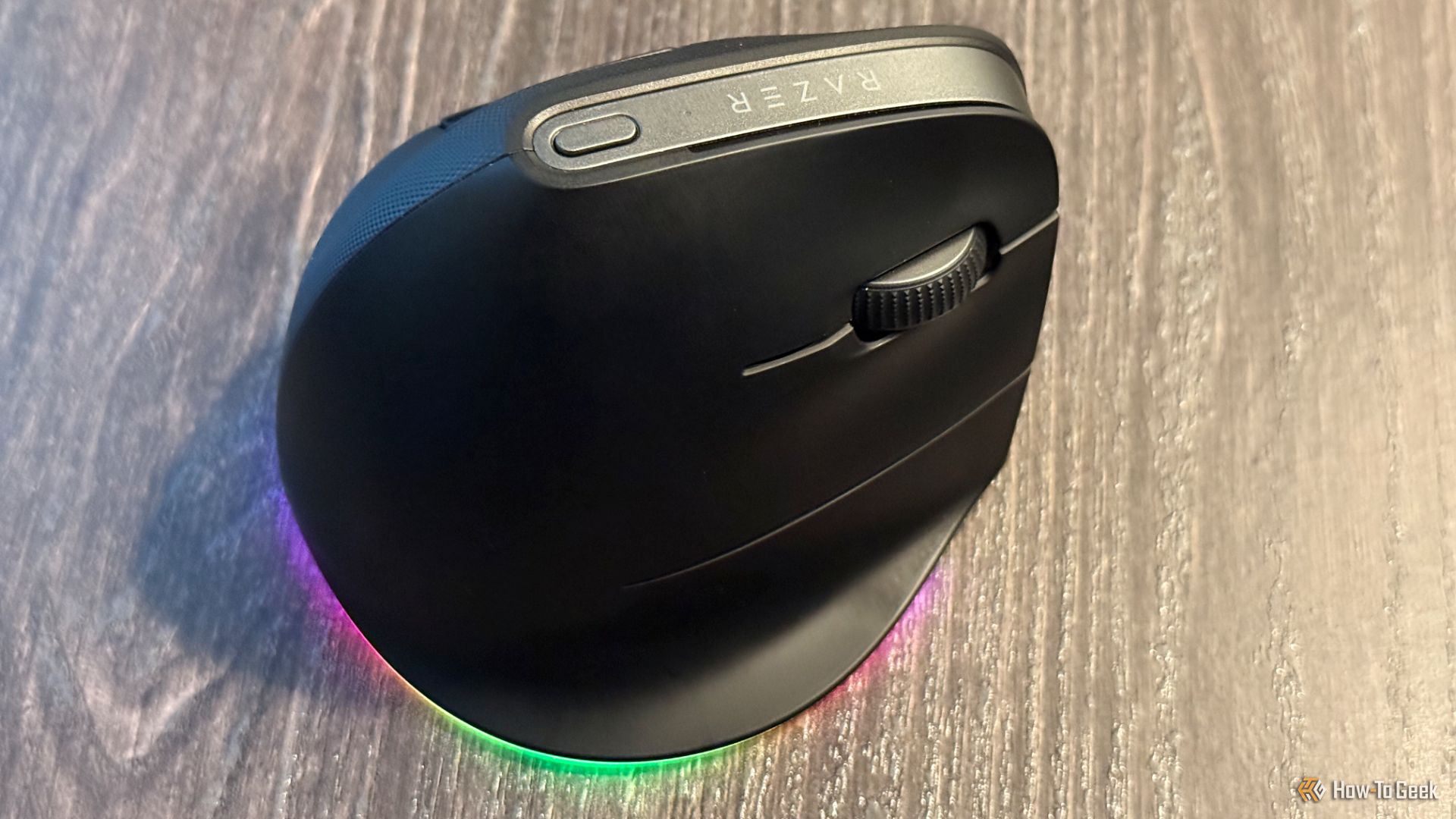
Razer is well-known for a host of high-quality gaming peripherals. While the Razer Pro Click V2 Vertical Edition tries to bring some interesting features to an ergonomic form factor, like one-touch access to AI, fails due to its large and uncomfortable design that makes gaming or anything else painful.
Weight
150g
Sensor
Razer Focus Pro Optical Sensor
Wireless?
Yes
Brand
Razer
The Razer Pro Click V2 Vertical Edition is an ergonomic mouse made with a natural handshake posture designed to reduce wrist friction. It can connect to up to five devices with switching using a single button on the mouse. The built-in rechargeable battery lasts for up to 6 months between charges.
Pros & Cons
- Switch between work and gaming DPI with one click
- 18-zone lighting with full underglow
- One-touch access to AI
- Customizable shortcuts for many apps
- Multiple connection options
- Design is too large and thus rest is too small
- Razer software for Mac was buggy
- AI options are the same found in Apple Intelligence
See Our Process
How We Test and Review Products at How-To Geek
We go hands-on with every product to ensure it’s worth your time and money.
Price and Availability
The Razer Pro Click V2 retails for $119.99 on Amazon and from Razer directly. It is only available in black, though RGB lighting adds a touch of color.
Weight
150g
Sensor
Razer Focus Pro Optical Sensor
Wireless?
Yes
Brand
Razer
Battery
Rechargable
Compatability
Mac, Windows
Color Options
Black
Connectivity
Razer HyperSpeed Wireless, Bluetooth, USB-C wired
Programmable Buttons
8
Maximum DPI
30000
Maximum speed
550
A Massive Mouse With Premium Build
Razer accessories always command a high price, so I was very pleased to see the high quality of the Pro Click V2 Vertical Edition. It feels heavy in the hand and is made with materials that should easily withstand daily use. I especially enjoyed the textured material on the left side of the mouse.
Since the mouse is ergonomic, it takes the usual design and puts it on its side. Instead of placing your hand flat on the mouse, you’ll use it in a handshake position. That posture is designed to prevent muscle fatigue and forearm twisting after a day or long-term use. The design is only made for the right hand.
Brent Dirks / How-To Geek
While the most-used buttons are on the right side of the mouse, you’ll place your thumb on a small rest on the left side near two buttons. The rest is where the package began to come apart. My hands are medium-sized and can easily work with most mice, but with thumb rest of the Pro Click V2 Vertical Edition was simply too small. For almost all of my sessions, I had to keep adjusting my right thumb. Each time, there was a sore spot at the base of my thumb.
On the top of the mouse is a metal strip with a one-click button to switch the DPI (sensitivity) or to use another customizable routine. The right side of the mouse houses the left and right clock buttons, scroll button, and a very comfortable pinky rest that is actually well-designed.
The USB-C charging port to juice up the rechargeable battery is on the front of the mouse. With normal use, you can go up to 6 months between charges. To help save battery power, you can also choose to enter sleep mode after a set amount of time.
Flip the mouse over to access the USB transmitter, which is stored in a convenient slot. The mouse also connects via Bluetooth or wired with the included equipment. As a nice touch, you can use the mouse with up to five devices—just use the button on the bottom to switch between each one.
There is also the 18-zone lighting strip on the bottom part of the mouse. You can use software to customize 16.8 million colors per zone. It also provides custom colors with more than 300 supported titles.
Yes, Razer Now Makes a Mac App
Brent Dirks / How-To Geek
I’ve never used a Razer product previously for a simple reason—the company has usually shied away from the Mac. But that’s changed with the Pro Click V2 Vertical Edition and a number of other devices from the company.
All of the customization is done with the Razer Synapse app. Along with tweaking the lighting, there’s the ability to easily tweak the DPI with basic and advanced settings.
The best part of the Synapse software is that it lets you customize each of the mouse’s buttons except for the left click. It’s also possible to select a profile to have specific mouse button customization depending on what app you’re running. That makes using a complicated, professional-grade app like Premiere Pro a bit easier.
It also comes in handy for more mundane apps. For example, in Microsoft Teams, one click can toggle video, mute, and more.
The headlining customization, one-touch access to AI, is a bit of a bust. There are two types of AI interaction you can unlock with the long press of the top button that is usually reserved to change the DPI. First, you can open up ChatGPT chat window. Alternatively, you can access an AI prompt master that uses Copilot or ChatGPT. With that, you can summarize text, rephrase it, or compose a quick email.
Those might sound nice, but the prompt master features are pretty much identical to what I already have with Apple Intelligence and you can easily set a quick keyboard shortcut to open up the native ChatGPT Mac app.
Should You Buy the Razer Pro Click V2 Vertical Edition?
Thanks to the retail price of $119.99, the Razer Pro Click V2 Vertical Edition is at the very top of the heap for anyone looking for a mouse. But there are not many reasons I can see that you’d want to actually purchase the mouse. It’s just simply way too big and is uncomfortable to use on a day-to-day basis, not exactly something you want in a supposedly ergonomic mouse.
The extra-added touches like the one-touch AI and lights look nice on paper, but don’t add anything significant to the experience. A mouse is a peripheral, and should be easy to program and use. I don’t want to have to battle with pages of settings to find what I want.
I’ll be sticking to my longtime desk mate, a traditional Logitech MX Vertical Mouse that is actually comfortable to hold and use.
Weight
150g
Sensor
Razer Focus Pro Optical Sensor
Wireless?
Yes
Brand
Razer
The Razer Pro Click V2 Vertical Edition is an ergonomic mouse made with a natural handshake posture designed to reduce wrist friction. It can connect to up to five devices with switching using a single button on the mouse. The built-in rechargeable battery lasts for up to 6 months between charges.
