

Close Menu

    Subscribe to Updates

    Get the latest creative news from FooBar about art, design and business.

    What's Hot

    OpenAI co-founder Greg Brockman takes charge of product strategy

    May 17, 2026

    Marketing operating system Nectar Social raises $30M Series A led by Menlo

    May 17, 2026

    The haves and have nots of the AI gold rush

    May 17, 2026
    Facebook X (Twitter) Instagram
    Tech Pulse
    • OpenAI co-founder Greg Brockman takes charge of product strategy
    • Marketing operating system Nectar Social raises $30M Series A led by Menlo
    • The haves and have nots of the AI gold rush
    • Meridian Ventures launched $35M fund to back MBA-deferred founders
    • Lovable just backed a company that’s looking to bring vibe coding to hardware
    X (Twitter) Pinterest YouTube LinkedIn WhatsApp
    Techurz
    • Home
    • AI Systems
    • Cyber Reality
    • Future Tech
    • Disruption Lab
    • Signals
    • Tech Pulse
    Techurz
    Home - AI - 6 new ways ChatGPT Projects supercharges your AI chats – how to try it
    AI

    6 new ways ChatGPT Projects supercharges your AI chats – how to try it

    TechurzBy TechurzJune 13, 2025Updated:May 10, 2026No Comments3 Mins Read
    Share Facebook Twitter Pinterest LinkedIn Tumblr Reddit Telegram Email
    6 new ways ChatGPT Projects supercharges your AI chats - how to try it
    Share
    Facebook Twitter LinkedIn Pinterest Email


    Lance Whitney / Elyse Betters Picaro / ZDNET

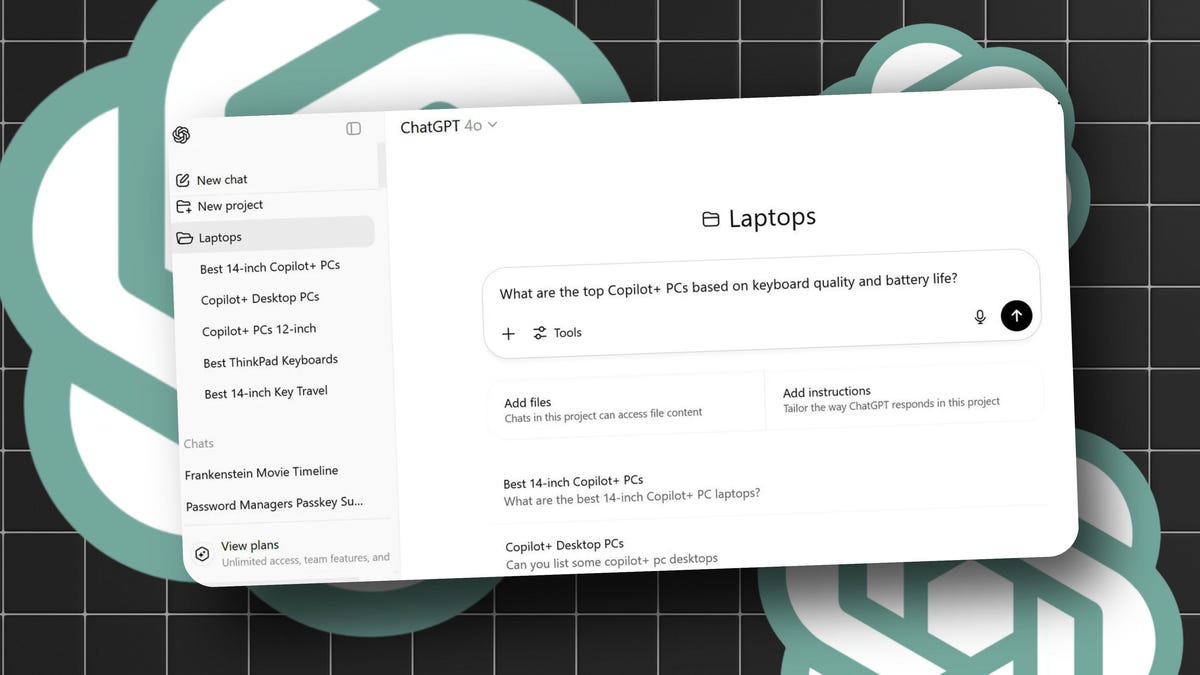
    One cool ChatGPT feature you might not know about is Projects. With ChatGPT Projects, you can organize all the chats, files, and other content for a specific topic into a project folder. The goal is to bring order to your chats so you can more easily find and work with particular ones. And now, OpenAI has added six cool new updates to Projects that collectively make it even more useful.

    Announced by OpenAI both on its website and through a post on X, the new capabilities are available to ChatGPT Plus, Pro, and Team users. If you’re a subscriber, here’s what you’ll find.

    1. Deep Research mode: You can now tap into ChatGPT’s Deep Research mode to arrange your chats, uploaded files, custom instructions and public web sources into a single project.
    2. Voice mode: Instead of typing at the prompt, you can now verbally ask for information about an uploaded file or other content in a project chat.
    3. Share individual chats: You can now create a URL to share any chat from a project.
    4. Mobile upgrades: In a project chat, you can upload files and switch models from the mobile app. Just make sure you’re running the latest version of the app.
    5. Improved project memory: With ChatGPT’s memory option, you can now reference past chats in a project.
    6. Project creation: You can now transform any chat into a project either from the sidebar menu or by dragging the chat into the project folder.

    How to try ChatGPT Projects

    Curious about ChatGPT Projects? Here’s how to give them a whirl.

    Sign in to the ChatGPT website, Windows app, Mac app, iOS app or Android app. Select “New project” or “Add project” from the left sidebar, name your project and select “Create project.”

    Also: How to use ChatGPT to write code – and my top trick for debugging what it generates

    From here, you can start a conversation, upload files and add custom instructions to build and shape the project. You can also add existing chats into your new project. To do that, drag any chat from the sidebar into the project or click the chat’s menu and select “Move to project.” You’ll see each chat listed under the name of the project on the sidebar. From here, you can also upload files and add custom instructions.

    You can then try any of the new capabilities introduced by OpenAI. Run a Deep Research query. Speak to ChatGPT by voice in your project. Share any individual chat with someone else. Reference any past chat within a project.

    Also: Is ChatGPT Plus still worth $20 when the free version packs so many premium features?

    Though ChatGPT Projects may sound like just a way to place chats into individual folders, the feature can prove much more useful, especially with the latest skills.

    “Projects are smart workspaces that keep everything related to a long-running effort in one place,” OpenAI said on its website. “Group together chats, upload reference files and add custom instructions so ChatGPT remembers what matters and stays on-topic. With memory, context and flexible tools, they’re ideal for repeated and evolving work such as writing, research, planning and more.”

    Want more stories about AI? Sign up for Innovation, our weekly newsletter.

    ChatGPT Chats projects Supercharges Ways
    Share. Facebook Twitter Pinterest LinkedIn Tumblr Email
    Previous Article‘Guys, the sea literally opened up’: AI-generated Bible characters are taking over TikTok
    Next Article Lava Storm Play and Storm Lite announced: 120Hz display, IP64 rating, and 5,000 mAh battery for under INR 10,000
    Techurz
    • Website

    Related Posts

    Opinion

    Meet Shapes, the app bringing humans and AI into the same group chats

    April 29, 2026
    Opinion

    Embattled startup Delve has ‘parted ways’ with Y Combinator

    April 4, 2026
    Opinion

    ChatGPT launched three years ago today

    November 30, 2025
    Add A Comment
    Leave A Reply Cancel Reply

    Top Posts

    College social app Fizz expands into grocery delivery

    September 3, 20252,288 Views

    A Former Apple Luminary Sets Out to Create the Ultimate GPU Software

    September 25, 202516 Views

    The Reason Murderbot’s Tone Feels Off

    May 14, 202512 Views
    Stay In Touch
    • Facebook
    • YouTube
    • TikTok
    • WhatsApp
    • Twitter
    • Instagram
    Latest Reviews

    Subscribe to Updates

    Get the latest tech news from FooBar about tech, design and biz.

    Most Popular

    College social app Fizz expands into grocery delivery

    September 3, 20252,288 Views

    A Former Apple Luminary Sets Out to Create the Ultimate GPU Software

    September 25, 202516 Views

    The Reason Murderbot’s Tone Feels Off

    May 14, 202512 Views
    • About Us
    • Contact Us
    • Editorial Policy
    • Our Authors / Editorial Team
    • Advertise
    • Write For Us
    • Disclaimer
    • Privacy Policy
    • Terms and Conditions
    • Cookie Policy
    • Affiliate Disclosure
    • Disclaimer
    • DMCA
    • Sitemap

    Subscribe to Updates

    Get the latest creative news from FooBar about art, design and business.

    Facebook X (Twitter) Instagram Pinterest
    • About Us
    • Contact Us
    • Privacy Policy
    • Terms and Conditions
    • Disclaimer
    © 2026 techurz. Designed by Pro.

    Type above and press Enter to search. Press Esc to cancel.