


When the LG G5 OLED TV was announced at CES 2025, you would have struggled to remove the Cheshire Cat grin from my face. The G5’s introduction of a new panel type, which promised vastly improved picture quality, had me beyond giddy with excitement. And our LG G5 review supports this, taking over from where the previous two generations of LG’s flagship OLED TV – the G3 and G4 – left off. I’ve used them both and believed them to be among the best TVs I’ve personally laid eyes on.
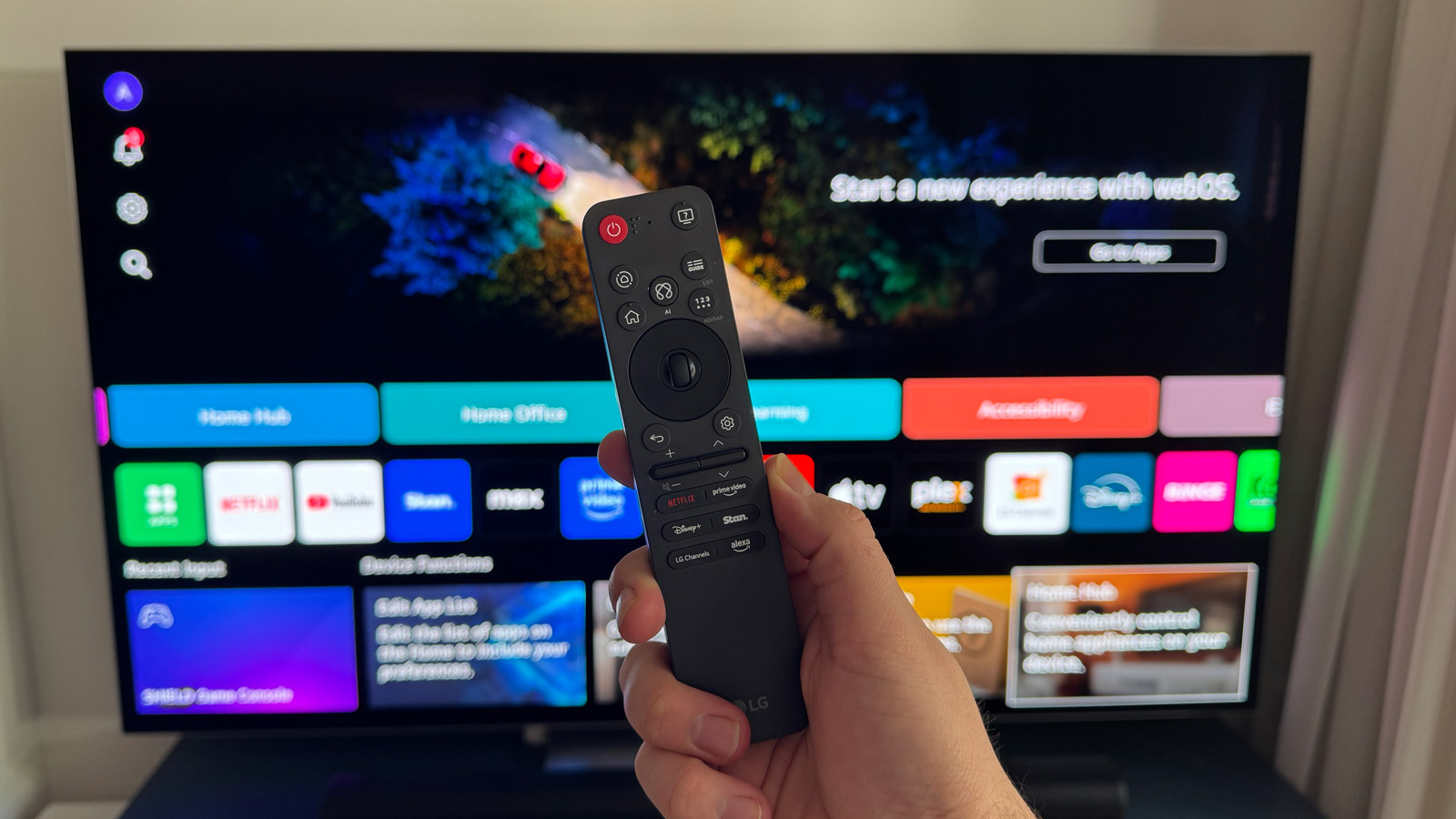
Alongside its new TV, LG also revealed a fully redesigned Magic Remote – the first overhaul in the best part of a decade. Between the two, I thought LG was on course to deliver the ultimate home-viewing experience.
After living with the G5 for a couple of weeks, I’ve come to the conclusion that the screen is truly out of this world. The remote, though? It doesn’t live up to my expectations.
You may like
My US-based colleague Al Griffin, who also wrote our TV review, recently opined of his love for the new Magic Remote design, but I’m of the opposite opinion. It’s not because of the physical redesign (although I do have thoughts on that), but because of the decision to remove certain buttons I found genuinely useful, then replacing them with ones that are forever going to go untouched… at least in my household.
Controversial design is dead, long live controversial design
I know the previous remote control has been subjected to its fair share of controversy, specifically due to its ability to act as a pointer wand to quickly move around the screen to click on apps and channels.
I’ve rarely used this feature because I’ve found it to be counterintuitive. It’s meant to make navigation and selections quick and easy but, in my experience, the opposite is true. Instead, I override the remote’s natural desire to act as a pointer and use the directional buttons to move around the webOS interface.
Image 1 of 2
(Image credit: Future)(Image credit: Future)
I’m not exactly surprised that the pointer wand has been retained with the new Magic Remote, and I’m still using the directional buttons to override it. What’s changed slightly with the new design, though, is the central select button – which retains its scroll wheel functionality – feels less reassuring to me whenever I make a selection. I just don’t get the same feedback as I did with the previous remote.
The overall physical design has changed, too. Gone is the elongated, rounded wand, now replaced with a more rectangular affair. I agree the new look is more modern and, to an extent, more premium-looking, but I find it to be less ergonomic than before. There’s no longer a dedicated cutout for fingers to naturally rest. It’s a minor problem, sure, but I feel it makes a difference in use, especially if I choose to use the pointer option to move around the screen.
Button down
New shape aside, the biggest change to the updated LG Magic Remote is a refreshed button layout. Not only do a couple of the buttons find themselves in new positions, but some useful ones from the previous remote have been replaced with some that I’ve so far found to be entirely superfluous.
(Image credit: Future / Max Langridge)
LG, like so many other companies in recent years, has gone big on AI with its 2025 TVs. Chief among the new features is being able to summon LG’s AI Chatbot to help you with any query you might have. These can include you telling it that you find the picture too dark, which results in the Chatbot bringing up some picture brightness options for you to choose from.
I can understand that this could be a useful feature for some users, but I’ve so far found LG’s preset picture modes – Filmmaker Mode most commonly – to be perfect and without need for further adjustment.
Or at least, that’s the intention of voicing a prompt such as this. It worked during an LG demonstration I was witness to before the G5’s official launch and it worked when I first took delivery of it at home. But when I was taking images for this article, I prompted the chatbot with the same line and each time it diverted me to the TV’s built-in media player. I’ve still yet to determine why.
Image 1 of 2
(Image credit: Future / Max Langridge)(Image credit: Future / Max Langridge)
I also tried asking “What’s new on Netflix?” and, while it did open the Netflix app, it searched for ‘new’ which just returned results with new in the title, rather than recently added content.
Since it has integrated AI, I wanted to see if LG’s Chatbot could respond to prompts that weren’t TV-related. I asked the simple question “what’s 2 + 2?” and it did in fact pull up a web browser page with the correct answer. But when I asked “which country has the most time zones including its overseas territories?” it returned results from the LG Gallery+ wallpaper library, along with a link to ask Microsoft Copilot.
Overall, then, my experiences with LG’s AI Chatbot have been less than satisfactory, making it a redundant feature in my household and, by extension, the button too.
(Image credit: Future / Max Langridge)
LG also clearly wants owners to use its shiny new TV as a hub for connected smart devices around the home. As such, there’s now a dedicated button to open the company’s ThinQ screen.
I have a fair few smart lights in my home, but I control them all via the Apple Home app on my iPhone. It’s a fast and seamless process, one that I can’t ever see myself changing. While I had forgotten the LG G5 could be used as a home hub, the process of controlling my lights via the TV requires more steps than it does to use my phone.
There you go, another button that’s rarely going to get any use. And I do mean ‘rarely’ because the only time I’ve accessed the Home Hub via the remote is to change inputs because LG has decided to remove the input select control.
Image 1 of 2
(Image credit: Future / Max Langridge)(Image credit: Future / Max Langridge)
Uh-huh, another useful button gone. Just how much of a hindrance this will be to owners will depend on how many (if any) external devices are connected and how they’re connected.
I currently have a Sony UBP-X700 Blu-ray player and an Nvidia Shield Pro plugged into my TV and both have HDMI CEC enabled, meaning when either is switched on, the input will automatically change.
However, I’ve been in situations where I’ve wanted to compare picture or sound quality between the Blu-ray player and the Nvidia, for example, and this is when an input-select button would be handy. Now I have to press the Home Hub button, then move the cursor to the input I want to select. I really do miss the quick-access input menu that appeared along the bottom of the screen on previous LG OLED TVs.
What’s also missing is a dedicated mute button. Whether it’s loud adverts or I want to quickly cut the volume to hear my partner ask me a question, having a mute button on the previous remote was invaluable.
When I first went to mute the volume of my G5 using the new remote, I thought it worked in a similar way to Samsung remote controls, in the fact that pressing the volume button inwards would do it. How wrong I was. Now, if you want to mute, you need to hold the volume button down for a few seconds. Again, a minor change, but one that I don’t quite understand the need for. Just give me back the mute button!
A missed charging opportunity
There’s one feature inherited from the old remote that has me a little puzzled. LG has continued to use AAA batteries for the new Magic Remote rather than giving it a rechargeable battery design.
(Image credit: Future / Max Langridge)
I could let slide the decision to use batteries in previous remote controls, but it’s 2025! Shouldn’t we have moved on by now? Samsung, for example, allows for solar recharging and, like the Apple TV 4K remote, has a USB-C port for charging. This is more beneficial to the environment and it’s also much more convenient for users.
Not the star of the show
Of course, you may well think my thoughts are geeky beyond all measure. In truth, they are little things that, overall, don’t necessarily detract from the main event, which is the LG G5 itself. As I’ve previously mentioned, I’ve been using it for a while and, if you ask me, I think it’s phenomenal.
I just wish the extended user experience was just as phenomenal as the images on screen.
Today’s best LG OLED evo AI G5 4K Smart TV 2025 deals
