


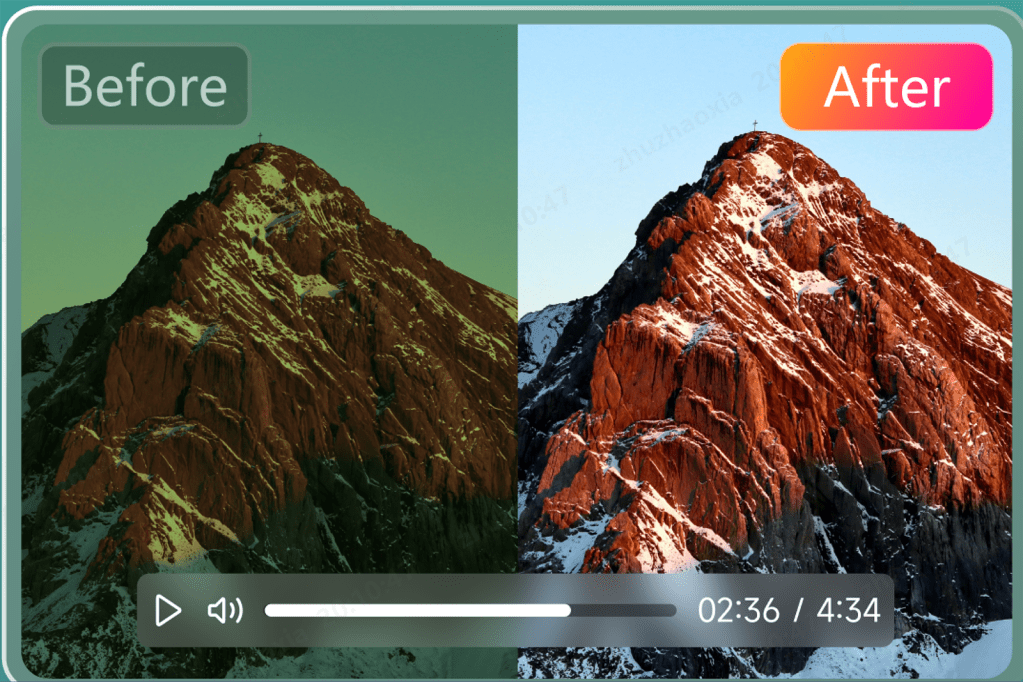
Whether you’re a content creator, a professional videographer, or someone looking to enhance their social media snippets, having access to powerful video enhancement tools makes all the difference. One such program that has gained attention is HitPaw VikPea. This AI video enhancer brings life to your videos by improving video quality, removing blurriness and noise, and enhancing details with minimal effort.
In this article, you’ll learn about its key features, pricing plans, overall effectiveness, and how it can enhance video quality.
What is HitPaw VikPea?
HitPaw VikPea is a specialized and advanced software with a beginner-friendly interface that uses cutting-edge technology to analyze and enhance video quality in one click. It can automatically upscale low-resolution videos to high definition, enhance facial details, repair corrupted files, and even colorize black-and-white footage to achieve vibrant and smooth visuals.
System Requirements
HitPaw VikPea is available for multiple platforms, including Windows, Mac, Web, and Mobile Apps. Here are the required specs:
HitPaw VikPea for Mac: macOS 10.15 or later, 8GB RAM, 2GB of free hard drive space with an Intel i3 processor or Apple M1 equivalent
- For Windows: Windows 11/10/8/7 64-bit, 8GB RAM, 2GB of free hard drive space with Intel i3 processor or AMD Ryzen 3 equivalent
- For Mobile: Android or iOS 13 or later
- For Web: Accessible through a web browser without downloading
Detailed Analysis of its Key Features – HitPaw VikPea
Here is an in-depth analysis of various HitPaw VikPea’s features:
Key Features
- Enhance video quality to 4K/8K: This software uses advanced AI to upscale low-resolution videos to 4K or even 8K. It can remove noise and reduce blur, resulting in sharp and crisp visuals. This is particularly beneficial for videos captured on older devices or in lower resolutions.
HitPaw
- Enhance facial video: Its specialized AI model helps improve facial features and fine details in videos, ensuring better clarity and detail for a more professional look. It’s especially useful for personal videos, interviews, or video calls where clarity is essential.
- Colourise Videos: Its AI Colour tool automatically adds realistic and vibrant colors to black-and-white videos, breathing new life into vintage footage. This is a fantastic feature for those working with archival footage or personal videos that need a more modern look.
- Repair damaged and corrupted Video: Another impressive feature is its ability to effectively fix damaged or corrupted video files. Whether the video was recorded on an old device or corrupted during the transfer, this software can restore its original quality.
- Batch Processing: Although batch upscaling multiple videos is difficult, this powerful tool saves time and effort by enhancing multiple videos simultaneously at a faster speed. If you’re working with a large collection of footage, this feature streamlines the entire process.
Additional Features
- Video Background Removal: This feature effortlessly erases or replaces video backgrounds without the need for green screens, which is beneficial for social media, education, or professional use.
HitPaw
- Object Remover: If you’ve ever been frustrated by unwanted objects in your videos, this is the solution. It can automatically remove background clutter, distracting people or items from your footage.
How to Enhance Video Using HitPaw VikPea
Enhancing videos with HitPaw VikPea is incredibly simple and intuitive. Let’s comply with the given steps on how AI enhance video:
Step 1. Import Video
After downloading this program from its official website, complete the installation. Then, click “Choose File” or drag and drop the original video. It supports 30+ input formats.
HitPaw
Step 2. Choose the AI Model
From the right column, select the appropriate AI model, such as the Face Model. Then, pick your preferred mode: Sharpen, Realistic, or Soften. Click the gear icon to choose the format and other aspects.
HitPaw
HitPaw VikPea offers eight Al models that can enhance the quality of your video, so simply choose the most appropriate option:
- Face Model: Repairs portrait videos by enhancing facial features.
- General Denoise Model: Uses Al technology to reduce noise in videos, enhancing picture details and overall image quality. Suitable for various scenes, including landscapes, objects, and animals.
- Animation Model: Al model specialized in restoring anime and cartoon videos to high-definition quality.
- Colorize Model: Perfect for colorizing black-and-white videos.
- Color Enhancement Model: Enhances colors to improve video appearance.
- Frame Rate Enhancement Model: Intelligently converts low frame rate videos to high frame rate, making motion smoother and details clearer.
- Stabilize Model: Automatically detects and corrects shaking in videos providing more stable and clear output.
- Low-Light Enhancement Model: Designed for night-shooting scenarios, it intelligently enhances brightness and contrast, restoring details in dark areas and making low-light videos brighter and clearer.
Step 3. Preview and Export
Once the video is uploaded, press the “Preview” tab and wait a few seconds. If the output is okay, hit “Export” to save the enhanced video. You’re all done!
HitPaw
User Feedback
HitPaw VikPea has garnered positive user feedback. Below is an overview of the ratings and a selection of user reviews:
Trustpilot: 4.6/5 Overall
As a long-term user of HitPaw Vikpea, I’m impressed with its ability to improve low-quality footage, adding clarity and details that make a noticeable difference. The output files maintain high quality, ensuring a polished final result. The customer support is also outstanding, offering prompt responses and reliable assistance
Desmond Yen (Trustpilot)
Capterra: 4.8/5 Overall
Using HitPaw AI Video Enhancer has been a game-changer for my workflow. The software’s AI-powered upscaling transformed grainy clips into sharp, professional-looking visuals in just minutes, all while preserving natural motion and vibrant colors. I appreciated how straightforward the interface is; no steep learning curve is required
Huseyin E. (Capterra)
Pricing and Plans
Although HitPaw VikPea offers a free plan, it has several pricing plans for advanced features to cater to different needs. Below is a table with the available options:
PlansDurationWindowsMacDevicesIndividualsMonthly$43.19$70.391 DeviceYearly$99.99$110.39Perpetual$350.39$350.39TeamAnnual$459.955 Devices$859.9510 Devices$1099.95100 DevicesBusinessAnnualContact Us
FAQ
1.
What’s the difference between HitPaw VikPea and HitPaw Video Enhancer?
HitPaw VikPea includes a video enhancer, repair, and colorizing tool with an advanced AI-powered toolbox for background removal, stabilization, etc. HitPaw AI Video Enhancer focuses on video upscaling and noise reduction.
2.
Is HitPaw VikPea safe and reliable?
Yes, HitPaw VikPea is a safe and reliable tool trusted by users worldwide. The software undergoes regular updates and is free of viruses or malicious software.
3.
Is HitPaw VikPea free?
Yes, HitPaw VikPea offers a free trial version with limited features. However, a paid plan is required to access the full suite of enhancements.
Conclusion
HitPaw VikPea’s comprehensive set of AI-driven tools, including upscaling, facial enhancement, and video repair, makes it suitable for both beginners and professionals. Moreover, it stands out as an attractive video enhancer for its easy-to-use interface, batch -rocessing, and reliable AI technology. Try it now to experience AI-powered magic!
