

Close Menu
TechurzTechurz
    What's Hot

    Asian AI startups launch Mythos-like models as Anthropic’s export ban drags on

    June 27, 2026

    Corgi, the buzzy Y Combinator-backed insurance tech startup, says it didn’t steal an open source product

    June 26, 2026

    OpenAI poaches Uber India chief to lead its biggest market outside the US

    June 26, 2026
    X (Twitter) Pinterest YouTube LinkedIn WhatsApp
    Tech Pulse
    • Asian AI startups launch Mythos-like models as Anthropic’s export ban drags on
    • Corgi, the buzzy Y Combinator-backed insurance tech startup, says it didn’t steal an open source product
    • OpenAI poaches Uber India chief to lead its biggest market outside the US
    • Early Bird pricing ends tonight for Founder Summit
    • Robotaxis drive miles just to get cleaned and charged; this new startup wants to fix that
    X (Twitter) Pinterest YouTube LinkedIn WhatsApp
    TechurzTechurz
    • Home
    • Tech Pulse
    • Future Tech
    • AI Systems
    • Cyber Reality
    • Disruption Lab
    • Signals
    TechurzTechurz
    Home - Apps - iOS 26 beta 2 is released to developers with a few new tweaks
    Apps

    iOS 26 beta 2 is released to developers with a few new tweaks

    TechurzBy TechurzJune 24, 2025No Comments3 Mins Read
    Share Facebook Twitter Pinterest LinkedIn Tumblr Reddit Telegram Email
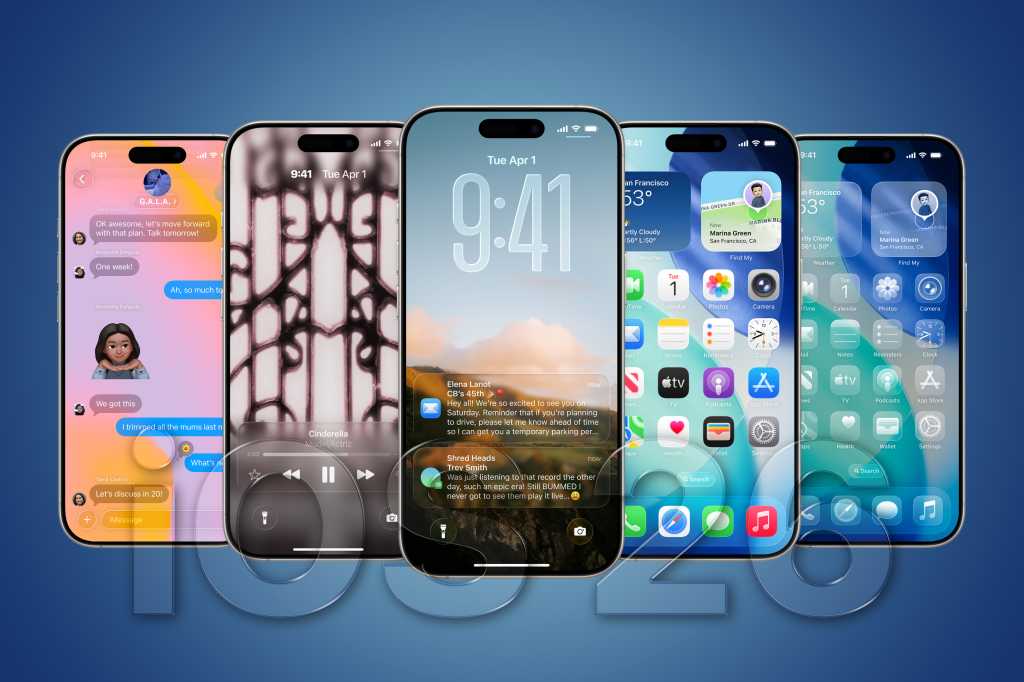
    iOS 26 hero
    Share
    Facebook Twitter LinkedIn Pinterest Email


    As is tradition, Apple released beta versions of its new operating systems to developers on the first day of WWDC on June 9. Beta 1 is for developers only–the public beta will begin in July, probably after two or three developer-only betas.

    The first beta release of iOS 26 has everything Apple demonstrated in its WWDC keynote: Liquid Glass, the new Phone app and features, the new Camera and Photos experience, and more.

    There are plenty of bugs and unrefined areas, as you would expect with the first beta release of a major new operating system update. Not everything is working as it should, and it is not advised to run this version of the OS unless you’re a developer or have a high tolerance for buggy or unoptimized software.

    You can read all about all the new features in our iOS 26 superguide and find out the latest information about the iOS beta including when it will launch and how to install it in a separate story.

    Update June 23: Apple has released iOS 26 beta 2. This is still a developers-only release. The public beta is scheduled to start in July, likely after one or two more developer-only beta releases.

    Table of contents
    1 What’s new in the latest beta release
    2 iOS 26: How to install the public beta
    3 iOS 26: How to install the developer beta

    What’s new in the latest beta release

    Here’s what’s new in the second beta of iOS 26:

    • It appears to have added something called a “Recovery Assistant.” It’s a mode meant to try to find and fix problems with your iPhone if it won’t start up normally. Think of it as the iPhone equivalent of the Mac Recovery Mode.
    • The second beta also makes that previously hidden new ringtone available as “Reflection Alt 1.”
    • The Control Center has been tweaked to further blur the background and make the buttons a little more opaque, so it’s all easier to read.
    • There is a new Apple Music widget focused on live radio
    • The order-tracking feature in Apple Wallet is now available.

    iOS 26: How to install the public beta

    The iOS 26 public beta test is expected to begin in July, but you can sign up now so you’re ready for it.

    1. Click Sign Up on the Apple Beta page and register with your Apple ID.
    2. Log in to the Beta Software Program.
    3. Click Enroll your iOS device.
    4. Open the Settings app, tap General, then Software Update.
    5. In the Beta Updates section, select the iOS Public Beta.

    It may take a few moments after registering for the beta option to appear in Software Update.

    iOS 26: How to install the developer beta

    You’ll need to be registered as an Apple developer, but a free developer account will do. You can get one via Xcode or the Apple Developer app in iOS. Here’s how to do it via the Apple Developer app:

    1. Download the Apple Developer App from the App Store.
    2. Open the app.
    3. Tap on Account.
    4. Sign in using your usual Apple ID.

    Find out everything you need to know about iOS 18 in our iOS 26 superguide.

    Beta Developers iOS Released Tweaks
    Share. Facebook Twitter Pinterest LinkedIn Tumblr Email
    Previous Article10 States May See Aurora On Tuesday During Geomagnetic Storm
    Next Article 8 effektive Multicloud-Security-Tipps
    Techurz
    • Website

    Related Posts

    Opinion

    Pixi’s new iOS app turns text messages into interactive AR experiences

    June 18, 2026
    Opinion

    Runware raises $50M Series A to help make image, video generation easier for developers

    December 11, 2025
    Cyber Reality

    ASD Warns of Ongoing BADCANDY Attacks Exploiting Cisco IOS XE Vulnerability

    November 1, 2025
    Add A Comment
    Latest Tech Pulse

    College social app Fizz expands into grocery delivery

    September 3, 20252,290

    SolarSquare in talks to raise up to $60M as India’s rooftop solar market draws major VC interest

    May 23, 202622

    Future of Digital Privacy and Security: 7 Truths Nobody Tells You

    May 25, 202619
    Stay In Touch
    • YouTube
    • WhatsApp
    • Twitter
    • Pinterest
    • LinkedIn

    Techurz helps readers stay ahead of digital change with clear, practical, future focused technology intelligence written today,searched tomorrow.

    X (Twitter) Pinterest YouTube LinkedIn WhatsApp
    Company
    • About Us
    • Contact Us
    • Our Authors / Editorial Team
    • Write For Us
    • Advertise
    Policy
    • Editorial Policy
    • Privacy Policy
    • Terms and Conditions
    • Affiliate Disclosure
    • Cookie Policy
    • Disclaimer
    • DMCA
    Explore
    • AI Systems
    • Cyber Reality
    • Future Tech
    • Disruption Lab
    • Signals
    • Tech Pulse
    • Sitemap

    Join the Techurz Brief

    The future does not arrive suddenly.
    Stay ahead with fast, sharp tech signals.

    Type above and press Enter to search. Press Esc to cancel.