


Why you can trust TechRadar
We spend hours testing every product or service we review, so you can be sure you’re buying the best. Find out more about how we test.
Beelink ME mini: 30-second review
Since Intel stopped leading the NUC charge, it has injected some much-needed diversity into the mini PC sector, and the Beelink ME mini is an example of the new thinking amongst hardware makers.
One of the aspects of small systems that holds them back is storage, and the ME mini confronts that issue head-on by supporting up to six M.2 SSDs internally. In other words, it’s a mini PC and NAS device combo.
There are limitations to the performance of each drive, which we’ll discuss below. However, given that 8TB SSDs are now a reality, in theory, the Me mini could hold 48TB of storage, and it features two 2.5 GbE LAN ports to distribute files stored on those drives across the network.
However, the specifications mention 4TB and only in the slots, suggesting that 24TB is a more realistic capacity.
The Windows 11 operating system comes pre-installed on a 64GB EMMC module, although it can be cloned to Slot 4, which accepts modules up to 2TB in size.
Because the CPU here is only an Intel Twin Lake N150 Processor with four cores and four threads, this isn’t an ideal machine for replacing a desktop PC.
However, for those who have spare M.2 drives handy, this could make an easy-to-set-up mini server, with enough network bandwidth to support at least ten users effectively.
Beelink has two SKUs available for pre-order: one with only 64GB EMMC storage included and another with an additional 2TB Crucial SSD. Each is available in one of three elegant colours.
The asking price of the EMMC-only model is just $209, making this an affordable option, especially if you aren’t required to purchase the M.2 modules to fill it.
(Image credit: Mark Pickavance)
Beelink ME mini: Price and availability
- How much does it cost? From $209
- When is it out? Available now in the US
- Where can you get it? US customers can get it via Beelink or Amazon
The Beelink ME mini is currently available in the US at the discounted price of $209 (RRP is $329). You can check it out here. I’m also seeing various configurations on Amazon here.
The basic SKU comes with 12GB of LPDDR5 memory and 64GB of eMMC storage. The second SKU with the same spec but the addition of a 2TB Corsair SSD is $329, down from $409.
Pricing for European customers isn’t available, but it appears to be a dollar conversion plus shipping. In Europe and Asia, the second SKU isn’t in stock, only the base model.
All SKUs come in Pearl While, Midnight Gray or Peacock Blue colours.
Based on the Intel N150 platform, it is possible to obtain a mini PC for $150 or less, although these typically don’t require more than a single SSD.
Considering the storage options, the asking price appears to be a verifiable bargain.
(Image credit: Mark Pickavance)
Beelink ME mini: Specs
Swipe to scroll horizontally
Item
Spec
CPU:
Intel N150 (4 cores, 4 Threads)
GPU:
Intel Graphics (EU32)
RAM:
12GB LPDDR5 (12GB x 1) not expandable
Storage:
1x 64GB eMMC module (not upgradable)
Expansion:
6x M.2 2280 is free for NVMe expansion, one is also SATA
Ports:
1x USB 3.2 Gen 2 Type-A, 1x USB 3.2 Gen 2 USB-C,1x USB 2.0, 1x HDMI 1.4
Networking:
2x 2.5GbE LAN, WiFi 6, Bluetooth 5.2
OS:
Windows 11 Pro (pre-installed)
Base Power:
6W
PSU:
45W
Dimensions:
99 x 99 x 99 mm
Beelink ME mini: Design
- Mini Cube
- Limited ports
- Six M.2 slots
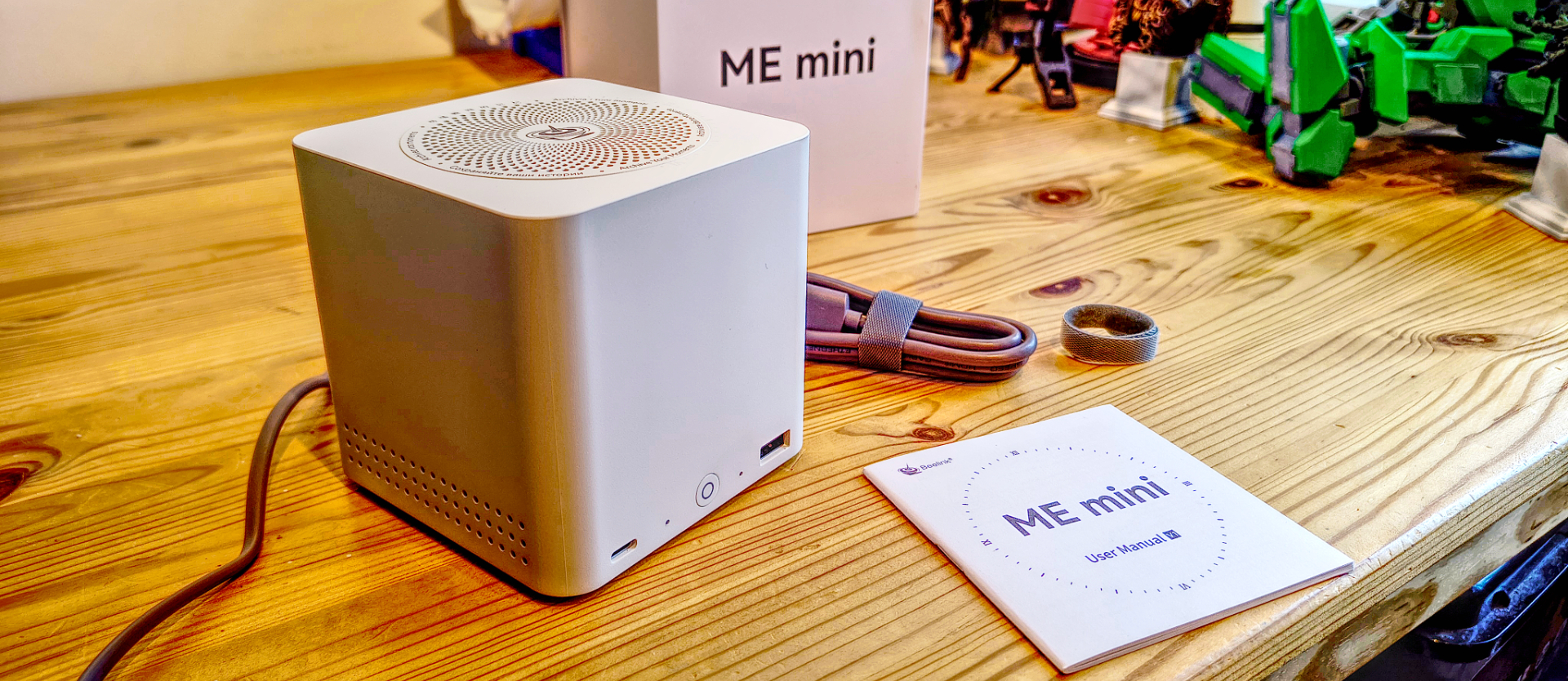
After I removed the Me mini from its packaging, I was curious how this machine fits six M.2 drives inside, since it is only 99 mm in every direction.
It turns out that the drives are on two sides of an internal structure that forms a chimney allowing air heated by the N150 processor and mainboard to vent through a perforated top.
I’ll discuss the internals later, but this is a remarkably compact design that makes other NUC-inspired designs seem massive in comparison.
The front of the Me mini has the power button along with two USB ports, one being a 10Gbps USB-C and the other port a USB 2.0 for a keyboard or mouse, but only one. There is no 3.5mm audio jack, which implies that the designer didn’t see this as a machine for everyday use, but specifically as a server.
On the rear, there is a single HDMI port, dual 2.5 GbE LAN ports, and a USB 3.2 Gen 2 Type-A port for external storage. What I didn’t expect was that there is no external PSU. The machine is supplied with a simple two-core power cable, and the tiny power supply is inside, making it relatively easy to take to other countries.
Access to the inside is via four screws on the underside, which release the top section, revealing the M.2 slots and the mainboard.
(Image credit: Mark Pickavance)
One curiosity about the mounting of the SSDs is that the thermal pad that connects them to the cooling system is underneath the modules, so they’re mounted facing towards the board, not away from it.
There are slots for 2260 and 2242-sized modules, along with the standard 2280, but because of the orientation, it isn’t possible to use those with a pre-installed heatsink.
Overall, this is an impressive piece of engineering, but it did make me wonder why it was made so small when a larger case and putting the PSU outside might have enabled a better processor to be used.
Beelink ME mini: Features
- Intel N150
- 9 PCIe lanes
- Limited USB
For those unfamiliar, the N150 is the modern equivalent of the old Atom, or had that company not retired that branding, it might have been given a Celeron designation.
Those not expecting much from this silicon won’t be disappointed, because with Windows 11 running on four cores and no hyperthreading, it won’t go far.
When it’s combined with the eMMC storage that Beelink used as the boot drive, this system has all the get-up-and-go of a sloth trapped in a block of concrete.
As if to highlight this glacial performance, the first thing this system did after Windows’ usual configuration questions was to download and install upgrades, and on this system, that took literally hours, even with a gigabit broadband connection.
For those wishing to get this system operational quicker, I’d recommend cloning the OS to an M.2 NVMe drive in slot number four and booting from that instead.
Interestingly, slot four and its exceptional capabilities bring me neatly to one of the weaknesses of the N150, specifically its limited number of PCIe lanes.
It has just nine lanes, and slot four can utilise two of those to achieve approximately 2,000MB/s, which leaves seven lanes, with one allocated to each of the other five M.2 slots. Therefore, don’t spend on high-performance NVMe drives that are Gen 4 or 5. Because on this platform, they won’t approach even their Gen 3 spec, and will be capped at around 1,000MB/s.
Under this regime, it is necessary to combine the bandwidth of all five drives into a single volume using RAID to deliver enough data to saturate the two 2.5 GbE LAN ports.
If you don’t intend to fill all the M.2 slots and stripe them into a volume, it isn’t possible to exploit the LAN potential of the ME mini, and frankly, it’s borderline if you do.
(Image credit: Mark Pickavance)
All this makes me wish Beelink had used a lower-power Ryzen chip instead, such as the AMD Ryzen 3 7440U, as at least it would have had enough PCIe lanes to provide each slot with dual lanes.
That said, what lanes it has are enough to saturate the dual 2.5GbE LAN ports from the storage, if it’s organised into a software equivalent of RAID5.
For those who want to use fewer SSDs, there are two USB ports that can be used for external storage, but the best speed is only 3.2 Gen 2. That equates to around 1000MB/s transfer speeds with external SSDs, or much less with conventional external drives.
As this machine was never intended to be a desktop system, the port selection is limited, though even by NAS standards, it has limited connections.
Beelink ME mini: Performance
Swipe to scroll horizontally
Mini PC
Header Cell – Column 1
Beelink ME mini
Minisforum UN100D
CPU
Row 0 – Cell 1
Intel N150
Intel N100
Cores/Threads
Row 1 – Cell 1
4C 4T
4C/4T
RAM
Row 2 – Cell 1
12GB LPDRR5 (1x 12GB)
8GB DDR5 (4x 2GB)
Storage
Row 3 – Cell 1
64GB eMMC + 2TB Crucial P3 Plus SSD
256GB GOFATOO P110N NVMe SSD
Graphics
Row 4 – Cell 1
Intel Graphics (EU24)
UHD Graphics (EU32)
3DMark
WildLife
2298
2903
Row 6 – Cell 0
FireStrike
732
1140
Row 7 – Cell 0
TimeSpy
293
367
Row 8 – Cell 0
Nomad Lite
188
N/A
CineBench23
Single
742
862
Row 10 – Cell 0
Multi
2723
1883
Row 11 – Cell 0
Ratio
3.67
2.18
GeekBench 5
Single
884
998
Row 13 – Cell 0
Multi
1902
2748
Row 14 – Cell 0
OpenCL
4179
4091
Row 15 – Cell 0
Vulkan
4032
3990
CrystalDisk
Read MB/s
1731
1779
Row 17 – Cell 0
Write MB/s
1686
1698
PCMark 10
Office
2781
2949
WEI
Row 19 – Cell 1
5.6
8
It seemed right to match this system with another N150 machine, but then I realised that I hadn’t reviewed any other mini PC with that chip in it. Instead, I’ve used the Beelink U59, a system that utilises the Celeron N5105, a Jasper Lake generation chip.
Beelink don’t sell the U59 these days, but it did cost around $200. It has been replaced by the Beelink EQ14, which uses the N150, and it sells for $199.
I’ll be honest, testing this machine was an exercise I’d never like to repeat. I had numerous annoying issues, along with dire performance, that made getting the machine through the Windows initialisation process horrible.
It took an entire day to get to a working desktop, mostly because the Windows installation, after about three hours, kept getting stuck at the PIN creation phase. I eventually discovered that the PIN input window was being pushed to the back, so it wasn’t visible, and I was able to progress.
I should mention that this was with a version of the Me mini that has the NVMe drive for booting, not just the 64GB eMMC. I tested the eMMC, and it managed a read speed of just 330MB/s, so anyone with one of those, good luck.
What’s not evident from these results is that, on paper at least, the N150 is a little faster than the N100. The reason it isn’t in this context is that Minisforum UN100D used for this comparison uses a four-channel arrangement of its DDR5, whereas the ME mini only has dual-channel. That choice reduces overall system bandwidth, which in turn impacts GPU performance, as it utilises shared memory.
Another factor is that the boot drive is only using dual PCIe 3.0 lanes, not the four PCIe 4.0 lanes that the Crucial P3 Plus is designed for, reducing the throughput to the storage.
That drive is rated for 5000MB/s reads and 4200MB/s writes, but here it struggles to deliver 1731MB/s reads and 1686MB/s writes. Why Beelink used a Gen 4 drive is a mystery, since a Gen 3 drive wouldn’t be any slower.
My conclusion about the way that the ME mini was organised is that it burned many bridges to achieve its six M.2 slot configuration, which made it less than ideal for any other purpose.
Ironically, some of these choices weren’t necessary. The memory model is a prime example, and I suggest that if this machine had only 8GB of RAM but were organised into a 4x2GB arrangement, the whole system would run dramatically better.
Not sure why the eMMC was even considered, as I presume it uses a SATA port that takes PCIe bandwidth from places it might have been better utilised. As an entry-level option, even a 128GB NVMe drive would be preferable.
For those curious, I put a Gen 4 NVMe drive in one of the spare slots and tested its performance, which achieved 877MB/s reads and 849MB/s writes.
If we total up the ‘special’ performance of slot four, and multiply the other slot by five, that comes up with a total read performance of 6,116MB/s and write of 5,931MB/s.
That might seem a little disappointing for six drives, but it dwarfs the 550MB/s that the dual 2.5GbE LAN ports can send or receive.
It would be more useful if the processor had sufficient power to use that bandwidth internally, but alas, it does not.
Overall, this machine doesn’t run well as a conventional PC, although it works acceptably as a file server, unless Microsoft decides to initiate a download and update Windows 11, which renders it completely unusable.
(Image credit: Mark Pickavance)
Beelink ME mini: Final verdict
(Image credit: Beelink)
Beelink makes good-quality equipment, and the ME mini certainly looks the part.
Unfortunately, a choice made for this mini server ultimately coloured the entire experience, and that’s the Intel Twin Lake N150.
And then a second decision to use eMMC memory for the boot drive took an inherently slow platform, and that stomped on the emergency brakes.
How much better this system runs when using the slot four storage is dramatic, even if that’s a slot that has a fraction of the bandwidth it needs.
And the final nail in the Me mini is using only half the memory model, cutting down both CPU and GPU performance. I suspect that with some of these decisions, the engineers were struggling with the thermal management of this system and concluded that the only way to prevent it from overheating or being noisy was to intentionally degrade its performance.
If that’s not the case, questionable choices were made.
It is a shame because the concept works as intended, but the low performance of the underlying platform makes deployment challenging and limits the flexibility of this solution.
However, it’s worth noting that this isn’t a mini system suitable for use as an office PC, as it lacks the performance required by modern software tools. I suspect it might work better using Linux than with Windows 11, but that’s true of almost any computer.
Should you buy a Beelink ME mini?
Swipe to scroll horizontally
Value
Compared to a SSD NAS, this is cheap
4 / 5
Design
Tiny cube with a few ports outside and M.2 slots inside
4 / 5
Features
A slow N150 and lots of M.2 slots with limited PCIe lanes
3 / 5
Performance
Not an office computer, but it works as a server.
2.5 / 5
Overall
The N150 compromised what could have been amazing
3.5 / 5
Buy it if…
Don’t buy it if…
For more NAS solutions we’ve collated the best NAS hard drives around
Beelink ME mini: Price Comparison
