


The Anker Prime TB5 Docking Station is an impressive Thunderbolt 5 dock, with dual display support, a whopping 14 ports, and impressive charging capabilities. It’s a fantastic desktop hub for any high-end laptop, but the bleeding-edge tech comes at a high price.
Ports
Thunderbolt, USB-C, USB-A, HDMI 2.1, DP 2.1, LAN
USB Power Delivery
140W
Power supply included
Yes
Dimensions
4.6 × 4.6 × 3.0 inches
This Thunderbolt 5-compatible dock has 14 ports, fast charging for connected accessories, and a compact cube design. It also works with Thunderbolt 4 and USB4, though your speeds and data bandwidth will be more limited.
Pros & Cons
- Plenty of ports
- Fast charging for host computer and USB accessories
- Works with Mac and Windows
- Limited USB support on downstream Thunderbolt ports
- Pricier than the competition
See Our Process
How We Test and Review Products at How-To Geek
We go hands-on with every product to ensure it’s worth your time and money.
Price and Availability
The Anker Prime Docking Station is sold at Amazon and Anker’s own online store, with a regular retail price of $400. There are occasional sales, though, so keep an eye on the product listings if you can’t buy it at full price.
Ports
Thunderbolt, USB-C, USB-A, HDMI 2.1, DP 2.1, LAN
USB Power Delivery
140W
Power supply included
Yes
Dimensions
4.6 × 4.6 × 3.0 inches
Design: So Many Ports
The Anker Prime is a large dock measuring 4.6 x 4.6 x 3.0 inches, or 116 x 116 x 75 mm. If you put it next to the M4 Mac Mini, the dock would be slightly less wide than the Mac, but over twice its height. The size shouldn’t be much of a problem for most desks, but you might need to do some creative stacking (or use a separate shelf) if you don’t have much horizontal space available.
The setup process is simple: plug it into a wall outlet, then use the included 3.3-foot Thunderbolt 5 cable to connect to your computer. It should just work with no extra software required—the magic of industry standards. There is an Anker Dock Manager desktop application for installing firmware updates, if you ever need to do that.
Corbin Davenport / How-To Geek
The dock’s ports are spread across the front and back, with the SD and microSD card slots on the left side of the unit. Here’s the full list of 14 ports, not including the AC input to power the dock:
- Thunderbolt 5 upstream port
- 2 Thunderbolt 5 downstream ports
- 2 USB-C ports
- 3 USB-A ports
- Full-size SD card reader (TF card)
- microSD card reader (microTF card)
- AC input for power
- 2.5Gbps ethernet port
- Audio jack
- HDMI 2.1 port and DisplayPort 2.1 (only one can be used at a time)
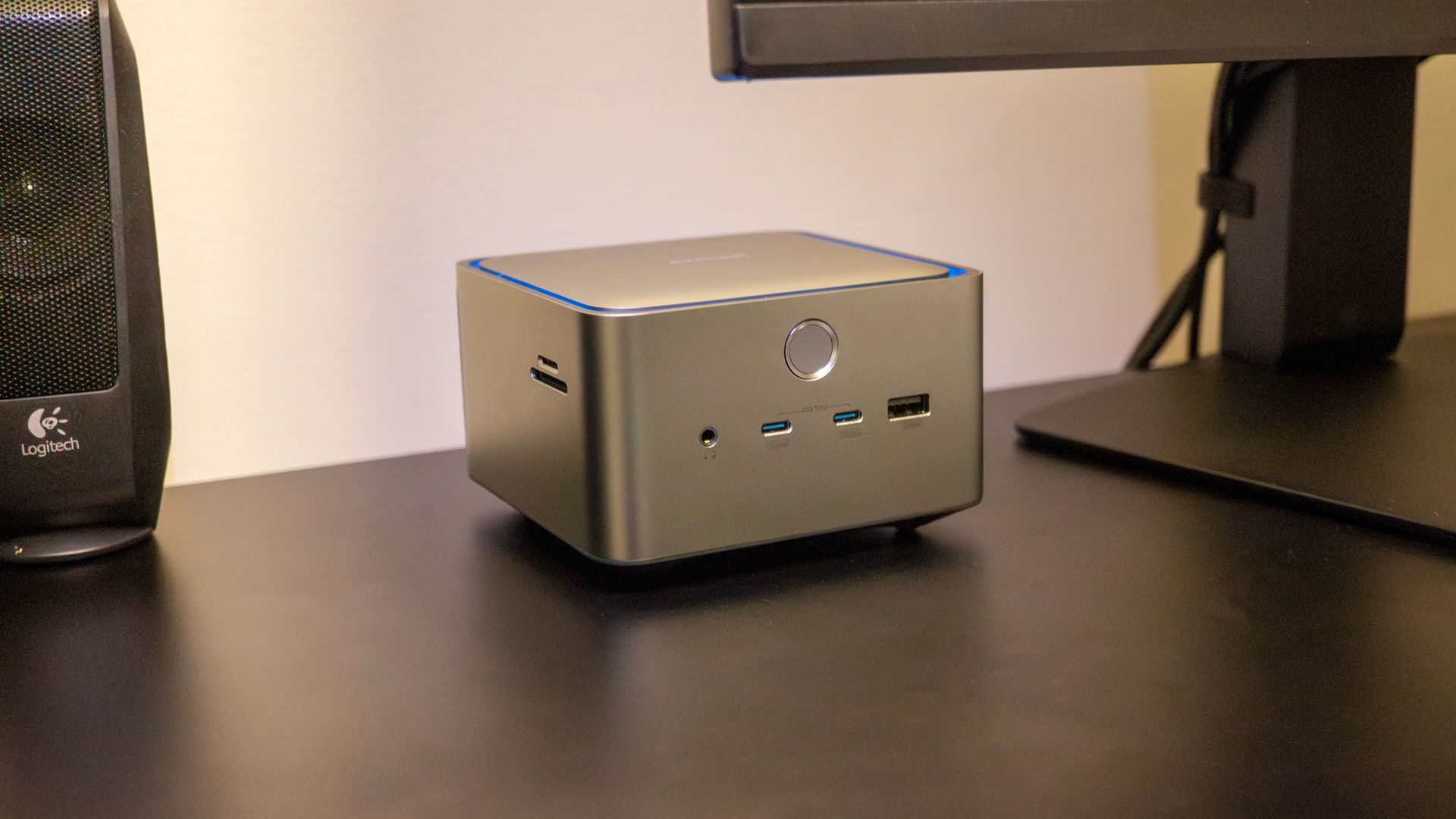
The front of the dock has the power button, two USB-C ports with 10Gbps speeds, a USB Type-A connector with 10Gbps, and a headphone/microphone combo audio jack. The USB-C ports can deliver a total output of 45W to the connected devices, so most phones, tablets, and other smaller devices should charge at full speed. It’s neat that the hub can replace a desktop charging station for your phone or tablet.
The power button has an ambient light strip to indicate the connection status, but you can turn the lights on or off by pressing the button once. Pressing the button for more than two seconds will power down the dock entirely.
Corbin Davenport / How-To Geek
The left side of the dock (with the power button facing front) only has the SD and microSD card slots. The microSD slot is a push mechanism with the card facing upwards, while full-size SD cards have to be inserted upside down. These are not SD Express slots, though, so they can’t read cards designed for the Nintendo Switch 2 and similar devices.
If the Anker Prime dock is connected to a laptop, it can charge the PC at up to 140W. That’s more than enough for any MacBook or PC ultrabook, but more power-hungry laptops (like gaming PCs with dedicated GPUs) might need to use their regular power adapter.
Displays: Depends on Your PC
The exact number and resolution of displays you can use with the Anker Prime dock will depend on your computer’s Thunderbolt support and graphics power. I recommend checking the dock’s user guide to get an idea of every supported configuration, but you generally get up to two external monitors.
Corbin Davenport / How-To Geek
A PC with Thunderbolt 5 can handle dual 8K@60Hz monitors or a single 4K@240Hz display with the Anker Prime dock. A MacBook with an M4 Pro/Max chipset can have dual 6K@60Hz screens or one 4K@240Hz screen. Computers with older Thunderbolt versions or devices that only support DisplayPort Alt Mode will have more limited resolutions and refresh rates. Anker notes that MacBook computers should be on macOS 15 or later, and Windows laptops with only Thunderbolt 3 won’t work at all.
I mostly used the dock with a single Samsung G70D 4K monitor running at a 44–144Hz variable refresh rate. That’s definitely not pushing the limits of this dock, but I didn’t have any problems with it.
Good Compatibility, With One Catch
The Anker Prime dock is designed to work with computers that support Thunderbolt 4, Thunderbolt 5, or USB4. I mostly used the dock with my M1 Mac Mini, where it was using the USB4 mode. The display output, SD card readers, USB ports, and other features all worked exactly as the computer’s own ports or when I used separate adapters.
There is one problem, though: if you connect a USB device to one of the downstream Thunderbolt ports, it seems to operate at USB 2 speeds instead of later USB 3 versions. When I connected my USB 3.2 Gen 2 external SSD enclosure, System Information on macOS says it’s on a USB 2.0 hub with a maximum link speed of 480 Mb/s. When I moved the drive to one of the hub’s 10 Gbps USB Type-A port, or one of the front USB-C ports, my Mac reported the correct 10 Gbps link speed.
That won’t be a problem if you’re connecting a webcam, keyboard, or other basic USB accessory to one of the Thunderbolt ports, but it’s a strange limitation. Hopefully, that’s something Anker can fix in a future firmware update, but there were no updates available as of the time of writing. If you need USB 3 speeds, don’t use one of the Thunderbolt ports.
I also tried the dock with an M4 Pro MacBook Pro over Thunderbolt 5, and a Lenovo Yoga Slim 7x over USB4, and the dock worked as expected with those laptops.
Should You Buy the Anker Prime TB5 Docking Station?
If you just need to charge your laptop at a desk while using a basic display, keyboard, and mouse, a regular USB-C hub under $50 might be enough. The Anker Prime dock and similar Thunderbolt/USB4 hubs are meant for multi-display configurations, fast LAN internet connections, external SSDs, and other devices where you need much more bandwidth.
Corbin Davenport / How-To Geek
If you definitely need a Thunderbolt 4 or 5 dock, the Anker Prime hub is a compelling option. Everything at my desk can go through one cable, I don’t have to dig out SD card adapters to transfer photos, and I can even charge my iPhone at full speed while it synchronizes and backs up to my Mac. The Thunderbolt ports not supporting full USB 3 speeds is a strange limitation, though.
The main catch with the Anker Prime hub is the $400 asking price. There are less expensive Thunderbolt 5 hubs, like the CalDigit E5 or OWC TB5 Hub, but they have fewer ports and different charging abilities. The closest competitor right now might be the UGREEN Revodok Max 213, which has similar ports and (as of the time of writing) costs $100 less than the Anker Prime.
The Anker Prime TB5 Docking Station is a great Thunderbolt dock, if you actually need all that bandwidth. A simple USB 3.2 or USB4 hub for a fraction of the price might be a better fit.
Ports
Thunderbolt, USB-C, USB-A, HDMI 2.1, DP 2.1, LAN
USB Power Delivery
140W
Power supply included
Yes
Dimensions
4.6 × 4.6 × 3.0 inches
This Thunderbolt 5-compatible dock has 14 ports, fast charging for connected accessories, and a compact cube design. It also works with Thunderbolt 4 and USB4, though your speeds and data bandwidth will be more limited.
