


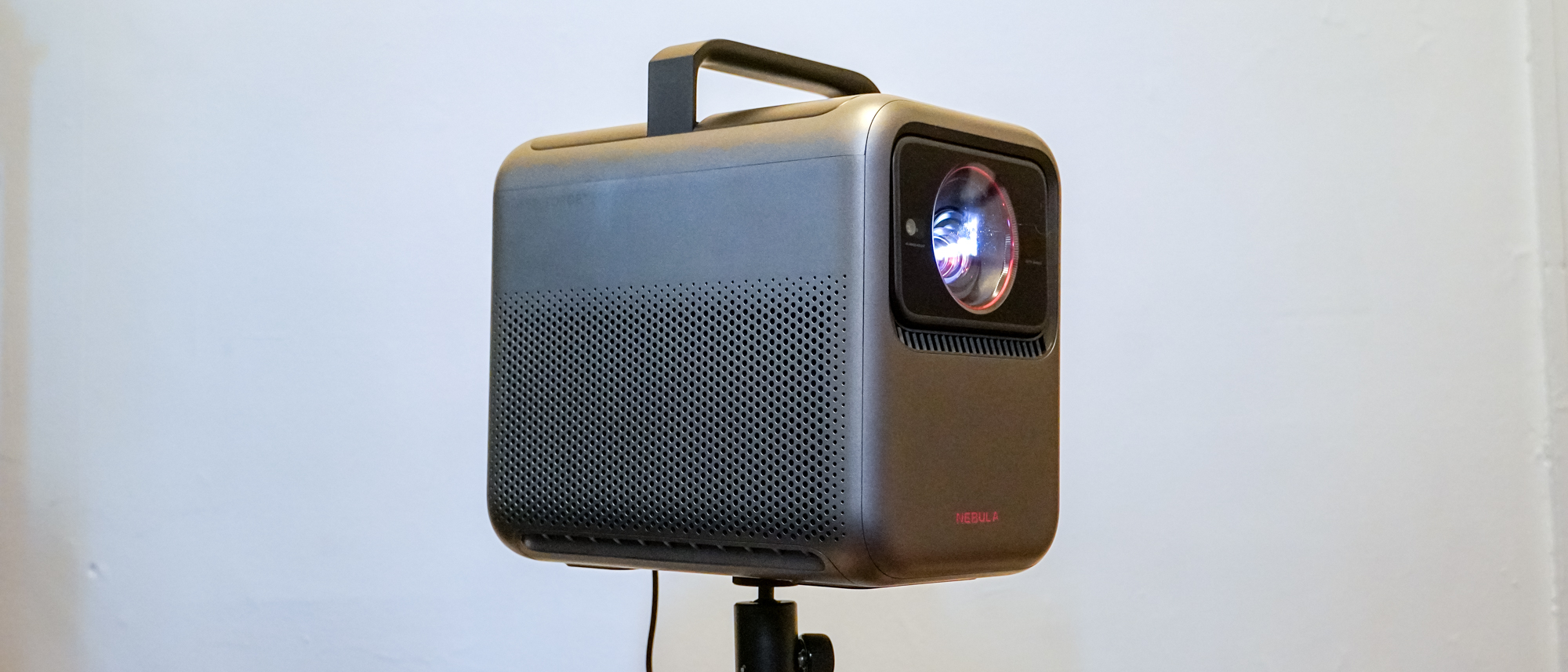
Anker Nebula X1 review: Specs
Price: $2999
Resolution: 4K
Lumens: 3500 ANSI
Audio: 2x15W + 2x5W
Light: RGB Laser
Projection: 0.47″ DLP
Screen size: up to 300 inches
HDR: HDR10, HLG, Dolby Vision
Refresh Rate: 60Hz
Ports: 2x HDMI 2.1 (1x eARC), 1x USB-A, 1x USB-C, 1x 3.5mm audio/optical Smart TV
Software: Google TV
Size: 11.1 x 7.3 x 9.7 inches
Weight: 13.7 lbs.
Lifespan: 30000 hours
The Anker Nebula X1 brings a lot to the table. Not only does it come swinging for the fences with a triple-laser projection system hitting 3,500 ANSI lumens, but it features Dolby Vision support, has Google TV baked in, features four internal speakers, and — the standout feature — mounts its internals on a motorized gimbal to adjust the aim of the projection while automatically framing the picture.
It’s an interesting machine, and it has strong fundamentals. When set up right, you can get an excellent picture out of it, and you should expect no less from a $2,999 projector. After all, it has to contend with the ever-so-slightly dimmer Hisense C2 Ultra.
As capable as it is, the Nebula X1 still has room to improve. The exciting gimbal loses some of its luster when considering that it can’t aim down at all, requires an unideal digital keystone anytime it’s used, and would have been better as a vertical lens shift mechanism instead. If you can live with those issues, the Nebula X1 still provides a strong option for a ready-to-move theater-in-a-box on account of its brightness and picture alone.
- Nebula X1 (Black) at Amazon for $2,549
Anker Nebula X1 review: Pricing and availability
The Anker Nebula X1 is a fairly pricey projector, though not unreasonable for the brightness it’s offering. It comes in at $2999, right in line with the MSRP of the Hisense C2 Ultra (though it has dropped down to as low as $2,500).
It launched May 21, 2025. Anker launched an accessory pack alongside it that includes a carrying case, two wireless speakers, and two wireless microphones for $999. But until June 20th, the accessory pack can be bundled with the projector for a total price of $3,298. The projector and accessory pack are available from the Anker Nebula store and Amazon.
Anker Nebula X1 review: Design
The Nebula X1 is a compact powerhouse bearing some resemblance to predecessors in the Nebula Mars and Nebula Cosmos line of projectors. It’s beefy for a portable projector, but it’s ready to move. Like its siblings, it has a top-mounted handle, but you wouldn’t know it at first — it hides the handle away, but a quick press will see it slowly rise up, and pressing it down will tuck it right back away.
(Image credit: Tom’s Guide)
It’s an impressive system for its ability to make all the adjustments on its own in a few seconds.
Where many projectors will have little legs or gimbal stands to help you adjust the angle of the projection, the Nebula X1 builds its lens and projection system into a motorized gimbal that can tilt 25-degrees up. The lenses also enable optical zoom for a throw ratio of 0.9:1 at the wide end and 1.5:1 at the long end, offering pretty flexible placement on the same level as the Hisense C2 Ultra.
Once it’s plopped down, the Nebula X1 relies almost entirely on internal smarts and mechanism to square away the image. Once powered up, it fires up a little red LED light show on the top panel and it will use its gimbal and cameras to scan up and down and find a clear space to project onto, digitally adjust keystone to keep the picture rectangular, and adjust focus. It can also be set to shrink the image down further to avoid obstacles and conform to a projector screen if you have one. It’s an impressive system for its ability to make all the adjustments on its own in a few seconds.
Image 1 of 2
(Image credit: Tom’s Guide)(Image credit: Tom’s Guide)
Though the vertical offset of the projection (compounded by the X1’s ability to only further aim up) means the Nebuila X1 should be set up low to the ground (e.g., coffee tables or the floor). And if the projection actually uses the gimbal to aim upward, it will inherently impact the quality of the image by requiring digital keystone adjustment that crops away some of the usable resolution.
(Image credit: Tom’s Guide)
While the Nebula X1 is easy to move, it’s not a completely portable projector like the Nebula Mars 3. It doesn’t pack an internal battery, so there’s no running away from a power outlet. The power brick and cabling that Anker does include can stretch a long way, though. A battery probably wouldn’t have been much use for the Nebula X1 anyway, as it’s a super-bright beamer promising 3,500 ANSI lumens.
(Image credit: Tom’s Guide)
Pumping out that much light from a small projector isn’t simple. The use of an external power brick likely helped make space for cooling inside the case and avoided adding another heat source to it. Anker has also opted for a liquid cooling system inside the X1, and it seems effective. Impressively, while beaming away at full brightness, the projector just whirrs, not kicking up an incredible racket of fan noise. It spouts out noticeable heat from the rear, so it won’t be comfortable to sit immediately behind.
(Image credit: Tom’s Guide)
The Nebula X1 offers a modest selection of ports along the upper edge of its backside. You’ll find the DC power connector alongside two HDMI ports, one of which supports eARC. These are next to a USB-A port, USB-C port (seemingly only for data transfer and power), and a 3.5mm jack that supports analog and optical audio.
(Image credit: Tom’s Guide)
Anker built four speakers into the Nebula X1: a pair of 15W woofers and a pair of 5W tweeters. These pump sound out the vented sides of the projector. Google TV is also built in.
Anker Nebula X1 review: Performance
HDR visuals look excellent. Bright elements can simply sizzle, as with the thrusters of the ships landing on Pandora during the intro section of “Avatar: The Way of Water.”
(Image credit: Tom’s Guide)
The contrast could still be stronger, as black levels aren’t quite tipping OLED levels, and the illumination of letter boxes (or any area left after keystone correction) is still easy to see. The projector is bright enough that it’s easy to get past those distractions, though, unless you’re simply staring at them.
(Image credit: Tom’s Guide)
With the projector’s 4K clarity, details impress even when stretching across sizable screen spaces. The fine textures constantly on display in “Dune” are still a delight to behold.
(Image credit: Tom’s Guide)
The high brightness of the projector also makes it much easier to enjoy all sorts of content at any time of day. I enjoyed wandering the world of Clair Obscur: Expedition 33 throughout the day without needing to draw the curtains. Most of the time, it was easy to see. Even as I explored the extremely dark Sinister Cave, I was able to push ahead with daylight entering the room. After the sun went down, the picture just got that much better, and the projector had the wiggle room to lower its brightness and still rock.
(Image credit: Tom’s Guide)
The Nebula X1 runs with a special picture mode by default, but this mode has unfortunate motion smoothing enabled. It also applies motion smoothing to its two Dolby Vision profiles. At its low setting, this isn’t as distracting, but it generally runs at a medium setting that has plenty of artifacts and introduces some stutter when it can’t quite figure out how to smooth the image.
(Image credit: Tom’s Guide)
Thankfully, it can be disabled, and motion looks quite good without it. This mode may be a more accurate picture mode, but for color lovers, it doesn’t have the widest gamut. Switching to the Vivid color profile expanded the color gamut considerably.
(Image credit: Tom’s Guide)
While projecting, the Nebula X1 is not a projector you want to get in front of. The bright lasers are a danger to eyeballs. Like many other home theater projectors, the X1 has a safety system to detect people and animals moving in front of the projector and dim the projection. This safety system is mixed, sometimes it seems quite reactive, but other times it will let me put my head into the corner of the screen without turning the lights down.
Anker Nebula X1 review: Test Results
To put it through its paces, the Nebula X1’s brightness measurements were taken with a light meter and ANSI test pattern. A Spyder X2 Ultra colorimeter was used alongside DataColor’s software and a 1.1-gain projection screen for color measurements.
(Image credit: Tom’s Guide)
This level of brightness can actually let the Nebula X1 hold up in rooms with lights on or daylight coming in.
Once tested, the Nebula X1 didn’t disappoint when it came to brightness. Anker promised 3,500 ANSI lumens, and I measured it at 3,491 lumens — respectably close to its rating, and pretty much spot on if you account for margin of error. This level of brightness can actually let the Nebula X1 hold up in rooms with lights on or daylight coming in. And the Nebula X1 achieves this without a special picture mode that unforgivably tints the picture.
Contrast is also fairly strong. Measuring brightness for a fully white image and comparing it to a fully black projection, the projector managed a 1311:1 FOFO contrast ratio. That’s within spitting distance of the Hisense C2 Ultra’s 1330:1.
(Image credit: Tom’s Guide)
Displaying a checkerboard pattern, contrast fell to 44.7:1, and with two white boxes in the corners and an otherwise black screen, contrast slipped back up to 128.5:1, lagging behind the Hisense C2 Ultra in both cases. It’s possible different picture profiles and auto-contrast and iris settings could boost these results further, but these results came from stock picture settings.
The Nebula X1 uses a triple-laser light source, which I’ve seen work wonders in other projectors. But Anker appears to temper its brilliance in some cases: The main Nebula Master profile only covered 88% of the DCI-P3 color space and 68% of the Rec.2020 space, well below the projector’s rating of 110% Rec.2020 coverage.
(Image credit: Tom’s Guide)
However, switching over to the Vivid picture profile, DCI-P3 gamut steps up to 92% and Rec.2020 leaps up to 87% coverage.
The projector is likely just not oversaturating colors in an attempt to maintain color accuracy. It’s certainly fun to see the brilliance of RGB laser systems, but Anker’s not wrong to clamp the color in most cases.
Anker Nebula X1 review: Audio
You can get pretty full sound out of the Nebula X1, but you won’t get the complete cinematic experience. While the projector combines a pair of woofers and a pair of tweeters to perform well across a range of frequencies and provide considerable volume, it doesn’t have the deep, sub-bass rumble that can bring movies to life.
It simply, and unsurprisingly, comes up short there.
(Image credit: Tom’s Guide)
It still deserves credit for its sound, however. It’s punchy and clear. And pretty much no projector is going to offer deep sub-bass anyway.
The projector’s native support for a pair of special external speakers is neat in theory, and they do sound better than the projector alone, but I was still unimpressed. They claim to offer 4.1.2 surround sound, but as far as I can hear, they aren’t enabling much beyond basic stereo, and in my testing, I experienced them struggling with their connection intermittently.
The height channels don’t seem to matter much, as they are just upmixing from the basic source audio — they don’t present to the system as Dolby Atmos-compatible or anything to receive proper height audio, and it shows.
The fact that they largely disable the projector’s onboard speakers seems like a waste. The projector will still play bass, but it doesn’t have the depth to serve as a real subwoofer anyway. It could have better served as a powerful center channel instead.
With the high price of the accessory pack, they really fail to impress — plenty of Bluetooth speakers would do a similar job at a fraction of the price.
Anker Nebula X1 review: Gaming
Gaming on the Nebula X1 wasn’t quite as impressive as some other projectors you can get in its class. It caps out at 60Hz, so there’s no bumping to a lower resolution for faster refresh rates like the Hisense C2 Ultra allows. Not to say 60Hz is bad, and 4K gaming still looks great at this speed, but the option to go faster never hurts.
The default picture settings won’t do for gaming, though, so change those ASAP. The latency is simply too high, sitting at over 150ms. I measured this with a timecode mirrored on both a 240Hz OLED monitor and the projector and a camera set to a 1/1000-second shutter speed to read how many milliseconds the projector’s timecode was behind the monitor’s.
(Image credit: Tom’s Guide)
The Nebula X1 has a pair of different gaming modes with the aim to reduce latency from picture processing. I found the main one good enough to get through some tough fights in Clair Obscur: Expedition 33 that required a lot of time-sensitive dodging and parrying, though the roughly 50ms of latency wasn’t negligible and required a little adaptation after coming from an OLED gaming monitor. This 50ms measurement was also with no keystone applied, so it’s possible using keystone could worsen the results.
The projector can completely disable even more processing (including keystone) to further lower latency, but it still was subtly detectable, only dropping to 46ms in my measurements. The mode also essentially requires a perfectly aimed projection, and thereby makes the special optical system pointless.
Anker Nebula X1 review: Smart TV Interface
You’ll get Google TV baked into the Nebula X1 with support for plenty of streaming services and a simple user interface. That said, the system is running on just 2GB of memory, and it’s easy to feel the limitations there. Navigation can be slow, especially at the start of playback.
(Image credit: Tom’s Guide)
This can make everything from pulling up picture settings, adjusting volume, or even changing inputs a slow and tedious process.
The X1 can be set up as a basic projector without the full array of features of Google TV, which may help it operate more smoothly. But this will require external video sources. And with just two HDMI ports, that may be similarly tedious if you have multiple devices you want to play video from.
To the Nebula X1’s credit, it provides fairly deep settings menus for the picture. It has plenty of picture profiles, and it lets you mess around with them to get your desired look.
(Image credit: Tom’s Guide)
One neat aspect of the projection settings is that the X1 knows how far it is from a screen. So if you adjust the zoom manually, it will tell you just how big the diagonal of the projection is. It may not be the most important detail, but it’s fun when you want to compare it to common TV screen sizes (and see how readily the projection can leap beyond them).
Anker Nebula X1 review: Remote
The remote control itself is a compact, simple Google TV remote. It’s far from the most effective I’ve come across as a result of its minimalistic approach to buttons.
You get your typical Google TV navigation wheel, Home and Back buttons, a settings button, a Google Assistant button and a power button. There’s also volume controls and a mute button, but they are confoundingly positioned — the mute button isn’t next to the volume buttons, and the volume buttons aren’t next to each other.
Unless you memorize where they are and feel them out, you can’t quickly make adjustments to them.
(Image credit: Tom’s Guide)
Beyond those controls, the remote has shortcuts to YouTube, Netflix, and Prime Video, and it has a button for image adaptation.
A custom shortcut button and an input selection button would have helped round out the remote. On the bright side, the remote has motion-activated backlighting for most of its buttons, making it easy to see them in a dark home theater space.
Anker Nebula X1 review: Verdict
The Anker Nebula X1makes great use of its triple-laser projection system to deliver a bold and bright image that exceeds every other projector I’ve tested for Tom’s Guide. It may not push the color to the limit, but its palette is still rich and provides better out-of-the-box accuracy than its rivals. The image is paired with powerful audio that can definitely serve in a pinch when dedicated audio gear isn’t available.
The high-tech motorized gimbal system of the projector is a neat concept and does simplify the process of plunking down the projector and getting to watching, but it’s an expensive addition. It also doesn’t support downward tilting, and it will basically always require digital keystone, which is never optimal.
As it stands, the Nebula X1 is a worthy rival to the Hisense C2 Ultra. It goes a bit brighter, though it lags slightly behind in other aspects. It has enhanced portability with its carrying handle, and Google TV offers more streaming options than Vidaa OS, but Hisense can run games faster at 240Hz and its OS runs more smoothly.
If you want the best brightness and a better built-in smart platform, the Nebula X1 is a good projector — but its price and stiff competition from Hisense keep it from a perfect score.
Nebula X1: Price Comparison
