


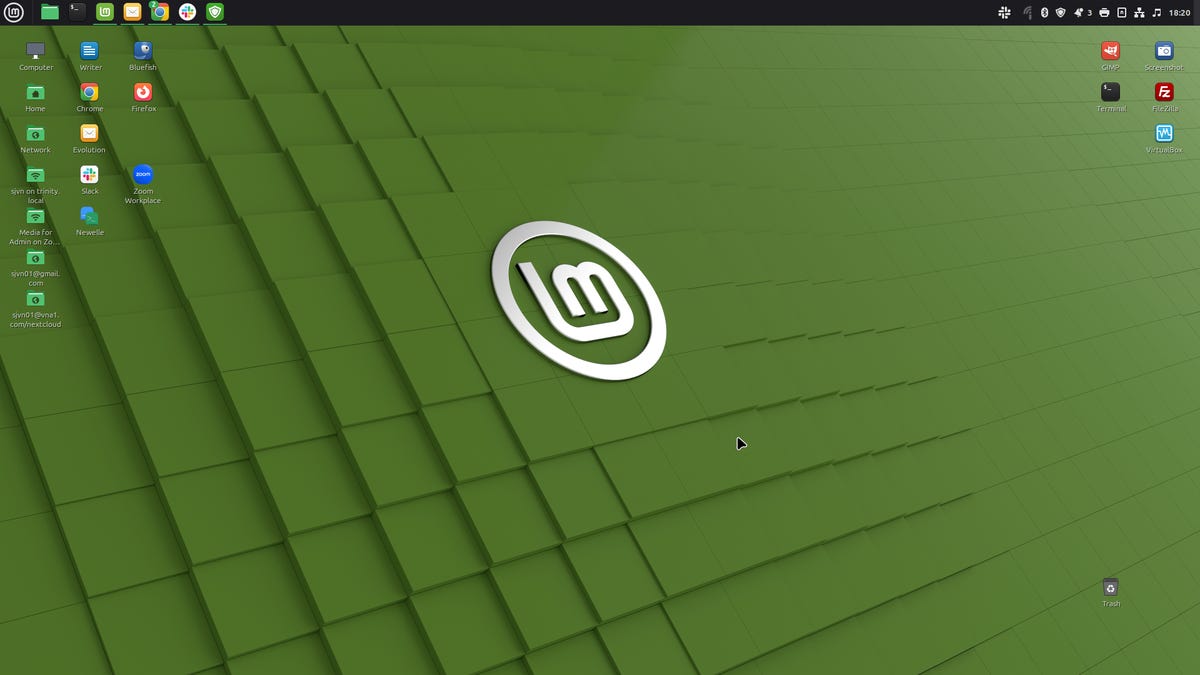
My highly customized Linux Mint 22.2 Zara desktop runs like a charm.
sjvn
Follow ZDNET: Add us as a preferred source on Google.
ZDNET’s key takeaways
- Linux Mint Zara is an excellent desktop for both Linux and Windows users looking for a change.
- Linux Mint 22.2 comes with numerous modest improvements.
- You can run the new Mint without worrying about needing to make major updates.
Clement “Clem” Lefebvre and the rest of the Linux Mint team have done it again. With the release of Linux Mint 22.2, also known as Zara, users get a distribution that’s easy to use and packed with helpful improvements to make the daily desktop experience better than ever.
As a long-time Linux Mint fan, I’m delighted with this latest release. As in the last version, Linux Mint 22.1, codenamed Xia, the release is based on the Ubuntu 24.04 Long Term Support (LTS) Linux distro. The new Mint has the usual desktop choices, including the default Cinnamon 6.4 interface. It also comes with the latest Xfce 4.18 and MATE 1.26 environments.
Also: Ready to ditch Windows 10? Don’t let these 7 Linux myths stop you
While there have been some reports that Mint 22.2 now uses the Linux kernel 6.14 by default, that’s not quite true. If you upgrade your system, like I did, the standard Mint Linux kernel remains the LTS Linux kernel 6.8, specifically 6.8.0-79. That’s because 6.14 is only supported until February 2026, while 6.8 is supported until April 2029.
However, if you install the new Mint for the first time, you will get the 6.14 kernel. That’s good news if you have a newer PC or are a gamer; the newer kernel supports more of the latest hardware, and the improved NTSYNC driver boosts the performance of Windows games and programs.
Also: The easiest way to try out Ubuntu Linux
But if you want to move from one kernel to another, go to the Mint Update Manager and select “View” -> “Linux Kernels” from the menu. With that stage complete, you can reboot your computer and choose “Advanced options” in the Grub menu. From here, you can pick a new kernel and your computer will boot with that one. I don’t recommend beginners try this approach, though. It requires some experience to shift kernels successfully. For most people, the default kernel will be fine.
sjvn
Moving on, for the first time, Linux Mint has fingerprint authentication. Thanks to the new Fingwit app, you can log in, unlock your screensaver, and run crucial root commands with just a touch. Mint 22.2 users with a fingerprint scanner on their laptop no longer need to fiddle with passwords.
Besides the 6.14 kernel hardware support, Mint 22.2 ships with the latest Mesa graphics stack. This stack enables you to get the most out of your graphic-heavy programs.
Also: How to decide between Linux and MacOS – if you’re ready to ditch Windows
Aesthetics matter, and Zara’s theming overhaul is clear the moment you use the desktop. The Mint-Y theme rocks a cooler gray palette, improved dark mode, and true GTK harmony across Flatpak and Adwaita apps. In addition, system-wide accent colors finally carry over into third-party apps, blurring the lines between native and containerized software. Even the login screen gets a modern makeover, complete with avatars and stylish blur effects.
Linux Mint isn’t just playing catch-up; it’s also pushing forward on cross-platform convenience. The Sticky Notes app now synchronizes your notes between Linux and Android devices, and Warpinator file transfer enables you to transfer files to Windows PCs and iPhones easily.
Of course, the usual Mint refinements are also here. A nimbler Software Manager and Update Manager, smarter file renaming tools, and updated packages for Firefox and Thunderbird, still delivered as good old DEB files, not Snaps. That said, if you like Snap applications, as I do, you can still set Mint up to support Snap application installation.
As always, Mint comes with free top-of-the-line end-user programs, with everything you need for home or office work. Specifically, Mint comes with LibreOffice 24.7.2 for office work and homework, Firefox 142 for web browsing, Thunderbird 128.14 for email and calendaring. If you’re a gamer, Linux Mint supports Steam, which lets you run games just like you would on Windows. All of this, including Mint, won’t cost you a thin dime.
Also: This new Linux desktop is almost a dead ringer for OS X
You’d rather run another program? No fuss, no muss. You can use Mint’s Software Manager to pick whatever program you want. For example, I prefer Chrome for web browsing and Evolution for email. Mint makes these choices simple. You use the Software Manager to search for a program, download it, and install it with a click. Anyone who tells you it’s hard to install Linux programs hasn’t touched the operating system in the 2020s.
I’m running the new Mint on my faithful 2020 Dell Precision 3451, powered by an Intel 8-core 3GHz i7-9700 CPU. The PC also includes 16GB of RAM and a 512GB SSD. I’m also using Mint 22.2 on my 2024 HP Pavilion Desktop TP01-223. This computer has an eight-core 3.8 GHz AMD Ryzen 7 processor, 16GB of RAM, and a 1TB Solid-State Drive (SSD). It also has integrated AMD Radeon Graphics. On both PCs, Mint runs like a well-tuned Porsche.
Either machine is more computer than Mint needs. You’re good to go if your PC has 2GB of RAM and 100GB of storage, any graphics card, and a monitor that supports a 1024×768 resolution. If you’re unsure about using Mint, consider grabbing a PC from a second-hand store to try it out.
Also: This lightweight Linux distro makes switching from Windows 10 easy
If you’re already running Mint, you can upgrade to 22.2 via the Update Manager. There’s no drama, no risky transitions; just solid updates and long-term reliability. If you want to try Mint on a new computer, you must download an ISO, burn it to a USB stick, and install it using the instructions in my story about how to install Mint on a Windows PC.
In a world where some Linux distros chase the bleeding edge, Linux Mint 22.2 “Zara” is a reminder that thoughtful refinement can be revolutionary in its own right. For those who want a Linux desktop that works and keeps getting better, release after release, Zara is the upgrade you’ve been waiting for.
