

Close Menu

    Subscribe to Updates

    Get the latest creative news from FooBar about art, design and business.

    What's Hot

    Meridian Ventures launched $35M fund to back MBA-deferred founders

    May 15, 2026

    Lovable just backed a company that’s looking to bring vibe coding to hardware

    May 14, 2026

    Clio’s $500M milestone arrives just as Anthropic ups the ante

    May 14, 2026
    Facebook X (Twitter) Instagram
    Tech Pulse
    • Meridian Ventures launched $35M fund to back MBA-deferred founders
    • Lovable just backed a company that’s looking to bring vibe coding to hardware
    • Clio’s $500M milestone arrives just as Anthropic ups the ante
    • Anduril raises $5B, doubles valuation to $61B
    • Kevin Hartz’s A* just closed its third fund with $450M
    X (Twitter) Pinterest YouTube LinkedIn WhatsApp
    Techurz
    • Home
    • AI Systems
    • Cyber Reality
    • Future Tech
    • Disruption Lab
    • Signals
    • Tech Pulse
    Techurz
    Home - Guides - A Beginner’s Guide to Watching Twitch on Roku
    Guides

    A Beginner’s Guide to Watching Twitch on Roku

    TechurzBy TechurzJune 28, 2025Updated:May 12, 2026No Comments3 Mins Read
    Share Facebook Twitter Pinterest LinkedIn Tumblr Reddit Telegram Email
    A Beginner's Guide to Watching Twitch on Roku
    Share
    Facebook Twitter LinkedIn Pinterest Email


    The Download

    • Visit my.roku.com/account/add in a web browser and log in to your Roku account.
    • To watch Twitch on Roku, enter twitchtv or C6ZVZD as the access code.
    • If those methods don’t work, mirror your phone or computer screen to supported Roku devices.

    This article explains how to watch Twitch on Roku. There is no official Twitch channel on Roku, but you can still watch your favorite streamers live with a workaround.

    How to Watch Twitch on Roku

    The official Twitch channel is no longer available in the Roku Channel Store, but there are two “non-certified” channels you can add instead. This works by entering a special app access code. Here’s how to do it:

    1. Open your Roku account in a web browser and then select Add beta app with code.

    2. Type twitchtv, and then select Add app. This will install the Unofficial Twitch.tv app.

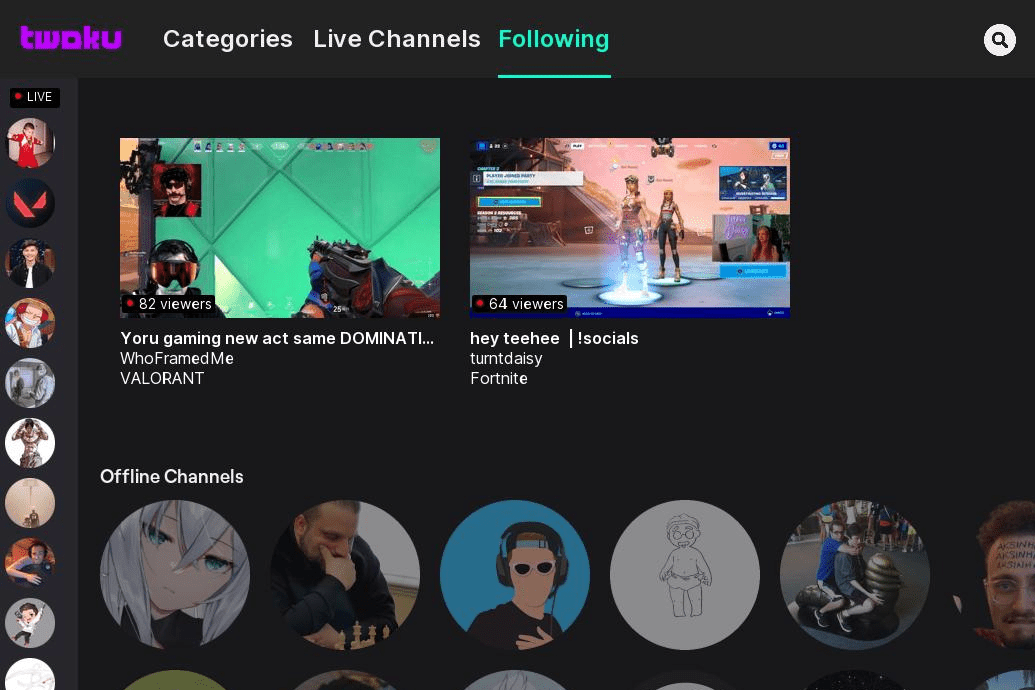
      If you’d rather install Twoku on your Roku, which is another method for linking your Twitch account and watching your favorite streamers, enter C6ZVZD.

    3. Select Ok, I understand to agree to proceed despite Roku’s warning.

      It’s generally safe to install uncertified Roku channels with a good reputation, but some risk is involved. If Roku determines you have added a channel that breaks their terms and conditions, you may lose the ability to add uncertified channels in the future. Your Roku would still work in that event, but you would only be able to use official channels from the Roku Channel Store.

    4. Click Yes, add app.

    Watch Twitch on Roku Through Screen Mirroring

    Screen mirroring or casting works by playing Twitch on a phone, tablet, or computer and then casting or screen mirroring to your Roku. Windows PCs use the wireless display feature, Macs and iPhones use AirPlay, Androids use screen mirroring, also called screencast, and Samsung devices use Smart View.

    Some Roku devices aren’t compatible with screen mirroring, and some devices can’t cast to Roku. Roku has a list of devices that support screen mirroring. If you can’t mirror to your Roku, try installing an unofficial Twitch channel directly on your Roku using the method described above.

    To use Twitch with Roku through screen mirroring, you first open the Twitch app or website on your device. You then use wireless display, AirPlay, or screen mirroring to discover your Roku. Your device will search for available streaming devices, locate your Roku, and you can then select your Roku from the list of options.

    When you select your Roku through your device’s wireless display, AirPlay, or screen mirroring settings, your Roku will mirror your device’s display. You continue to control Twitch through your device, and you can select the full-screen option to view Twitch in full-screen mode on your television.

    FAQ

    • How do I stream on Twitch from Xbox?

      To use Twitch live streaming on an Xbox, go to the Microsoft Store on your Xbox One and download the Twitch app. Next, connect your Twitch and Xbox accounts: Log in to Twitch on your computer, then open Twitch on your Xbox and select Log In. A code displays; enter the code into the Twitch activation website.

    • How do I go live on Twitch?

      To stream live on Twitch from a PC or Mac, open the Twitch Studio application and log in to your account. Select Get Started and follow the prompts to configure your settings. When you’re satisfied, select Done > Start Stream.

    Thanks for letting us know!

    Get the Latest Tech News Delivered Every Day

    Subscribe

    Tell us why!

    Other

    Not enough details

    Hard to understand

    beginners Guide Roku Twitch watching
    Share. Facebook Twitter Pinterest LinkedIn Tumblr Email
    Previous ArticleNYT Connections hints and answers for Sunday, June 29 (game #749)
    Next Article ChatGPT was downloaded 30 million times last month – but its user base data is more shocking
    Techurz
    • Website

    Related Posts

    Cyber Reality

    The MSP Cybersecurity Readiness Guide: Turning Security into Growth

    November 1, 2025
    Cyber Reality

    How to use ChatGPT: A beginner’s guide to the most popular AI chatbot

    October 17, 2025
    Cyber Reality

    Dull but dangerous: A guide to 15 overlooked cybersecurity blind spots

    October 14, 2025
    Add A Comment
    Leave A Reply Cancel Reply

    Top Posts

    College social app Fizz expands into grocery delivery

    September 3, 20252,288 Views

    A Former Apple Luminary Sets Out to Create the Ultimate GPU Software

    September 25, 202516 Views

    The Reason Murderbot’s Tone Feels Off

    May 14, 202512 Views
    Stay In Touch
    • Facebook
    • YouTube
    • TikTok
    • WhatsApp
    • Twitter
    • Instagram
    Latest Reviews

    Subscribe to Updates

    Get the latest tech news from FooBar about tech, design and biz.

    Most Popular

    College social app Fizz expands into grocery delivery

    September 3, 20252,288 Views

    A Former Apple Luminary Sets Out to Create the Ultimate GPU Software

    September 25, 202516 Views

    The Reason Murderbot’s Tone Feels Off

    May 14, 202512 Views
    Our Picks

    Meridian Ventures launched $35M fund to back MBA-deferred founders

    May 15, 2026

    Lovable just backed a company that’s looking to bring vibe coding to hardware

    May 14, 2026

    Clio’s $500M milestone arrives just as Anthropic ups the ante

    May 14, 2026

    Subscribe to Updates

    Get the latest creative news from FooBar about art, design and business.

    Facebook X (Twitter) Instagram Pinterest
    • About Us
    • Contact Us
    • Privacy Policy
    • Terms and Conditions
    • Disclaimer
    © 2026 techurz. Designed by Pro.

    Type above and press Enter to search. Press Esc to cancel.