


Summary
- UnifyDrive UT2 is a unique portable NAS that will mainly appeal to creative professionals on the go.
- The NAS’ hardware and software are fairly well-made, though there are some unfortunate quirks.
- Some of the UnifyDrive’s UT2’s features feel out of place, but the built-in media player is great.
At a conceptual level, the UnifyDrive UT2 is really fantastic. It’s the first truly portable NAS device I’ve ever seen, and it’s packed full of travel-friendly features that should appeal to photographers, videographers, or other media professionals. Unfortunately, it’s got some flaws and quirks that limit its usefulness, and at $600, it may be better to buy a small laptop or tablet instead.
CPU
Rockchip RK3588
Memory
8GB LPDDR4 (Soldered-on)
Drive Bays
2 x M.2 NVMe 2280
Ports
SD Card, CFexpress, HDMI, USB-C x 2, 2.5Gb Ethernet, USB-A
The UnifyDrive UT2 is a feature-rich portable NAS solution with automatic SD card and CFexpress backup capabilities, a built-in media player for TVs and phones, an internal battery, and other compelling features. It’s a unique product for on-the-go creative professionals, though the price of entry is pretty steep.
Pros & Cons
- Travel-friendly design is great for creatives on the go
- Automatic SD and CFe card backup capabilities
- The mobile and desktop apps feel very competent
- Built-in media player lets you take your favorite shows and movies anywhere
- 60-minute battery life is good for photo backups but insufficient for anything else
- Locked-down ARM platform and operating system limit the NAS’ capabilities
- It costs $600, and that’s before you buy the SSDs
See Our Process
How We Test and Review Products at How-To Geek
We go hands-on with every product to ensure it’s worth your time and money.
Price and Availability
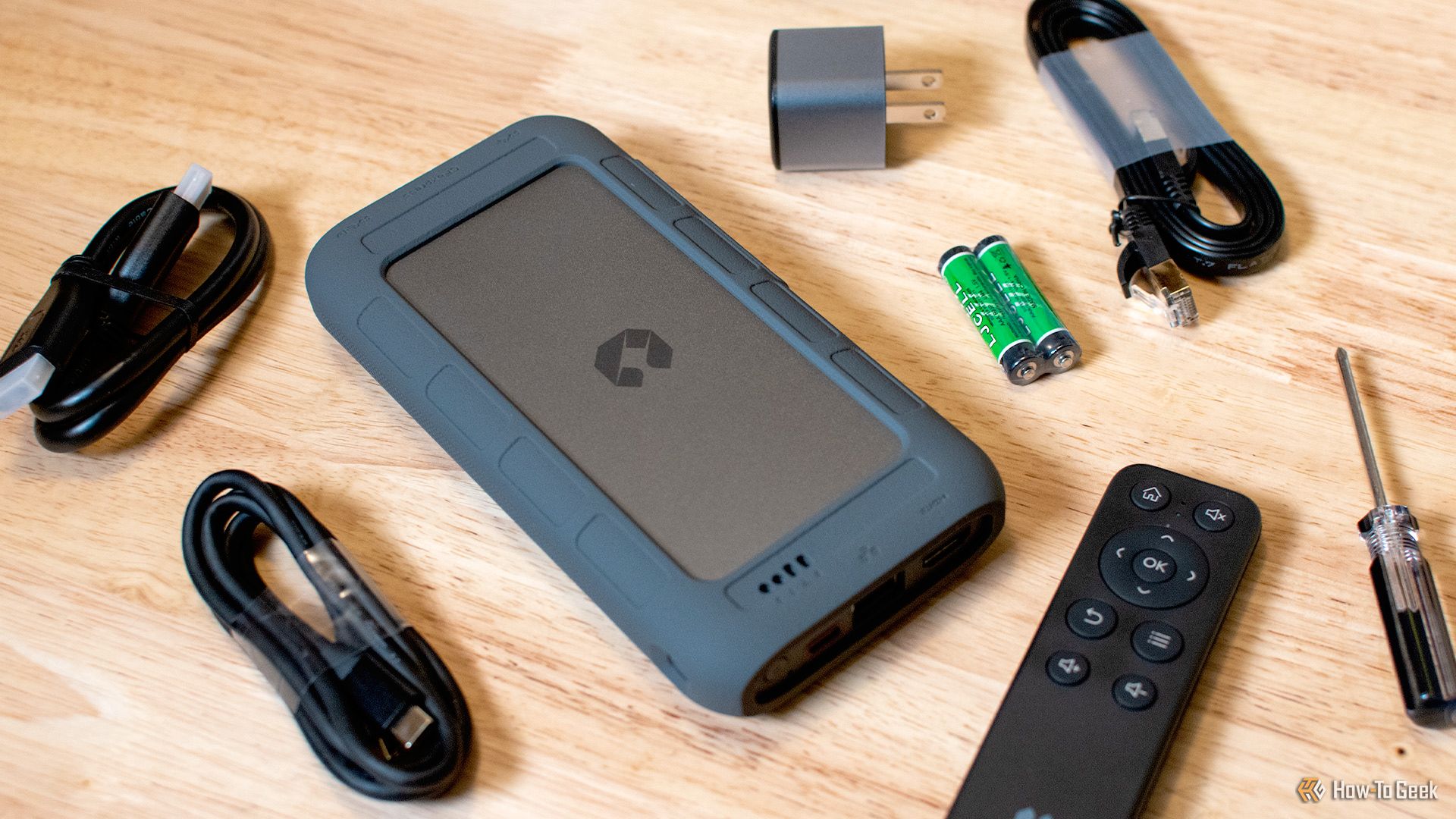
The UnifyDrive UT2 costs $600 and is sold exclusively at the UnifyDrive website. It comes with a power adapter, a USB-C cable, an HDMI cable, an Ethernet cable, and a remote control. That said, you’ll need at least one M.2 NVMe SSD to use this product.
CPU
Rockchip RK3588
Memory
8GB LPDDR4 (Soldered-on)
Drive Bays
2 x M.2 NVMe 2280
Ports
SD Card, CFexpress, HDMI, USB-C x 2, 2.5Gb Ethernet, USB-A
OS
UDOS
Dimensions
6.8 x 3.5 x 1.1 Inches
Weight
0.8 lbs
Okay, What The Heck Is This Thing?
Andrew Heinzman / How-To Geek
I chose to review the UnifyDrive UT2 on a whim. Honestly, the only thing that I knew about the product before receiving it was the basic sales pitch; it’s a truly portable NAS with an internal battery, and it can play movies when you plug it into a TV. But there’s actually a lot of nuance here, so I feel the need to clarify some things before we go forward with the rest of the review.
The UnifyDrive UT2 is, at its core, a portable storage and data redundancy solution for creative professionals. This appeals to me because I have to shoot and edit a lot of photos for work. Shooting is easy, and editing isn’t too bad either, but the process of transferring photos to my computer and picking out the “good ones” is very time-consuming and storage-intensive. UnifyDrive UT2 can alleviate this problem, at least to some extent, because it’s a portable server with automatic SD card backup. I can plug my camera’s SD card into the NAS, sort through the photos on my phone while I’m riding in an Uber or waiting for lunch, and dive right into editing when I sit down at my computer.
Of course, I can also use the UnifyDrive for on-the-go Time Machine backups, which gives my anxious reptile brain a little peace of mind.
But the purpose of this device isn’t so clear when you read reviews or look at the UnifyDrive website. Its creative-focused features are muddied by some mundane-yet-useful functionality, such as the ability to plug the NAS into a TV and use it as a portable movie player, or the option to use it as a Google Photos replacement for your smartphone. I’m glad that these features are present, but I wouldn’t buy the UnifyDrive UT2 for media playback or smartphone backup alone. Other products are better suited for these mundane tasks—you’ll see what I mean later.
Hardware
While it may look like a LaCie HDD, the UnifyDrive UT2 actually utilizes solid-state storage. It’s got a pair of M.2 NVMe 2280 slots and supports a maximum 16TB of storage. And although you can treat the UnifyDrive UT2 like a wired external drive, it’s got all the guts of a home server—a Rockchip RK3588 eight-core processor with Mali-G610 MC4 graphics, 8GB of LPDDR4 memory (non-upgradable), a 2.5 GbE port, an HDMI jack, plus SD card and CFexpress slots.
But this is a portable NAS. And, as such, it features some unique hardware, namely a Wi-Fi 6 modem and an internal battery. You can connect the UnifyDrive UT2 to your phone or laptop without a wired internet connection or a power source. And although the battery life is limited to about 40 minutes (the manufacturer says 60 minutes, but it’s definitely less than that), I’ve found this to be perfectly adequate for SD card backups, file transfers, and other creative work. (You can run the NAS off an external power bank if needed. It sips electricity, the ARM chipset is fairly efficient.)
I’m impressed by the amount of hardware that’s packed in this device, as well as the lightweight build. It clocks in at just 0.8 pounds, and you can take the weight down to just 0.6 pounds if you remove the NAS’ silicone bumper.
That said, the SD card slot in this unit feels pretty cheap—it’s not spring-loaded, and it isn’t flush with the NAS’ chassis, so inserted SD cards stick out a bit. It’s not a problem when you’re sitting at a desk, but it feels like a missed opportunity in terms of portability. Ideally, I’d be able to toss the UnifyDrive in my bag while it’s copying data from an SD card, but I’m not comfortable doing so because the SD card slot just doesn’t feel robust enough. (Oh, the SD card slot is upside-down, too. I wish that the slot took cards in a label-up orientation, which would make me less likely to shove the card in the wrong way.)
I’m also disappointed by UnifyDrive’s decision to use non-upgradable, soldered-on memory. While 8GB of LPDDR4 RAM is fine for basic tasks like file transfer or media playback, it proves to be a limitation when running Docker containers or utilizing the UnifyDrive UT2’s Android VM—yes, that’s a built-in feature, we’ll get to it soon.
A Competent Mobile App
I’ve reviewed consumer tech products for a while now, probably about 7 years. And while I love playing with new toys, I hate most of the software that I come across. Half-baked NAS operating systems, Bluetooth headphone apps that look like they were vibe coded by a five-year-old, and the list goes on. Even when dealing with big brands, crappy software is often the norm.
While UnifyDrive’s software is far from perfect, it’s surprisingly polished and feature-rich. The smartphone app, available on Android and iOS, is easy to navigate and offers automatic photo backups, a gallery with AI-powered photo recognition and natural language search, media streaming playback, file management, and a range of options that let you manage the NAS without sitting at a desktop computer. There’s even a “Cloud Backup” feature, but it can only upload to Google Drive and OneDrive at the time of writing.
To be clear, I’m not saying that this app is perfect—it got on my nerves more than once. I hate that you have to log in and out just to set up Wi-Fi or WLAN Hotspot connectivity (which allows you to access the UnifyDrive without a wired Ethernet connection). The iPhone app keeps asking if it can access my MacBook’s clipboard, which is weird and annoying (maybe this is Apple’s problem), and the “Photos” thumbnail at the top of the app doesn’t always load in a timely manner.
UnifyDrive also hides some very basic functionality within the smartphone app (and desktop app), which strikes me as odd. I don’t really understand why automatic SD card and CFexpress backup are disabled by default. The same goes for Flash Drive Mode, which lets you transfer files to the UnifyDrive over a USB connection (as if it’s a run of the mill SSD). Though, to be fair, some people may want to adjust the automatic SD card or CFexpress backup behavior to filter out certain file types, and the Flash Drive Mode needs you to manually allocate a portion of your storage, so maybe these inelegant quirks are justified.
Fun at the Desktop
UnifyDrive’s desktop app is just a web wrapper. But it lets you access all the UnifyDrive’s features in a desktop environment, so it’s more enjoyable to use than the mobile app, especially if you need to shift some files around. More notably, the desktop app allows you to set up Docker containers—UnifyDrive doesn’t have a built-in app store, so Docker is the only way to add new functionality to the NAS.
I’m honestly kind of surprised by the inclusion of Docker, and I hope that people who are smarter or more desperate than me can find a good use for it. The problem here, of course, is that the NAS uses a mobile ARM chipset with just 8GB of RAM. It doesn’t have a ton of processing power, and the CPU architecture places a hard limit on what apps you can run. I briefly spun up Jellyfin in a container, but it was brutal on the UnifyDrive UT2’s CPU and was unwilling to transcode anything. (A native ARM application would’ve worked better, obviously.)
There’s also a very weird, very unusual tool on the UnifyDrive desktop called “Virtual Device.” It’s an Android VM—it lets you virtualize six smartphones simultaneously. I’m seriously struggling to understand why this feature is here, but it appears to be a popular thing in China where the UnifyDrive UT2 is sold as the Ji Kongjian T2. Oh, yeah, now’s a good time to clarify that the UnifyDrive UT2 is not a “new” device. That’s why the app and desktop UI are so mature.
Anyways, I fired up an Android VM and didn’t really find any uses for it. The VM doesn’t come with any Google services, which is understandable, so you have to download apps through a third-party app store (APKPure comes preloaded). I guess that you could use this VM to watch TikToks on your desktop monitor, but I can’t think of any real uses beyond running bots or automated scripts. It’s an odd thing to include in a product that should be laser-focused on file storage and creative work.
While I’m on the desktop, now’s a good time to mention the UnifyDrive’s Flash Drive mode. You can use it like an external drive by plugging it into your computer via USB-C, but only after you’ve allocated a flash storage pool in the mobile or desktop app. Frustratingly, the flash storage pool is the only thing that you can access in Flash Drive mode. When I plug the UnifyDrive UT2 into my computer, I don’t see any of the photos that I dumped on the NAS via SD card. You can access the flash storage pool when in regular NAS mode, but the opposite isn’t true—a bizarre flaw that really disappointed me.
I see the UnifyDrive UT2 as a neat solution for creative professionals who spend a lot of time away from home. And although I think that some of the NAS’ features detract from its professional capabilities, the ability to use the NAS as a portable streambox is pretty cool.
The UnifyDrive UT2 has a built-in video player that appears to be based on VLC. Plug the NAS into a TV, and you’re met with a streaming interface similar to Kodi or Plex. It can’t tap into external services, but it lets you play any media that you’ve saved to the UnifyDrive UT2, and it utilizes the TMDB database to automatically fetch posters, descriptions, and other information for all of your movies and shows.
I like to watch familiar shows when I’m falling asleep. So, I travel with an HDMI cable and plug my laptop into the TV every time I stay at a hotel. The UnifyDrive UT2 can clearly fulfill this task, and it even comes with a tiny remote control, so you don’t have to use your smartphone as a remote (although you can if you really want to).
You can select a preferred folder for your media library, meaning that videos shot on your phone or saved to the UnifyDrive from an SD card won’t flood the media player. And, thankfully, it can access files that were saved to the NAS’ flash storage pool. I’ve got a bunch of movies and shows on my home server, and I was relieved to know that I could transfer them over USB-C instead of a slow network connection.
There’s also an option to access UnifyDrive’s filesystem from your TV, which may be useful if you need to show photos, documents, or other files to coworkers or clients on a big screen.
I don’t have any major complaints about this particular feature. However, I noticed that the media player doesn’t have any subtitle cleanup functionality. Subtitle files that aren’t properly encoded show up with HTML artifacts (such as “”&”) in place of punctuation, which is kind of annoying, although it isn’t the end of the world. Also, the video scrobbler appears in the center of the screen for some reason, but it disappears quickly when you resume a video, so it’s more of an aesthetic problem than a real flaw.
And in case you’re wondering, the answer is “yes,” the UnifyDrive UT2 supports video output over both HDMI and USB-C. You could pair this NAS with some AR glasses on flights or long car rides, but the NAS’ extremely short battery life kinda limits the convenience here, as you can’t get through a full movie without a power source or power bank.
Related
The 9 Hidden Costs of Owning a NAS
I bet you didn’t know at least one of these hidden costs.
Should You Buy the UnifyDrive UT2?
Andrew Heinzman / How-To Geek
The UnifyDrive UT2 could be a great file management solution for photographers, videographers, and other creatives on the go. But it’s not a super graceful product, and the $600 price tag is kind of difficult to stomach because, of course, you need to buy the SSDs separately. At that price, you could just buy a small laptop or tablet and use it as your on-the-go media backup and editing solution—something that I tell myself I should do every time I’m sent to cover a trade show.
But I see a lot of potential here, and I’m sure that others will share my sentiment. If you feel that the UnifyDrive UT2 will meet your needs, then buy one. And although I would never recommend this product to someone who works outside of media, there are probably some exceptions that I’ve overlooked.
I should take this opportunity to reiterate that the UnifyDrive UT2 is a locked-down ARM device. While I’m sure that it’s possible to swap out the operating system, I don’t see an easy way of doing so. In effect, the device’s lifespan is extremely dependent on the manufacturer’s software support. It’s not a huge concern in the short term, but it’s something that’ll matter four or five years from now, especially if UnifyDrive fails to find a foothold in the Western market.
CPU
Rockchip RK3588
Memory
8GB LPDDR4 (Soldered-on)
Drive Bays
2 x M.2 NVMe 2280
Ports
SD Card, CFexpress, HDMI, USB-C x 2, 2.5Gb Ethernet, USB-A
The UnifyDrive UT2 is a feature-rich portable NAS solution with automatic SD card and CFexpress backup capabilities, a built-in media player for TVs and phones, an internal battery, and other compelling features. It’s a unique product for on-the-go creative professionals, though the price of entry is pretty steep.
