


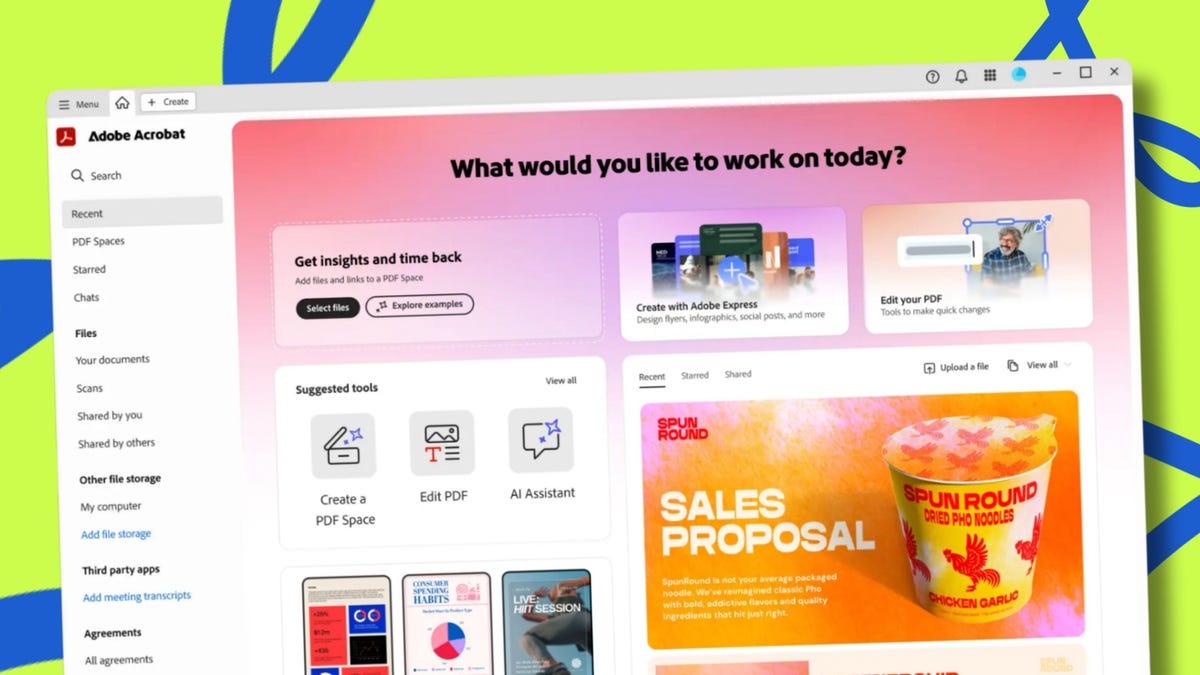
Adobe / Elyse Betters Picaro / ZDNET
ZDNET’s key takeaways
- Adobe launches Acrobat Studio for $24.99 per month.
- AI Assistants summarize, analyze, and help create your documents.
- PDF Spaces centralize your files for collaboration and sharing.
Get more in-depth ZDNET tech coverage: Add us as a preferred Google source on Chrome and Chromium browsers.
Adobe has launched Acrobat Studio — something it describes as an “AI-powered home” for creating PDFs, presentatons, and more.
The idea is, instead of just opening and reading a PDF like we’ve done for more than 30 years, you’ll be able to use Acrobat Studio to interact and work with them like never before. You can drag in documents and research, extract insights, AI-generate everything from recaps to infographics, and share your entire project — or “PDF Spaces” — with others to collaborate.
Also: The best online photo editors: Expert tested and reviewed
Think of Acrobat Studio as Adobe blending the best AI features of NotebookLM with the design simplicity of Canva, although Adobe frames it as a mash-up of Acrobat’s PDF tools, Adobe Express, and generative AI.
How does Acrobat Studio work?
If you’re already juggling a PDF reader, a note-taking app, an AI chatbot, and a design tool, Adobe’s pitch is simple: Why not just use Acrobat Studio? The tool offers everything from reading and analyzing documents to AI summaries and creating visuals.
Professionals can use Acrobat Studio to work up proposals and prepare presentations for work in minutes. Students can use it to turn their class notes into study guides and flashcards — complete with automatically cited research sources. Everyday users might lean on Acrobat Studio for practical tasks, such as tracking home renovation budgets or even planning trips.
You can share entire PDF Spaces too — so everyone works from the same set of documents and files and the same “AI Assistants.”
Also: This new Photoshop feature can boost image resolution in just one click, thanks to AI
There are four main components to Acrobat Studio:
- Acrobat Pro tools are built in so you can edit, scan, combine, redact, compare, e-sign, and protect documents, while new AI features help summarize contracts, process scanned files, and simplify complex agreements.
- AI Assistants are Adobe’s take on agentic AI — customizable helpers that make working with documents faster. You can assign them roles like “analyst,” “instructor,” or even create your own. They pull key points from long documents, explain complex sections, provide clickable citations, brainstorm ideas, suggest next steps, and more. Adobe gave the example of planning the “perfect trip” by collecting reviews, itineraries, and brochures, then letting a “personal AI travel agent” handle the rest.
- PDF Spaces let you pull together PDFs, Office files, and web links into a single hub. Instead of juggling folders, tabs, and apps, everything related to a project lives in one organized, centralized space. You can revisit it anytime, add notes, and share the entire space with teammates, classmates, or family so everyone accesses the same collection of materials.
- Adobe Express Premium is another key part, because Acrobat Studio isn’t just for reading or analyzing content — it’s also for creating it. Express Premium includes professional templates, brand kits, stock assets, and Adobe Firefly’s generative AI for text-to-image and text-to-video. You can create an infographic, design social posts, or build a flyer or presentation.
Adobe / Elyse Betters Picaro / ZDNET
More about those AI Assistants
Adobe describes Acrobat Studio’s AI Assistants as “agentic AI.”
Want your assistant to explain concepts like a teacher? Done. Need it to sift through a stack of reports like an analyst? That’s doable too. Within PDF Spaces, you can pick from prebuilt assistants or create your own for a specific project. Crucially, like NotebookLM, Acrobat Studio’s AI Assistants stay fixed to your files, so when you ask a question, they provide clickable citations that link directly back to the documents you’ve uploaded. It’s Adobe’s answer to the “hallucination” problem that affects many AI tools.
Also: Adobe Firefly can now generate AI sound effects for videos – and I’m seriously impressed
Once customized, assistants can be shared along with a PDF Space, so everyone interacts with the same knowledge and helper.
How to access Acrobat Studio
Acrobat Studio is available as a website starting today — in English and globally — and comes with a free trial.
Also: Get up to a year of Adobe Creative Cloud access for 40% off
Early-access pricing is $24.99 per month for individuals or $29.99 per month for teams. Both plans include the full Acrobat Pro toolset, AI Assistants, and Express Premium access, along with 100GB of cloud storage and 250 monthly generative credits.
