
Close Menu
TechurzTechurz

    Subscribe to Updates

    Get the latest creative news from FooBar about art, design and business.

    What's Hot

    Why top talent is walking away from OpenAI and xAI

    February 13, 2026

    Fusion startup Helion hits blistering temps as it races toward 2028 deadline

    February 13, 2026

    AI burnout, billion-dollar bets, and Silicon Valley’s Epstein problem

    February 13, 2026
    Facebook X (Twitter) Instagram
    Trending
    • Why top talent is walking away from OpenAI and xAI
    • Fusion startup Helion hits blistering temps as it races toward 2028 deadline
    • AI burnout, billion-dollar bets, and Silicon Valley’s Epstein problem
    • Score, the dating app for people with good credit, is back
    • Didero lands $30M to put manufacturing procurement on ‘agentic’ autopilot
    • Eclipse backs all-EV marketplace Ever in $31M funding round
    • Complyance raises $20M to help companies manage risk and compliance
    • Meridian raises $17 million to remake the agentic spreadsheet
    Facebook X (Twitter) Instagram Pinterest Vimeo
    TechurzTechurz
    • Home
    • AI
    • Apps
    • News
    • Guides
    • Opinion
    • Reviews
    • Security
    • Startups
    TechurzTechurz
    Home»Security»Don’t like Apple’s new Liquid Glass look? Here’s how to tone it down
    Security

    Don’t like Apple’s new Liquid Glass look? Here’s how to tone it down

    TechurzBy TechurzSeptember 16, 2025No Comments1 Min Read
    Share Facebook Twitter Pinterest LinkedIn Tumblr Reddit Telegram Email
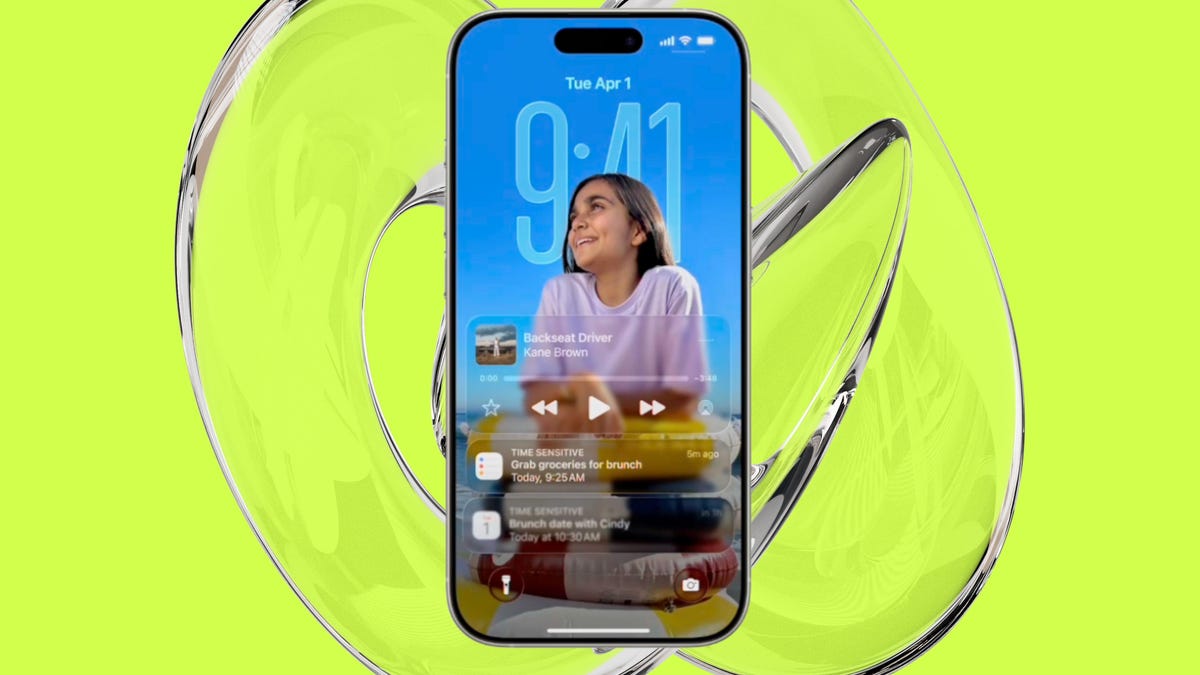
    Don't like Apple's new Liquid Glass look? Here's how to tone it down
    Share
    Facebook Twitter LinkedIn Pinterest Email

    Can you customize the look and color of Liquid Glass?

    Yes. You can change how Liquid Glass looks on your home screen — simply by customizing your app icons and widgets. You can make them translucent (“clear”), tint them with color, switch between light and dark modes, change icon size, etc.

    Elyse Betters Picaro / ZDNET

    How to do it:

    1. Go to the Home Screen.
    2. Touch and hold any empty space on the Home Screen until the app icons begin to jiggle.
    3. Tap Edit at the top of the screen, then select Customize.

    In the menu that pops up, you can choose between Default, Dark, Clear, and Tinted themes. From there, you can further set Light, Dark, or Auto modes (Auto adapts based on whether your phone is in light or dark mode). You’ll also see an option to make things brighter (sun icon), and you can even make your app icons larger or smaller now (boxes icon). 

    This feature is available in iOS and iPadOS. You can also customize Liquid Glass on Mac.

    Want to follow my work? Add ZDNET as a trusted source on Google.

    Apples dont glass Heres liquid Tone
    Share. Facebook Twitter Pinterest LinkedIn Tumblr Email
    Previous ArticleWhy Setting Global Ethical Standards Builds Trust and Protects Your Business
    Next Article How to Set Up and Use a Burner Phone
    Techurz
    • Website

    Related Posts

    Opinion

    Supabase hit $5B by turning down million-dollar contracts. Here’s why.

    November 28, 2025
    Opinion

    Astro Teller isn’t afraid of killing ideas; here’s why

    November 18, 2025
    Security

    AI is becoming introspective – and that ‘should be monitored carefully,’ warns Anthropic

    November 3, 2025
    Add A Comment
    Leave A Reply Cancel Reply

    Top Posts

    College social app Fizz expands into grocery delivery

    September 3, 20251,560 Views

    A Former Apple Luminary Sets Out to Create the Ultimate GPU Software

    September 25, 202514 Views

    The Reason Murderbot’s Tone Feels Off

    May 14, 202511 Views
    Stay In Touch
    • Facebook
    • YouTube
    • TikTok
    • WhatsApp
    • Twitter
    • Instagram
    Latest Reviews

    Subscribe to Updates

    Get the latest tech news from FooBar about tech, design and biz.

    Most Popular

    College social app Fizz expands into grocery delivery

    September 3, 20251,560 Views

    A Former Apple Luminary Sets Out to Create the Ultimate GPU Software

    September 25, 202514 Views

    The Reason Murderbot’s Tone Feels Off

    May 14, 202511 Views
    Our Picks

    Why top talent is walking away from OpenAI and xAI

    February 13, 2026

    Fusion startup Helion hits blistering temps as it races toward 2028 deadline

    February 13, 2026

    AI burnout, billion-dollar bets, and Silicon Valley’s Epstein problem

    February 13, 2026

    Subscribe to Updates

    Get the latest creative news from FooBar about art, design and business.

    Facebook X (Twitter) Instagram Pinterest
    • About Us
    • Contact Us
    • Privacy Policy
    • Terms and Conditions
    • Disclaimer
    © 2026 techurz. Designed by Pro.

    Type above and press Enter to search. Press Esc to cancel.