

Close Menu
TechurzTechurz
    What's Hot

    Peec, one of Berlin’s rising startups, more than doubled annualized revenue in months to $10M, sources say

    May 23, 2026

    This young startup is taking on a fragrance industry that hasn’t changed in a almost half century

    May 21, 2026

    Maka Kids is redefining kids’ screen time with a streaming app optimized for well-being, not engagement

    May 21, 2026
    X (Twitter) Pinterest YouTube LinkedIn WhatsApp
    Tech Pulse
    • Peec, one of Berlin’s rising startups, more than doubled annualized revenue in months to $10M, sources say
    • This young startup is taking on a fragrance industry that hasn’t changed in a almost half century
    • Maka Kids is redefining kids’ screen time with a streaming app optimized for well-being, not engagement
    • Beauty booking startup Fresha hits $1 billion valuation with KKR backing
    • General Catalyst just led a $63M bet on India’s travel payments market
    X (Twitter) Pinterest YouTube LinkedIn WhatsApp
    TechurzTechurz
    • Home
    • Tech Pulse
    • Future Tech
    • AI Systems
    • Cyber Reality
    • Disruption Lab
    • Signals
    TechurzTechurz
    Home - Cyber Reality - Don’t like Apple’s new Liquid Glass look? Here’s how to tone it down
    Cyber Reality

    Don’t like Apple’s new Liquid Glass look? Here’s how to tone it down

    TechurzBy TechurzSeptember 16, 2025Updated:May 10, 2026No Comments1 Min Read
    Share Facebook Twitter Pinterest LinkedIn Tumblr Reddit Telegram Email
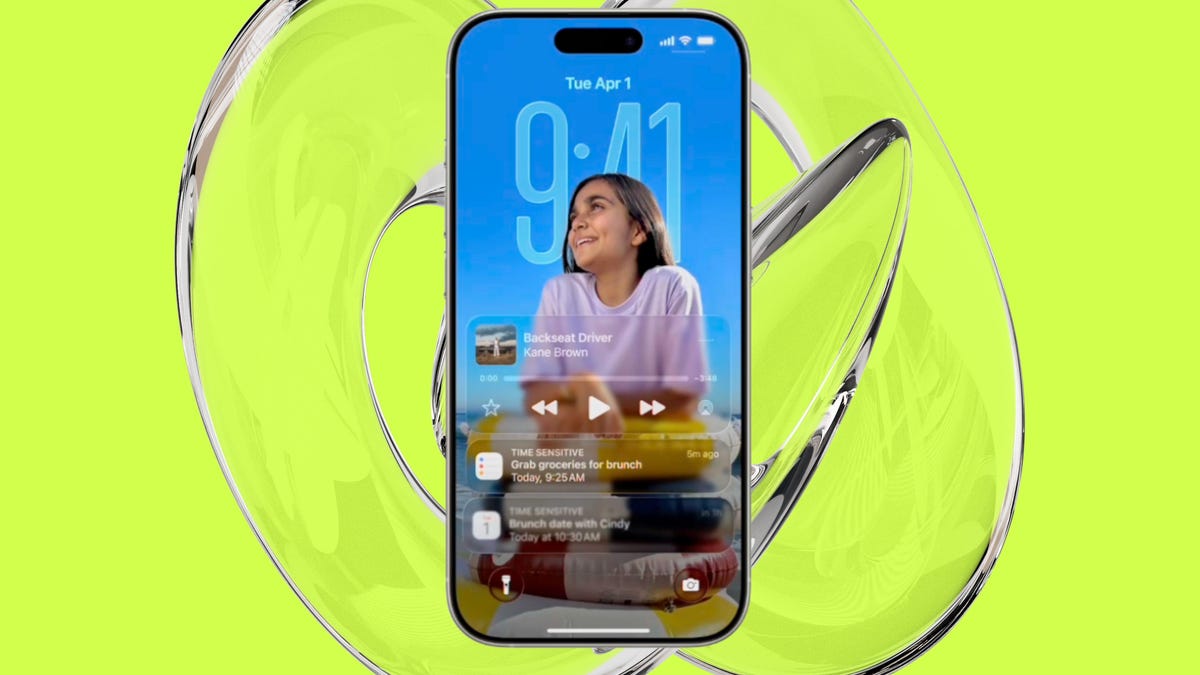
    Don't like Apple's new Liquid Glass look? Here's how to tone it down
    Share
    Facebook Twitter LinkedIn Pinterest Email

    Can you customize the look and color of Liquid Glass?

    Yes. You can change how Liquid Glass looks on your home screen — simply by customizing your app icons and widgets. You can make them translucent (“clear”), tint them with color, switch between light and dark modes, change icon size, etc.

    Elyse Betters Picaro / ZDNET

    How to do it:

    1. Go to the Home Screen.
    2. Touch and hold any empty space on the Home Screen until the app icons begin to jiggle.
    3. Tap Edit at the top of the screen, then select Customize.

    In the menu that pops up, you can choose between Default, Dark, Clear, and Tinted themes. From there, you can further set Light, Dark, or Auto modes (Auto adapts based on whether your phone is in light or dark mode). You’ll also see an option to make things brighter (sun icon), and you can even make your app icons larger or smaller now (boxes icon). 

    This feature is available in iOS and iPadOS. You can also customize Liquid Glass on Mac.

    Want to follow my work? Add ZDNET as a trusted source on Google.

    Apples dont glass Heres liquid Tone
    Share. Facebook Twitter Pinterest LinkedIn Tumblr Email
    Previous ArticleWhy Setting Global Ethical Standards Builds Trust and Protects Your Business
    Next Article How to Set Up and Use a Burner Phone
    Techurz
    • Website

    Related Posts

    Opinion

    Particle’s AI news app listens to podcasts for interesting clips so you you don’t have to

    February 23, 2026
    Opinion

    Why these startup CEOs don’t think AI will replace human roles

    February 19, 2026
    Opinion

    Supabase hit $5B by turning down million-dollar contracts. Here’s why.

    November 28, 2025
    Add A Comment
    Latest Tech Pulse

    College social app Fizz expands into grocery delivery

    September 3, 20252,289 Views

    A Former Apple Luminary Sets Out to Create the Ultimate GPU Software

    September 25, 202516 Views

    AI is becoming introspective – and that ‘should be monitored carefully,’ warns Anthropic

    November 3, 202512 Views
    Stay In Touch
    • YouTube
    • WhatsApp
    • Twitter
    • Pinterest
    • LinkedIn

    Techurz helps readers stay ahead of digital change with clear, practical, future-focused technology intelligence - written today, searched tomorrow.

    X (Twitter) Pinterest YouTube LinkedIn WhatsApp
    Company
    • About Us
    • Contact Us
    • Our Authors / Editorial Team
    • Write For Us
    • Advertise
    Policy
    • Editorial Policy
    • Privacy Policy
    • Terms and Conditions
    • Affiliate Disclosure
    • Cookie Policy
    • Disclaimer
    • DMCA
    Explore
    • AI Systems
    • Cyber Reality
    • Future Tech
    • Disruption Lab
    • Signals
    • Tech Pulse
    • Sitemap

    Join the Techurz Brief

    The future does not arrive suddenly.
    Stay ahead with fast, sharp tech signals.

    Type above and press Enter to search. Press Esc to cancel.