


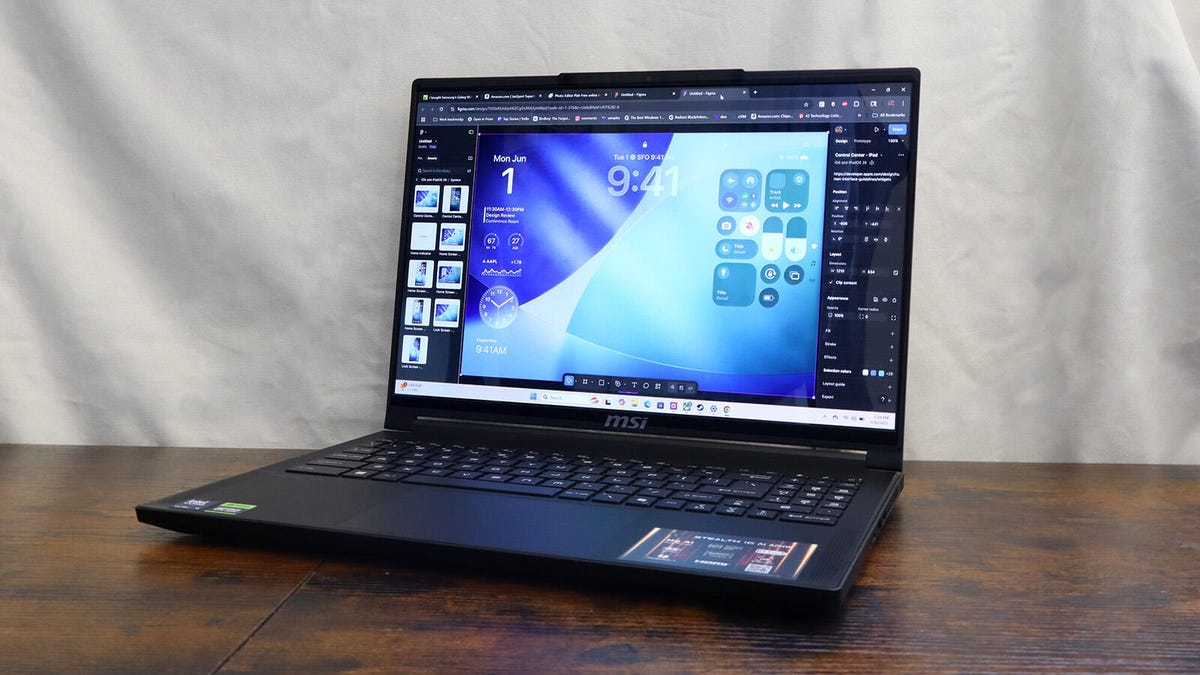
ZDNET’s key takeaways
- The MSI Stealth 16 AI is on sale at Best Buy for $2,030.
- It’s a gaming laptop with powerful hardware and a vibrant OLED display that’s ideal for both gaming and graphic design.
- However, like its predecessor, it has a hungry battery and runs hot.
The 2025 MSI Stealth 16 is the latest entry in the tech company’s sleek gaming laptop series. I’m pretty familiar with the Stealth line, having reviewed several models in the past. This version doesn’t reinvent the wheel. In fact, it shares many similarities with its predecessor, the Stealth A16 AI+, to its benefit and to a fault.
Also: The best laptops for graphic designers: Expert tested
First off: on the surface, I genuinely can’t tell the difference between this model and the previous generation. The Stealth 16 measures 14″x 10.22″x 0.85″ inches — the exact same dimensions as the A16. It even weighs the same at 4.63 pounds.
What’s funny is I used to think that was really heavy, but after carrying around chunky laptops, MSI’s device feels lightweight. Even with the power adapter, I didn’t mind carrying it around town. By the way, I factor that adapter into the overall weight because you will need it on hand. More on that later.
Bringing back the classics
A few other great design elements make their triumphant return. Going down the list, you have a full-size gaming keyboard. Each button has a 1.5mm travel distance, ensuring a comfortable typing feel. Six surround sound speakers are located at either end below the keyboard for immersive audio.
One of my favorite moments testing this laptop came from listening to “Doomsday” by MF Doom. The lyrical flow from Doom sounded crystal clear and powerful through the laptop’s speakers, filling my entire room with his supervillainy.
Cesar Cadenas/ZDNET
Above the keyboard is the 16-inch OLED display. At QuadHD+ (2,560 x 1,600 pixels) resolution, it’s not quite 4K, but it’s close enough — the screen still delivers impressive visual output. Colors are vibrant, the high resolution delivers detailed images, and the 240Hz refresh rate ensures smooth on-screen motion.
Power boost
One of my favorite things about MSI laptops is how easy it is to tweak their performance. On many Windows 11 laptops, all you can really do is change the Power mode in the Settings, but MSI Center, its internal settings program is actually pretty robust. Here, you can adjust the computer’s output on the fly. For example, enabling Extreme Performance and Discrete Graphics Mode delivers the best hardware results.
Also: I tested Dell’s XPS successor, and it beat my $3,000 Windows laptop in almost every way
Inside my review unit was an Intel Core Ultra 9 285H, an Nvidia GeForce RTX 5070 graphics card, and 32GB of RAM. It’s a pretty good configuration, if I say so myself, and it shows in the performance numbers.
Cesar Cadenas/ZDNET
Below is a list comparing MSI’s Stealth 16 with its predecessor, the Stealth A16 AI Plus, and the Dell Premium 16. You’ll notice that the newer model has better raw processing and rendering power than the others, indicating it excels at handling heavy workloads and rendering complex 3D graphics.
There is a bit of a gap between the Stealth 16 and the A16 on PCMark 10, suggesting that the older model has better general performance; it’s able to hop between web pages and apps without much issue. However, I didn’t experience any slowdown. This laptop ran great everywhere.
PCMark 10
Geekbench 6
Cinebench 2024
Cinebench R23
MSI Stealth 16 AI
7,693
15,883
1,129
21,656
MSI Stealth A16 AI+
7,913
14,196
N/A
18,336
Dell Premium 16
6,865
14,763
726
17,522
Having Dell’s machine may seem random, but you need to understand that the Stealth 16 isn’t just a solid gaming computer. It’s also a powerful graphic design laptop, too. For testing, I installed Blender, a free 3D creation app, and edited images on Pixlr. I’m not much of an artist, but I did manage to create and render simple scenes starring Blender’s complex monkey model.
I had a similar experience with Pixlr, as I was able to edit 4K photographs without any major hiccups. The entire process went smoothly. MSI’s laptop is a powerhouse in almost every sense of the word.
Also: I switched to the Dell 14 Premium for a week, and it makes even the XPS feel outdated
As powerful as the laptop may be, it has its limits. I ran multiple 4K YouTube livestreams as part of my usual 50-tab Chrome browser test. Everything ran fine when there were only three livestreams, although once I hit six, I noticed a slowdown. Livestreams were slow to load. It took a few seconds before the Stealth 16 could play the video as normal.
Staying cool
Heavy workloads do cause the Stealth 16 to heat up a bit, but high temperatures were never an issue. Heat vents are strategically placed above the keyboard, on the side of the laptop, and on the bottom, so your hands are never at risk of touching a hot keyboard. In fact, the keys stayed nice and cool the entire time. Unfortunately, this means you can’t place the computer on your lap; otherwise, your legs will be blasted by hot air.
This ability to stay cool under duress is thanks to the Cooler Boost 5 cooling system, which consists of two large fans and five heat pipes directing hot air out through the vents. This system is also on the vastly more powerful MSI Raider 18 HX.
Cesar Cadenas/ZDNET
Unsurprisingly, MSI’s Stealth 16 is not designed to be away from its charger for long. You can push its endurance by enabling ECO-Silent and Integrated Graphics Mode in the MSI Center app, and Best Power Efficiency in Windows, but even then, it will last around six hours on a single charge, depending on what you’re doing.
Like many gaming laptops with this kind of hardware, it may have power, but it lacks in stamina. For that reason, I’d suggest this for users who don’t need an all-day battery kind of laptop, but are fine with a few hour stints throughout the day.
ZDNET’s buying advice
The MSI Stealth 16 AI is on sale at Best Buy for $2,030, which is a good price for a laptop with this kind of hardware. I recommend this device to anyone looking for an affordable gaming laptop that can also be used as a work machine. If you like this laptop but want to save some cash, its predecessor, the Stealth A16 AI+, is very similar and still relevant in 2025, retailing for $1,800.
If you want a more powerful graphic design computer, I suggest the Alienware 18 Area-51. It is a much more powerful gaming laptop that leaves every laptop I mentioned so far in the dust. I think it’s one of the best for the year. It is, however, very expensive; my review unit cost $3,200.
