


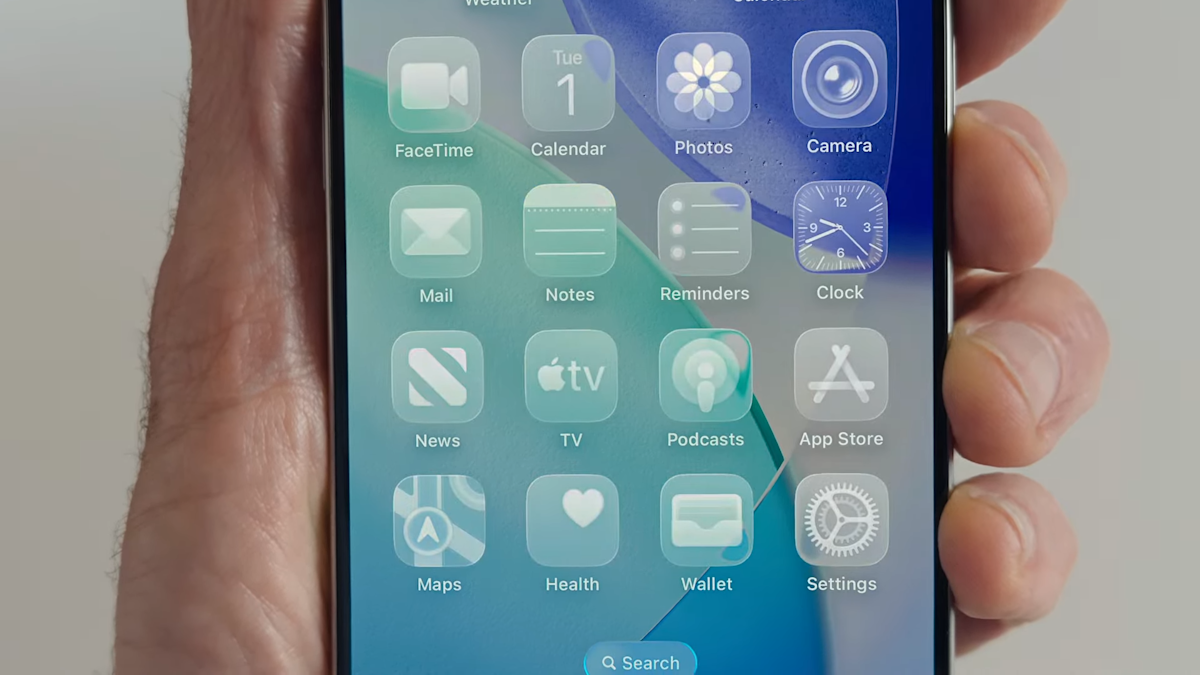
Liquid Glass is a huge new change coming to iOS 26. (Apple)
Can’t wait until the fall to access all the new Apple iOS 26 features? You can officially download and install the public beta if you’re looking forward to seeing what’s coming this year. Prefer more of a guided tour? Check out our preview of the iOS 26 public beta release, which shows off the fresh home and lock screen redesign we’ve been asking to see for years. Called Liquid Glass, the new translucent look will extend across all of Apple’s upcoming operating systems. The overhaul is one of several big changes coming to iOS, macOS, iPadOS and the rest of Apple’s software suite, all of which were showcased during the company’s WWDC keynote on June 9.
After overpromising on AI plans last year, Apple kept its iOS roadmap focused more on basic quality of life improvements this year. There are multiple useful additions coming to the Phone and Messages apps on your iPhone, for instance: Apple execs outlined the ability to weed out spam texts or other unknown senders and an option to hold your spot on a phone call when you’ve been waiting for a representative to pick up. Plus, a treasured feature that we took for granted is coming back (hint: it’s in the Photos app).
Siri, meanwhile, is in a holding pattern. Apple has previously specified that its smarter voice assistant — first promised at WWDC 2024 — is delayed until some point “in the coming year,” so you shouldn’t expect any major changes in the current betas. But there are reports that Apple is aiming to give Siri a bigger brain transplant by basing it on third-party artificial intelligence models like OpenAI’s ChatGPT or Anthropic’s Claude, which could make 2026 a pivotal year.
With each beta, it seems like additional new improvements are popping up, like a newly discovered FaceTime feature that’ll freeze your video if it detects nudity. Most newer iPhone models are eligible to download iOS 26 (both the betas and final version). Want to see the full list of new features coming this fall? Read on.
What is iOS 26?
While the current iPhone operating system is iOS 18, Apple is skipping the numbering ahead to iOS 26 later this year. The company has decided to line up its iOS version numbers with a year-based system, similar to car model years. So while iOS and its sibling operating systems will be released in late 2025, they’re all designated “26” to reflect the year ahead. (Meanwhile, iOS 18 is still getting new versions this summer, too.)
It’s official, we’re moving to iOS 26. (Apple)
What is Liquid Glass design?
Let’s be honest. Out of everything announced at WWDC this year, the new Liquid Glass design was the star of the show. The iPhone’s home and lock screens have looked pretty much the same year after year — the last exciting thing (in my opinion) was the option to add your own aesthetic to your home screen by customizing your apps and widgets. So seeing the home and lock screens’ new facelift is refreshing.
So what exactly is Liquid Glass? Apple calls it a “new translucent material” since, well, the apps and widgets are clear. However, the screen can still adapt to dark and light modes, depending on surroundings. You’ll also notice buttons with a new floating design in several apps, like Phone and Maps. They’re designed to be less distracting than the current buttons, but are still easy to see. While the design overhaul has proven to be controversial since its announcement, some — including Engadget’s own Devindra Hardawar — like the new direction, even if it’s somewhat reminiscent of Microsoft’s translucent Windows Vista Aero designs from nearly twenty years ago.
That said, as of the release of the iOS 26 beta 2, Apple has already incorporated some user feedback into the design, dialing back the transparency in at least some places. And while it will continue to evolve, Apple users won’t be able to escape it: Liquid Glass was designed to make all of Apple’s OSes more cohesive. Here’s a look at how the translucent aesthetic will look with the new macOS Tahoe 26 on your desktop.
What are the new and notable features of iOS 26?
iOS 26 has a laundry list of new features. Among the most worthwhile:
Phone app redesign: You’ll finally be able to scroll through contacts, recent calls and voicemail messages all on one screen. It also comes with a new feature called Hold Assist that’ll notify you when an agent comes to the phone so you can avoid the elevator music and continue on with other tasks.
Live Translation in Phone, FaceTime and Messages: iOS 26 is bringing the ability to have a conversation via phone call or text message with someone who speaks another language. Live Translation will translate your conversation in real time, which results in some stop-and-go interactions in the examples Apple shared during its presentation.
Polls in group chats: Tired of sorting through what seems like hundreds of messages in your group chat? You and your friends will soon be able to create polls in group messages for deciding things like which brunch spot you’re eating at or whose car you’re taking on a road trip.
Filtering unknown senders in Messages: If you haven’t received spam texts about unpaid tolls or other citations, you’re lucky. For those of us who have, those annoying messages will soon be filtered away in a separate folder.
Visual Intelligence: Similar to a reverse Google image search, this new feature will allow you to search for anything that’s on your iPhone screen. For instance, if you spot a pair of shoes someone is wearing in an Instagram photo, you can screenshot it and use Visual Intelligence to find those shoes (or similar ones) online.
Photos tabs are back: For anyone who’s still frustrated with the Photos changes made last year, you’ll be happy to know that your tabs are coming back. Library and Collections will have their own separate spaces so you don’t have to scroll to infinity to find what you’re looking for.
FaceTime “Communication Safety” feature: A newer addition to iOS 26 appears to be the FaceTime “Communication Safety” feature that pauses communications if and when nudity is detected. The feature appears to be a child safety feature that uses on-device detection, thus obviating any cloud-based privacy issues.
Apple’s Hold Assist will be nifty for those pesky services that put you on hold for 10 or more minutes. (Apple)
Which iPhones will be able to upgrade to iOS 26?
A few iPhone models that run the current version of iOS — iPhone XR, XS and XS Max — won’t be compatible with the latest upgrade. But any iPhones released in 2019 or later will be eligible for the iOS 26 update.
Not listed here are the presumed new iPhone 17 models (or maybe iPhone 26?) that are all but certain to be announced and released in September.
How to install iOS 26 beta
The iOS 26 public beta is now available to download via the Apple Beta Software Program. If you’re not already a member, you’ll need to sign up to try out all the latest features. Just visit beta.apple.com and sign up with your phone number or email address. It’s free.
Once you’re in, you can install it by going to Settings > General > Software Update and selecting iOS 26 public beta.
A word of caution: Don’t sign up with your main iPhone unless you’re OK with any risks that occur with using an OS that isn’t finalized.
When will the final version of iOS 26 be released?
iOS 26 will be released to the public this fall. It usually comes in September, within a week of the Apple iPhone event. Last year, it rolled out to iPhone users on September 16 — exactly one week after the iPhone 16 lineup was announced.
If you’re more interested in the Apple Intelligence features coming, here’s everything Apple revealed for iOS, macOS and more during WWDC. Also, check out how iOS 26 screenshots could be an intriguing preview of Apple’s delayed Siri rework.
Update, July 24: Noted the iOS 26 public beta is now available.
Update, July 3: Noted new FaceTime feature found in the developer beta.
Update, June 30: Noted ongoing iOS 18 releases, and reports that Apple is considering additional external LLMs for Siri.
Update, June 25: Noted changes added in iOS 26 beta 2.
If you buy something through a link in this article, we may earn commission.
