


ZDNET’s key takeaways
- The Murena Tablet is available starting at $549 for the 128GB version.
- This de-Googled Pixel Tablet runs on /e/OS, a custom version of Android 13 that removes all default Google services, trackers, and bloatware
- Getting a de-Googled Murena Tablet comes at a premium with no speaker dock, for $549, while the Google Pixel Tablet alone starts at $399 (currently $299) at $479 with a dock.
Many tablet users, myself included, struggle to truly embrace an Android device. It’s hard to escape the bloatware and Google-ification that comes with Android tablets and simply use the device for its capabilities. All I want is a tablet for entertainment, light work, and games that isn’t bogged down by extras or tracking my use.
Also: Your iPad is getting a major upgrade. Here are the best features in iPadOS 26
This is a big reason why I mostly prefer Apple devices, including iPads, over Android. But the Murena Pixel Tablet is a ready-made, de-Googled Android tablet you can buy that doesn’t require tinkering or work on your end. And after testing it for a few weeks
The Murena Tablet runs on /e/OS, a custom Android version developed by Murena, a company focused on privacy-first devices. It is a de-Googled Pixel Tablet, so it is physically the same hardware as Google’s tablet, but skips the bloatware and tracking that comes with Android.
A de-Googled tablet doesn’t come preloaded with the Google apps you get with other out-of-the-box Android tablets. It has a few apps from Murena, like an app store, browser, email, etc. But instead of the 60+ apps that come preloaded in your Google Pixel Tablet (and other Android tablets, for that matter), the Murena Tablet only comes with 23.
Maria Diaz/ZDNET
Using the Murena Tablet on a day-to-day basis is a refreshing experience. Once you get used to different ranges of Android tablets and iPads, switching to the Murena tablet is freeing: there are no forced ecosystems or distractions. You truly choose your apps and services, down to deciding whether you use an account with your tablet or not.
Also: Finally, an Android tablet that I wouldn’t mind putting my iPad Pro away for
To get the most private experience, I chose not to use a registered account with my Murena Tablet. I’m still able to download apps and use them as I would and log into my preferred apps, like Gmail and YouTube, if I choose to do so. But I get to choose to have these apps on my tablet and how much information I share with apps like these.
Maria Diaz/ZDNET
Murena just announced the /e/OS 3.0 update, which includes a new Qwant-powered search engine, called Murena Find. The update also offers stronger parental controls, speech-to-text messaging, the ability to find a device via SMS, a CryptPad-powered Murena Vault for cloud storage, and detailed privacy reports on app tracking.
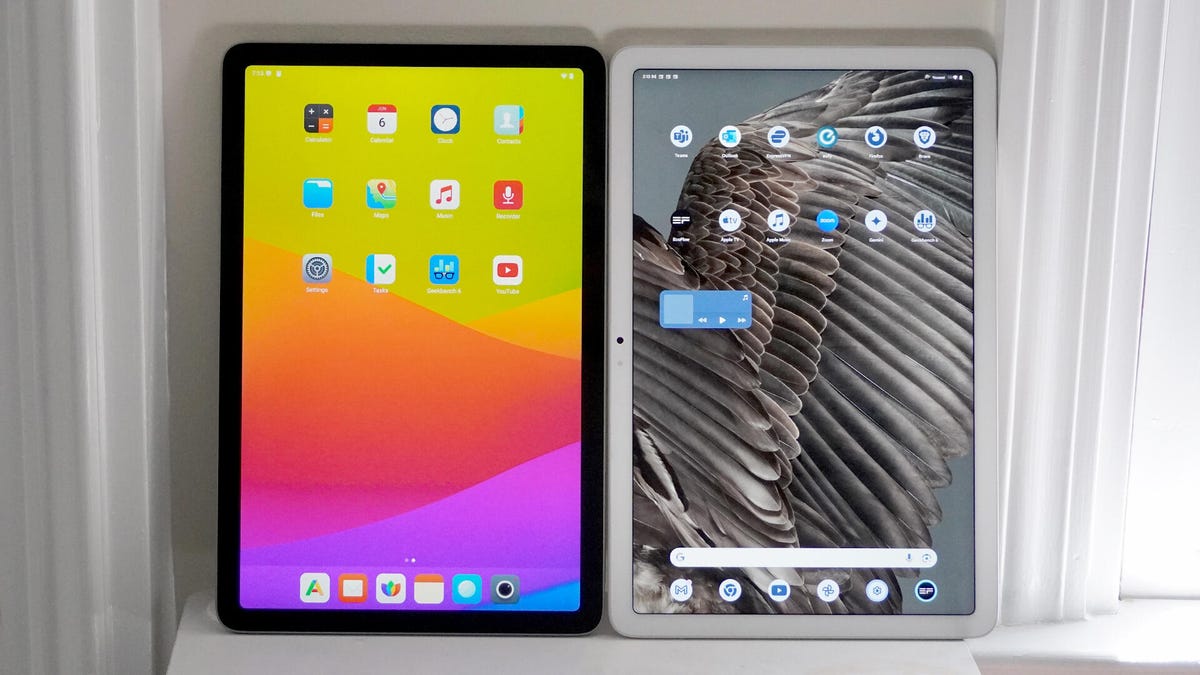
Murena Pixel Tablet (left) and the Google Pixel Tablet (right).
Maria Diaz/ZDNETGeekbench 6 scoresStarting priceSingle-Core CPU BenchmarkMulti-Core CPU BenchmarkGPU benchmarkMurena Tablet$5491,4773,8674,158Google Pixel Tablet$3991,4513,7874,961Lenovo Idea Tab Pro (2025)$2901,4084,5257,977iPad 10$2992,0834,90216,973
The Murena Tablet and the Google Pixel Tablet are both the same tablet, it’s the same hardware, so benchmark scores are unsurprisingly quite similar. The only slight difference is in the Murena Tablet’s lower GPU scores, which are likely due to the lack of Google graphics libraries and driver tuning.
Also: I did not expect this $300 Android tablet to be as impressive as it is
When you consider a privacy-focused tablet, you may immediately think of an iPad. These are generally more private than your average Android tablets, thanks to Apple’s efforts to protect user data, but you’re still locked into Apple’s ecosystem when you use an iPad. While Apple may not sell your data if you opt out of tracking, it still knows your habits.
The Murena Tablet gives users more independence from big tech: there’s no Apple or Google involved, and no account is required to use it.
ZDNET’s buying advice
Maria Diaz/ZDNET
If you’re an Android fan who wants more control over your privacy and digital life, the Murena Tablet is currently the best privacy-focused Android tablet. It’s a ready-made, de-Googled tablet that you don’t need to tinker with or flash an OS on. The Murena Tablet requires no work, only than you to set it up like you would any other tablet.
Also: I replaced my Kindle with an iPad Mini as my ebook reader – 8 reasons why I don’t regret it
Aside from having a more private experience, the Murena Tablet is slightly faster in everyday use. It has no bloatware, so you can breeze through most tasks and apps and not worry about your apps randomly crashing or glitching due to processing performance.
