

Close Menu
TechurzTechurz
    What's Hot

    Slate Auto’s radically simple electric truck starts at $24,950

    June 24, 2026

    Valor Equity Partners looks to raise a $2.5B Fund VII, per Bloomberg

    June 24, 2026

    Superhuman acquires AI detection startup GPTZero

    June 23, 2026
    X (Twitter) Pinterest YouTube LinkedIn WhatsApp
    Tech Pulse
    • Slate Auto’s radically simple electric truck starts at $24,950
    • Valor Equity Partners looks to raise a $2.5B Fund VII, per Bloomberg
    • Superhuman acquires AI detection startup GPTZero
    • HaloBraid raises $7M from Seven Seven Six to end the six-hour hair salon appointment
    • 4 days left to save up to $190 on Founder Summit 2026
    X (Twitter) Pinterest YouTube LinkedIn WhatsApp
    TechurzTechurz
    • Home
    • Tech Pulse
    • Future Tech
    • AI Systems
    • Cyber Reality
    • Disruption Lab
    • Signals
    TechurzTechurz
    Home - Disruption Lab - Instagram’s new location sharing map: how it works and how to turn it off
    Disruption Lab

    Instagram’s new location sharing map: how it works and how to turn it off

    TechurzBy TechurzAugust 8, 2025Updated:May 11, 2026No Comments3 Mins Read
    Share Facebook Twitter Pinterest LinkedIn Tumblr Reddit Telegram Email
    PluggedIn Newsletter logo
    Share
    Facebook Twitter LinkedIn Pinterest Email


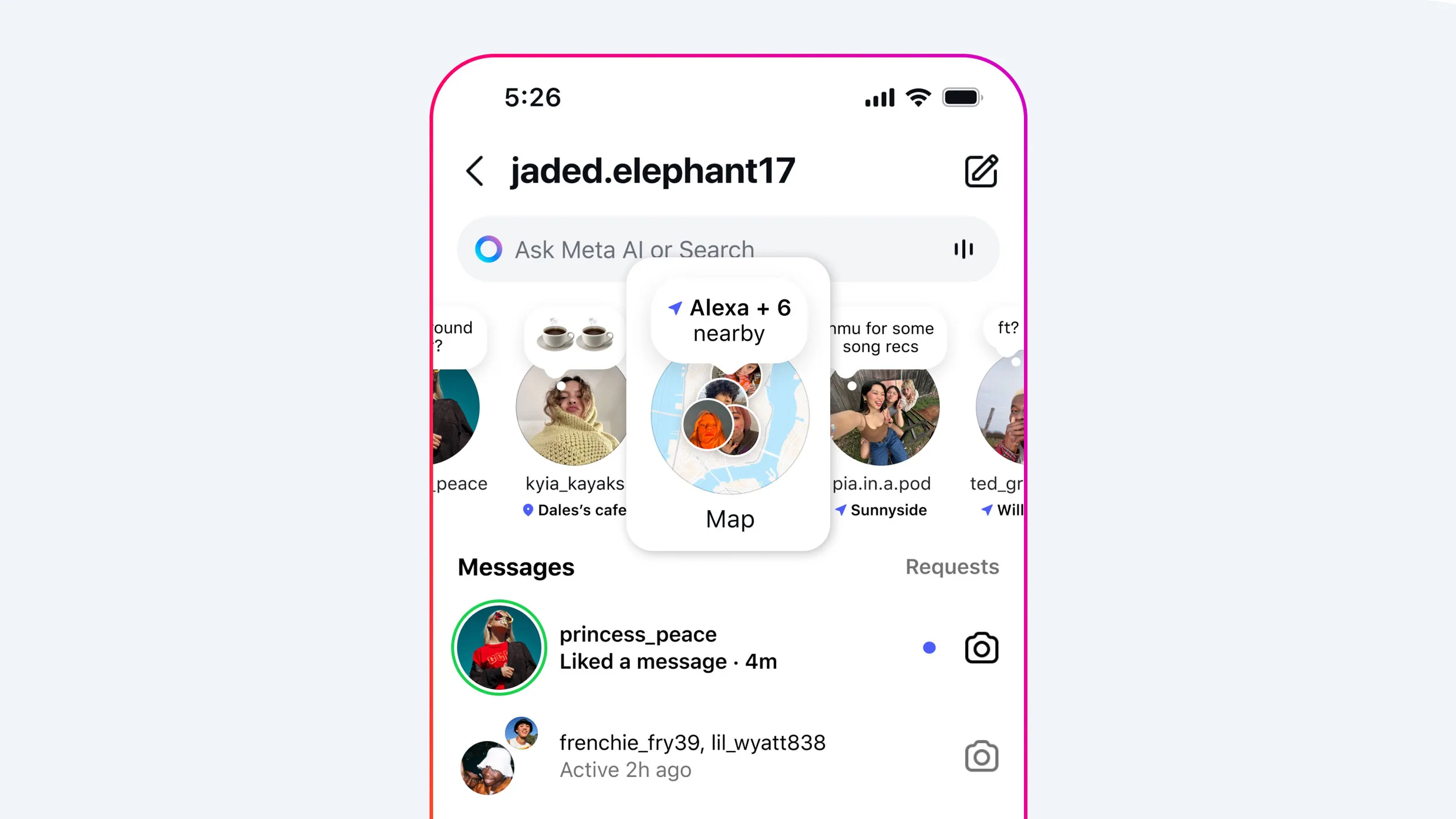
    Instagram’s new location-sharing Map feature is raising privacy concerns among some users, who worry their whereabouts could be tracked or misused.

    Meta announced the rollout this week, introducing a map that lets U.S. users share their locations and see location-based content from friends—similar to Snapchat’s Snap Map or Apple’s Find My.

    The feature is opt-in and turned off by default. Users can disable it at any time, Meta said in a release.

    This feature is opt-in and off by default. Users also have the option to turn off location sharing “at any time,” Meta said in a release. Here’s how to do it. 

    Table of contents
    1 Accessing the Map feature
    2 Updating your settings
    3 How to turn off location services entirely
    4 For teen users

    Accessing the Map feature

    Open the Instagram app and tap the arrow icon in the top right of your home feed to open Messages. The Map option should appear at the top of your inbox.

    The first time you open Map, you’ll see a screen labeled “Who can see your location.” You can choose to share it with:

    • Friends (followers you follow back)
    • Your Close Friends list
    • Selected users
    • No one

    Updating your settings

    To update your preferences, navigate to your profile, tap the settings icon in the top-right corner, select “Story, live and location,” then choose “Location sharing.” From there, you can adjust who sees your location.

    On the Map, different icons indicate your status:

    • A blue arrow means you’re sharing your location with your selected audience.
    • A red dot indicates you’re not sharing your location.
    • An orange triangle means you need to enable location permissions on your device to share your location.

    How to turn off location services entirely

    To shut off location services for Instagram on an iPhone, open Settings and tap through from Privacy & Security to Location Services. Scroll to Instagram and select “Never.” 

    To turn off location services for Instagram on an Android device, open your phone’s settings and scroll to Apps. Select Instagram, then tap Permissions and choose Location. From here, you can select “Don’t allow” to completely block location access, or opt for “Allow only while using the app” or “Ask every time” for more control. (You can also toggle off precise location if you prefer.)

    Even with location sharing off, you can still see friends who share their location with you. If you enable it, your location updates whenever you open the app or return to it from the background, Meta says.

    For teen users

    Parents with supervision enabled can control whether their child has access to location sharing, see who they’re sharing with, and receive notifications if location sharing is turned on.

    The early-rate deadline for Fast Company’s Most Innovative Companies Awards is Friday, September 5, at 11:59 p.m. PT. Apply today.

    Instagrams Location map sharing Turn works
    Share. Facebook Twitter Pinterest LinkedIn Tumblr Email
    Previous ArticleInstagram’s Map is here, and this is how you can turn it off
    Next Article Google Working on Fix for Glum Gemini, Stuck in ‘Infinite Loop’ of Self-Esteem Issues
    Techurz
    • Website

    Related Posts

    Opinion

    Forget the feed: Status AI raises $17M to turn social media into interactive entertainment

    May 19, 2026
    Opinion

    Spain’s Xoople raises $130 million Series B to map the Earth for AI

    April 6, 2026
    Opinion

    Why hiring the weirdos works

    March 26, 2026
    Add A Comment
    Latest Tech Pulse

    College social app Fizz expands into grocery delivery

    September 3, 20252,289

    SolarSquare in talks to raise up to $60M as India’s rooftop solar market draws major VC interest

    May 23, 202622

    Future of Digital Privacy and Security: 7 Truths Nobody Tells You

    May 25, 202619
    Stay In Touch
    • YouTube
    • WhatsApp
    • Twitter
    • Pinterest
    • LinkedIn

    Techurz helps readers stay ahead of digital change with clear, practical, future focused technology intelligence written today,searched tomorrow.

    X (Twitter) Pinterest YouTube LinkedIn WhatsApp
    Company
    • About Us
    • Contact Us
    • Our Authors / Editorial Team
    • Write For Us
    • Advertise
    Policy
    • Editorial Policy
    • Privacy Policy
    • Terms and Conditions
    • Affiliate Disclosure
    • Cookie Policy
    • Disclaimer
    • DMCA
    Explore
    • AI Systems
    • Cyber Reality
    • Future Tech
    • Disruption Lab
    • Signals
    • Tech Pulse
    • Sitemap

    Join the Techurz Brief

    The future does not arrive suddenly.
    Stay ahead with fast, sharp tech signals.

    Type above and press Enter to search. Press Esc to cancel.