

Close Menu

    Subscribe to Updates

    Get the latest creative news from FooBar about art, design and business.

    What's Hot

    Clio’s $500M milestone arrives just as Anthropic ups the ante

    May 14, 2026

    Anduril raises $5B, doubles valuation to $61B

    May 13, 2026

    Kevin Hartz’s A* just closed its third fund with $450M

    May 13, 2026
    Facebook X (Twitter) Instagram
    Tech Pulse
    • Clio’s $500M milestone arrives just as Anthropic ups the ante
    • Anduril raises $5B, doubles valuation to $61B
    • Kevin Hartz’s A* just closed its third fund with $450M
    • Riding an AI rally, Robinhood preps second retail venture IPO
    • Korea’s biggest manufacturers back Config, the TSMC of robot data
    X (Twitter) Pinterest YouTube LinkedIn WhatsApp
    Techurz
    • Home
    • AI Systems
    • Cyber Reality
    • Future Tech
    • Disruption Lab
    • Signals
    • Tech Pulse
    Techurz
    Home - News - Nintendo’s updated mobile app will make sharing Switch 2 screenshots a lot easier
    News

    Nintendo’s updated mobile app will make sharing Switch 2 screenshots a lot easier

    TechurzBy TechurzMay 29, 2025Updated:May 11, 2026No Comments3 Mins Read
    Share Facebook Twitter Pinterest LinkedIn Tumblr Reddit Telegram Email
    Nintendo’s updated mobile app will make sharing Switch 2 screenshots a lot easier
    Share
    Facebook Twitter LinkedIn Pinterest Email

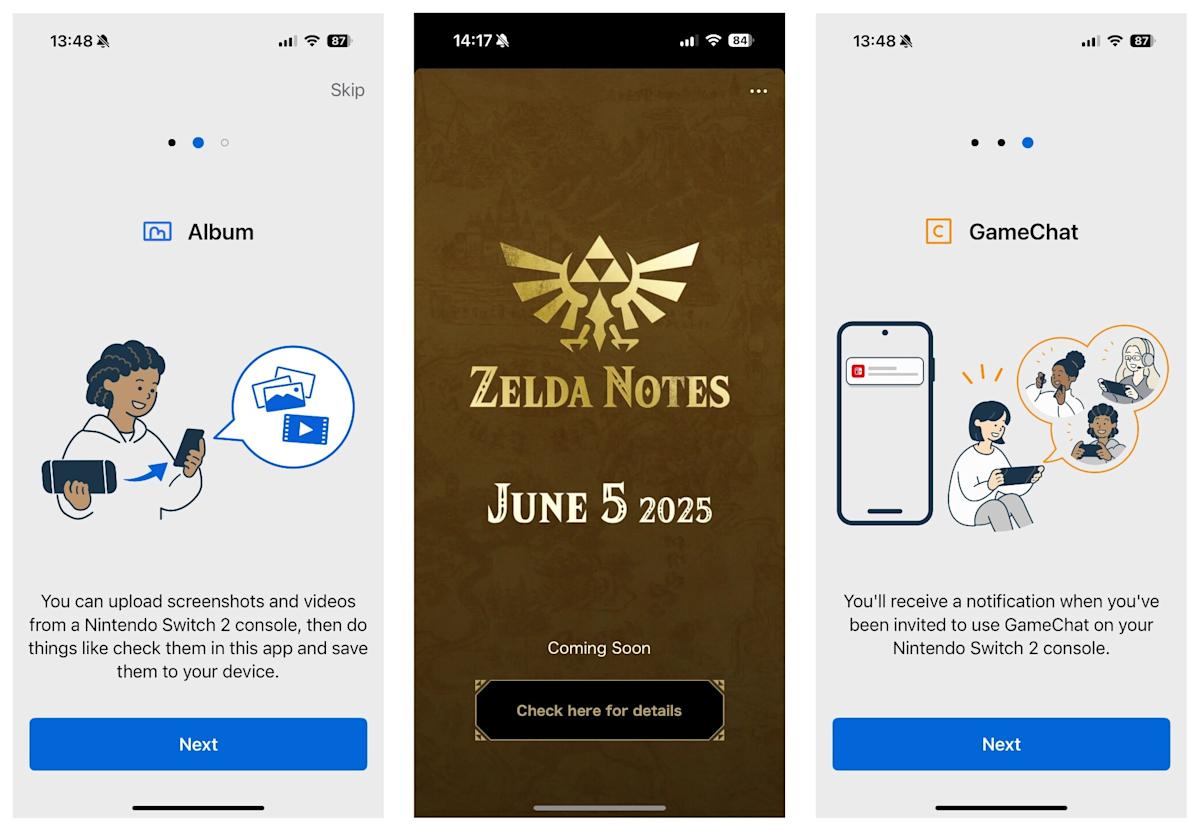
    Nintendo is gearing up for the launch of the Switch 2 on June 5, and to ensure you’re ready to go when the console arrives at your door, you’ll need to download the latest update for the newly renamed Nintendo Switch App. The app, which was previously called the Nintendo Switch Online app, had added a number of new features, including a more seamless screenshot interface, GameChat functionality and placeholder icons for game-specific services like Zelda Notes. The latter will become usable on launch day.

    Arguably the most useful addition is the revamped screenshots and video upload feature, which allows you to link your phone to your Switch 2 and wirelessly upload in-game media to the app, either manually or automatically. This was already possible on the original Switch (and is hardly a revolutionary feature), but doing so involved some needlessly clunky QR code scanning that didn’t always work. Now, screenshots and gameplay clips should just appear in the app, where you can save them locally. Up to 100 files can be stored in the app for 30 days from the point of upload, and once you hit the limit the oldest files will disappear if not saved.

    Another big Switch 2 feature is GameChat, Nintendo’s new multiplayer voice chat functionality. Via the Nintendo Switch App you’ll be able to receive notifications for GameChat invites, friends coming online and friend requests. Your added friends will be displayed on the home screen of the app. Again, no one who’s been playing games on a modern PlayStation or Xbox console for the last decade is going to be blown away by any of this stuff, but it looks like playing online with friends on Switch 2 is going to be mercifully less fiddly than on its predecessor.

    The Zelda Notes icon now appears when you open the Nintendo Switch App, but it won’t be functional until June 5. The app, which is only compatible with the Nintendo Switch 2 Editions of The Legend of Zelda: Breath of the Wild and Tears of the Kingdom, effectively functions like a sat nav for tracking down missing Koroks and shrines on your save file. You can also share your Autobuild creations in TotK with friends, edit in-game photos and check play records such as the number of enemies defeated and total game overs.

    Nintendo is making small tweaks to some of its other services ahead of the Switch 2’s arrival. Over on Nintendo Switch Online (not to be confused with the mobile app), where you can play a selection of emulated classics from Nintendo’s back catalogue, a new Switch 2-exclusive rewind feature will be added to the N64 library, as well as a new CRT filter option. These features were already available for NES and SNES games on the service, and it’s not entirely clear why original Switch owners won’t benefit from the additional N64 options as well.

    app easier lot Mobile Nintendos screenshots sharing Switch updated
    Share. Facebook Twitter Pinterest LinkedIn Tumblr Email
    Previous ArticleApple is rumored to release iOS 26, not iOS 19 at WWDC 2025
    Next Article Chris Hemsworth Posts A Confusing ‘Thor’ Video, Possible ‘Doomsday’ Spoiler
    Techurz
    • Website

    Related Posts

    Opinion

    Meet Shapes, the app bringing humans and AI into the same group chats

    April 29, 2026
    Opinion

    Investors back Skye’s AI home screen app for iPhone ahead of launch

    April 27, 2026
    Opinion

    SaySo is a new short-form video app that aims to restore users’ trust in news

    April 17, 2026
    Add A Comment
    Leave A Reply Cancel Reply

    Top Posts

    College social app Fizz expands into grocery delivery

    September 3, 20252,288 Views

    A Former Apple Luminary Sets Out to Create the Ultimate GPU Software

    September 25, 202516 Views

    The Reason Murderbot’s Tone Feels Off

    May 14, 202512 Views
    Stay In Touch
    • Facebook
    • YouTube
    • TikTok
    • WhatsApp
    • Twitter
    • Instagram
    Latest Reviews

    Subscribe to Updates

    Get the latest tech news from FooBar about tech, design and biz.

    Most Popular

    College social app Fizz expands into grocery delivery

    September 3, 20252,288 Views

    A Former Apple Luminary Sets Out to Create the Ultimate GPU Software

    September 25, 202516 Views

    The Reason Murderbot’s Tone Feels Off

    May 14, 202512 Views
    Our Picks

    Clio’s $500M milestone arrives just as Anthropic ups the ante

    May 14, 2026

    Anduril raises $5B, doubles valuation to $61B

    May 13, 2026

    Kevin Hartz’s A* just closed its third fund with $450M

    May 13, 2026

    Subscribe to Updates

    Get the latest creative news from FooBar about art, design and business.

    Facebook X (Twitter) Instagram Pinterest
    • About Us
    • Contact Us
    • Privacy Policy
    • Terms and Conditions
    • Disclaimer
    © 2026 techurz. Designed by Pro.

    Type above and press Enter to search. Press Esc to cancel.