


ZDNET’s key takeaways
- The Baseus Nomos NU1 Air Spacemate is on sale for $79.
- It’s a compact docking station that’s ideal for both Windows or macOS users on the go.
- Unlike its predecessor, however, it only supports two monitors at 4K resolution instead of three.
more buying choices
Sometimes the best updates are incremental, and not a complete top-to-bottom overhaul. That’s how I feel about the Baseus Nomos NU1 Air Spacemate 12-in-1 Docking Station. It’s a follow-up to the Baseus 11-in-1 Spacemate, but it’s not a direct upgrade to the older device. If anything, it’s an alternate version. It performs similarly, although the Nomo NU1 carves out its own niche.
Also: The best laptop docking stations you can buy
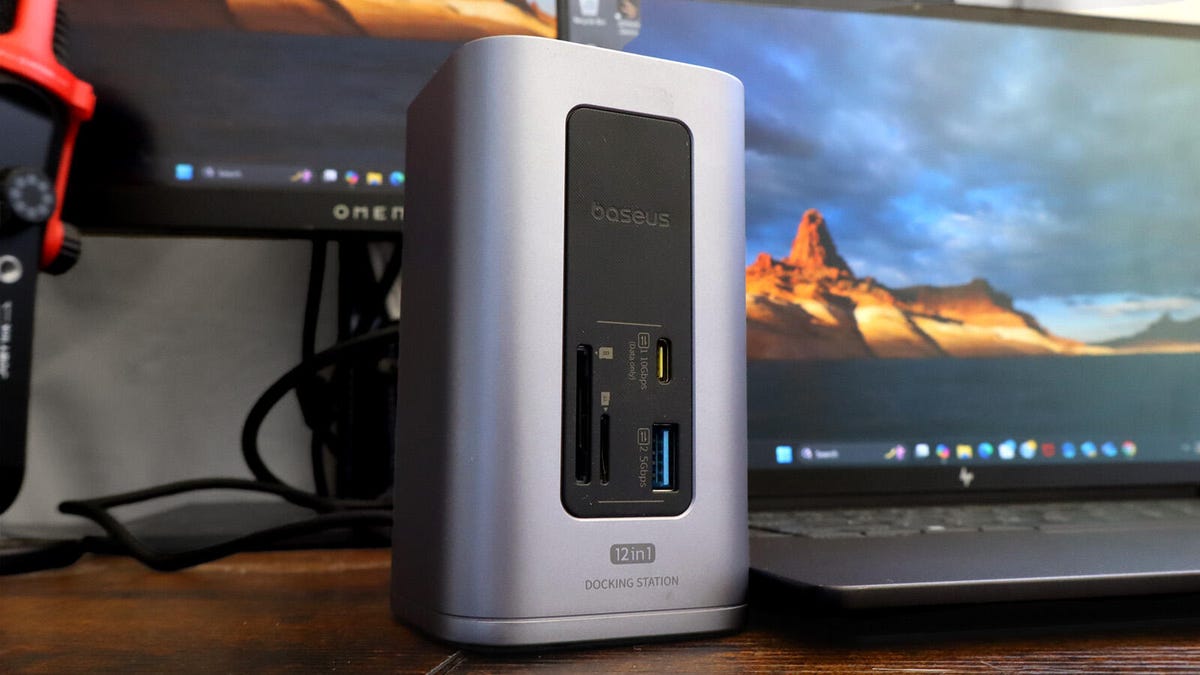
One thing you’ll notice is that it is significantly smaller than the older model, measuring 115.5 x 65.5 x 65.5 mm (4.54 x 2.57 x 2.57 inches). Port selection is mostly the same, except it now has an SD card slot and replaced the headphone jack with a microSD card slot.
Another major difference is that it only supports two 4K external displays running at 60Hz on Windows instead of three. It does support two screens on Mac, but according to Baseus, “macOS doesn’t support Multi-Stream Transport (MST)”. This means the two monitors will display the same content for macOS.
Another major difference of the Nomos Spacemate is that it only supports two 4K external displays running at 60Hz on Windows instead of three. It does support two screens on Mac, but according to Baseus, since macOS doesn’t support Multi-Stream Transport (MST), the two monitors will display the same content as each other.
Key compatibility
With this dock, usage requirements aren’t super strict as long as your laptop supports screencasting through a fully functioning Thunderbolt port. You’ll see a list of “compatible devices” on the device’s official Amazon listing. Don’t read too much into that.
A Baseus representative told me that it only highlights “common devices users could be using,” but it is not definitive. I tested the device with an HP OmniBook X Flip 16, and everything went smoothly (more on this later). That said, if you remain unsure whether or not your laptop will work with the Baseus Nomos NU1 Spacemate, check the sticker around the dock’s side. It spells out the requirements.
Also: Our favorite rugged portable SSD is over 40% off for Prime Day
Around the back is the permanently affixed, tethered cable. This goes directly into the source computer. At first, I didn’t really like the cable. It got in the way, but after a while, I got used to it. The in-package velcro strap helps with storage.
Baseus Nomos NU1 Air Spacemate
Cesar Cadenas/ZDNET
Port selection
I would recommend the Baseus Nomos NU1 Air over the 11-1 Spacemate for three reasons: one, it’s cheaper; two, it’s smaller so it fits my cluttered desk better; and three, it performs at the same level.
The following are the ports on the front of the Baseus Nomos NU Air:
- 10Gbps USB-C
- SD Card slot
- microSD card slot
- 5 Gbps USB-A port
Around the back are the following:
- 10Gbps USB-C
- 4K@60Hz HDMI ports (2)
- 480Mbps USB-A port (2)
- 5 Gbps USB-A port
- 1Gbps Ethernet
- 100W Power Input port
- Plus, the tethered cable.
My favorite feature, however, is the button on top. Pressing it once locks the device screen, while holding it down for a couple of seconds puts the device into Smart Power Saving Mode. Doing so disconnects all ports except the PD input on the back. It’s a neat way to put your computer to sleep with a literal push of a button.
Cesar Cadenas/ZDNET
Easy to use across devices
Using the Nomo NU1 is incredibly easy since all you have to do is connect the back cable to the laptop. This does mean that the dock will have to drain your computer’s battery, but it doesn’t steal too much energy. For testing, I hooked the Spacemate up to an HP OmniBook X Flip 16 and an Asus ROG Ally to see how it improves the user experience. Things went great overall.
Also: One of my favorite budget OLED laptops for work just got even more affordable
Through the dock, I was able to connect a wide variety of accessories to the OmniBook, which it normally wouldn’t be able to support with the stock ports. I even paired the computer up to my two high-resolution monitors. Image quality was mostly good. I noticed a few dead pixels on my second monitor; however, I believe this issue was the result of a faulty HDMI cable because my main display was totally fine.
Baseus Nomo NU1 Air Spacemate
Cesar Cadenas/ZDNET
I had a similarly solid experience with the Asus ROG Ally. Video games ran great while connected through the docking station. There wasn’t a modicum lag, input delay, or anything that hampered gameplay. It was totally smooth. Plus, the 12 ports enable lets you connect all sorts of accessories to the Ally that it wouldn’t normally be able to support like a mouse and keyboard.
ZDNET’s buying advice
Normally, the Baseus Nomos NU1 Air Spacemate retails for $100, but it’s on sale for $80 on the company’s website and Amazon. If you buy it from Amazon during Prime Day, you get another unit totally for free. I highly recommend the Nomos Spacemate to casual and professional users who want to expand their port options without being forced to carry a big brick around. Some stations can get pretty big.
If you want an alternative, the Belkin Connect Universal Pro Dock is a solid choice with a sleek design.
Looking for the next best product? Get expert reviews and editor favorites with ZDNET Recommends.
