


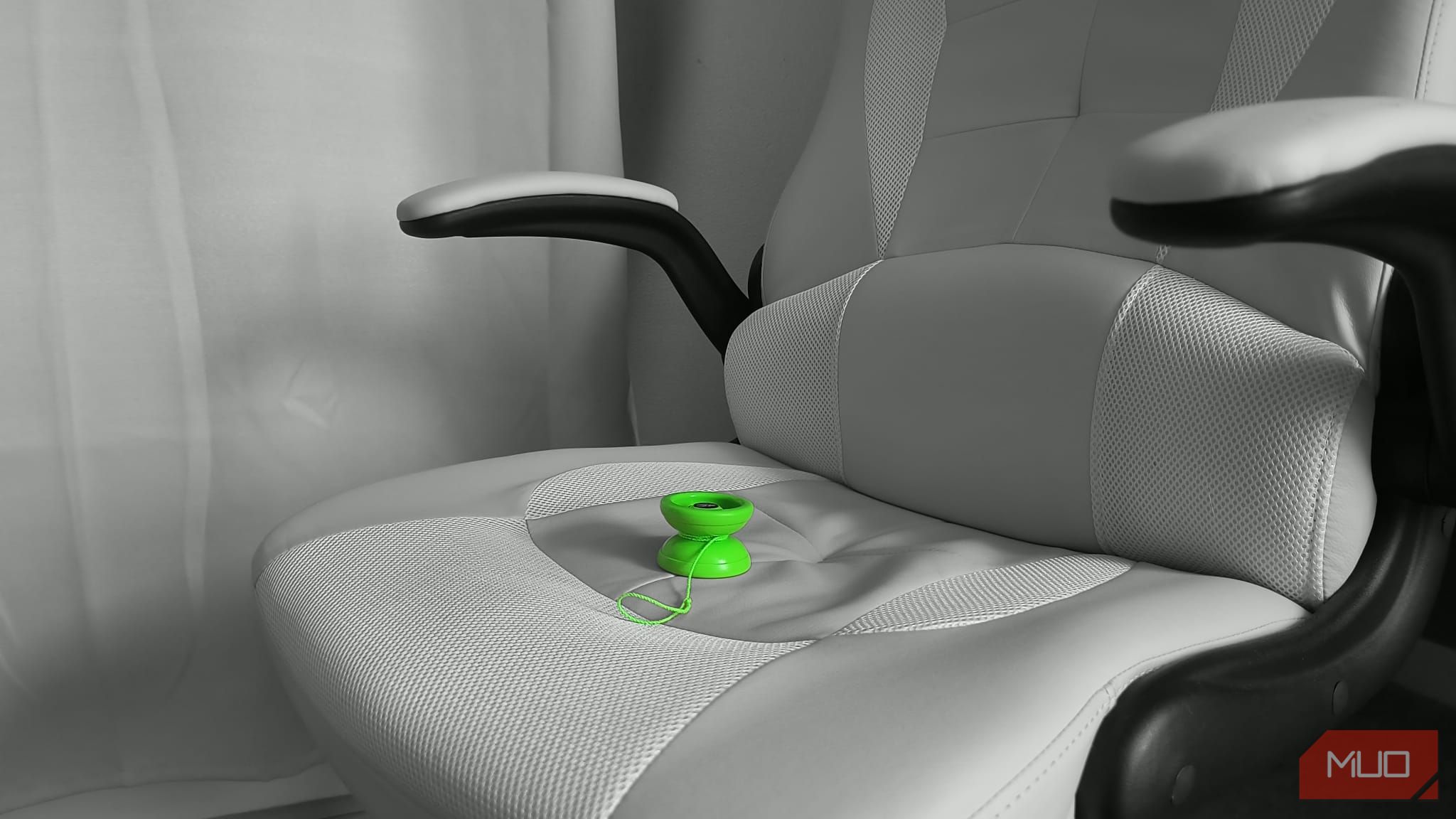
You don’t need a fancy app or pro camera to make your photos stand out—just a setting buried in your phone’s menus. Most people never touch it, but it’s the quickest way I’ve found to go from bland to eye-catching in seconds.
What Spot Color Actually Does and Why It Works
Spot Color is a Motorola photo feature that isolates your subject in full color while turning the background grayscale. The effect is subtle but bold. It draws your eye directly to what matters in the frame, stripping away distractions and giving even casual shots a deliberate, stylized look.
Tyler Fyock/MakeUseOf
Unlike filters that alter the tone or warmth of an image, Spot Color reshapes the focus of a photo. It mimics what high-end portrait lenses do by creating visual separation without the need for the most advanced photography software or camera gear.
Where To Find Spot Color on Your Motorola Device
Motorola doesn’t advertise this feature prominently; it takes a bit of digging in order to enable the setting.
Here’s how to access this stunning feature:
- Open the Camera app and go to the More section to access additional shooting modes.
- Select Spot Color to activate the feature.
- Point the reticle at the color you want to keep and tap to lock it in, turning the rest of the image black and white.
- Adjust the color intensity using the slider until you achieve the desired effect.
- Capture the photo by pressing the shutter or using a volume button.
Tyler Fyock/MakeUseOf
Tyler Fyock/MakeUseOf
Tyler Fyock/MakeUseOf
Any type of scene can benefit from this feature, but it tends to work best on portraits, pets, or objects with clear contrast against the background. My Motorola Edge 2023 handles the processing quickly and cleanly, which makes experimenting with it seamless.
When This Feature Works Best and When to Skip It
Spot Color shines in specific situations. It’s not something you’ll want to use on every photo, but when the conditions are right, it can elevate an ordinary image into something visually striking.
When Spot Color Works Best
Tyler Fyock/MakeUseOf
Spot Color shines when your subject is bold and clearly defined. A red jacket in a snowy street or a bright flower in a green field are a couple examples of compositions that would work well for this tool. It’s especially effective in portraits, pet photos, or product shots where isolating one color helps the subject stand out without distraction.
In visually cluttered environments, such as busy streets or messy countertops, it simplifies the frame by turning the background grayscale. Spot Color is more than just a visual effect, it adds a storytelling layer. It allows you to direct the viewer’s attention with precision and create photos that feel intentional, emotional, and artistic.
When to Skip Spot Color
Tyler Fyock/MakeUseOf
Spot Color isn’t suitable for every photo. In low-contrast scenes or when the subject doesn’t clearly stand out from the background, the effect can feel flat or muddled. It’s best avoided when the background plays an important role in the image’s mood or story—such as colorful landscapes or sunsets—because turning it black and white can reduce emotional impact.
The tool can also struggle with complex or multicolored scenes. When faced with a shot where isolating a single hue cleanly is difficult, it can sometimes cause unwanted artifacts.
Ultimately, Spot Color is a stylistic choice that shines when used thoughtfully. Its real strength comes from knowing when not to apply it.
Related
8 Cool Smartphone Photography Tricks That Actually Work
If you want to give your smartphone photography an edge, try these unique tricks.
It’s Not Just a Motorola Feature: Other Brands Have It Too
Motorola’s Spot Color stands out for how easy and flexible it is, but other major phone brands have introduced similar features under different names. Some are accessible only during editing, while others are built into the camera app itself.
Samsung Galaxy Devices: Color Point in Portrait Mode
Samsung phones come with a lot of useful features, including a similar tool called Color Point. Unlike Motorola’s version, which you apply after you’ve taken the photo, Samsung’s approach happens in real time while shooting in Portrait Mode.
To use it:
- Open the Camera app and swipe to select Portrait mode.
- Tap the circle icon in the bottom right corner to access effect options.
- Choose Color Point from the available effects.
- Adjust the effect strength using the slider to your preference.
- Capture the photo by pressing the shutter button.
You won’t be able to change the effect afterward if you don’t turn it on before taking the shot, you’ll have to retake the photo. The tradeoff is that Samsung gives you live previews, so you can compose your photo with the effect already active.
Google Photos: Color Pop via AI Suggestions
Google also has a feature named Color Pop, but it works differently from both Motorola and Samsung. Instead of a manual tool, Google Photos uses AI to suggest the effect on eligible images—mainly portrait shots with depth information.
Here’s how to find it:
- Open Google Photos and select the image you wish to edit; portrait photos tend to work best.
- Tap the Edit icon (the pencil) at the bottom of the screen.
- Navigate to the Suggestions tab.
- Apply the effect by tapping on Color Pop.
- Adjust the intensity using the slider to your preference.
- Save the edited photo by tapping Done.
The catch is that you can’t manually apply it to any photo; it only shows up if Google’s algorithm thinks the image fits. There’s also no way to fine-tune the effect manually, which limits flexibility compared to other versions.
It’s fast and effective when it works, but you’re at the mercy of the software deciding when to offer it. For the sake of convenience, you can choose to use the editor tool in Google Photos on your computer, rather than on your phone.
Related
You Need to Learn These 9 Awesome Mobile Photography Effects
Looking to add some creative flair to your smartphone shots? Try these effects.
What makes features like Spot Color so compelling isn’t just the visual punch, they offer a surprisingly intuitive way to tell a story through your photos. While there are plenty of apps that can instantly improve your smartphone photography, this is an incredibly simple and powerful tool for directing attention, evoking emotion, and giving your photos a unique look.
