


Static wallpapers don’t cut it anymore. Android 16’s new effects let you add movement and personality. Suddenly, your phone feels new again every time you pick it up.
Wallpaper Effects in Android 16
Android 16 is in the works, and it’s looking quite promising. What sets it apart is the Material 3 Expressive, a new design language that promises deeper personalization, richer animations, and a more responsive interface.
Material 3 Expressive builds on Material You. Among other notable additions that it brings to Android, wallpaper effects are a key feature. Put simply, wallpaper effects are customization options that you can apply to your wallpapers to make your home screen and lock screen stand out.
As of the time of writing, Android 16 offers three wallpaper effects: Shape Effect, Weather Effect, and Cinematic Effect. While Cinematic Effect has been available on Android for ages, the notable options here are Shape Effect and Weather Effect.
Related
How to Create Unique Cinematic Wallpapers From Your Photos on Android
You can turn your own photos into unique cinematic wallpapers on a Pixel phone or a device running Android 14.
Shape Effect
The Shape Effect allows you to isolate the main subject in your photo by applying a specific shape or cutout around it. You can choose from five different cutout shapes available, and the feature intelligently frames the subject into your selected shape accordingly. It then also fills the surrounding area of the cutout with a complementing color while offering four other color options to choose from. You can adjust the shade of these colors if you want.
Unfortunately, with Shape Effect, you don’t get the option to frame your subject in a custom shape. Nor does it let you adjust the framing, so if it frames the subject in your photo a certain way, you have to make peace with it.
Weather Effect
The Weather Effect, as the name implies, allows you to apply weather effects to your photo. It does this in two ways.
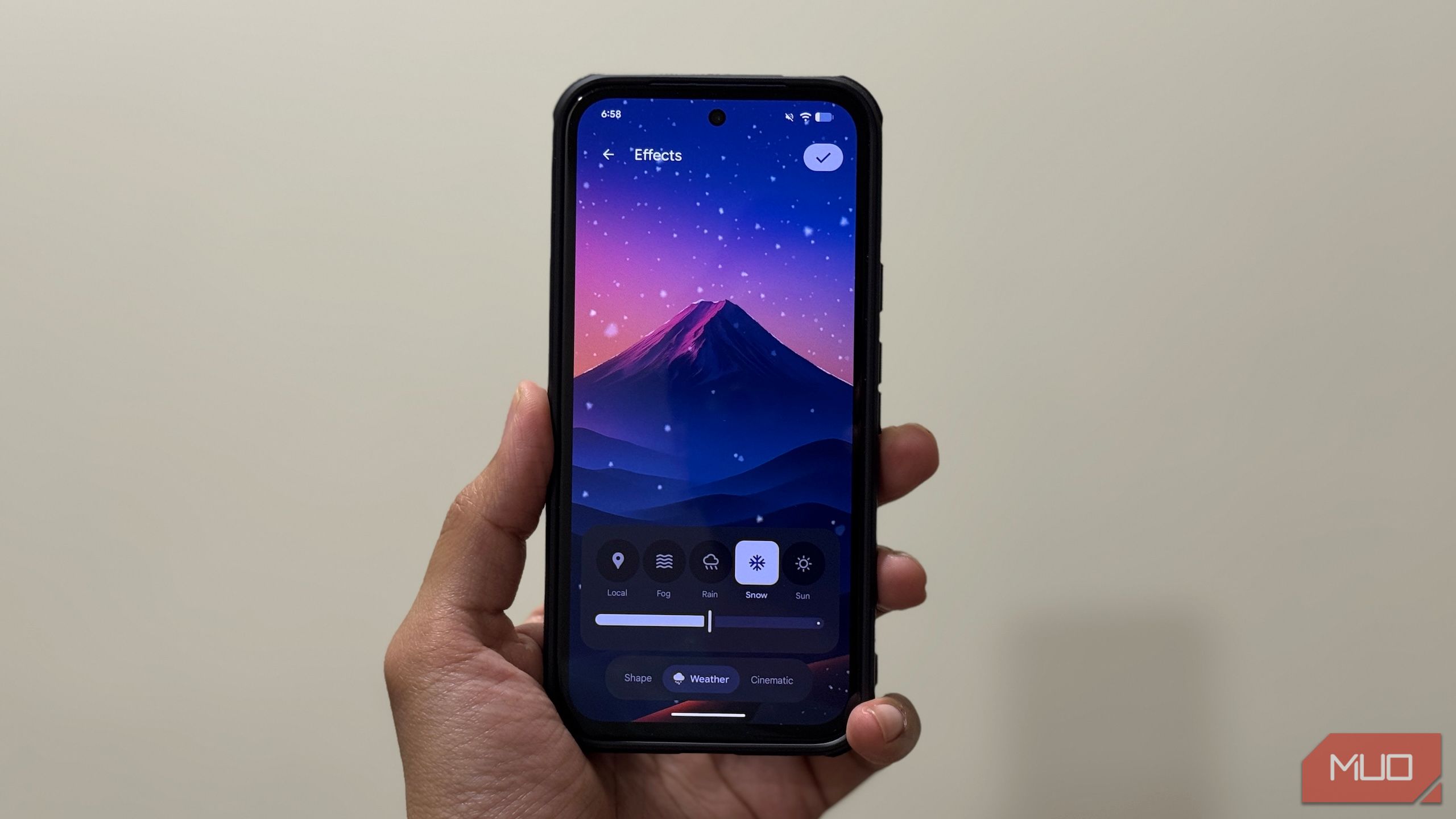
First, it allows you to set a weather effect manually to match your mood. For this, it offers four different weather conditions to choose from, namely Fog, Rain, Snow, and Sun. You can see how these effects will affect your wallpaper and set their intensity using the slider below to achieve your desired look.
Second, it lets you apply weather effects dynamically based on real-time conditions at your current location. This means that if it’s raining outside your window, you’ll see water droplets on your wallpaper right on your lock screen.
I like the Local option more. I feel it’s a great way to stay informed about the weather since it gives you an immediate sense of the conditions at your current location directly on your lock screen.
Weather and Shape wallpaper effects are currently limited to Pixel phones and available on Android 16, which is currently in beta. As such, if you want to try these out, you need to get your hands on the beta first.
How to Apply Weather and Shape Effects to Your Photos
To use the new wallpaper effects, you need to enroll in the Android 16 beta. Head to the Android Beta Program website, scroll down to the Your eligible devices section, and click the Opt in button on the compatible device.
Then, wait until you receive a notification on your device that the Android 16 beta software is ready for download and installation. If you don’t get the notification, you can check for the update manually by heading to Settings > System > Software updates > System update. Download and install the available update. Be sure to back up your phone before installing the beta software.
With the beta installed, applying Android 16’s wallpaper effects is straightforward. Open Settings. Go to Wallpaper & style and tap on Wallpapers. Hit the Choose a photo button at the top, select the photo you want to use as your wallpaper, and hit Done.
Next, on the Preview screen, tap Effects at the bottom. Now, to apply a Shape Effect, make sure the Shape tab is selected at the bottom. Then, tap on a shape to preview it. Tap on a color below it to change the fill color.
Alternatively, if you want to apply a Weather Effect, select Weather on the bottom bar. Now, choose Local for real-time weather effects. (You need location services enabled for this.) Or tap on a weather effect to apply and preview it. Use the slider below to adjust its intensity.
Once satisfied, tap the check mark in the top-right corner and hit Next. Finally, tap Apply to set the photo as your lock screen and home screen wallpaper.
Weather and Shape Wallpaper Effects Aren’t New
While the Weather and Shape wallpaper effects are a great addition to Android 16, they aren’t entirely new.
Samsung’s One UI offers Frame, which offers a similar visual experience as Android 16’s Shape Effect, allowing you to highlight the main subject in your photo. In fact, it does things slightly better, as it gives you the freedom to adjust the subject in the frame just how you want it.
Similarly, there’s the Photo Ambient Wallpaper feature—available starting with the Galaxy S24 series—that overlays real-weather effects onto your lock screen and home screen wallpaper, similar to the Weather Effect feature in Android 16.
Related
7 Unusual Places Where I Find Amazing Mobile Wallpapers
These sites make it easy to find unique phone wallpapers for free.
Wallpaper effects are a great way to add a visual flair to your otherwise boring-looking lock screen and home screen wallpaper. While I have reservations about the Shape Effect, I’m definitely keeping the Weather Effect on.
Mind you, both these effects are still in beta, so they may undergo some changes before they arrive on the stable Android 16 release, which is slated for later this month. While Pixel owners will be the first to experience them, we may see other manufacturers adopting them down the road.
