


ZDNET’s key takeaways
- TCL’s 60 XE Nxtpaper 5G is on sale on Amazon for $222.
- It has a unique display, and a feature set that promotes minimalism and digital well-being.
- I just wish the camera system and general performance were better.
Being glued to your smartphone’s screen all day can do a number on your eyes, and I definitely can feel it. TCL’s Nxtpaper technology offers a paper-like screen that’s made for tired eyes like mine. The TCL 60 XE Nxtpaper 5G is the company’s affordable attempt at relieving some of the stress that comes from modern smartphone screens.
Also: I gave up my iPhone for a dumbphone with no apps. A month later, here’s my take
It’s a unique trick for a very inexpensive smartphone that needs to be seen to be understood. While far from perfect, and definitely a device built to a price, it brings a differentiator that will matter for some users looking to give their eyes a rest while they scroll or read.
A unique multi-faceted display
The display is what immediately sets the 60XE apart. TCL’s Nxtpaper 3.0 matte coating gives the glass an undeniably unique finish that I quite like. On-screen content looks a bit like E-ink depending on the mode the phone is in, but underneath that hazy layer is a standard 1080p, 120Hz LCD panel.
Jason Howel/ZDNET
The coating addresses a slew of common downsides of modern displays. It reduces blue light, cuts reflections to nearly nothing, and even eliminates most fingerprints. There’s also a nice texture that feels a bit like paper, which is a nice departure from a sea of glossy, reflective displays.
Beneath the power and volume buttons is a physical Nxtpaper Key, a plastic switch that feels a bit cheaper than I’d like. Flipping the switch offers up a menu of distinct modes that change how the display operates.
Also: Why I’m patiently waiting for the Samsung Z Fold 8 next year (even though the foldable is already great)
TCL clearly wants users to notice and appreciate this feature because every toggle results in a five-second full-screen animation complete with an obnoxious serenade. I made sure to set my volume to mute so I could avoid the theatrical effect.
Jason Howell/ZDNET
Each mode provides its own twist on usability and comfort. Color Paper Mode, my favorite, mutes the colors while retaining a standard Android interface that’s easier on the eyes for all-day use. I even enjoyed watching YouTube videos in this mode, though everything feels a bit flatter than my eyes are used to.
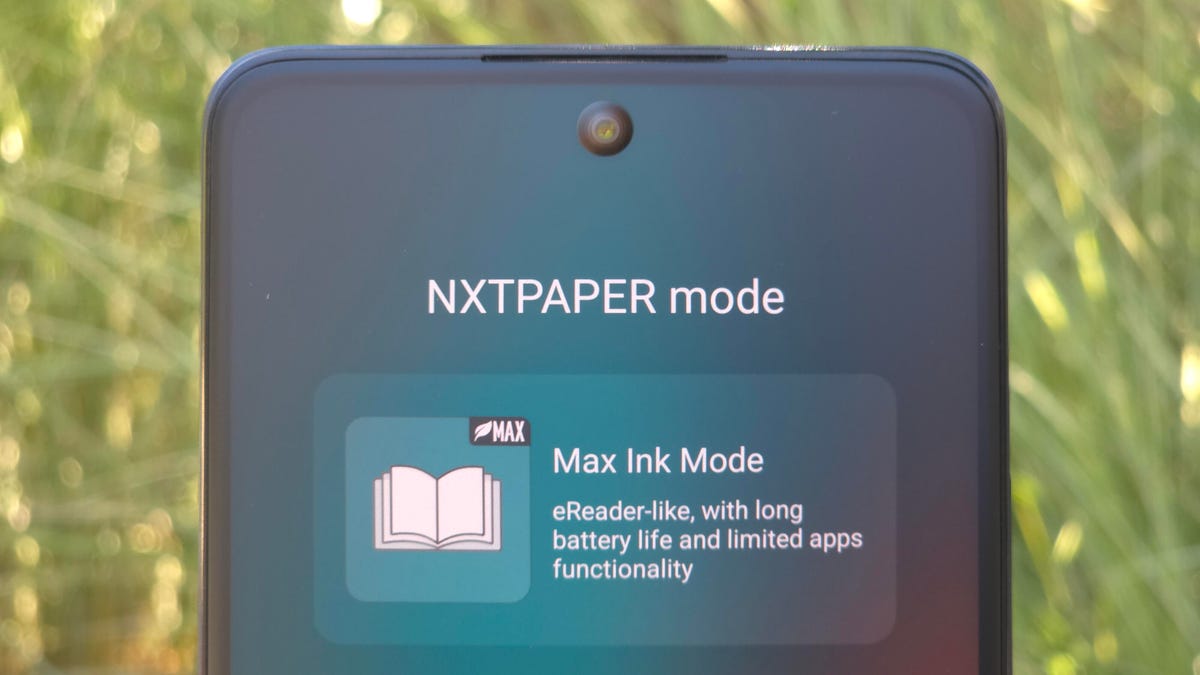
Ink Paper Mode goes one step further, stripping color from icons and text for a no-frills grayscale approach, while still delivering the full unencumbered Android experience. Max Ink Mode is the most dramatic change, stripping all color while also limiting apps to a small subset of essentials and suspending certain background processes.
Also: iOS 26 envy? 5 iPhone features you can already use on your Android (Samsung included)
The result is an ultra-minimal, battery-saving mode that can last more than a week on a single charge. I enjoyed this mode for reading ebooks and could see it as a great solution for users looking to cut back on smartphone use entirely.
Jason Howell/ZDNET
The display does come with a major caveat. On the brightest days, the matte finish would all but wash out on-screen content, often making it unusable in direct sunlight. If you spend time outside reading or working, you’ll be looking for shade like I was.
Performance and battery
Performance is modest but serviceable, with a MediaTek Dimensity 6100+ processor inside paired with 8GB of RAM. In use, this is not a phone for hardcore users who push their devices to the limit. I noticed many actions have a slight delay attached to them. Launching the camera often takes a few seconds to negotiate.
General tasks like web browsing, email, and messaging are responsive enough to keep me happy, but things never felt snappy.
Jason Howell/ZDNET
On the software front, the 60 XE runs Android 15, with a promise from TCL of just one upgrade to Android 16 and two years of security patches. As someone who always decries the poor state of Android OS update promises, this is a weak point, and TCL needs to step up its game. Anyone hoping to get long-term value should consider other options.
Also: I spent a week in New York City with the Samsung Z Fold 7 – and it spoiled me the entire time
I found battery life to be a highlight, which isn’t that surprising given the 5,010mAh battery hidden inside. I routinely made it through the day with around 20-30% capacity to spare at bedtime. Wired charging tops out at a slow 18 watts, so quick daytime top-ups will take some time, but it’s fine for plugging in overnight.
For the truly battery paranoid, there’s the Max Ink Mode that considerably jumps battery life to more than a week if you are willing to cut down on much of what the phone is capable of.
Stay for the display, but not the camera
The plastic marble-like backplate surrounds a large circular camera array that’s hard to miss and perhaps even more premium-looking than its price point. One pet peeve of mine is an off-center camera module, and this phone has a notable wobble when placed on a tabletop as a result.
The camera system itself is one area where the low-end cutbacks really show. The main sensor does its best outdoors in very bright conditions and needs a lot of light to help shots taken indoors. The camera performance is mediocre with soft output that lacks punch and definition most of the time.
Jason Howell/ZDNET
Low-light conditions easily demonstrate the camera system’s baseline capability, and the ultrawide lens often results in grainy images. The 32MP front camera works, but that’s about it. Let’s just say that this is not the phone for the discerning camera buff.
ZDNET’s buying advice
What the TCL 60 XE Nxtpaper 5G offers is a key standout feature: a unique matte display. At $250, the 60XE offers something that you really can’t find anywhere else, in this price category and beyond, and the benefits of that might matter a lot for certain users. For everyone else, consider phones like the CMF Phone 2 Pro, which offers better imaging, better speed, and its signature modular design approach.
Follow my latest tech reviews and projects across social media. You’ll find me on YouTube at YouTube.com/@JasonHowell, on X (formerly Twitter) at @JasonHowell, and on Instagram at Instagram.com/thatjasonhowell.
