


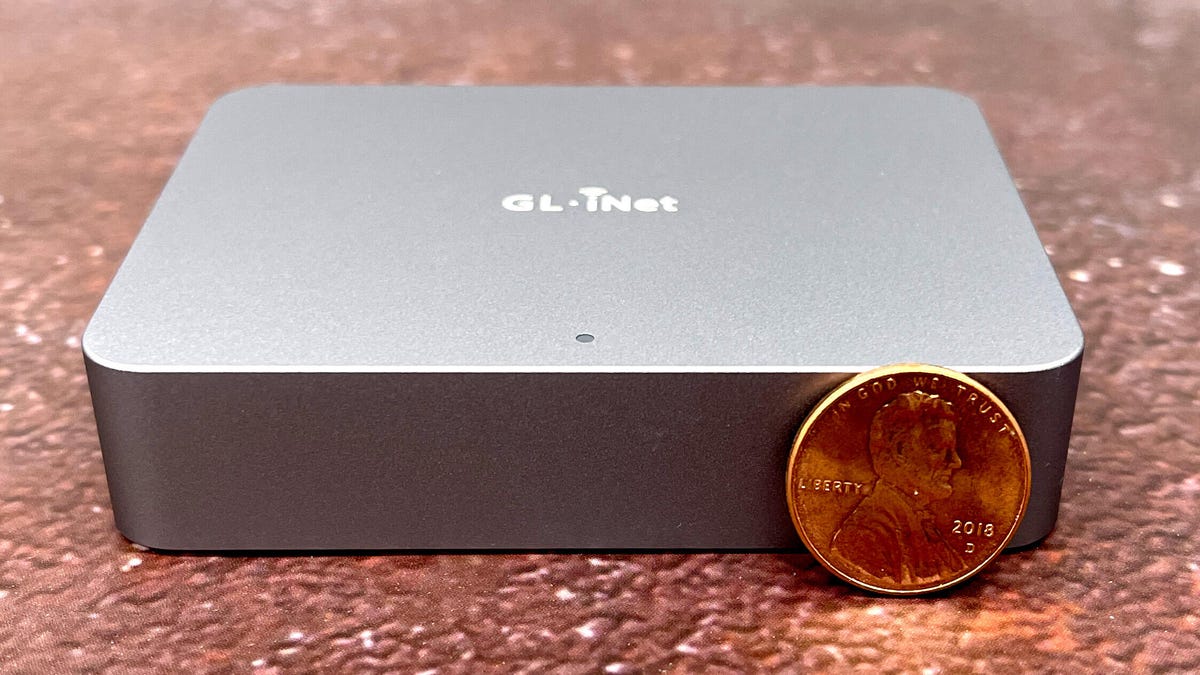
ZDNET’s key takeaways
- The GL.iNet Comet KVM lets you replace keyboard, mouse, and monitor with an Ethernet connection
- It works well, with good performance, a nice web interface, and specialty options for custom needs
- At $90, it’s fairly pricey, especially when adding to a bunch of PCs, but it does the job.
It’s always a happy day when I find a new gadget. It’s a particularly happy day when that gadget solves an existing problem or (even better) removes a particularly grating annoyance.
Today is a happy day.
That’s because I deployed the GL.iNet Comet, a remote KVM. You’ll get a better feel for why this little box sparks joy if I explain the annoyance, and then show you how the Comet tackled the toleration.
No space for old mice
So here’s the situation: We have a home security camera NVR (network video recorder) sitting on the house’s server rack. While you can monitor the cameras from an app on your computer or phone, some of the configuration must be done from a monitor and mouse directly connected to the device’s back.
Not at all precarious. Not at all.
David Gewirtz/ZDNET
From what I can tell, that’s a security feature designed to prevent certain settings from being changed unless you have physical access to the server. It’s a smart feature, but it’s also a pain in the ass.
Also: How a circuit breaker finder helped me map my home’s wiring (and why that matters)
As you can see, the monitor is precariously balanced on top of my Mac mini server, and there’s no space at all for the mouse. But as we upgrade the outdoor cameras and power-over-Ethernet cabling around our yard, we need fairly constant access to the configuration screens for updating and testing.
I have knocked over the monitor more than once. Balancing the mouse on a spare filament box to make selections is tedious at best. There’s absolutely no space for a keyboard, so I used the on-screen keyboard (also darned tedious) to enter keystrokes.
Then I found this little network KVM.
How the GL.iNet Comet works
This little box is very clearly intended for remote PC management. YouTube reviews show the Comet remotely connecting to PC servers and even being able to access the BIOS. There’s also an add-on ATX board for your computer that lets you boot from a shutdown state.
I didn’t use those features. I connected the box to the nearest Ethernet switch, then ran an HDMI cable to the back of the NVR. I also ran a USB-C to USB-A cable from the Comet to my NVR to provide mouse functionality.
Also: 9 programming tasks you shouldn’t hand off to AI – and why
There is an app you can use on your computer to remotely access the box, but I found that the web interface was more than complete for my needs since I only needed local access.
Images blurred for privacy.
Screenshot by David Gewirtz/ZDNET
When you connect to glkvm.local and hit the Settings button, you have a wide range of control options. When I took the above screenshot, I had Show Local Cursor turned on. But I found that if I turned that option off and set Mouse Mode to relative, the mouse tracking on the NVR was perfectly smooth.
Video on the LAN is also very crisp, clear, and responsive. Here, we’re running four cameras on the NVR dashboard screen, and whenever there was activity outside, the cameras updated smoothly.
Images blurred for privacy.
Screenshot by David Gewirtz/ZDNET
There’s also a Toolbox button that provides access to several other helpful features. These include pasting to the remote system, sending some common key combinations, enabling Wake On Lan, and an option to open a terminal into the box.
Screenshot by David Gewirtz/ZDNET
A little poking around yielded some interesting information. The box is built on Buildroot, a lightweight Linux distro often used for embedded systems. It’s using an ARMv7 32-bit kernel (version 4.19.111).
It’s also running BusyBox, which is a single, compact executable that contains many of the most common Linux utilities, all in a single binary, with its own simple shell.
Also: A vibe coding horror story: What started as ‘a pure dopamine hit’ ended in a nightmare
Do you need to know all this to derive value from the Comet? No. But you know I can’t resist a command line interface. It’s my happy place.
ZDNET’s buying advice
As for the Comet itself, as long as you have an Ethernet connection, you can use this little box to connect into any device.
Have you ever used a remote KVM like the Comet? What’s the most frustrating setup you’ve had to manage without a proper keyboard, mouse, or monitor? Do you see a use for a device like this in your own home lab or tech setup? And how important is a clean, responsive web interface when it comes to managing remote gear? Let us know in the comments below.
You can follow my day-to-day project updates on social media. Be sure to subscribe to my weekly update newsletter, and follow me on Twitter/X at @DavidGewirtz, on Facebook at Facebook.com/DavidGewirtz, on Instagram at Instagram.com/DavidGewirtz, on Bluesky at @DavidGewirtz.com, and on YouTube at YouTube.com/DavidGewirtzTV.
