

Close Menu
TechurzTechurz

    Subscribe to Updates

    Get the latest creative news from FooBar about art, design and business.

    What's Hot

    Netflix growing up, data center jet engines, and the circular AI economy

    December 12, 2025

    What most VCs won’t tell you about raising capital

    December 12, 2025

    Retro, a photo-sharing app for friends, lets you ‘time-travel’ through your camera roll

    December 12, 2025
    Facebook X (Twitter) Instagram
    Trending
    • Netflix growing up, data center jet engines, and the circular AI economy
    • What most VCs won’t tell you about raising capital
    • Retro, a photo-sharing app for friends, lets you ‘time-travel’ through your camera roll
    • The market has ‘switched’ and founders have the power now, VCs say
    • Capital is a commodity (but your investor relationships aren’t)
    • Harness hits $5.5B valuation with $240M raise to automate AI’s ‘after-code’ gap
    • On Me raises $6M to shake up the gift card industry
    • Interest in Spoor’s bird monitoring AI software is soaring
    Facebook X (Twitter) Instagram Pinterest Vimeo
    TechurzTechurz
    • Home
    • AI
    • Apps
    • News
    • Guides
    • Opinion
    • Reviews
    • Security
    • Startups
    TechurzTechurz
    Home»AI»Windows 11 is getting a new Start menu this month
    AI

    Windows 11 is getting a new Start menu this month

    TechurzBy TechurzMay 6, 2025No Comments3 Mins Read
    Share Facebook Twitter Pinterest LinkedIn Tumblr Reddit Telegram Email
    Windows 11 is getting a new Start menu this month
    Share
    Facebook Twitter LinkedIn Pinterest Email

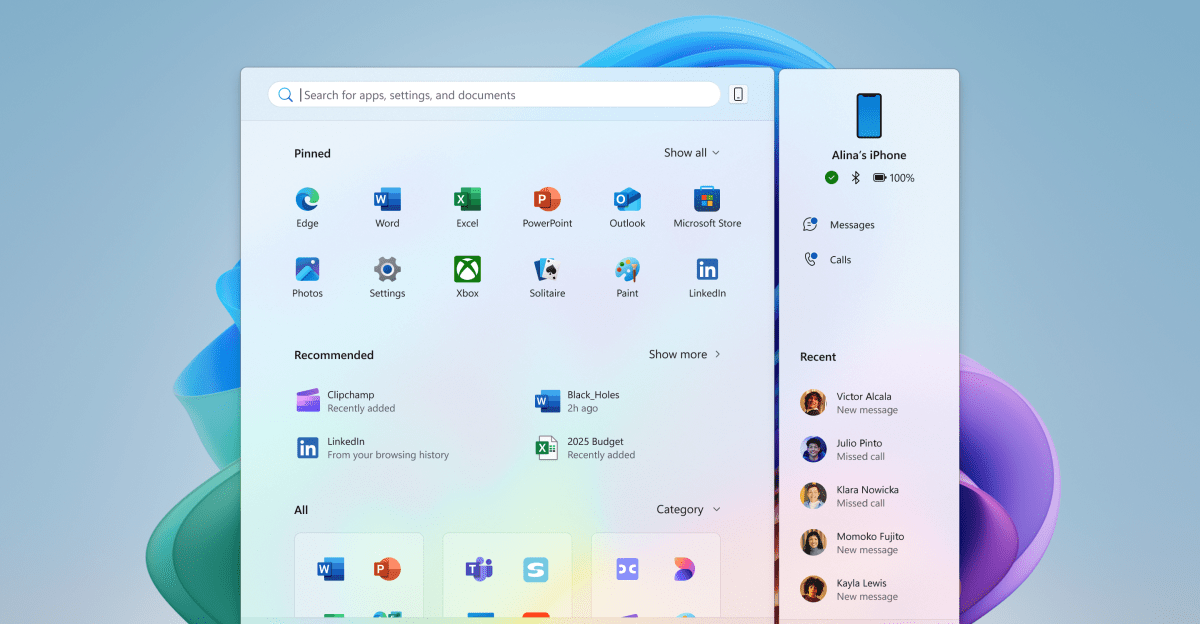
    Microsoft is revamping the Windows 11 Start menu and adding a glut of new AI features over the next month, coming first to Windows Insiders running Snapdragon X Copilot Plus PCs like the newly announced Surface devices. The new Start menu, first discovered last month in an early build preview, is roomier and gives easier scrollable access to the all apps view — complete with category organization.

    Aside from likely looking much better on large displays, the updated Windows 11 Start menu will have a new phone companion panel, giving quick access to recent contacts, messages, calls, battery level, and more on a synced iPhone or Android device.

    Windows 11 is also getting a variety of new AI features, including an AI agent baked into the Windows settings menu; more Click to Do text and image actions; AI editing features for Paint, Photos, and the Snipping Tool; Copilot Vision visual search; improved Windows Search; rich image descriptions for Narrator; AI writing functions in Notepad; and AI actions from within File Explorer. In its detailed blog post Microsoft says the AI features are designed to “make our experiences more intuitive, more accessible, and ultimately more useful.”

    Users will be able to ask an on-device AI to adjust Windows settings for them, or seek help troubleshooting a problem they’re experiencing — like the mouse cursor being too small. According to Microsoft’s example image above, Windows will flag these with a “Recommendations are AI-generated and may be incorrect” warning. That doesn’t exactly instill the most confidence, considering Windows settings can do things like factory reset your computer. As for the File Explorer, right-clicking a file will offer new Click to Do-like shortcuts such as editing images and generating text summaries before you open a file.

    For those that actually use Microsoft’s core Windows apps for editing images, you’ll be able to use a new “Relight” feature in the Photos app to add up to three positional light sources to a picture. The Paint app will get a new content-aware selection tool for moving, erasing, and generative fill, and it will be able to generate digital stickers from a text prompt. The other big image-related features are for the Snipping Tool: a function called Perfect Screenshot that automatically crops to the most prominent content, the ability to copy text from images and screenshots, and an eyedropper tool for sampling on-screen colors.

    Windows on Arm users with Snapdragon X chips will be first on deck for these new features, but Copilot Plus PC owners with Intel and AMD chips will also get the updates a little later.

    Personally, I could take or leave the AI stuff. Just give me that new, jumbo Start menu.

    menu month start Windows
    Share. Facebook Twitter Pinterest LinkedIn Tumblr Email
    Previous ArticleStadt Ellwangen von Cyberattacke getroffen
    Next Article Okay, Grand Theft Auto 6 has finally earned my attention
    Techurz
    • Website

    Related Posts

    Opinion

    Amazon hopes to jump start its AI coding tool Kiro by giving it away to startups

    December 4, 2025
    Opinion

    Simular’s AI agent wants to run your Mac, Windows PC for you

    December 2, 2025
    Security

    Two Apple devices you really shouldn’t buy this month (and 9 that are safe for now)

    November 1, 2025
    Add A Comment
    Leave A Reply Cancel Reply

    Top Posts

    College social app Fizz expands into grocery delivery

    September 3, 202520 Views

    A Former Apple Luminary Sets Out to Create the Ultimate GPU Software

    September 25, 202513 Views

    The Reason Murderbot’s Tone Feels Off

    May 14, 20259 Views
    Stay In Touch
    • Facebook
    • YouTube
    • TikTok
    • WhatsApp
    • Twitter
    • Instagram
    Latest Reviews

    Subscribe to Updates

    Get the latest tech news from FooBar about tech, design and biz.

    Most Popular

    College social app Fizz expands into grocery delivery

    September 3, 202520 Views

    A Former Apple Luminary Sets Out to Create the Ultimate GPU Software

    September 25, 202513 Views

    The Reason Murderbot’s Tone Feels Off

    May 14, 20259 Views
    Our Picks

    Netflix growing up, data center jet engines, and the circular AI economy

    December 12, 2025

    What most VCs won’t tell you about raising capital

    December 12, 2025

    Retro, a photo-sharing app for friends, lets you ‘time-travel’ through your camera roll

    December 12, 2025

    Subscribe to Updates

    Get the latest creative news from FooBar about art, design and business.

    Facebook X (Twitter) Instagram Pinterest
    • About Us
    • Contact Us
    • Privacy Policy
    • Terms and Conditions
    • Disclaimer
    © 2025 techurz. Designed by Pro.

    Type above and press Enter to search. Press Esc to cancel.