

Close Menu
TechurzTechurz

    Subscribe to Updates

    Get the latest creative news from FooBar about art, design and business.

    What's Hot

    Luma launches AI-powered production studio with faith-focused Wonder Project

    April 17, 2026

    Factory hits $1.5B valuation to build AI coding for enterprises

    April 16, 2026

    Slash, a Ramp competitor founded by teenagers, raises $100M at $1.4B valuation

    April 16, 2026
    Facebook X (Twitter) Instagram
    Trending
    • Luma launches AI-powered production studio with faith-focused Wonder Project
    • Factory hits $1.5B valuation to build AI coding for enterprises
    • Slash, a Ramp competitor founded by teenagers, raises $100M at $1.4B valuation
    • Upscale AI in talks to raise at $2B valuation, says report
    • From the Startup Battlefield stage to the International Space Station: geCKo Materials built a sticky product
    • This energy startup’s bet on 100-year-old grid tech is paying off
    • You’ve heard of hybrid cars. Now meet a hybrid cement plant.
    • AI learning app Gizmo levels up with 13M users and a $22M investment
    Facebook X (Twitter) Instagram Pinterest Vimeo
    TechurzTechurz
    • Home
    • AI
    • Apps
    • News
    • Guides
    • Opinion
    • Reviews
    • Security
    • Startups
    TechurzTechurz
    Home»AI»Windows 11’s new update will add a bunch of AI features
    AI

    Windows 11’s new update will add a bunch of AI features

    TechurzBy TechurzJuly 23, 2025No Comments3 Mins Read
    Share Facebook Twitter Pinterest LinkedIn Tumblr Reddit Telegram Email
    Windows 11’s new update will add a bunch of AI features
    Share
    Facebook Twitter LinkedIn Pinterest Email

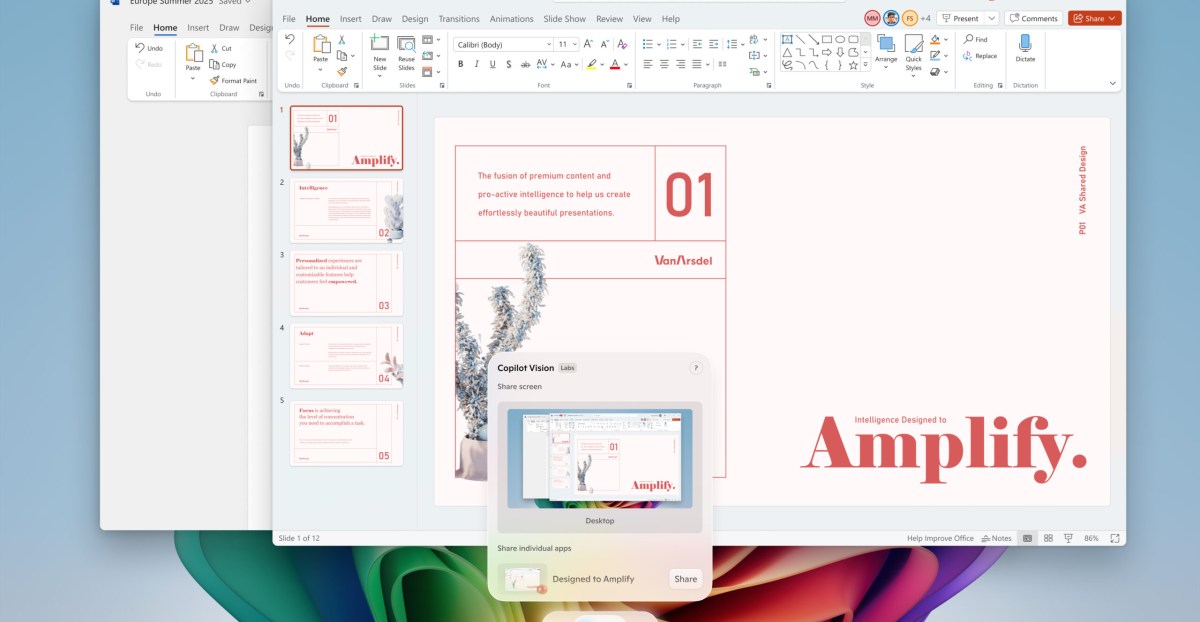
    Microsoft is releasing several new AI features for Windows 11, including its Copilot Vision tool that can scan everything on your screen. The features, which are gradually rolling out to everyone now, also include tools that are exclusive to Copilot Plus PCs.

    For starters, all Windows 11 users can now access Copilot Vision through the Copilot app, which uses AI to analyze the content on your screen. With the tool, you can ask questions aloud about what you’re seeing across multiple apps and webpages that are open on your screen. You can also ask it how to complete specific tasks on your computer, like how to improve the lighting on a photo. Microsoft first began testing a more limited form of this feature last year.

    Additionally, users with Snapdragon-powered Copilot Plus PCs can access an AI-powered “agent” within the Settings app. This allows you to search for a specific setting with natural language, such as “I want to enable quiet hours” or “connect Bluetooth device.” If the agent is capable of carrying out the task, it will offer to complete it on your behalf.

    Microsoft is making its AI-powered “Click to Do” preview more useful on Copilot Plus PCs, too. This feature, which surfaces when users hold down the Windows key and left-click on an app, text, website, or other piece of content, is designed to help you quickly complete actions, like summarizing a highlighted paragraph. As part of its update, Microsoft is rolling out several new actions you can perform with Click to Do, including practicing reading fluency and pronunciation with its Reading Coach tool, drafting a document in Microsoft Word using Copilot, and scheduling a Teams meeting.

    Other features coming only to Copilot Plus PCs include a new AI-powered sticker generator in Paint and an object select tool in the app that lets you separate and edit specific parts of an image. There’s also a new AI lighting option available in Photos for Snapdragon-equipped Copilot Plus PCs, along with a “perfect screenshot” tool within the Snipping Tool that uses AI to “precisely capture content on your screen.”

    Microsoft is also releasing some features that aren’t related to AI across all Windows 11 PCs, including a handy color picker within the Snipping Tool and a new mechanism that allows PCs to automatically fix issues causing unexpected restarts.

    Microsoft says it will roll out all of these features “over the next month.” Some of them are already available in Windows’ new non-security preview update and as updates that you can download in the Microsoft Store.

    11s add bunch features update Windows
    Share. Facebook Twitter Pinterest LinkedIn Tumblr Email
    Previous ArticleI replaced my Microsoft account password with a passkey – and you should, too
    Next Article Samsung Galaxy Z Flip7 FE in for review
    Techurz
    • Website

    Related Posts

    Opinion

    Flighty’s new update gives you real-time alerts about airport disturbances

    March 24, 2026
    Opinion

    Simular’s AI agent wants to run your Mac, Windows PC for you

    December 2, 2025
    Security

    Thinking of buying an Arm-based Windows PC? These three issues might be dealbreakers

    November 1, 2025
    Add A Comment
    Leave A Reply Cancel Reply

    Top Posts

    College social app Fizz expands into grocery delivery

    September 3, 20252,288 Views

    A Former Apple Luminary Sets Out to Create the Ultimate GPU Software

    September 25, 202516 Views

    The Reason Murderbot’s Tone Feels Off

    May 14, 202512 Views
    Stay In Touch
    • Facebook
    • YouTube
    • TikTok
    • WhatsApp
    • Twitter
    • Instagram
    Latest Reviews

    Subscribe to Updates

    Get the latest tech news from FooBar about tech, design and biz.

    Most Popular

    College social app Fizz expands into grocery delivery

    September 3, 20252,288 Views

    A Former Apple Luminary Sets Out to Create the Ultimate GPU Software

    September 25, 202516 Views

    The Reason Murderbot’s Tone Feels Off

    May 14, 202512 Views
    Our Picks

    Luma launches AI-powered production studio with faith-focused Wonder Project

    April 17, 2026

    Factory hits $1.5B valuation to build AI coding for enterprises

    April 16, 2026

    Slash, a Ramp competitor founded by teenagers, raises $100M at $1.4B valuation

    April 16, 2026

    Subscribe to Updates

    Get the latest creative news from FooBar about art, design and business.

    Facebook X (Twitter) Instagram Pinterest
    • About Us
    • Contact Us
    • Privacy Policy
    • Terms and Conditions
    • Disclaimer
    © 2026 techurz. Designed by Pro.

    Type above and press Enter to search. Press Esc to cancel.