


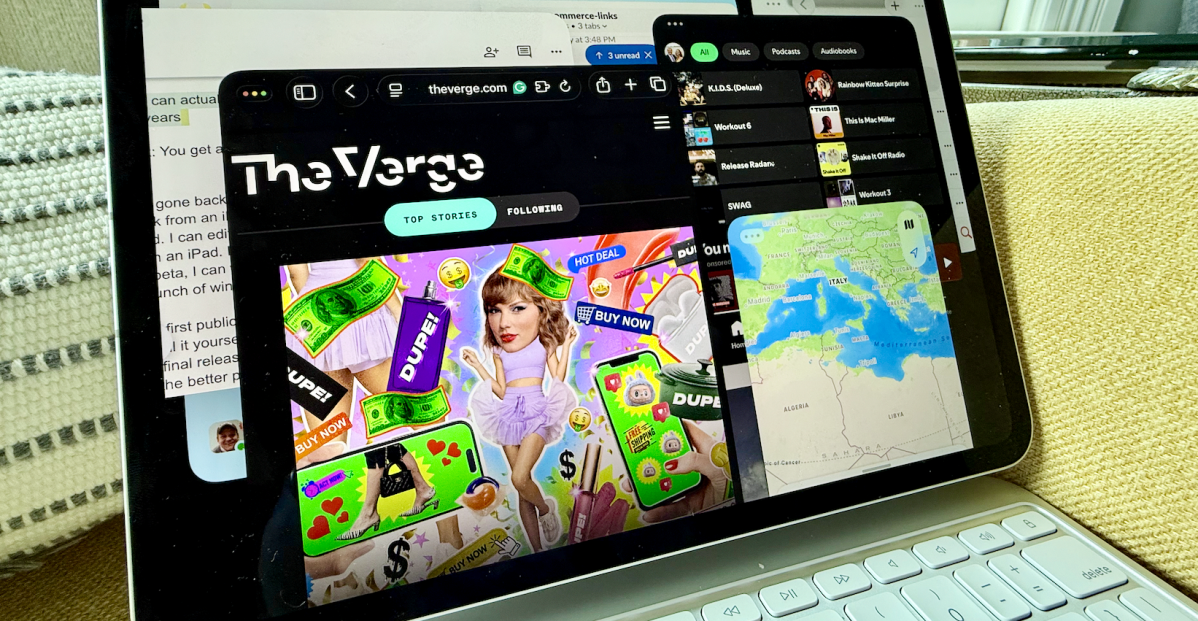
I’ve gone back and forth over the years on whether or not I can actually work from an iPad. The answer has always been: sort of. I can write on an iPad. I can edit on an iPad. So, I guess I’ve always been able to “work” from an iPad. But with a Magic Keyboard and an iPad running the iPadOS 26 beta, I can work like I would right on my MacBook or Surface Pro, using a bunch of windows plastered all over the place.
The first public beta for iPadOS 26 dropped today. You can download and install it yourself on most recent iPads — just know it might be buggy until the final release this fall. Still, I’ve been using the beta for most work tasks for the better part of a week, and aside from a few pain points, it’s what I’ve always wanted from an iPad. It just took Apple 15 years to get here.
iPadOS 26 finally gives us real windows, not Split View or Slide Over or Stage Manager or whatever other multitasking attempts Apple has tried to “differentiate the iPad from the Mac” or make it a “touch first” experience. I have Slack open in one window and Safari open in another, and this Google Doc that I’m writing right now in another. Spotify is somewhere in the background. I could launch YouTube TV if I want to be naughty about it. I opened about 10 apps before I stopped trying to open more. (Sometimes they open in another space, but this feels like a bug.)
These buttons should look familiar.
This is real multitasking and, for the most part, it’s like how I work on a MacBook Air or a Surface Pro. Apps can be placed on top of one another or moved around the screen and dropped exactly where I want them. There’s even a real arrow for a cursor! No more moving a silly little dot around the screen.
When you open an app, each launches into a full-sized window. The familiar red, yellow, and green buttons to close, minimize, or maximize the window are there in the top left corner. I drag the corner in or out to resize the window. Each app also has a brand new menu bar along the top, so you can view or change all the app’s settings. In its simplest sense, it allows you to select File > Print, for example, if you’re in a document. In Apple Music, you can choose File > New Playlist, or manage your controls and create new stations. It’s very much like using apps on a Mac.
There are full menus in apps.
There’s also a new Files app that makes it easier to access all the files saved on your iPad, or in iCloud, so you can quickly open documents you have saved on other computers. And you can add files or folders to your dock. It’s not perfect; I wish I could see drives or save to the desktop like on a Mac, but it’s fine.
This all works so well that Apple has wiped out any remaining excuses for not bringing a touchscreen to the Mac. Those little red, yellow and green buttons get larger whenever I go to tap them, so I can use the cursor or my finger to minimize windows, or resize them or move things around. If I touch the bottom of the screen, all the apps slide away and I can see the icons and widgets on my desktop.
There are still reasons I turn to my MacBook Air, though. Unless I’m connected to a monitor, the 11-inch screen on my iPad Pro is a little tiny if I need to dig around in a big spreadsheet or if I really want to keep a bunch of apps open at full size. Resizing works most of the time, but I can’t always see all the chats that I want in Slack unless I make it bigger, and even then it ends up mostly hidden behind other apps because of the limited screen real estate. I don’t have a 13-inch iPad Pro or iPad Air to test on, but I imagine that helps a bit.
Also, while I love having all the apps I use available here — X, Bluesky, Safari, Chrome, Slack, Spotify, whatever — the desktop versions can still be better and easier to use than the iPad versions. Take Google Docs for example: it’s bad on the iPad. For whatever reason I can’t use my cursor to select a bunch of text properly, and instead have to touch the screen. There’s also a bug where I can control the mouse but can’t type for a little bit. I use the Grammarly plugin to catch silly mistakes in my writing, but it works through a keyboard plugin on the iPad that isn’t as effective as the browser extension on a Mac or PC. My grammar is be damned.
I’ll travel with just my iPad.
The iPad still won’t cut it for everyone. There are a lot of professional apps for Macs that just aren’t built for the iPad. And some people need Macs for the additional horsepower you can get from the more powerful chips. But for folks who can mostly work in a bunch of windows? This is what’s up.
There’s this little test I like to do when I think about whether or not a new gadget will work for me. I think to myself whether, over a long weekend or on a trip somewhere, I’ll be able to jump on and do a work task if I have to. Most of the time I’ll bring my MacBook Air or Surface Pro along just in case it’s something I can’t do from my phone. (The Galaxy Z Fold and Pixel Fold have passed this test, for what it’s worth.) I’ll usually bring my iPad along, too, because I bring my iPad everywhere. With iPadOS 26, I don’t need to carry my MacBook Air anymore.
Follow topics and authors from this story to see more like this in your personalized homepage feed and to receive email updates.
- AppleClose
Apple
Posts from this topic will be added to your daily email digest and your homepage feed.
PlusFollow
See All Apple
- Hands-onClose
Hands-on
Posts from this topic will be added to your daily email digest and your homepage feed.
PlusFollow
See All Hands-on
- iOSClose
iOS
Posts from this topic will be added to your daily email digest and your homepage feed.
PlusFollow
See All iOS
- iPadClose
iPad
Posts from this topic will be added to your daily email digest and your homepage feed.
PlusFollow
See All iPad
- ReviewsClose
Reviews
Posts from this topic will be added to your daily email digest and your homepage feed.
PlusFollow
See All Reviews
- TechClose
Tech
Posts from this topic will be added to your daily email digest and your homepage feed.
PlusFollow
See All Tech
