

Close Menu
TechurzTechurz

    Subscribe to Updates

    Get the latest creative news from FooBar about art, design and business.

    What's Hot

    StrictlyVC San Francisco is in less than a month

    April 1, 2026

    Toyota’s Woven Capital appoints new CIO and COO in push for finding the ‘future of mobility’

    April 1, 2026

    Mercor says it was hit by cyberattack tied to compromise of open-source LiteLLM project

    April 1, 2026
    Facebook X (Twitter) Instagram
    Trending
    • StrictlyVC San Francisco is in less than a month
    • Toyota’s Woven Capital appoints new CIO and COO in push for finding the ‘future of mobility’
    • Mercor says it was hit by cyberattack tied to compromise of open-source LiteLLM project
    • It’s not your imagination: AI seed startups are commanding higher valuations
    • Yupp.ai shuts down after raising $33M from a16z crypto’s Chris Dixon
    • Whoop’s valuation just tripled to $10 billion
    • Nomadic raises $8.4 million to wrangle the data pouring off autonomous vehicles
    • The company behind ClassPass and Mindbody just got a lot bigger with a $7.5B merger
    Facebook X (Twitter) Instagram Pinterest Vimeo
    TechurzTechurz
    • Home
    • AI
    • Apps
    • News
    • Guides
    • Opinion
    • Reviews
    • Security
    • Startups
    TechurzTechurz
    Home»Apps»iOS 26 has a new Camera app: Here’s what’s new and how to find everything that’s moved
    Apps

    iOS 26 has a new Camera app: Here’s what’s new and how to find everything that’s moved

    TechurzBy TechurzJuly 29, 2025No Comments3 Mins Read
    Share Facebook Twitter Pinterest LinkedIn Tumblr Reddit Telegram Email
    iOS 26 camera app
    Share
    Facebook Twitter LinkedIn Pinterest Email


    When you first launch the Camera app after updating to iOS 26, you’ll see a splash screen telling you that it’s a new design. If you’re like us, you’ll just tap “Continue” to get it out of your way—you have selfies to take!

    Don’t panic at the dramatically different look. For the most part, the new Camera app works like the old one and doesn’t remove any major features. In fact, it adds some settings selections that you used to have to jump into the Settings app for, which is a big time-saver.

    Here’s how the new Camera app works.

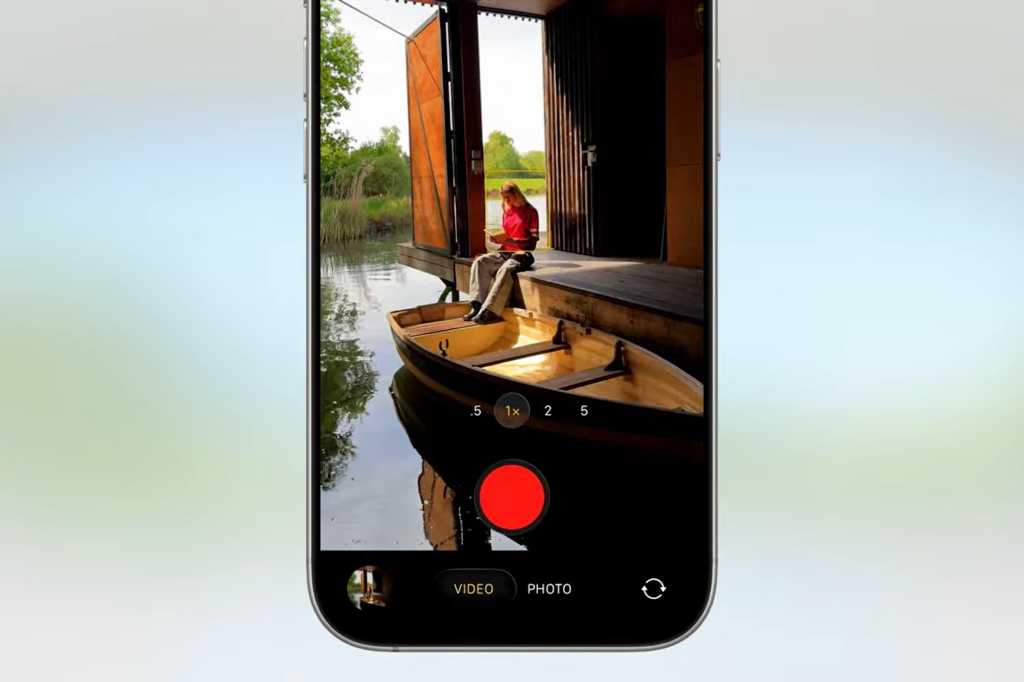
    Swipe for camera modes

    The camera modes used to be listed just above the shutter button. Now they’re below it. You’ll only see Photo and Video at first, but just tap and drag left and right, the same as you did with iOS 18. All the modes you’re used to are still there.

    Foundry

    Quick-select features in the upper-right

    In the upper right, you’ll see little icons for common features, like flash or night mode, depending on the circumstances. Tapping those toggles the feature.

    Foundry

    Show all features for your current mode

    Tapping the little six-dot icon next to those quick features, or tapping the model you’re already in again (Photo, Video, Portrait, etc.) will bring up a pop-up menu with large buttons to select every available feature for that mode. This is how you’ll turn on or off Live Photo, select Photographic Styles, change aspect ratio, and so on.

    Foundry

    Change capture settings in the upper-left

    In the upper-left corner, you’ll see an indication of your current capture settings. In a photo mode it’ll be HEIC or RAW with an indication of the maximum megapixel count (zooming in might result in lower-res images, of course). In video modes, it will show the resolution and frame rate.

    Tapping this area will let you select different resolutions, frame rates, and quality settings. You used to have to jump into the Settings menu to get this stuff, so changing it right in the Camera app is a big improvement.

    Foundry

    Lens cleaning hints

    There are still plenty of settings you need to access from the Settings app, like changing how the Camera Control button behaves, tweaking your custom Photographic Styles, and changing sound recording settings.

    But there’s one totally new feature worth highlighting: Lens Cleaning Hints. You’ll find a toggle for that near the bottom of the Settings > Camera menu. With this enabled, your phone will suggest when you might have dirt or something over your camera lens and should clean it.

    Foundry

    AirPods as a camera remote

    Another fun trick introduced in iOS 26 is using your AirPods Pro 2 or AirPods 4 as a remote shutter. You’ll have to enable this in your AirPods settings while your AirPods are connected to your iPhone. Look for Camera Remote and you’ll have the option to set it to Press Once or Press and Hold.

    Foundry

    When your AirPods are connected and in your ears, trigger the remote, and the Camera app will give you a three-second countdown (to take your hand away from your ear, or remove your AirPods if you like), and then it will take a 10-image burst, so you can capture just the right moment.

    app camera Find Heres iOS moved Whats
    Share. Facebook Twitter Pinterest LinkedIn Tumblr Email
    Previous ArticleThe massive blackout in Spain, Portugal, and France exposed a global power crisis. Now what?
    Next Article Trump’s AI plan is a massive handout to gas and chemical companies
    Techurz
    • Website

    Related Posts

    Opinion

    Digg lays off staff and shuts down app as company retools

    March 13, 2026
    Opinion

    MyFitnessPal has acquired Cal AI, the viral calorie app built by teens

    March 2, 2026
    Opinion

    Jest, a marketplace for messaging games, is challenging the app store status quo

    February 26, 2026
    Add A Comment
    Leave A Reply Cancel Reply

    Top Posts

    College social app Fizz expands into grocery delivery

    September 3, 20252,288 Views

    A Former Apple Luminary Sets Out to Create the Ultimate GPU Software

    September 25, 202516 Views

    The Reason Murderbot’s Tone Feels Off

    May 14, 202512 Views
    Stay In Touch
    • Facebook
    • YouTube
    • TikTok
    • WhatsApp
    • Twitter
    • Instagram
    Latest Reviews

    Subscribe to Updates

    Get the latest tech news from FooBar about tech, design and biz.

    Most Popular

    College social app Fizz expands into grocery delivery

    September 3, 20252,288 Views

    A Former Apple Luminary Sets Out to Create the Ultimate GPU Software

    September 25, 202516 Views

    The Reason Murderbot’s Tone Feels Off

    May 14, 202512 Views
    Our Picks

    StrictlyVC San Francisco is in less than a month

    April 1, 2026

    Toyota’s Woven Capital appoints new CIO and COO in push for finding the ‘future of mobility’

    April 1, 2026

    Mercor says it was hit by cyberattack tied to compromise of open-source LiteLLM project

    April 1, 2026

    Subscribe to Updates

    Get the latest creative news from FooBar about art, design and business.

    Facebook X (Twitter) Instagram Pinterest
    • About Us
    • Contact Us
    • Privacy Policy
    • Terms and Conditions
    • Disclaimer
    © 2026 techurz. Designed by Pro.

    Type above and press Enter to search. Press Esc to cancel.