

Close Menu
TechurzTechurz
    What's Hot

    This startup raised $43M to build a hive mind for ships

    May 20, 2026

    OpenAI barrels towards IPO that may happen in September

    May 20, 2026

    Quartermaster is building a maritime hive mind

    May 20, 2026
    Facebook X (Twitter) Instagram
    Tech Pulse
    • This startup raised $43M to build a hive mind for ships
    • OpenAI barrels towards IPO that may happen in September
    • Quartermaster is building a maritime hive mind
    • From teen hacker to Iron Dome researcher, this founder raised $28M to fight AI phishing
    • ‘Survivor’ stars Kyle Fraser and Kamilla Karthigesu introduce a goal-tracking app, Paprclip
    X (Twitter) Pinterest YouTube LinkedIn WhatsApp
    TechurzTechurz
    • Home
    • AI Systems
    • Cyber Reality
    • Future Tech
    • Disruption Lab
    • Signals
    • Tech Pulse
    TechurzTechurz
    Home - Apps - Google Photos adds ‘Quick Edits’ when you share images
    Apps

    Google Photos adds ‘Quick Edits’ when you share images

    TechurzBy TechurzMay 14, 2025Updated:May 11, 2026No Comments1 Min Read
    Share Facebook Twitter Pinterest LinkedIn Tumblr Reddit Telegram Email
    Google Photos adds ‘Quick Edits’ when you share images
    Share
    Facebook Twitter LinkedIn Pinterest Email

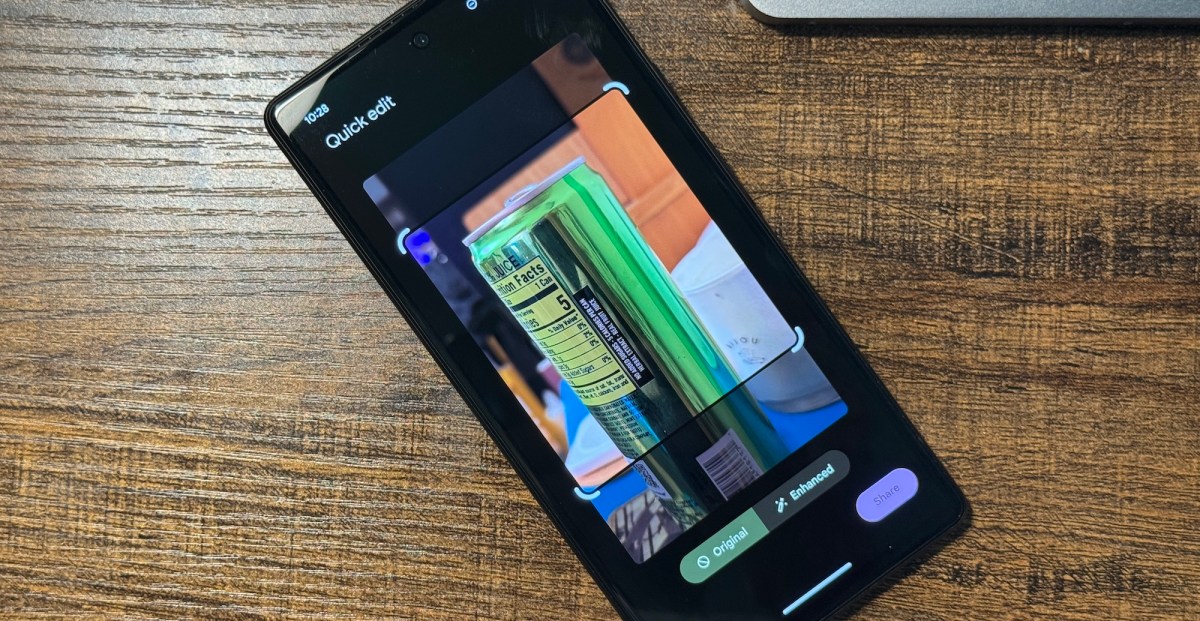
    Google has announced that it’s now added a “Quick Edits” feature that lets you edit an image as you’re sharing it without necessarily saving those changes to your library.

    We’re not talking deep edits here: you’ll be able to crop or auto-enhance the image, then compare it to the unedited version before you let the photo fly. Whatever changes you make will be saved when sharing in Google Photos itself, creating a shared link, or adding the image to a shared Google Photos album. However, they won’t be saved if you’re sharing through another app like Google Messages or WhatsApp.

    The option to create these edits will appear automatically when you go to share an image. If having that extra step shoved into your sharing workflow isn’t your cup of tea, there’s an option to turn it off when you tap the Settings icon on that screen.

    The feature only works for images that you haven’t already edited, and “typically doesn’t appear for photos that have been edited and sorted into document albums such as receipts or screenshots.” And it’s only available in Google Photos for Android 14 and up.

    Adds Edits Google images Photos quick share
    Share. Facebook Twitter Pinterest LinkedIn Tumblr Email
    Previous ArticleThe 10 Most Beautiful Headphones Ever Made
    Next Article Sony Bravia Theater System 6 Review: Great Performance, Odd Design
    Techurz
    • Website

    Related Posts

    Opinion

    Walmart-owned Flipkart, Amazon are squeezing India’s quick commerce startups

    April 12, 2026
    Opinion

    Google, Accel India accelerator choses 5 startups and none are ‘AI wrappers’

    March 16, 2026
    Opinion

    Google completes $32B acquisition of Wiz

    March 11, 2026
    Add A Comment
    Leave A Reply Cancel Reply

    Top Posts

    College social app Fizz expands into grocery delivery

    September 3, 20252,288 Views

    A Former Apple Luminary Sets Out to Create the Ultimate GPU Software

    September 25, 202516 Views

    The Reason Murderbot’s Tone Feels Off

    May 14, 202512 Views
    Stay In Touch
    • YouTube
    • WhatsApp
    • Twitter
    • Pinterest
    • LinkedIn
    Latest Reviews

    Techurz is a future-first technology publication covering AI systems, cyber reality, future tech, disruption, and digital signals — written today, searched tomorrow.

    Useful Links
    • Affiliate Disclosure
    • Terms and Conditions
    • Privacy Policy
    • Cookie Policy
    • Write For Us
    • About Us
    • Contact Us
    USEFUL LINKS
    • Our Authors / Editorial Team
    • Advertise
    • Disclaimer
    • DMCA
    • Editorial Policy
    • Sitemap

    Join the Techurz Brief

    The future does not arrive suddenly.
    Get sharp weekly signals on the technologies, risks, tools, and shifts that matter before they become obvious.

    Facebook X (Twitter) Instagram Pinterest
    • About Us
    • Contact Us
    • Privacy Policy
    • Terms and Conditions
    • Disclaimer
    © 2026 techurz. Designed by Pro.

    Type above and press Enter to search. Press Esc to cancel.