

Close Menu
TechurzTechurz
    What's Hot

    Meet Wrinkles, an AI app that uncovers the hidden stories of the places around you

    August 4, 2026

    Take an extra $100 off your TechCrunch Disrupt 2026 pass: This week only!

    August 4, 2026

    Bending Spoons to buy Airtable for $1.28B

    August 4, 2026
    X (Twitter) Pinterest YouTube LinkedIn WhatsApp
    Tech Pulse
    • Meet Wrinkles, an AI app that uncovers the hidden stories of the places around you
    • Take an extra $100 off your TechCrunch Disrupt 2026 pass: This week only!
    • Bending Spoons to buy Airtable for $1.28B
    • Base Power raises another $1B to save the grid using backyard batteries
    • Design Arena creators raise $7.9 million to bring taste to AI models
    X (Twitter) Pinterest YouTube LinkedIn WhatsApp
    TechurzTechurz
    • Home
    • Tech Pulse
    • Future Tech
    • AI Systems
    • Cyber Reality
    • Disruption Lab
    • Signals
    TechurzTechurz
    Home - News - AutoMix on iOS 26 is going viral. Here’s how to try the hottest iPhone feature yourself
    News

    AutoMix on iOS 26 is going viral. Here’s how to try the hottest iPhone feature yourself

    TechurzBy TechurzJune 18, 2025Updated:May 11, 2026No Comments3 Mins Read
    Share Facebook Twitter Pinterest LinkedIn Tumblr Reddit Telegram Email
    AutoMix on iOS 26 is going viral. Here's how to try the hottest iPhone feature yourself
    Share
    Facebook Twitter LinkedIn Pinterest Email


    Sabrina Ortiz/ZDNET

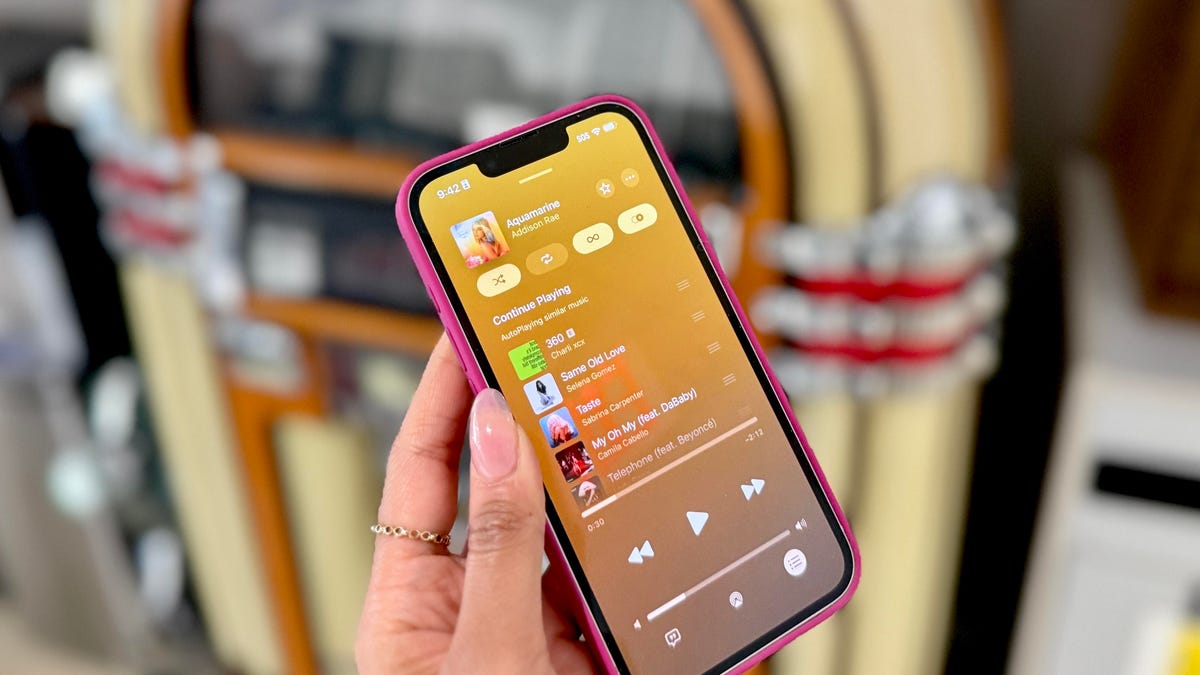
    Apple Music users have often watched Spotify take the lead when it comes to innovative features and personalized listening experiences. But with the introduction of the new AutoMix feature, Apple Music may finally be closing the gap — and even setting a new standard of its own.

    Also: How to install iOS 26 beta on your iPhone (and which models support it)

    What is AutoMix in Apple Music?

    At Apple’s Worldwide Developer Conference (WWDC) last week, the company unveiled upgrades to Apple Music, including the ability to pin artists to the top of the display menu, AI-powered lyrics translation, the lyrics pronunciation option, animated cover art on your lock screen, and an AutoMix feature that’s taking the internet by storm.

    As seen in the video above, AutoMix seamlessly transitions between songs, using AI to match the tempo and beat of the upcoming track, which is automatically selected using Autoplay. Apple describes it in Settings as “songs transition at the perfect moment, based on analysis of the key and tempo of the music.”

    Also: ZDNET’s WWDC 2025 recap with Sabrina Ortiz and Jason Hiner

    The feature builds on the previously available Crossfade option, which enabled smoother transitions between songs but did not mix the two songs together the way a DJ would. While Spotify users may be quick to point out that they had an AI DJ first, it’s worth noting the differences. Spotify’s AI DJ includes a narrated experience that guides listeners through tracks, placing less emphasis on seamless transitions and more on commentary and curation.. 

    How to access AutoMix in iOS 26

    Sabrina Ortiz/ZDNET

    The iOS 26 update doesn’t launch until the fall. As a result, to access AutoMix now, you have to install the developer beta. The beta gives users access to all of the latest features available in iOS 26, but since the features are not fully developed, you risk your device not performing at optimized efficiency and the features being buggy. 

    Also: Spotify now lets you create an AI-made playlist with just a text prompt

    The beta version of the AutoMix feature, in particular, is pretty great, as seen in the video above and in my own experience. However, it is not representative of what the final experience will be, as Apple will likely iterate on the feature a couple of times before launching. 

    If you are interested in downloading the developer beta, you can visit ZDNET’s guide with step-by-step instructions. Once you have it downloaded, accessing AutoMix is easy. The steps are: click on Settings, Apps, Music, and Song Transitions. After toggling Song Transitions on, you can select AutoMix, and you are set. Alternatively, you can type “AutoMix” in the search bar in settings, toggle Song Transitions on, and tap AutoMix. 

    You can keep up with my latest stories and tech adventures on social media. Follow me on Twitter/X at @sabrinaa_ortiz and on Instagram at www.instagram.com/sabrinaa.ortiz/. 

    AutoMix Feature Heres hottest iOS iPhone Viral
    Share. Facebook Twitter Pinterest LinkedIn Tumblr Email
    Previous ArticleWaymo will start testing its autonomous cars in New York again
    Next Article 6-month-old, solo-owned vibe coder Base44 sells to Wix for $80M cash
    Techurz
    • Website

    Related Posts

    Opinion

    Station F ramps up as a launchpad for Europe’s hottest AI startups

    July 6, 2026
    Opinion

    Here’s why Slate changed the battery in its cheap EV truck

    June 24, 2026
    Opinion

    Pixi’s new iOS app turns text messages into interactive AR experiences

    June 18, 2026
    Add A Comment
    Latest Tech Pulse

    College social app Fizz expands into grocery delivery

    September 3, 20252,290

    12 Father’s Day E-Card Sites That Are Actually Good

    June 4, 202523

    SolarSquare in talks to raise up to $60M as India’s rooftop solar market draws major VC interest

    May 23, 202622
    Stay In Touch
    • YouTube
    • WhatsApp
    • Twitter
    • Pinterest
    • LinkedIn

    Techurz helps readers stay ahead of digital change with clear, practical, future focused technology intelligence written today,searched tomorrow.

    X (Twitter) Pinterest YouTube LinkedIn WhatsApp
    Company
    • About Us
    • Contact Us
    • Our Authors / Editorial Team
    • Write For Us
    • Advertise
    Policy
    • Editorial Policy
    • Privacy Policy
    • Terms and Conditions
    • Affiliate Disclosure
    • Cookie Policy
    • Disclaimer
    • DMCA
    Explore
    • AI Systems
    • Cyber Reality
    • Future Tech
    • Disruption Lab
    • Signals
    • Tech Pulse
    • Sitemap

    Join the Techurz Brief

    The future does not arrive suddenly.
    Stay ahead with fast, sharp tech signals.

    Type above and press Enter to search. Press Esc to cancel.