


ZDNET’s key takeaways
- The Geekcom IT 15 Mini PC is available on Amazon for $1,100.
- This tiny form-factor PC has plenty of power to spare for everyday tasks.
- The only downside is that the IT15 doesn’t have a dedicated GPU.
I’ve always enjoyed a mini PC, and any time I can cobble together a system with a tiny form factor, I feel like a kid at Christmas. The latest mini to grace my desktop was the Geekcom IT 15 Mini PC, a truly diminutive machine with a healthy selection of I/O.
This device measures 4.5 x 4.5 x 2 inches, so it’s not only small, but it also includes a VESA mount so you can attach it to the back of your monitor to resemble an all-in-one.
Also: The best mini PCs you can buy
But, for me, however, the biggest selling point is the power. Although it’s not built for serious gaming or number crunching, for typical use cases, this small PC has more than enough power.
Let’s chat about it.
My experience
After unboxing the IT 15 Mini PC, I attached it to a spare monitor and keyboard. When I booted it up, I was sadly greeted by Windows 11. Yeah, not a fan. I went ahead and walked through the setup, which took far too long, and then did what you probably expected I would do.
I burned Linux to a USB flash drive, inserted the drive, rebooted the PC, and installed Ubuntu Budgie. Instead of installing Linux over Windows, I decided to dual-boot them, mostly so I could compare the performance of each OS. That comparison, of course, is tangential to this review, but it was fun regardless. Plus, I’m exponentially more familiar with Linux than I am with Windows, and I believe Linux gives me a clearer picture of how well a PC can perform.
After Linux was installed, I booted into it to kick the tires of the PC. My goal was to treat this as if it were my primary desktop machine, to see if it could stand up to what I throw at it. The first thing I did was to install Ollama AI and Msty, which has become my go-to test for PC hardware.
I figure if a computer can perform well using a local LLM, it’ll pretty much do anything the average user would need. One thing to understand is that local LLMs consume a lot of system resources, and without an NPU or Nvidia GPU, all processing is on the shoulders of the CPU.
Also: This Windows mini PC fits in my hand – and supports up to three 4K monitors
Unfortunately, the IT 15 sports an Intel GPU, which means the CPU will take on the entirety of the AI load, and it showed.
When the installation was complete, I fired up the GUI and ran a quick query of “What is Linux?” Ollama went to work with the default LLM (gemma3:1b) and immediately began printing replies to the query. On a machine with an Nvidia GPU, the output would be almost instantaneous, but with Ollama using only the CPU, the output was considerably slower. Again, that’s not the fault of the CPU, but rather, the lack of a supported GPU. Even so, the output didn’t take too long to complete, and I had a very detailed answer to my question.
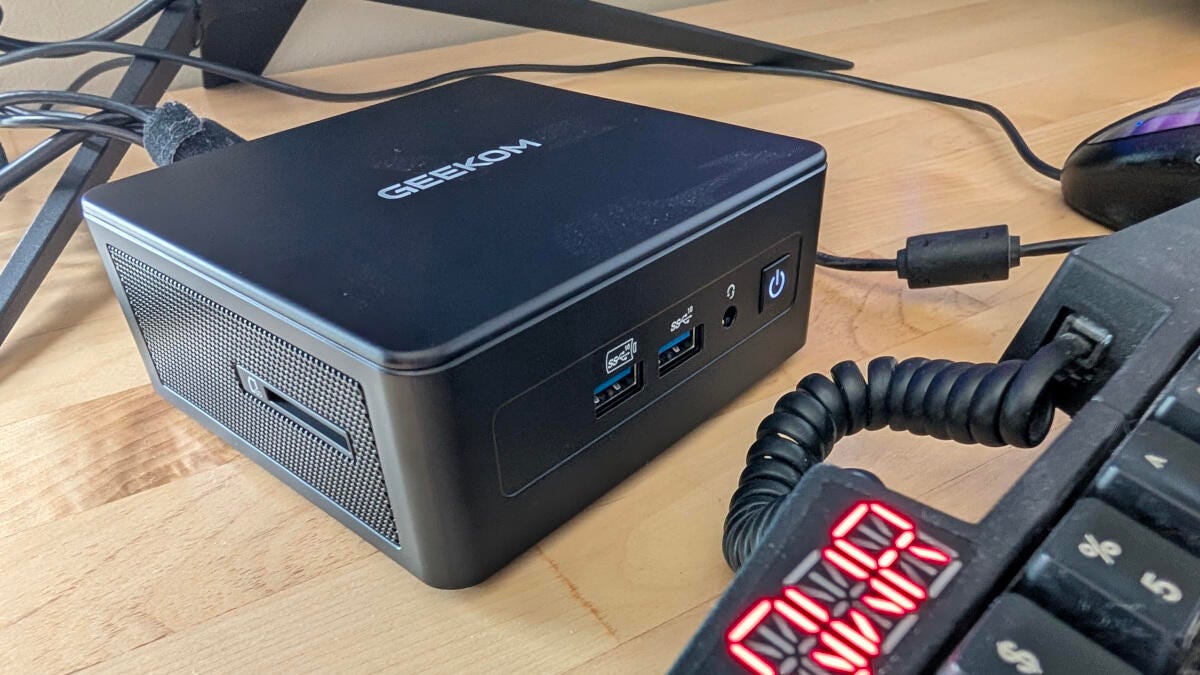
You get two extra USB ports and a 3.5 mm headphone jack on the front panel.
Jack Wallen/ZDNET
After that test, I went about doing the usual things: browsing, installing software, running upgrades, etc. The CPU in this PC is an Intel Core Ultra 9 285H — which raises it well above midrange and into high-end territory — so I could only imagine how fast the AI would perform with an Nvidia GPU. That being said, everything I threw at this tiny beast ran to perfection. Apps launched almost immediately, animations were clean and smooth, and everything on Ubuntu Budgie performed like a champ.
Also: Why I ditched Google Authenticator for Proton’s new 2FA app – and how to set it up
I’d go so far as to say this is the best-performing small-form-factor PC I’ve ever used. That makes sense, given this machine is targeted at users who want high performance, and it certainly delivers. You’d be hard-pressed to find a more powerful machine at this size.
With many tiny form-factor PCs, I’m used to seeing a bit of plastic and several corners cut to lower the price. Although the IT 15 does use PC+ABS for the outer case, which can withstand 200 kg of force, the inner frame is all metal and has a crushproof rating of 441 pounds.
Need more storage, you get an SD card slot with the IT 15.
Jack Wallen/ZDNET
The tolerances on every aspect of the hardware are spot on, and the internals are well laid out and fabricated. I have zero complaints in this category.
According to the Geekom site, the IT 15 uses Intel AI Boost, powered by an NPU delivering a peak of 13 TOPS (INT8). Naturally, with Ollama/Msty, I wasn’t able to test text-to-image AI conversion (on top of which, I’m not keen on using AI for creating art), but I can safely say the CPU is powerful enough to do whatever you need.
ZDNET’s buying advice
This one is easy. If you’re looking for a new PC, you don’t have much space, and you don’t want to sacrifice power, the Geekom IT15 Mini PC is a great buy at $1,100 on Amazon. If I had to replace my current System76 Thelio with a PC this size, you can bet I’d be happy utilizing the IT15. The cherry on top is that everything worked out of the box with Linux.
Also: This official Ubuntu Spin might just be the perfect intro to Linux
If you’re a fan of small PCs, do yourself a favor and grab a Geekom IT15. You can use the default Windows 11 OS, install Linux over it, or dual-boot Linux and Windows to have the best of both worlds. It’s a bargain and will outperform your expectations for most typical use cases.
How it compares
CPU
GPU
RAM/Storage
Wi-Fi
Geekom IT15 Mini PC
Intel Core Ultra 9 285H
Integrated Intel Arc 140T
32GB, 2TB
7
Mac Mini M4
Apple M4
Apple M4
64GB, 512GB
6E
Minisforum AI X1 Pro
AMD Ryzen Al 9 HX 370
AMD Radeon 890M
128GB, 1TB
7
Geekom IT15 tech specs
- CPU – Intel Core Ultra 9-285H
- GPU – Integrated Intel Arc 140T GPU
- Memory – Dual-channel DDR5 262PIN 5600 MHz SODIMM, up to 64 GB
- Storage – Crucial P3 Plus M.2 NVMe PCIe 4.0 2TB SSD
- Ports – USB 3.2 Gen 2 Type A x 3, USB 2.0 Type-A x 1, USB4 x 2, 3.5 mm stereo jack x 1, 2.5G RJ45 x 1, HDMI x 2, SD card 4.0 reader x 1
- Ethernet – Intel 10/100/1000/2500 Mbps RJ45
- Wireless LAN – Intel M.2 Wi-Fi 7, Bluetooth 5
- Cooling – internal fan (which can get somewhat loud under heavy load)
